Танилцуулга
The Behringer NEKKST K8 is an ultra-linear 150-Watt reference-class studio monitor designed for accurate sound reproduction. It features an 8-inch woofer and a 1-inch silk dome tweeter, utilizing advanced waveguide technology for optimal acoustic dispersion and a wide 'sweet zone'. This monitor operates in a true bi-amping mode with two separate amplifiers for enhanced sound clarity.

Зураг: Урд view of the Behringer NEKKST K8 Studio Monitor, showcasing 8 инчийн вуфер болон 1 инчийн tweeter.
Аюулгүй байдлын чухал заавар
Please read and follow all safety instructions before operating the Behringer NEKKST K8 studio monitor. Retain these instructions for future reference.
- Цахилгаан цочролын эрсдэл: Do not open the device. Refer all servicing to qualified service personnel.
- Энэ төхөөрөмжийг бороо, чийгэнд бүү тавь.
- Энэ төхөөрөмжийг усны ойролцоо бүү ашигла.
- Зөвхөн хуурай даавуугаар цэвэрлэ.
- Агааржуулалтын нүхийг хааж болохгүй. Үйлдвэрлэгчийн зааврын дагуу суурилуулна.
- Радиатор, халаалтын төхөөрөмж, зуух болон бусад төхөөрөмж (үүнд ampөргөгч) дулаан үүсгэдэг.
- Цахилгааны утсыг гишгэх, хавчихаас хамгаалаарай, ялангуяа залгуур, залгуур, төхөөрөмжөөс гарах цэг дээр.
- Зөвхөн үйлдвэрлэгчээс заасан хавсралт/дагалдах хэрэгслийг ашиглана уу.
- Аянга шуурганы үед эсвэл удаан хугацаагаар ашиглаагүй үед энэ төхөөрөмжийг цахилгааны залгуураас салга.

Image: Safety and regulatory labels found on the Behringer NEKKST K8, indicating electrical warnings and compliance information.
Тохиргоо
Савлаж байна
Carefully unpack your NEKKST K8 monitor. Inspect the unit for any signs of damage that may have occurred during transit. Retain the original packaging for future transport or storage.
Холболтууд
The NEKKST K8 offers both balanced XLR and unbalanced RCA input options. Connect your audio source (e.g., audio interface, mixer) to the appropriate input on the rear panel of the monitor.
- XLR оролт: For balanced audio signals, providing optimal noise rejection.
- RCA оролт: For unbalanced audio signals, commonly used with consumer audio equipment.
Ensure the monitor is powered off before making any connections.
Placement and Room Compensation
Proper placement of your studio monitors is crucial for accurate sound reproduction. The NEKKST K8 features 'ROOM COMPENSATION' switches on the rear panel to help optimize its performance for your specific acoustic environment.
- Free Field: Use this setting when the monitor is placed away from walls and corners.
- Хана: Select this setting if the monitor is placed close to a wall.
- Булан: Choose this setting if the monitor is placed in a corner, which typically results in increased bass response.
Experiment with these settings to achieve the most balanced sound in your listening space.
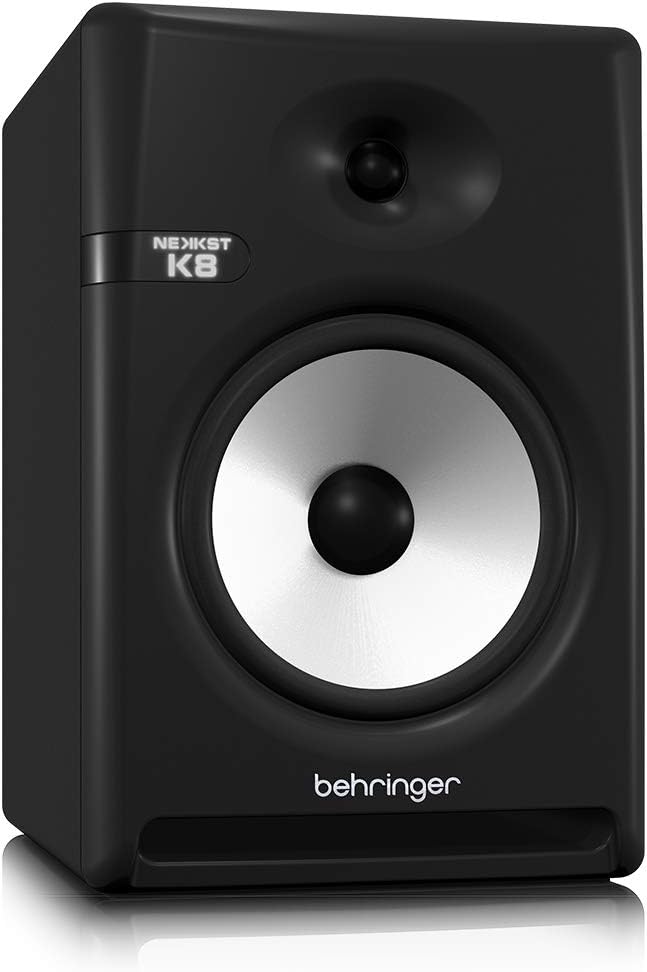
Image: Rear panel of the Behringer NEKKST K8, displaying XLR and RCA inputs, along with various control switches for room compensation and frequency adjustments.

Зураг: Нарийвчилсан view of the NEKKST K8's rear control panel, highlighting the input trim, frequency adjustments, and room compensation switches.
Эрчим хүчний холболт
Connect the provided power cord to the AC IN socket on the rear panel and then to a suitable power outlet. Ensure the power switch is in the OFF position before connecting to power.
Үйл ажиллагаа
Асаах/унтраах
After all connections are made, switch the power button on the rear panel to the ON position. It is recommended to power on your monitors last and power them off first to prevent any pops or clicks through your speakers.
Input Trim Adjustment
The 'INPUT TRIM' knob on the rear panel allows you to adjust the input sensitivity of the monitor. Start with the knob at a lower setting and gradually increase it to achieve a comfortable listening level without distortion. This control helps match the output level of your audio source to the monitor's input.
Frequency Adjustments
The NEKKST K8 provides 'HIGH FREQUENCY' and 'LOW FREQUENCY' switches for fine-tuning the monitor's response to your listening environment and personal preference. These switches allow you to cut or boost specific frequency ranges.
- ӨНДӨР ДАВТАТ: Adjusts the treble response. Options typically include flat, -2 dB, +2 dB.
- LOW FREQUENCY: Adjusts the bass response. Options typically include flat, -2 dB, -4 dB, -6 dB. This can be useful for compensating for room acoustics or when using a subwoofer.
Refer to the markings on the rear panel for specific dB adjustments.
Засвар үйлчилгээ
Цэвэрлэгээ
To clean the exterior of your NEKKST K8 monitor, use a soft, dry cloth. Do not use liquid cleaners, abrasive cleaners, or solvents, as these can damage the finish or internal components. Ensure the monitor is unplugged before cleaning.
Хадгалах
If storing the monitor for an extended period, it is recommended to use the original packaging to protect it from dust and physical damage. Store in a cool, dry place away from direct sunlight and extreme temperatures.
Алдааг олж засварлах
| Асуудал | Боломжит шалтгаан | Шийдэл |
|---|---|---|
| Дуу алга |
|
|
| Гажуудсан дуу чимээ |
|
|
| Хум эсвэл чимээ |
|
|
Хэрэв эдгээр шийдлүүдийг туршиж үзсэний дараа асуудал арилахгүй бол Behringer хэрэглэгчийн дэмжлэгтэй холбогдоно уу.
Үзүүлэлтүүд
| Загварын нэр | K8 |
| Чанга яригчийн төрөл | Хяналт |
| Woofer диаметр | 8 инч |
| Жийргэгчийн диаметр | 1 инч |
| Чанга яригчийн хамгийн их гаралтын чадал | 150 ватт |
| Ватtage | 150 ватт |
| Давтамжийн хариу үйлдэл | 20000 Hz (Upper limit; full range typically wider) |
| Холболтын технологи | RCA, XLR |
| Аудио гаралтын горим | Стерео |
| Эрчим хүчний эх үүсвэр | Утастай цахилгаан |
| Бүтээгдэхүүний хэмжээс | 13.4"D x 13.4"W x 18.8"H |
| Зүйлийн жин | 19.18 фунт |
| Материал | Хуванцар, металл, даавуу |
| Үйлдвэрлэгч | АНУ-ын хөгжим овог |
| UPC | 748252139344 |
Баталгаат хугацааны мэдээлэл
The Behringer NEKKST K8 Studio Monitor comes with a Limited Warranty. For detailed information regarding warranty terms, conditions, and registration, please refer to the official Behringer webсайт эсвэл таны бүтээгдэхүүнд багтсан баталгаат карт.
Дэмжлэг
Нэмэлт тусламж, техникийн дэмжлэг авах эсвэл хамгийн сүүлийн үеийн драйвер болон програм хангамжийг татаж авахын тулд албан ёсны Behringer вэбсайтад зочилно уу. webсайт эсвэл харилцагчийн үйлчилгээний хэлтэстэй холбогдоно уу.
Та мөн зочилж болно Амазон дээрх Берингерийн дэлгүүр Бүтээгдэхүүний мэдээлэл, дагалдах хэрэгсэл.


