Танилцуулга
This manual provides detailed instructions for the installation and operation of the PAC RP4.2-HY12 RadioPRO Radio Replacement Interface. This all-in-one interface is designed to facilitate the replacement of a factory radio in select Hyundai vehicles while retaining essential vehicle features, including pre-programmed steering wheel controls, amplifier retention, and navigation-based output signals.
Аюулгүй байдлын мэдээлэл
- Disconnect the vehicle's battery before installation to prevent electrical shorts.
- Ensure all connections are secure and properly insulated to avoid damage to the interface or vehicle electronics.
- Consult a professional automotive technician if you are unsure about any installation steps.
- This device is intended for use in specific Hyundai vehicles as indicated by the manufacturer. Verify compatibility before installation.
Багцын агуулга
Суулгаж эхлэхээс өмнө бүх эд ангиуд бэлэн байгаа эсэхийг шалгаарай.
- PAC RP4.2-HY12 RadioPRO Interface Module
- Wiring Harnesses (vehicle-specific)
- Суулгах гарын авлага (энэ баримт бичиг)
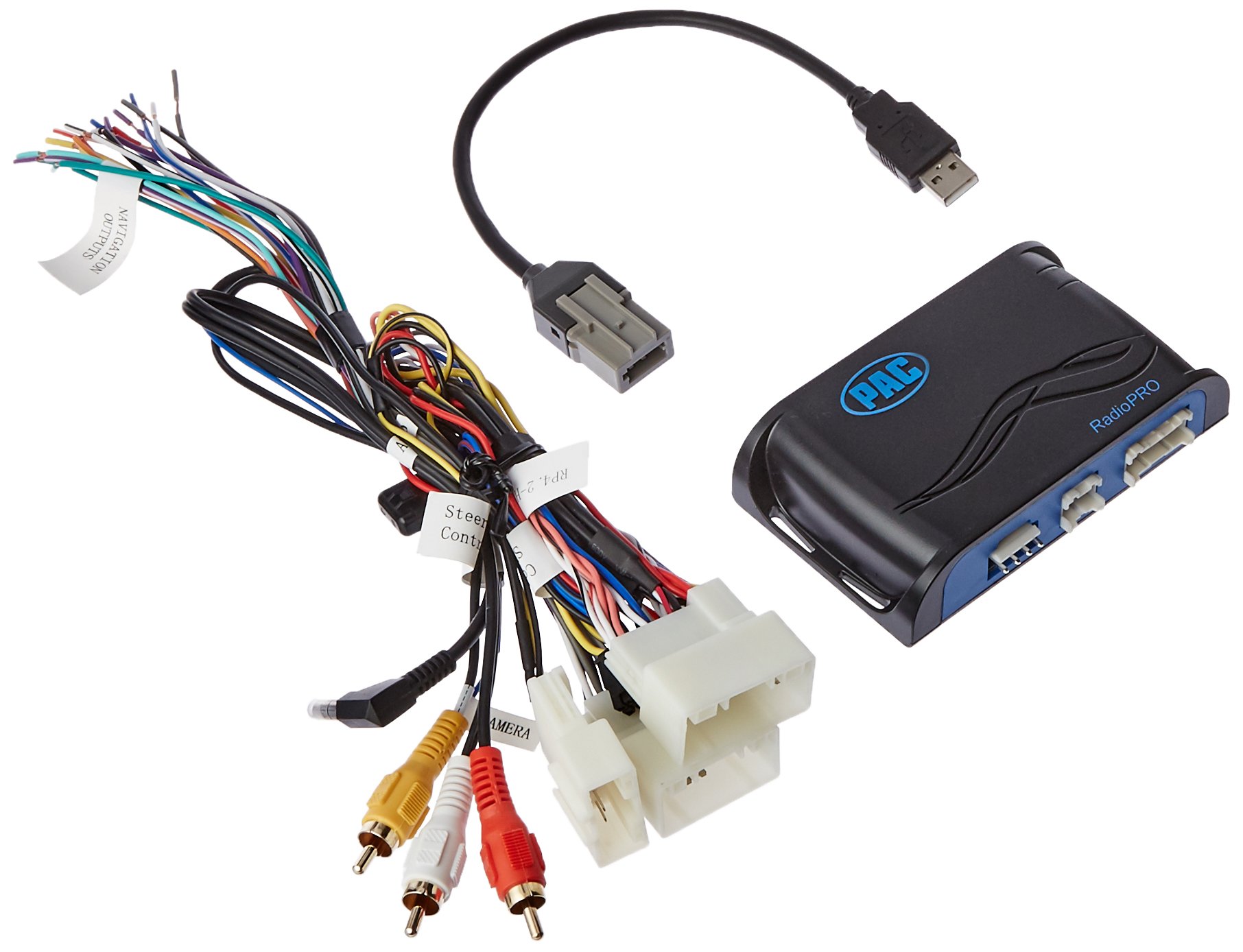
Image: The PAC RP4.2-HY12 RadioPRO interface module, typically a compact black box with various wiring connectors.
Тохиргоо ба суурилуулалт
The PAC RP4.2-HY12 is designed for select Hyundai Veloster vehicles. Refer to the vehicle-specific wiring diagram for your exact model.
Суулгахын өмнөх тэмдэглэл
- This interface does not retain Blue Link functionality. For Blue Link retention, the RP5.2-HY12 model is required.
- In vehicles equipped with auto climate controls, the fan mode, fan speed, auto status, and temperature display may not be visually confirmed on the new radio. The functions will still operate.
- The interface provides data-controlled accessory and navigation outputs.
- A 10A accessory output is provided.
Суурилуулалтын ерөнхий алхамууд
- Батерейг салгах: Before starting, disconnect the negative terminal of the vehicle's battery.
- Үйлдвэрийн радио устгах: Carefully remove the factory radio from the dashboard.
- Утасны бэхэлгээг холбох:
- Connect the vehicle-specific harness from the RP4.2-HY12 module to the factory wiring harness in the vehicle.
- Connect the aftermarket radio harness to the RP4.2-HY12 module's output harness. Ensure all wires are matched correctly (e.g., power, ground, speakers, accessory, illumination).
- Connect Steering Wheel Control (SWC) Wire: Connect the SWC output wire from the RP4.2-HY12 to the appropriate SWC input wire on your aftermarket radio. Refer to your aftermarket radio's manual for SWC input location.
- Connect Navigation Outputs (if applicable): Connect the navigation outputs (e.g., VSS, Reverse, Parking Brake) from the RP4.2-HY12 to the corresponding inputs on your aftermarket navigation radio.
- Модулийг суурилуулах: Securely mount the RP4.2-HY12 module in a location that does not interfere with vehicle operation or reassembly of the dashboard.
- Батерейг дахин холбох: Тээврийн хэрэгслийн батерейны сөрөг терминалыг дахин холбоно уу.
- Туршилтын систем: Turn on the vehicle and test all functions of the aftermarket radio, including audio, steering wheel controls, and navigation features.
Үйл ажиллагаа
The PAC RP4.2-HY12 interface is designed to seamlessly integrate your aftermarket radio with your vehicle's existing systems, primarily focusing on steering wheel control retention.
Жолооны хүрдний удирдлага (SWC)
The interface comes pre-programmed to retain the factory steering wheel controls. Once installed, the buttons on your steering wheel should operate the corresponding functions on your aftermarket radio (e.g., volume up/down, track up/down, mode).
- Дууны хяналт: Use the volume buttons on your steering wheel to adjust the audio level.
- Track/Seek: Use the track or seek buttons to change radio stations or music tracks.
- Горим/Эх сурвалж: Use the mode or source button to switch between audio sources (e.g., AM/FM, CD, Bluetooth, USB).
Note: Specific button functions may vary slightly depending on the aftermarket radio model and vehicle configuration. Refer to your aftermarket radio's manual for custom programming options if available.
Алдааг олж засварлах
- No Power to Aftermarket Radio
- Check the vehicle's fuse box for blown fuses.
- Verify all power and ground connections from the RP4.2-HY12 harness to the aftermarket radio and vehicle.
- Ensure the vehicle's battery is fully charged and properly connected.
- Steering Wheel Controls Not Working
- Confirm the SWC wire from the RP4.2-HY12 is correctly connected to the aftermarket radio's SWC input.
- Check the aftermarket radio's settings to ensure SWC is enabled and configured for a PAC interface, if applicable.
- Some aftermarket radios require a specific programming sequence for SWC; consult your radio's manual.
- Хэрэглэгч Review Note: One user reported losing steering controls when using the audio jack provided with a similar kit. If experiencing issues, try disconnecting any auxiliary audio jacks if present and re-test SWC.
- Аудио гаралт байхгүй
- Verify all speaker wire connections are secure and correctly matched.
- Ensure the aftermarket radio's amplifier turn-on wire is connected to the RP4.2-HY12's amplifier turn-on output (if applicable for factory amplifier retention).
- Check the aftermarket radio's volume and mute settings.
Үзүүлэлтүүд
| Онцлог | Дэлгэрэнгүй |
|---|---|
| Загварын дугаар | RP4.2-HY12 |
| Тохиромжтой байдал | Select Hyundai Veloster Vehicles |
| Дагалдах хэрэгслийн гаралт | 10 А |
| Blue Link Retention | Not retained (RP5.2-HY12 required) |
| Climate Control Display | Visual confirmation of fan mode, speed, auto status, and temperature may be lost. Functions remain operational. |
| Хэмжээ | 8.5 x 8.4 x 2 инч (Бүтээгдэхүүн) |
| Жин | 11 унц (зүйл) |
Баталгаат болон дэмжлэг
For warranty information and technical support, please contact PAC customer service directly. Keep your purchase receipt as proof of purchase.
Онлайн нөөцүүд: Visit the official PAC website for the latest product information, firmware updates, and additional support resources.
Холбоо барих мэдээлэл: Refer to the PAC webодоогийн холбоо барих мэдээллийг авахын тулд сайт эсвэл бүтээгдэхүүний сав баглаа боодол.


