Бүтээгдэхүүн дууссанview
The SIIG Single Monitor Desk Mount (Model CE-MT1H12-S1) is a height-adjustable, gas spring-assisted full-motion desktop mount designed for monitors ranging from 15 inches to 27 inches and weighing up to 17.6 lbs (8 kg). It provides smooth and effortless viewing angle adjustments for optimal ergonomic positioning. The VESA plate supports both portrait and landscape monitor orientations, offering flexibility for various tasks and preferences.
Аюулгүй байдлын чухал заавар
- Read all instructions carefully before installation and use to ensure proper setup and prevent damage.
- Do not exceed the maximum weight capacity of 17.6 lbs (8 kg). Overloading can cause instability and potential injury.
- Ensure the mounting surface (desk) is strong enough to support the combined weight of the mount and monitor.
- Use only the provided hardware. If any parts are missing or damaged, contact SIIG customer support immediately.
- Keep children and pets away from the installation area during assembly to prevent accidents.
- Санал 65 Анхааруулга: Энэ бүтээгдэхүүн нь Калифорни мужид хорт хавдар үүсгэх, ургийн гажиг үүсгэх эсвэл нөхөн үржихүйн бусад гэмтэл учруулдаг химийн бодис агуулдаг.
Багцын агуулга
Verify that all components are present and undamaged before beginning installation. If any items are missing or appear damaged, please contact SIIG customer support.
- Monitor Arm Assembly (Gas Spring Arm)
- Desk Pole
- VESA хавтан
- C-Clamp Суурь
- Громмет бэхэлгээний суурь
- Mounting Hardware (various screws, washers)
- Allen Keys (for assembly and tension adjustment)
- Кабелийн менежментийн клипүүд
This image displays the individual components of the monitor mount, including the gas spring arm, desk pole, C-clamp, and various mounting hardware.
Тохиргоо ба суурилуулалт
Step 1: Choose Mounting Method
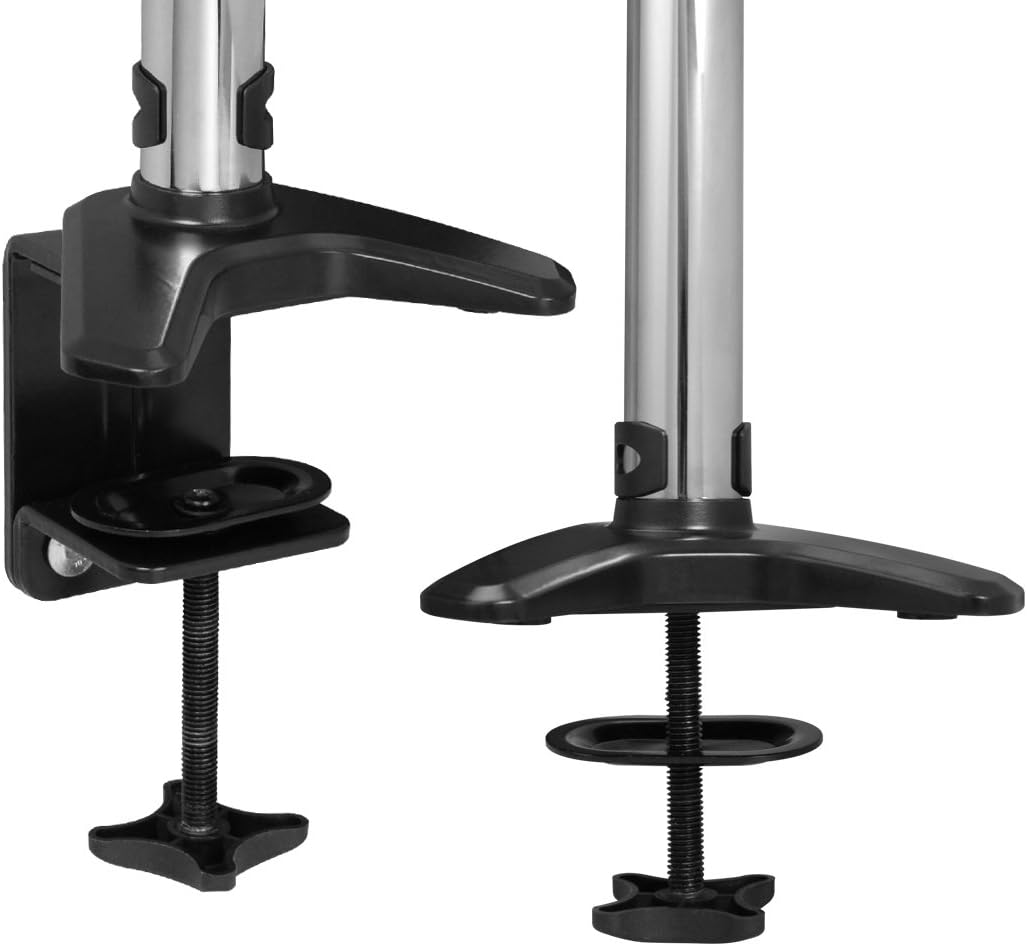
The monitor mount offers two installation options: C-clamp for desk edges or grommet mount for desks with existing holes.

This image illustrates the two available mounting options: the C-clamp for desk edges and the grommet mount for desks with existing holes.
C-Clamp Суурилуулалт
- C-cl-ийг хавсаргана ууamp base to the bottom of the desk pole.
- cl-ийг байрлуулamp on the edge of your desk and tighten the screw until the base is securely fastened.
Grommet Mount суурилуулах
- If your desk has a grommet hole, use the grommet mount base.
- Insert the desk pole through the grommet hole and secure it from underneath the desk with the provided hardware.
Step 2: Attach Monitor to VESA Plate
- Carefully align the VESA plate with the mounting holes on the back of your monitor.
- Secure the monitor to the VESA plate using the appropriate screws provided in the hardware kit. Ensure they are tightened firmly but do not overtighten.
Step 3: Mount Monitor Arm to Pole
- Slide the monitor arm assembly onto the desk pole.
- Adjust the arm to your desired initial height and tighten the collar screw on the pole to secure it in place.
Алхам 4: Кабелийн менежмент
Route monitor cables (power, video, etc.) through the integrated cable management clips located on the arm and along the pole. This helps maintain a tidy and organized workspace.
Installation and Adjustment Video
This video demonstrates the complete installation process for the SIIG Single Monitor Desk Mount, including attaching the clamp, mounting the monitor, routing cables, and adjusting the arm's movement.
Ашиглалтын заавар
Өндөр тохируулга
The gas spring mechanism allows for smooth and effortless vertical adjustment. Gently push or pull the monitor to the desired height. The arm provides up to 13 inches of vertical adjustment from its lowest to highest point.

This image shows the vertical adjustment range of the monitor arm, highlighting the 13-inch height capability.
Хүчдэлийн тохируулга
If the monitor sags or rises too easily, the gas spring tension needs adjustment. Use the included 6mm Allen key:
- Эргээрэй цагийн зүүний дагуу хөнгөн дэлгэцийн хурцадмал байдлыг багасгах.
- Эргээрэй цагийн зүүний эсрэг хүнд мониторуудын хурцадмал байдлыг нэмэгдүүлэх.
Multiple turns may be needed to achieve the desired tension. Test the adjustment by moving the monitor after each set of turns.
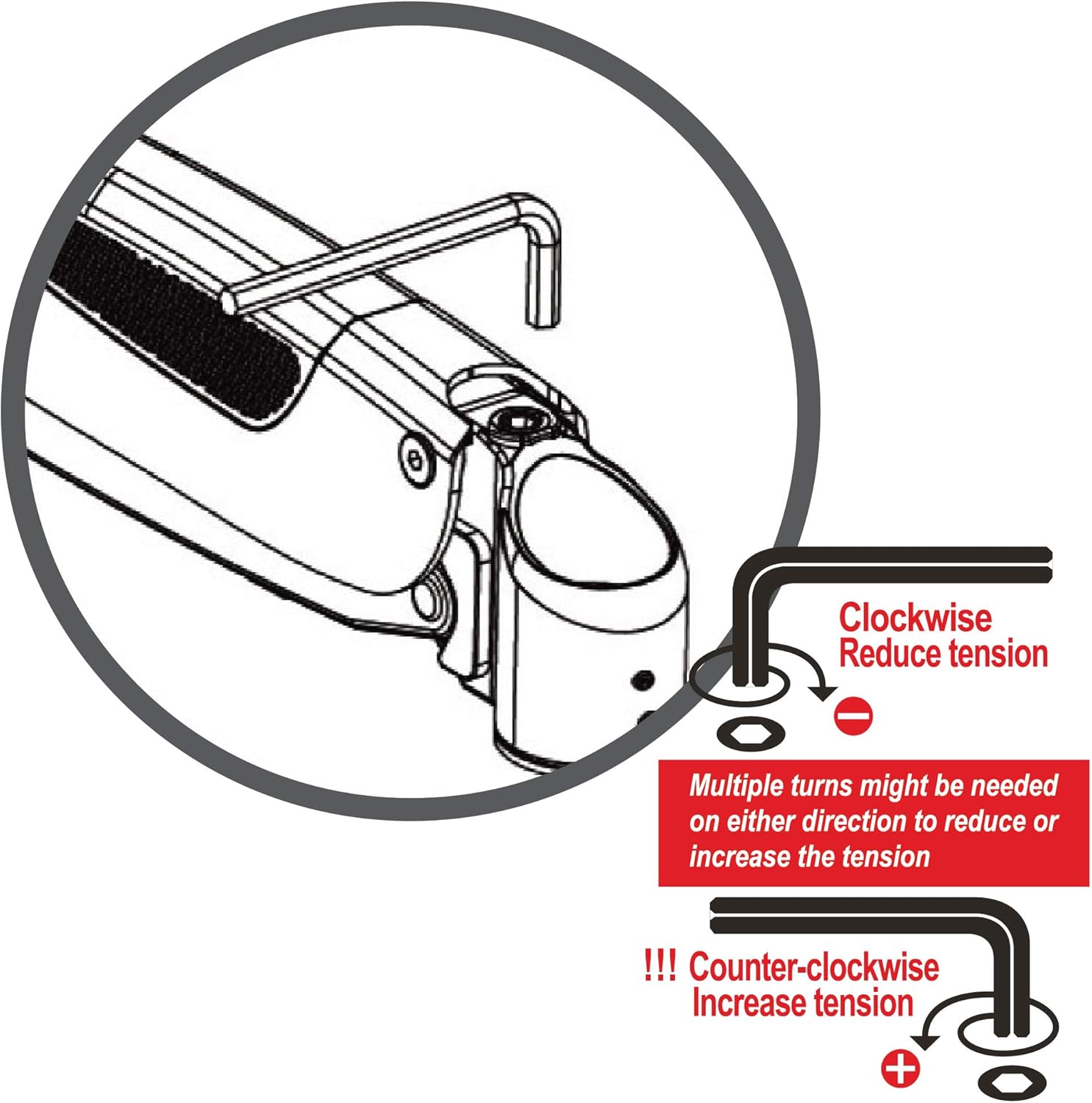
This diagram provides instructions on how to adjust the gas spring tension using the provided Allen key to accommodate different monitor weights.
Хазайлгах, эргүүлэх, эргүүлэх
The VESA plate and arm joints provide extensive movement capabilities:
- Хазайлт: Adjust the monitor screen up or down by up to 90 degrees.
- Эргэдэг: Rotate the monitor horizontally 360 degrees around the pole.
- Эргүүлэх: Rotate the monitor 360 degrees at the VESA plate for easy switching between portrait and landscape orientations.
- Гар сунгалт: The arm can extend up to 22 inches from the mounting pole, allowing you to pull the monitor closer or push it further away.

This image demonstrates the maximum extension of the monitor arm, which is 22 inches from the base.
Арчилгаа, засвар үйлчилгээ
- Regularly check all screws and connections to ensure they are tight and secure. Loose connections can affect stability and performance.
- Суурилуулалтыг зөөлөн, d-ээр цэвэрлээрэйamp даавуу. Зүлгүүрийн цэвэрлэгч, уусгагч эсвэл хатуу химийн бодис хэрэглэхээс зайлсхий, учир нь эдгээр нь өнгөлгөөг гэмтээж болно.
- Do not attempt to lubricate the gas spring mechanism. It is designed to be maintenance-free.
Алдааг олж засварлах
Monitor Sags or Does Not Stay in Position
Шийдэл:
Adjust the gas spring tension. Use the 6mm Allen key and turn counter-clockwise to increase tension for heavier monitors. Continue adjusting until the monitor holds its position.
Monitor is Difficult to Move
Шийдэл:
Adjust the gas spring tension. Use the 6mm Allen key and turn clockwise to reduce tension for lighter monitors. Continue adjusting until the monitor moves smoothly.
Mount is Unstable or Wobbles
Шийдэл:
C-cl-ийг баталгаажуулна ууamp or grommet mount is securely tightened to the desk. Verify that the desk surface itself is stable and not prone to wobbling. Re-tighten all connection points on the arm and pole.
Бүтээгдэхүүний техникийн үзүүлэлтүүд
| Онцлог | Дэлгэрэнгүй |
|---|---|
| Загварын дугаар | CE-MT1H12-S1 |
| Тохиромжтой дэлгэцийн хэмжээ | 15"-аас 27" |
| Жингийн багтаамж | 17.6 фунт (8 кг) хүртэл |
| VESA нийцтэй байдал | 75х75мм, 100х100мм |
| Хөдөлгөөний төрөл | Articulating, Gas Spring Assisted |
| Налалтын өнцөг | 90 градус хүртэл |
| Эргэдэг | 360 градус |
| Эргүүлэх | 360 градус |
| Гар сунгах | 22 инч хүртэл |
| Өндөр тохируулга | 13 инч хүртэл |
| Суурилуулах төрөл | Tabletop (C-clamp эсвэл Grommet) |
| Материал | Хөнгөн цагаан |
| Өнгө | Хар ба цагаан |
Баталгаат хугацааны мэдээлэл
For detailed warranty information regarding your SIIG Single Monitor Desk Mount, please refer to the official SIIG website or contact SIIG customer support directly. Keep your proof of purchase for warranty claims.
Хэрэглэгчийн дэмжлэг
If you encounter any issues, have questions, or require further assistance with your SIIG Single Monitor Desk Mount, please visit the Амазон дээрх SIIG дэлгүүр or contact SIIG customer service through their official channels. Our support team is ready to help.


