1. Танилцуулга
The atolla 4-Port USB 3.0 Hub is designed to expand your device's USB connectivity, offering four Super Speed USB 3.0 data ports and one dedicated USB charging port. Each data port features an individual on/off switch for convenient power management. This hub is ideal for connecting multiple USB devices such as external hard drives, flash drives, keyboards, mice, and other peripherals to your computer.
2. Бүтээгдэхүүний онцлог
- Супер хурдтай өгөгдөл дамжуулах: Supports transfer rates up to 5Gbps (500MBps), significantly faster than USB 2.0, suitable for high-throughput devices.
- Тусдаа асаах/унтраах унтраалга: Each of the four USB 3.0 data ports has an independent power switch, allowing you to control power to individual devices without unplugging them.
- Dedicated Smart Charging Port: Includes one additional port optimized for charging mobile phones, tablets, and other USB-powered devices.
- Бат бөх дизайн: Features solid construction with built-in surge protection and over-current protection for enhanced durability and safety.
- Өргөн нийцтэй байдал: Plug and play functionality with most operating systems including Windows 10, 8.1, 8, 7, Vista, XP, Mac OS X (10.x or above), and Linux. No drivers required.
- Авсаархан, зөөврийн: Sleek piano black glossy UV clear coat finish with a compact size (4.29x1.73x0.9 inches) and lightweight design (3.17 ounces).
3. Багцын агуулга
- atolla USB 3.0 Hub (Model CH-204U3)
- Integrated USB cable (approximately 2 feet / 60cm)
- Note: A power adapter is NOT included with this item.
4. Тохиргоо
- Компьютерт холбогдох: Plug the integrated USB 3.0 cable from the atolla hub into an available USB 3.0 port on your computer (laptop or desktop). The hub is plug-and-play, requiring no additional drivers.
- Optional External Power (for high-power devices): If you are connecting multiple high-power consumption devices (e.g., external hard drives, multiple charging devices), it is recommended to use an optional 5V DC power adapter (not included). Connect the power adapter to the "DC 5V" input port on the side of the hub.
- Төхөөрөмжийн анхны холболт: Connect your USB devices (e.g., flash drives, mouse, keyboard) to the blue USB 3.0 data ports on the hub.

Image: The atolla 4-Port USB 3.0 Hub with its integrated USB cable, ready for connection to a computer.

Image: The atolla USB 3.0 Hub connected to a laptop, with multiple USB devices and a smartphone charging, demonstrating a typical setup.
5. Ашиглалтын заавар
- Using USB 3.0 Data Ports:
- Connect your USB 3.0 compatible devices to any of the four blue USB 3.0 ports for Super Speed data transfer.
- Each port supports data transfer speeds up to 5Gbps.
- Тусдаа асаах/унтраах унтраалга:
- Each data port has a corresponding power button.
- To turn a port on, tap the button. The blue LED indicator for that port will illuminate.
- To turn a port унтраах, press and hold the button for approximately 2 seconds. The blue LED indicator will turn off.
- This feature allows you to conserve power and manage connected devices efficiently.
- Using the Dedicated Charging Port:
- The fifth port, marked "Charging" (often red or a different color), is specifically designed for smart charging.
- Connect your mobile devices to this port for optimized charging. This port does not have an individual on/off switch.

Image: A hand demonstrating the individual on/off switches for each USB 3.0 data port on the atolla hub. Tapping turns it on, holding turns it off.

Image: A close-up of the atolla USB 3.0 Hub highlighting the dedicated Smart Charging Port, indicated by a lightning bolt icon.
Видео: Дууслааview of the atolla 4-Port USB 3.0 Hub, demonstrating its features and compact design.
6. Засвар үйлчилгээ
- Keep the hub in a dry environment, away from moisture and extreme temperatures.
- Clean the exterior with a soft, dry cloth. Avoid using liquid cleaners or aerosols.
- Төхөөрөмжийг өөрөө задлах эсвэл засах гэж бүү оролдоорой. Аливаа засварын талаар мэргэшсэн үйлчилгээний ажилтнаас лавлана уу.
7. Алдаа засах
- Төхөөрөмж танигдаагүй байна:
- Хаб нь таны компьютерын USB портод найдвартай холбогдсон эсэхийг шалгаарай.
- Verify that the individual on/off switch for the connected port is activated (blue LED is on).
- Try connecting the device directly to your computer's USB port to confirm the device is functional.
- If using high-power devices, ensure an optional external 5V DC power adapter is connected to the hub.
- Өгөгдөл дамжуулах хурд удаан:
- Ensure the hub is connected to a USB 3.0 port on your computer (typically blue inside).
- Verify that the connected device is USB 3.0 compatible.
- If multiple high-bandwidth devices are connected, consider using an external power adapter.
- Цэнэглэх асуудал:
- Ensure the charging cable is properly connected to the dedicated charging port.
- For optimal charging, an external 5V DC power adapter is recommended.
8. Техникийн үзүүлэлтүүд
| Бүтээгдэхүүний хэмжээс | 4.25 x 1.69 x 0.91 инч |
| Зүйлийн жин | 3.17 унц |
| Загварын дугаар | CH-204U3 |
| Брэнд | атолла |
| Тоног төхөөрөмжийн интерфейс | USB, USB 3.0 |
| Онцлог шинж чанар | Plug and Play |
| Тохиромжтой төхөөрөмжүүд | Desktops, laptops, tablets, smartphones running Windows 10, 8.1, 8, 7, Vista, XP, Mac OS X (10.x or above), and Linux |
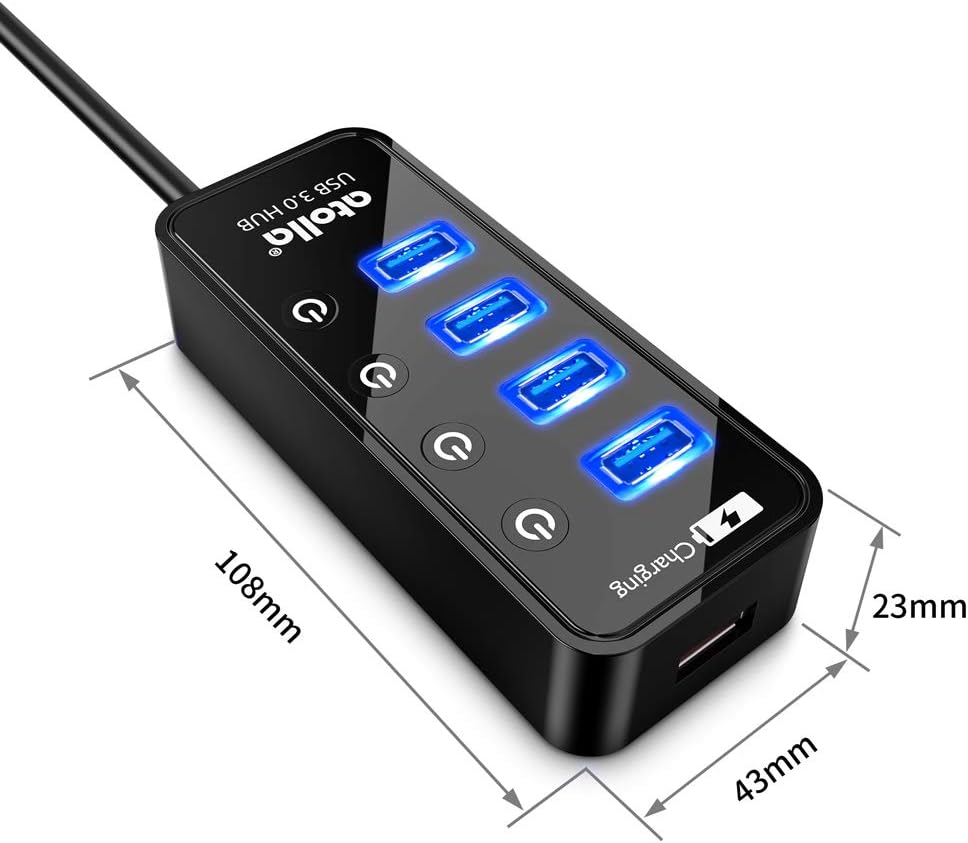
Image: The atolla USB 3.0 Hub with its dimensions (108mm length, 43mm width, 23mm height) clearly indicated.

Image: Visual representation of the atolla USB 3.0 Hub's compatibility with Windows, Mac iOS, and Linux operating systems.
9. Баталгаат хугацаа ба дэмжлэг
The atolla USB 3.0 Hub comes with a 2-year warranty. For technical support or warranty claims, please refer to the contact information provided on the product packaging or the official atolla webсайт.
Нэмэлт тусламж авахыг хүсвэл зочилж болно atolla Store on Amazon.


