Танилцуулга ба түүнээс дээшview
The Eton Scorpion II is a rugged, multipowered portable emergency weather radio and flashlight designed for reliability in various conditions. This compact unit is an essential tool for outdoor activities and emergency preparedness, offering multiple ways to stay informed and powered.
Key features include AM/FM/NOAA weather bands for critical updates, a built-in LED flashlight for illumination, and a USB port for charging smartphones. Its robust exterior and aluminum carabiner ensure durability, while multiple power options provide continuous operation.
Тохиргоо
Before initial use, it is recommended to fully charge the Scorpion II using the USB port. This ensures the internal 800 mAh Lithium Ion battery is ready for extended use.
- Анхны төлбөр: Connect the provided USB cable to the unit's USB input port and to a standard USB power source (e.g., computer, wall adapter). Allow several hours for a full charge.
- Антен: Радио хүлээн авахыг оновчтой болгохын тулд телескоп антенныг бүрэн сунгана уу.

Ашиглалтын заавар
Асаах/унтраах
-г удаан дар Хүч button located on the unit to turn the radio on or off.
Радио тааруулалт
-г ашиглана уу Хамтлаг button to cycle through AM, FM, and NOAA weather bands. Use the Ая +/- buttons to manually adjust the frequency. The digital display will show the current frequency.
Дууны хяналт
ашиглан аудио гаралтын түвшинг тохируулна уу Эзлэхүүн +/- товчлуурууд.
LED Flashlight & SOS
дээр дарна уу Гар чийдэн button to activate the built-in LED flashlight. Some models may include an SOS function, which can be activated by pressing and holding the flashlight button, causing the light to flash Morse code for distress.

Ухаалаг утас цэнэглэж байна
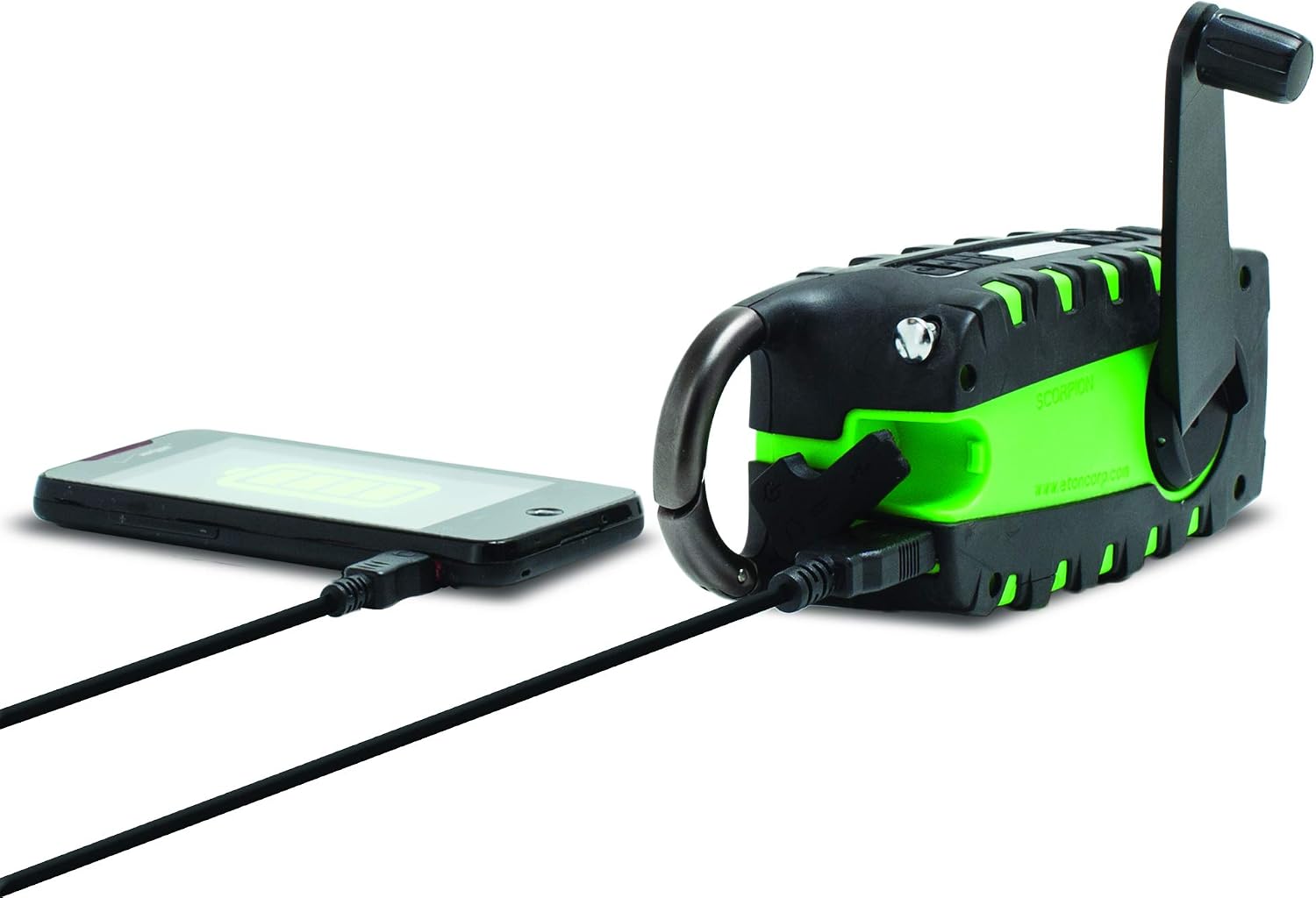
The unit features a USB output port to charge compatible smartphones. Connect your smartphone's charging cable to the Scorpion II's USB output. Ensure the Scorpion II has sufficient charge for this function.

Эрчим хүчний эх үүсвэрүүд
The Eton Scorpion II offers multiple ways to power the unit and charge external devices:
- Гар бүлүүр: Extend the hand crank handle and rotate it clockwise or counter-clockwise for manual power generation. Continuous cranking will charge the internal battery and power the radio.
- Нарны хавтан: Place the unit with its solar panel facing direct sunlight. The solar panel will slowly charge the internal battery. This method is ideal for maintaining charge over time or for trickle charging.
- USB цэнэглэх: Use the micro-USB input port to charge the internal battery from any standard USB power source. This is the fastest method for a full charge.

Засвар үйлчилгээ
To ensure the longevity and optimal performance of your Eton Scorpion II, follow these maintenance guidelines:
- Цэвэрлэгээ: Төхөөрөмжийг зөөлөн арчиж арчихamp даавуу. Хүчтэй химийн бодис, зүлгүүрийн цэвэрлэгч хэрэглэж болохгүй.
- Батерейны арчилгаа: For best battery life, fully charge the unit at least once every 3 months, even if not in use. Avoid completely draining the battery frequently.
- Хадгалах: Радиог нарны шууд тусгал, хэт температураас хол, сэрүүн, хуурай газар хадгална.
- Усны эсэргүүцэл: The rugged exterior provides protection against splashes and dust, but the unit is not fully waterproof. Avoid submerging it in water.
Алдааг олж засварлах
If you encounter issues with your Eton Scorpion II, refer to the following common troubleshooting steps:
- Эрчим хүчгүй: Ensure the unit is charged. Try hand cranking for a few minutes or connecting to a USB power source.
- Радио хүлээн авалт муу: Fully extend the telescopic antenna. Try repositioning the unit to a different location, especially near a window or outdoors.
- Smartphone Not Charging: Verify that the Scorpion II has sufficient battery charge. Ensure the smartphone's charging cable is securely connected to the unit's USB output port.
- Гар чийдэн ажиллахгүй байна: Check if the unit is powered on and has battery charge. Press the flashlight button firmly.
Үзүүлэлтүүд
| Бүтээгдэхүүний хэмжээс | 2.2 x 3.6 x 7.2 инч |
| Зүйлийн жин | 10.6 унц |
| Загварын дугаар | NSP101WXGR |
| Батерей | 2 лити ион батерей шаардлагатай (дотоод) |
| Холболтын технологи | USB |
| Эрчим хүчний эх үүсвэр | Solar Powered, Hand Crank, USB |
| Радио хамтлагуудыг дэмждэг | AM, FM, NOAA Weather |
| Онцлог шинж чанар | Portable, LED Flashlight, Smartphone Charger |
Хайрцагт юу байна
- Eton Scorpion II Rugged Multipowered Portable Emergency Weather Radio & Flashlight Green
- USB цэнэглэгч кабель
Баталгаат болон дэмжлэг
For warranty information, technical support, or service inquiries, please refer to the documentation included with your product or visit the official Eton webсайт. Баталгаат зардлаа авахын тулд худалдан авалтын баримтаа хадгална уу.