Танилцуулга
Thank you for choosing the Casio Collection SGW-450H watch. This timepiece combines analog and digital displays with advanced sensor technology, including an altimeter, barometer, and thermometer, making it ideal for outdoor activities and daily wear. To ensure proper operation and longevity, please read this manual carefully before using your watch.
This manual provides detailed instructions on setting up your watch, understanding its various modes and functions, performing routine maintenance, and troubleshooting common issues.
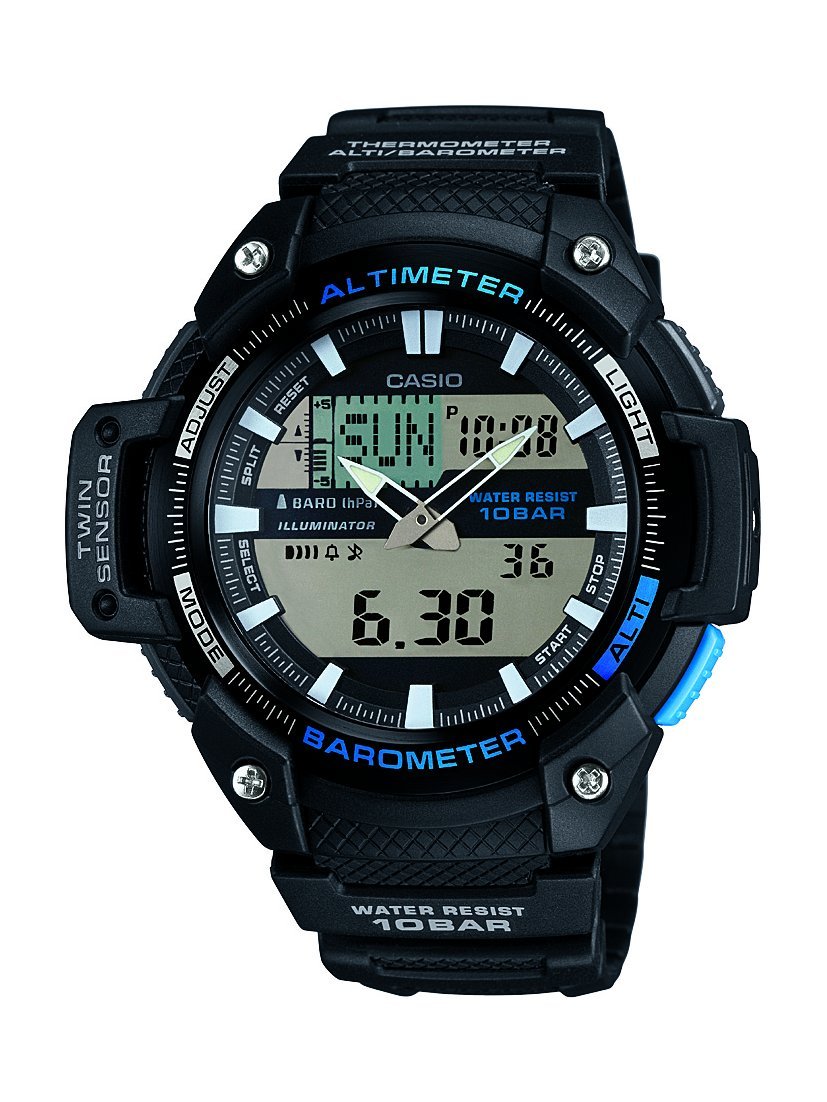
Урд view of the Casio Collection SGW-450H watch, highlighting its dual display and sensor indicators.
Тохиргоо
1. Анхны цагийн тохиргоо
Upon first use or after a battery change, you will need to set both the analog and digital times. Refer to the watch's specific button layout for 'ADJUST' and 'MODE' buttons.
- Digital Time: In Timekeeping Mode, press and hold the 'ADJUST' button until the city code starts flashing. Use the 'MODE' and 'SEARCH' buttons to navigate and adjust settings like city code, DST (Daylight Saving Time), 12/24-hour format, hour, minute, year, month, and day. Press 'ADJUST' again to exit.
- Аналог цаг: If the analog hands do not match the digital time, enter the Hand Setting Mode (usually by holding 'ADJUST' in Timekeeping Mode and then pressing 'MODE' multiple times until 'H.SET' appears). Use the 'SEARCH' button to advance the analog hands. Press 'ADJUST' to synchronize.
2. Мэдрэгчийн тохируулга
The altimeter, barometer, and thermometer require calibration for accurate readings. Perform calibration in a stable environment or against known values.
- Альтиметр: In Altimeter Mode, press and hold 'ADJUST' until the current altitude value flashes. Use 'SEARCH' to adjust the altitude to a known reference point.
- Барометр: In Barometer Mode, press and hold 'ADJUST' until the current barometric pressure value flashes. Adjust to a known local pressure reading.
- Термометр: The thermometer is integrated. For accurate temperature readings, remove the watch from your wrist for at least 20-30 minutes to avoid body heat interference.
3. Battery Installation/Reset
If the watch hands are stuck or not moving, a battery reset may be required. This involves temporarily removing and reinserting the battery.
- Carefully remove the four screws from the back cover of the watch.
- Gently lift out the battery.
- Replace the battery back into its position.
- Re-attach the back cover and screws, ensuring a secure fit to maintain water resistance.
- Set the analog hands as per the manual's instructions (Step 1. above).
Цагийг ажиллуулах
The SGW-450H features multiple modes accessible via the 'MODE' button. Press 'MODE' to cycle through the following functions:
- Цагийн горим: Одоогийн цаг, өдөр, огноог харуулна.
- Өндөр хэмжигч горим: Measures and displays current altitude. The watch can store altitude data for tracking.
- Барометрийн горим: Displays barometric pressure and a pressure tendency graph, which can indicate upcoming weather changes.
- Термометрийн горим: Одоогийн температурыг харуулна.
- Секундомер горим: Өнгөрсөн хугацаа, хуваасан хугацаа болон хоёр барианы тоог хэмждэг.
- Сэрүүлгийн горим: Өдөр тутмын сэрүүлгийг тохируулах.
- Дэлхийн цагийн горим: Displays the current time in various cities around the world.
Гэрэл ашиглах
Press the 'LIGHT' button (usually located on the upper right side) to illuminate the digital display for visibility in low-light conditions.
Усны эсэргүүцэл
This watch is water-resistant up to 100 meters (10 BAR). It is suitable for swimming and snorkeling but not for scuba diving. Do not operate buttons while the watch is wet or submerged to prevent water ingress.
Засвар үйлчилгээ
Цэвэрлэгээ
Regularly clean your watch with a soft, dry cloth. For resin bands and cases, a mild soap solution and a soft brush can be used, followed by thorough rinsing with fresh water and drying. Avoid harsh chemicals or abrasive cleaners.
Зай солих
The watch is powered by a battery. When the display becomes dim or functions become erratic, it may be time for a battery replacement. It is recommended to have the battery replaced by a qualified watch technician to ensure proper sealing and maintain water resistance.
Хадгалах
When not in use for extended periods, store the watch in a cool, dry place away from direct sunlight and extreme temperatures. Avoid exposing the watch to strong magnetic fields.
Алдааг олж засварлах
- Digital Display Difficult to Read: In some lighting conditions, the negative LCD display may be less visible. Adjust the viewing angle or use the built-in light.
- Мэдрэгчийн буруу уншилт: Ensure sensors are calibrated regularly, especially the altimeter and barometer, against known reference points. Temperature readings are affected by body heat; remove the watch for 20-30 minutes for accurate ambient temperature.
- Analog Hands Not Moving or Incorrect: Perform the battery reset procedure as described in the Setup section (remove and reinsert battery), then manually set the analog hands.
- Watch Not Functioning: Check if the battery needs replacement. If issues persist after battery replacement and reset, contact Casio customer support.
Үзүүлэлтүүд
| Онцлог | Тодорхойлолт |
|---|---|
| Брэнд | Casio |
| Загварын дугаар | SGW-450H-1AER |
| Загварын дугаар | SGW-450H-1AER |
| Дэлгэцийн төрөл | Аналог-Дижитал |
| Хөдөлгөөний төрлийг үзэх | Кварц |
| Эрчим хүчний эх үүсвэр | Батерейгаар ажилладаг |
| Усны эсэргүүцлийн гүн | 100 метр (10 бар) |
| Спортын төрөл | Гүйж байна |
| Тэврэлтийн төрөл | Тэврэлт |
| Загвар | Спортлог |
| Зүйлийн хэлбэр | Дугуй |
| Хамтлаг өнгө | Хар |
| Өнгө залгах | LCD |
| Насны хүрээний тодорхойлолт | Насанд хүрсэн |
| Загварын нэр | Спорт |
| Олон улсын нийтлэлийн код (EAN/UPC) | 04971850036418 |
| Хамтлаг материалын төрөл | Давирхай |
| Кейсийн материалын төрөл | Хуванцар |
| Цонхны материалын төрөл | Ашигт малтмал |
| Кейсийн диаметр | 52 миллиметр |
| Хамтлагийн өргөн | 18 миллиметр |
| Кейсийн зузаан | 15 миллиметр |
| Бүтээгдэхүүний хэмжээ (L x W x H) | 5.18 x 1.5 x 5.08 см; 45 грамм |
Баталгаат болон дэмжлэг
Your Casio watch is covered by a manufacturer's warranty against defects in materials and workmanship. Please refer to the warranty card included with your purchase for specific terms and conditions, including the warranty period and coverage details.
For technical assistance, repairs, or further inquiries, please contact Casio customer support. You can find contact information on the official Casio website or through your local authorized Casio dealer.

The Casio product box, typically containing the watch, warranty information, and a more detailed manual.