Танилцуулга
Thank you for choosing the Baseus H08 3D Surround Sound Gaming Earphones. This manual provides essential information for the safe and efficient use of your new earphones. Please read it thoroughly before use and retain it for future reference.
Бүтээгдэхүүн дууссанview
The Baseus H08 earphones are designed to deliver an immersive 3D surround sound experience for gaming. They feature a wired connection, in-ear design, and an integrated microphone for clear communication.
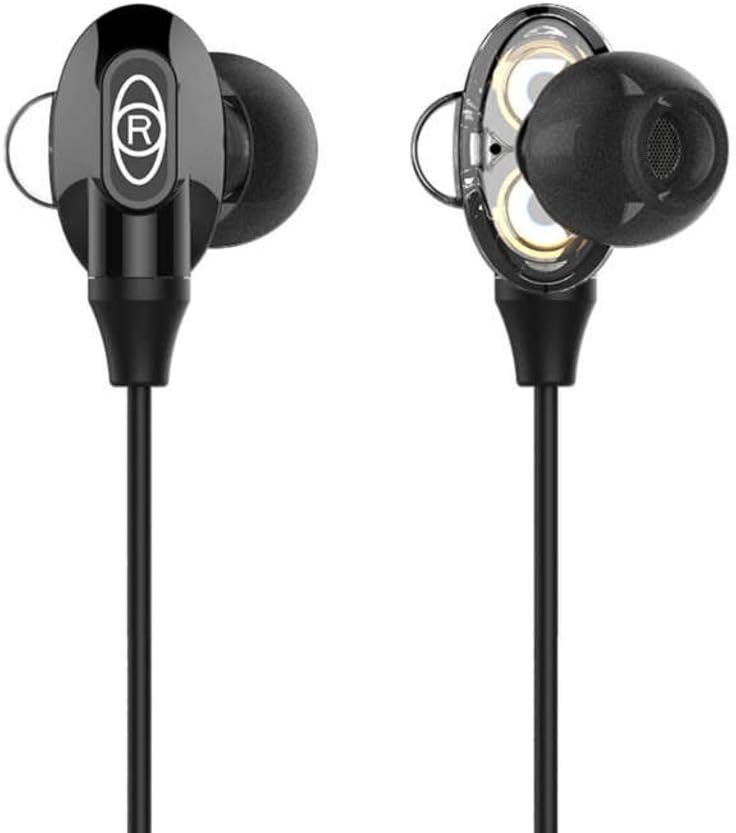
Figure 1: Baseus H08 In-Ear Gaming Earphones
This image displays the two in-ear earpieces of the Baseus H08 earphones, highlighting their sleek black design and the 'R' (right) indicator on one of the earpieces.
Гол онцлогууд:
- 3D хүрээлэх дуу чимээ: Engineered for an immersive audio experience, enhancing spatial awareness in games.
- Утастай холболт: Ensures stable audio transmission with a 3.5mm jack.
- Чихний дизайн: Provides a secure and comfortable fit, along with passive noise isolation.
- Нэгдсэн микрофон: For clear voice communication during gameplay.
- Inline Control: Easy access to volume adjustments and microphone functions.
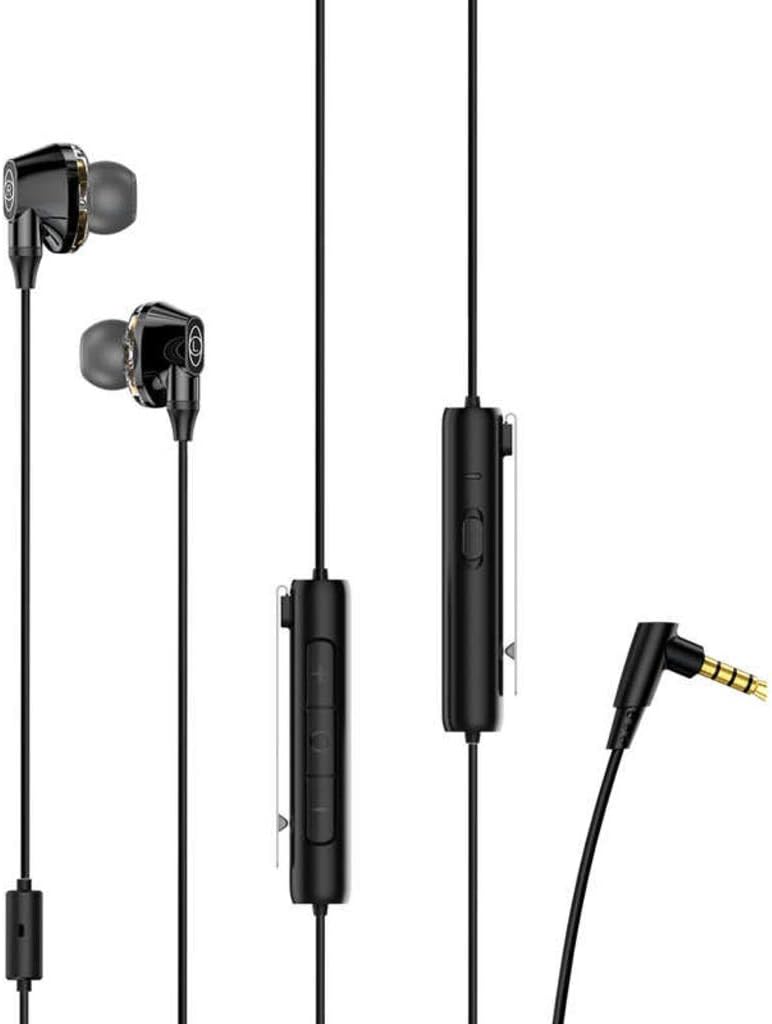
Figure 2: Earphones with Inline Control and 3.5mm Jack
This image shows the full length of the Baseus H08 earphones, including the in-ear buds, the inline control unit with buttons, and the L-shaped 3.5mm audio jack.
Тохиргоо
- Төхөөрөмжид холбогдох: Insert the 3.5mm audio jack into the corresponding port on your gaming console, PC, or mobile device. Ensure the connection is secure.
- Чихэвч зүүх: Gently insert the left (L) and right (R) earpieces into your ears. Adjust them for a comfortable and snug fit. The correct fit is crucial for optimal sound quality and noise isolation.
- Микрофоны байрлал: Position the inline microphone close to your mouth for clear voice pickup.
Ашиглалтын заавар
Inline Control Functions:
- Дууны хяналт: Use the volume up (+) and volume down (-) buttons on the inline control unit to adjust the audio level.
- Микрофоны дууг хаах/асах: The inline control may include a switch or button to mute or unmute the microphone. Refer to the specific markings on your control unit.
- Дуудлагын удирдлага: For mobile devices, the central button on the inline control typically allows you to answer/end calls or play/pause music.
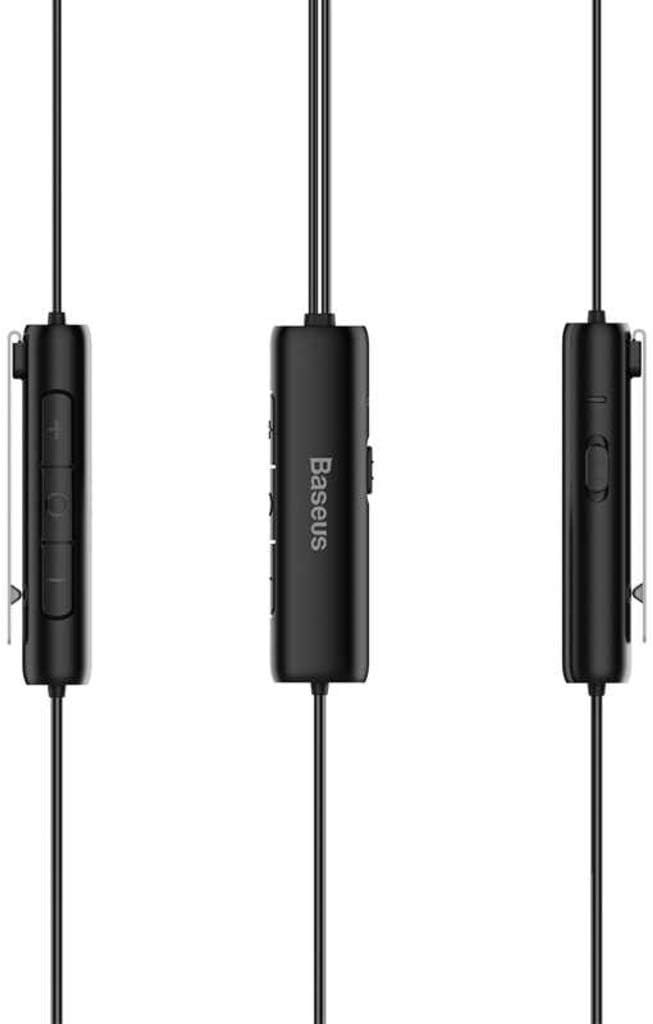
Figure 3: Inline Control Unit
Энэ зураг нь дэлгэрэнгүй мэдээллийг өгдөг view of the inline control unit, showing the volume buttons and the Baseus branding.
3D хүрээлэх дуу чимээ:
The Baseus H08 earphones are designed to deliver a 3D surround sound effect, enhancing directional audio cues in compatible games. This feature is automatically active when connected to a device that supports stereo audio output. No additional setup is required for the 3D sound functionality.

Figure 4: Immersive 3D Sound Experience
This image shows a person wearing the Baseus H08 earphones, with visual effects suggesting an immersive 3D sound experience, highlighting the earphones' capability to deliver rich audio details.
Засвар үйлчилгээ
- Цэвэрлэгээ: Regularly clean the earpieces and ear tips with a soft, dry cloth. For stubborn dirt, a slightly damp даавууг ашиглаж болно, гэхдээ чанга яригчийн сараалж руу чийг орохгүй байхыг анхаарна уу.
- Хадгалах: When not in use, store the earphones in a clean, dry place, preferably in a protective pouch, to prevent tangling and damage.
- Онцгой нөхцөл байдлаас зайлсхийх: Do not expose the earphones to extreme temperatures, humidity, or direct sunlight.
- Кабель арчилгаа: Avoid sharply bending or pulling the cable, as this can damage internal wiring.
Алдааг олж засварлах
| Асуудал | Боломжит шалтгаан | Шийдэл |
|---|---|---|
| Дуугүй эсвэл дуу багатай |
|
|
| Микрофон ажиллахгүй байна |
|
|
| Дууны чанар муу |
|
|
Үзүүлэлтүүд
| Брэнд | Базеус |
| Загварын дугаар | NGH08-01 |
| Холболтын технологи | Утастай |
| Чихэвчний үүр | 3.5 мм Жак |
| Чихэвчний форм фактор | Чихэнд |
| Микрофон багтсан | Тиймээ |
| Дуу чимээний хяналт | Идэвхтэй дуу чимээг арилгах |
| Хяналтын төрөл | Дууны хяналт |
| Өнгө | Хар |
| Бүтээгдэхүүний хэмжээс | 5 x 3 x 10 см |
| Зүйлийн жин | 200 грамм |
| Тохиромжтой төхөөрөмжүүд | PC, Mac |
Баталгаат болон дэмжлэг
For warranty information or technical support, please refer to the documentation included with your purchase or visit the official Baseus webсайт. Та мөн Baseus хэрэглэгчийн үйлчилгээтэй шууд холбогдож тусламж авах боломжтой.
Baseus албан ёсны Webсайт: www.baseus.com