1. Танилцуулга
This manual provides detailed instructions for the setup, operation, and maintenance of your Peavey PV 14 AT 14 Channel Compact Mixer. The PV 14 AT is designed for professional audio applications, featuring 14 channels, integrated Bluetooth connectivity, and Antares Auto-Tune pitch correction technology. Please read this manual thoroughly to ensure proper use and to maximize the performance and longevity of your mixer.
2. Аюулгүй ажиллагааны чухал заавар
- Эрчим хүчний эх үүсвэр: Connect the unit only to the type of power supply specified in this manual or on the unit.
- Чийг ба шингэн: To reduce the risk of fire or electric shock, do not expose this apparatus to rain or moisture. Do not place objects filled with liquids, such as vases, on the apparatus.
- Агааржуулалт: Зөв агааржуулалтыг хангах. Агааржуулалтын нүхийг хааж болохгүй. Үйлдвэрлэгчийн зааврын дагуу суурилуулна.
- Дулаан: Радиатор, халаалтын төхөөрөмж, зуух болон бусад төхөөрөмж (үүнд ampөргөгч) дулаан үүсгэдэг.
- Газардуулга: Туйлшсан эсвэл газардуулгын төрлийн залгуурын аюулгүй байдлын зорилгыг бүү алдаарай. Туйлшсан залгуур нь нэг нь нөгөөгөөсөө өргөн хоёр иртэй байдаг. Газардуулгын төрлийн залгуур нь хоёр иртэй, гурав дахь газардуулгатай байдаг. Таны аюулгүй байдлыг хангах үүднээс өргөн ир буюу гурав дахь ишийг хангасан. Хэрэв өгөгдсөн залгуур таны залгуурт тохирохгүй бол хуучирсан залгуурыг солихын тулд цахилгаанчинтай зөвлөлдөнө үү.
- Цахилгааны утас хамгаалах: Цахилгааны утсыг гишгэх, хавчихаас хамгаалаарай, ялангуяа залгуур, залгуур, төхөөрөмжөөс гарах цэг дээр.
- Үйлчилгээ: Бүх үйлчилгээг мэргэшсэн үйлчилгээний ажилтнуудад шилжүүлээрэй. Төхөөрөмж нь цахилгаан тэжээлийн утас, залгуур гэмтсэн, шингэн асгарсан, эд зүйл унасан, бороо, чийгэнд өртсөн, хэвийн ажиллахгүй байгаа тохиолдолд засвар үйлчилгээ хийх шаардлагатай. , эсвэл хасагдсан.
3. Бүтээгдэхүүн дууссанview болон онцлог
3.1 Урд самбарын удирдлага
The front panel of the PV 14 AT mixer provides access to all channel inputs, equalization controls, effects, and master output faders. Each channel features dedicated gain, EQ, and auxiliary send controls for precise audio shaping.

Зураг: өнцөгтэй view of the Peavey PV 14 AT mixer's front panel, showing various knobs, faders, and input jacks.
3.2 Арын самбарын холболтууд
The rear panel houses essential power and digital audio connections, including the DC power input, power switch, and the Digital Audio Port for USB connectivity to a computer. Bluetooth pairing information is also located here.

Зураг: Ар талд view of the Peavey PV 14 AT mixer, displaying the DC power input, power switch, Digital Audio Port (USB), and Bluetooth pairing information.
3.3 Хэмжээ
The compact design of the PV 14 AT makes it suitable for various setups. Refer to the image below for approximate dimensions.
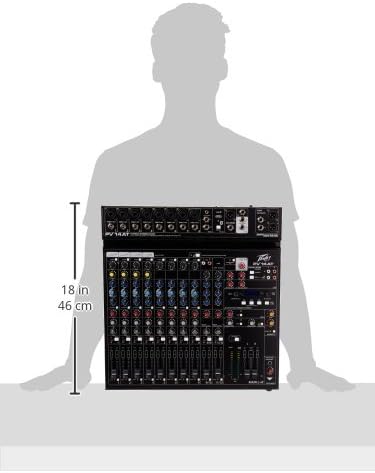
Image: Diagram showing the approximate dimensions of the Peavey PV 14 AT mixer, indicating a height of 18 inches (46 cm).
4. Тохиргоо
4.1 Савлах
Carefully remove the mixer from its packaging. Retain all packaging materials for future transport or storage. Inspect the unit for any signs of damage incurred during shipping. If damage is found, contact your dealer immediately.
4.2 Эрчим хүчний холболт
- Холигчийн цахилгаан унтраалга OFF байрлалд байгаа эсэхийг шалгаарай.
- Connect the provided power adapter to the DC IN port on the rear panel of the mixer.
- Цахилгаан адаптерийг тохирох АС цахилгаан залгуурт холбоно уу.
4.3 Аудио холболт
Connect your microphones, instruments, and other audio sources to the appropriate input channels. Use XLR cables for microphones and 1/4-inch TRS/TS cables for line-level instruments. Connect your main speakers or recording interface to the MAIN L+R outputs using XLR or 1/4-inch cables.
5. Ашиглалтын заавар
5.1 Сувгийн ажиллагаа
Each input channel features a GAIN control to adjust input sensitivity, a 3-band EQ (High, Mid, Low) for tone shaping, and AUX SEND controls for monitor mixes or external effects. The channel fader controls the individual channel's level in the main mix. The SOLO button allows you to monitor a single channel without affecting the main output.
5.2 Antares Auto-Tune
The PV 14 AT includes Antares Auto-Tune on select channels. To activate Auto-Tune, locate the dedicated Auto-Tune button on the desired channel and press it. Adjust the Auto-Tune parameters (if available) via the mixer's digital display and controls to achieve the desired pitch correction effect.
5.3 Bluetooth холболт
- Press the Bluetooth button on the mixer to activate Bluetooth pairing mode. The Bluetooth indicator light will flash.
- On your smart device (phone, tablet, computer), search for available Bluetooth devices and select "PV 14 AT" (or similar name).
- Once paired, the Bluetooth indicator light will become solid. You can now stream audio wirelessly to the mixer.
5.4 Дижитал эффектүүд
The mixer features built-in digital effects. Use the EFFECTS section controls and LCD display to browse and select various effects such as reverb, delay, and chorus. Adjust the effect send levels on individual channels and the master effect return level to blend effects into your mix.
5.5 USB аудио интерфэйс
The Digital Audio Port (USB) on the rear panel allows the PV 14 AT to function as an audio interface for your computer. Connect a USB cable from the mixer to your computer. The mixer will be recognized as an audio input/output device, enabling multi-track recording to a Digital Audio Workstation (DAW) or playback from your computer through the mixer.
6. Засвар үйлчилгээ
6.1 Цэвэрлэгээ
To clean the mixer, use a soft, dry cloth. Do not use abrasive cleaners, solvents, or waxes. Ensure the unit is powered off and disconnected from the power source before cleaning.
6.2 Хадгалалт
When not in use for extended periods, store the mixer in a cool, dry place, away from direct sunlight and extreme temperatures. It is recommended to use the original packaging for protection during storage or transport.
7. Алдаа засах
7.1 Эрчим хүчгүй
- Check if the power adapter is securely connected to both the mixer and a working power outlet.
- Арын самбар дээрх цахилгаан унтраалга асаалттай байрлалд байгаа эсэхийг шалгаарай.
- Өөр төхөөрөмжийг залгах замаар цахилгааны залгуур ажиллаж байгаа эсэхийг шалгана уу.
7.2 Дууны гаралт байхгүй
- Confirm that all channel faders and the MAIN L+R faders are raised.
- Бүх аудио кабелиудыг найдвартай холболт болон зөв ажиллагааг шалгана уу.
- Ensure input sources (microphones, instruments) are active and producing sound.
- Verify that the connected speakers or headphones are powered on and functioning correctly.
7.3 Hum or Noise
- Бүх кабелиуд зөв хамгаалагдсан, сайн нөхцөлд байгаа эсэхийг шалгаарай.
- Check for ground loops by ensuring all equipment is connected to the same power circuit or using a ground loop isolator.
- Reduce gain levels if input signals are too hot, causing clipping.
7.4 Bluetooth холболтын асуудал
- Ensure the mixer's Bluetooth is in pairing mode.
- Move your smart device closer to the mixer to ensure it is within range.
- Forget the device from your smart device's Bluetooth settings and attempt to re-pair.
8. Техникийн үзүүлэлтүүд
| Зүйлийн жин | 12 фунт |
| Бүтээгдэхүүний хэмжээс | 12 x 12 x 12 инч |
| Загварын дугаар | PV14AT |
| Тоног төхөөрөмжийн интерфейс | Bluetooth |
| Материалын төрөл | Зэвэрдэггүй ган |
| Холигч сувгийн тоо | 14 |
| Эрчим хүчний эх үүсвэр | Утастай цахилгаан |
| Холболтын технологи | Bluetooth |
9. Баталгаат хугацаа ба дэмжлэг
For warranty information and technical support, please refer to the warranty card included with your product or visit the official Peavey website. You can also contact Peavey customer service directly for assistance with product registration, troubleshooting, and service inquiries.


