PRORECK Party 15 Portable PA Speaker System
Хэрэглэгчийн гарын авлага
Model: PARTY 15
Танилцуулга
Худалдан авалт хийсэнд баярлалааasing the PRORECK Party 15 Portable PA Speaker System. This system is designed to deliver powerful and clear audio for various applications, including parties, DJ events, home studios, and social gatherings. Featuring Bluetooth connectivity, USB/SD card playback, FM radio, and integrated LED lights, the Party 15 offers versatile audio solutions. Please read this manual thoroughly before operating the system to ensure proper use and to maximize its performance and longevity.
Аюулгүй байдлын чухал мэдээлэл
Гал түймэр, цахилгаан цочрол, гэмтлийн эрсдлийг бууруулахын тулд энэ бүтээгдэхүүнийг ашиглахдаа аюулгүй байдлын үндсэн арга хэмжээг үргэлж дагаж мөрдөөрэй.
- Энэ төхөөрөмжийг бороо эсвэл чийгэнд бүү гарга.
- Do not open the speaker enclosure. There are no user-serviceable parts inside. Refer all servicing to qualified service personnel.
- Эрчим хүчний хангамжийн хэмжээг баталгаажуулна ууtage ботьтой таарч байнаtage нэгж дээр заасан.
- Цахилгааны утсыг гишгэх, хавчихаас хамгаалаарай, ялангуяа залгуур, залгуур, төхөөрөмжөөс гарах цэг дээр.
- Аянга шуурганы үед эсвэл удаан хугацаагаар ашиглаагүй үед энэ төхөөрөмжийг цахилгааны залгуураас салга.
- Агааржуулалтын нүхийг хааж болохгүй. Үйлдвэрлэгчийн зааврын дагуу суурилуулна.
- Зөвхөн үйлдвэрлэгчээс заасан тэрэг, тавиур, tripod, хаалт, ширээ зэргийг ашиглана уу.
Хайрцагт юу байна
Carefully unpack your PRORECK Party 15 system and ensure all items listed below are present and in good condition. If any items are missing or damaged, please contact your retailer immediately.

Image: Complete PRORECK Party 15 system with all included accessories.
- 1 х идэвхтэй чанга яригч
- 1 x идэвхгүй чанга яригч
- 2 х чанга яригчийн тавиур
- 1 x утастай микрофон
- 1 x Speakon Cable (for connecting active to passive speaker)
- 1 х цахилгаан кабель
- 1 x Алсын удирдлага

Зураг: Нарийвчилсан view of the wired microphone, remote control, and various cables.
Тохиргоо
Follow these steps to set up your PRORECK Party 15 speaker system.
1. Чанга яригчийн суурь угсралт
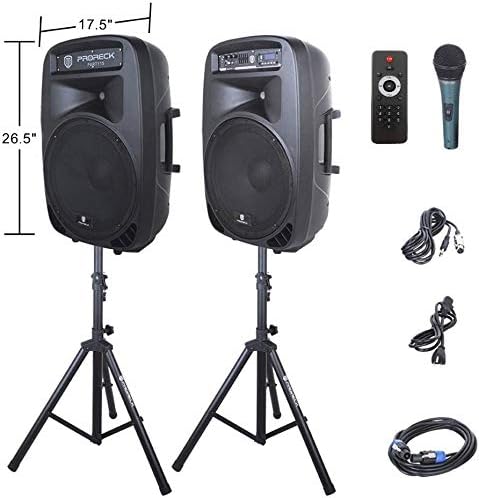
Image: The two included speaker stands.
- Unfold the tripod legs of each speaker stand until they are fully extended and stable.
- Loosen the height adjustment knob on the stand and extend the pole to your desired height. Ensure the safety pin is inserted through the appropriate hole to secure the height.
- Өндөр тохируулах бариулыг чанга чангал.
2. Илтгэгчийн байршил
- Carefully lift each speaker and place it onto the top pole of a speaker stand. Ensure the speaker is securely seated.
- Position the active speaker (the one with the control panel) near a power outlet.
- Place the passive speaker within reach of the included Speakon cable from the active speaker.
Image: PRORECK Party 15 speakers set up on their stands.
3. Чанга яригчийг холбох
- Locate the Speakon output on the rear panel of the active speaker and the Speakon input on the rear panel of the passive speaker.
- Connect one end of the Speakon cable to the active speaker's Speakon output and the other end to the passive speaker's Speakon input. Ensure a secure connection.

Image: Rear panels of the active and passive speakers, highlighting the Speakon connection.
4. Эрчим хүчний холболт
- Ensure the master volume knob on the active speaker is turned down to its minimum setting.
- Connect the power cable to the active speaker's power input and then plug it into a suitable electrical outlet.
Ашиглалтын заавар
This section details how to operate your PRORECK Party 15 speaker system and utilize its various features.
Хяналтын самбар дууссанview

Зураг: Нарийвчилсан view of the active speaker's control panel.
The active speaker features a comprehensive control panel with an LCD display, various input options, volume controls, and an equalizer.
1. Асаах/унтраах
- After connecting the power cable, locate the power switch on the rear panel of the active speaker.
- Flip the switch to the "ON" position to power on the system. The LCD display will illuminate.
- To power off, flip the switch to the "OFF" position.
2. Горим сонгох
дээр дарна уу MODE button on the control panel or remote control to cycle through available input modes: Bluetooth, USB, SD Card, FM Radio, and Line Input.
3. Bluetooth холболт
- ашиглан "Bluetooth" горимыг сонгоно уу MODE button. The LCD display will show "BLUE".
- Bluetooth идэвхжүүлсэн төхөөрөмж дээрээ (ухаалаг утас, таблет гэх мэт) боломжтой Bluetooth төхөөрөмжүүдийг хайгаарай.
- Select "PRORECK PARTY 15" from the list. Once paired, the speaker will emit a confirmation sound.
- Та одоо төхөөрөмжөөсөө чанга яригчаар дамжуулан аудио тоглуулж болно.
4. USB/SD картыг тоглуулах
- Insert a USB drive or SD card containing MP3 audio files into the respective slot on the control panel.
- The system will automatically switch to USB or SD mode and begin playing the first compatible audio fileХэрэв үгүй бол дарна уу MODE зөв оролтыг сонгохын тулд товчлуурыг дарна уу.
- -г ашиглана уу ТОГЛОХ/ЗОГСООХ, ӨМНӨХ, ба ДАРААГИЙН buttons on the control panel or remote to manage playback.
5. FM радио
- Select "FM Radio" mode using the MODE товч.
- дээр дарна уу ТОГЛОХ/ЗОГСООХ button to initiate an automatic scan for available FM stations. The system will save detected stations.
- -г ашиглана уу ӨМНӨХ болон ДАРААГИЙН Хадгалсан станцуудаар шилжих товчлуурууд.
6. Микрофоны хэрэглээ
- Connect the wired microphone to the 1/4'' MIC input on the control panel.
- Adjust the "MIC VOL" knob to control the microphone's volume level.
- Санал хүсэлтээс зайлсхийхийн тулд үндсэн дууны түвшинг зөв тохируулсан эсэхийг шалгаарай.
7. Алсын удирдлагатай функцууд
Image: The included remote control.
The remote control allows for convenient operation from a distance (up to 20 feet). Functions include:
- Заалт: Оролтын горимуудын хооронд шилжих.
- ТОГЛОХ/ЗОГСООХ: Аудио тоглуулахыг тоглуулах эсвэл түр зогсоох.
- ӨМНӨХ/Дараагийн: Skip tracks or navigate FM stations.
- VOL+/VOL-: Үндсэн дууны хэмжээг тохируулна уу.
- Тэгшитгэл: Эквалайзерын урьдчилсан тохиргоонуудаар ээлжлэн солино уу.
- Numeric buttons for direct track selection (in USB/SD mode).
8. Эквалайзерын тохируулга
The control panel features a 5-band graphic equalizer. Adjust the sliders to fine-tune the audio output to your preference. Experiment with different settings to achieve the desired sound for various music genres or vocal performances.
9. LED гэрэл

Image: PRORECK Party 15 speakers demonstrating various LED light colors.
The PRORECK Party 15 speakers are equipped with built-in LED lights that activate with sound. These lights enhance the party atmosphere. There is a dedicated switch on the rear of the active speaker to turn the LED lights on or off.
Засвар үйлчилгээ
Тохиромжтой засвар үйлчилгээ нь таны чанга яригч системийн урт наслалт, оновчтой ажиллагааг баталгаажуулдаг.
- Цэвэрлэгээ: Use a soft, dry cloth to clean the exterior of the speakers. Do not use abrasive cleaners, waxes, or solvents.
- Хадгалах: Чанга яригчийг удаан хугацаагаар ашиглахгүй бол сэрүүн, хуурай газар, нарны шууд тусгал болон хэт өндөр температураас хол хадгална уу.
- Агааржуулалт: Хэт халалтаас урьдчилан сэргийлэхийн тулд агааржуулалтын нүхийг тоос шороо, хог хаягдалгүй байлгах хэрэгтэй.
- Кабель: Бүх кабелийг элэгдэл, эвдрэлийн шинж тэмдэг байгаа эсэхийг тогтмол шалгаж байгаарай. Гэмтсэн кабелийг нэн даруй солино уу.
Алдааг олж засварлах
If you encounter issues with your PRORECK Party 15 system, refer to the following common problems and solutions.
| Асуудал | Боломжит шалтгаан | Шийдэл |
|---|---|---|
| Хүч чадалгүй | Power cable not connected; Power switch off; Outlet malfunction. | Ensure power cable is securely connected and plugged into a working outlet. Check power switch on rear panel. |
| Чанга яригчаас дуу гарахгүй | Volume too low; Incorrect input mode; Speakon cable loose/damaged; Audio source issue. | Increase master volume. Select correct input mode. Check Speakon cable connection between active and passive speakers. Verify audio source is playing. |
| Bluetooth-г холбохгүй байна | Speaker not in Bluetooth mode; Device too far; Device already paired to another speaker. | Ensure speaker is in Bluetooth mode ("BLUE" on display). Move device closer to speaker. Disconnect device from other Bluetooth connections. |
| Микрофон ажиллахгүй байна | Mic volume too low; Microphone not connected properly; Microphone faulty. | Increase "MIC VOL" knob. Ensure microphone is fully inserted into the 1/4'' input. Test with another microphone if available. |
| Гажуудсан дуу чимээ | Volume too high; Input signal too strong; Equalizer settings. | Reduce master volume or input source volume. Adjust equalizer settings. |
| LED гэрэл ажиллахгүй байна | LED switch off; Volume too low for activation. | Ensure the LED switch on the rear panel is in the "ON" position. Increase volume to activate sound-reactive lights. |
Үзүүлэлтүүд
| Загварын нэр | ҮДЭШ 15 |
| Чанга яригчийн төрөл | Вүүфер |
| Чанга яригчийн хэмжээ | 15 инч |
| Чанга яригчийн хамгийн их гаралтын чадал | 2000 Watts P.M.P.O (Peak Music Power Output) |
| Холболтын технологи | Утастай, Утасгүй (Bluetooth) |
| Утасгүй холбооны технологи | Bluetooth |
| Bluetooth хүрээ | 10 метр (ойролцоогоор 33 фут) |
| Онцлог шинж чанарууд | LED Light, FM Radio, USB Port, SD Card Reader, Digital LCD Display |
| Оролтууд | 1/4'' Mic, RCA Line Inputs, USB, SD Card |
| Гаралт | Speakon Output (for passive speaker), RCA Line Output |
| Материал | Акрилонитрил бутадиен стирол (ABS) |
| Бүтээгдэхүүний хэмжээс (чанга яригч бүр) | 19"D x 30"W x 29"H (approximate, likely including handles/feet) |
| Барааны жин (нийт) | 81.6 фунт |
| Эрчим хүчний эх үүсвэр | Утастай цахилгаан |
Баталгаат болон дэмжлэг
PRORECK products come with a limited warranty. For specific warranty terms and conditions, please refer to the warranty card included with your product or visit the official PRORECK website. For technical support, troubleshooting assistance, or parts inquiries, please contact PRORECK customer service through their official channels.
Manufacturer: PRORECK AUDIO


