1. Танилцуулга
This manual provides instructions for the VINABTY Universal Remote Control, model TS-12+AL. This remote is designed to replace original remote controls for a wide range of Toshiba LED and LCD HDTV models. It offers direct control for most Toshiba TVs without initial setup, but includes various programming methods if direct functionality is not achieved.
Тохиромжтой загварууд: This remote is compatible with numerous Toshiba TV models, including but not limited to: 19AV600, 19AV600U, 19AV600UZ, 19C100, 19C100U, 19C10U, 19C1D, 19C1DU, 19L4200, 19L4200U, 19SL400, 19SL400U, 19SL410U, 19SL410X, 22AV600, 22AV600U, 22AV600UZ, 22C10, 22C100, 22C100U, 22C10U, 22SL400, 22SL400U, 23L1350U, 23L2300U, 24L4200, 24L4200U, 24SL410U, 24SL410UM, 26C10, 26C100, 26C100U, 26C100U1, 26C100UM, 26C10U, 26SL400, 26SL400U, 29L1350, 29L1350U, 32C10, 32C100, 32C100U, 32C100U1, 32C100U2, 32C10U, 32C110, 32C110U, 32C120, 32C120U, 32DT1, 32DT1U, 32DT2U, 32DT2U1, 32DT2UL, 32E200U, 32E200UM, 32E20U, 32FT2U, 32L1300, 32L1300U, 32L1300UA, 32L1350, 32L1350U, 32L1400, 32L1400U, 32L2200U, 32L2300U, 32L2400U, 32L4200, 32L4200U, 32SL400, 32SL400U, 32SL400VPK, 32SL400VPKU, 32SL410U, 32SL410UM, 37E200U, 37E20U, 39L1350U, 39L22U, 39L2300U, 40E200U, 40E200U1, 40E200U2, 40E200UM, 40E20U, 40E20U1, 40E210U, 40E210X, 40E220U, 40FT1, 40FT1U, 40FT2U, 40FT2U1, 40FT2UX, 40L1400, 40L1400U, 40L1400UC, 40L2200U, 40L2400, 40L2400U, 40L5200, 40L5200U, 40SL412, 40SL412U, 40SL412UM, 46G310U, 46L5200, 46L5200U, 46SL412U, 50L1350, 50L1350U, 50L1400, 50L1400U, 50L1400UC, 50L1450, 50L1450U, 50L2200, 50L2200U, 50L2300U, 50L2400, 50L2400U, 50L2400UC, 50L5200, 50L5200U, 50M2U, 55G310U, 55G310U1, 55HT1, 55HT1U, 55S41U, 55SL412U, 58L1350U, 65HT2U, 28L110U, 32L110U, 32L220U, 40L310U, 43L310U, 43L420U, 49L310U, 49L420U, 55L310U, 65L350U.
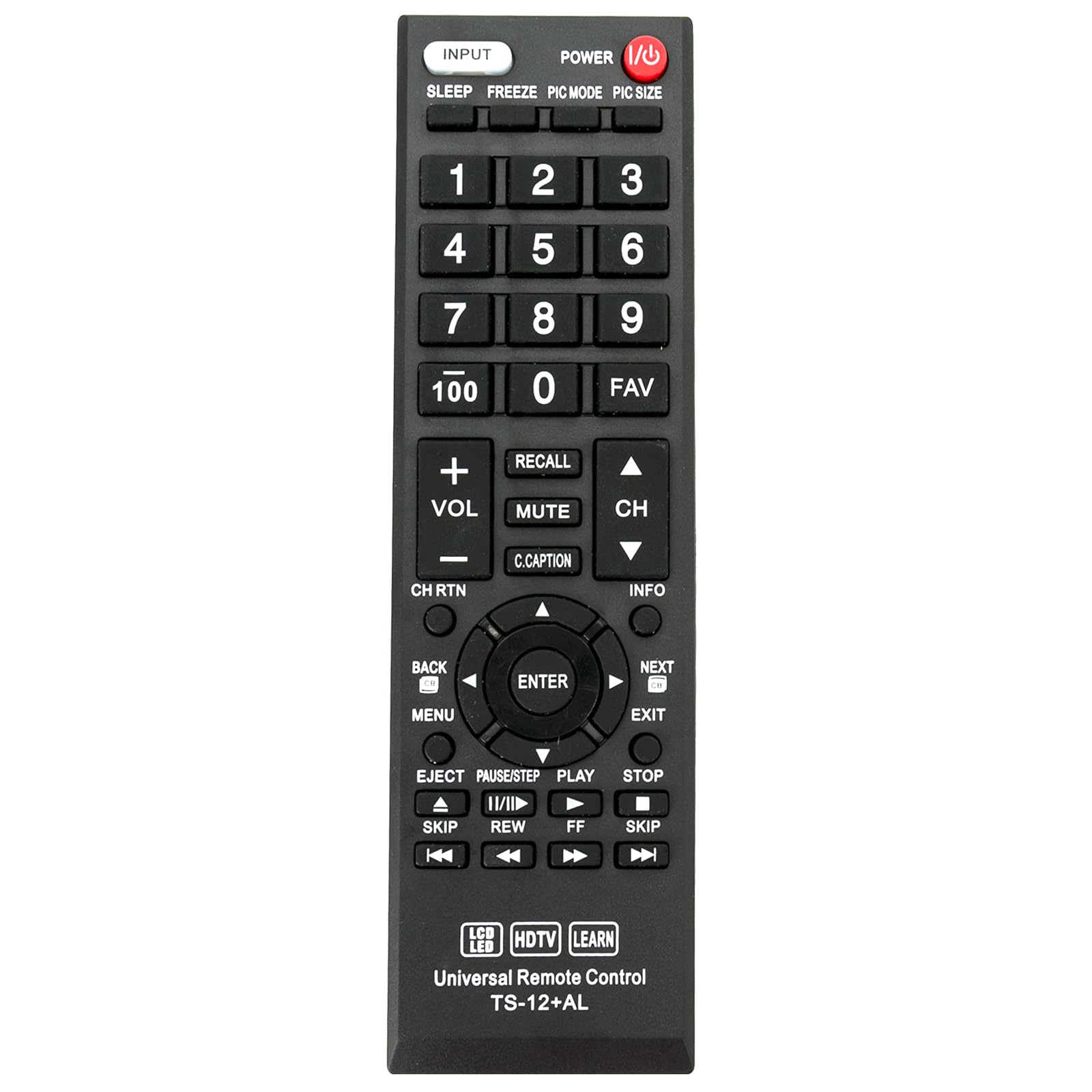
Зураг 1: Урд view of the VINABTY Universal Remote Control TS-12+AL.
2. Тохиргоо ба програмчлал
The remote control is designed to work directly with approximately 98% of Toshiba TV models without any setup. If the remote does not function immediately after battery installation, please follow one of the programming methods below.
2.1 Батерей суурилуулах
Open the battery compartment cover on the back of the remote control. Insert two AAA batteries (not included), ensuring correct polarity (+/-). Close the battery compartment cover.

Зураг 2: Буцах view of the remote control, illustrating the battery compartment and learning function instructions.
2.2 Programming Methods (If direct use fails)
If the remote does not operate your TV directly, use one of the following methods to program it:

Image 3: Detailed instruction sheet for programming the remote control.
A. Input Code Method
This method involves entering a specific code for your TV brand.
- Кодын жагсаалт: 001, 002, 003, 004, 005, 006, 007, 008, 009, 010, 011
- Press and hold the [MUTE] button and the [POWER] button simultaneously until the LED indicator lights up.
- Хоёр товчлуурыг суллана уу.
- Enter one of the three-digit codes from the list above. If the code is entered correctly, the LED indicator will turn off.
- Test the remote control's functions. If it does not work, repeat the process with another code from the list.
Жич: If an invalid code is entered, the LED will flash twice and remain on. If a correct code is entered, the LED will turn off. To exit programming mode, press the [MUTE] button.
B. Fast Search Method
This method automatically searches for the correct code.
- Press and hold the [MUTE] button and the [POWER] button simultaneously for approximately 3 seconds until the LED indicator lights up.
- Хоёр товчлуурыг суллана уу.
- Repeatedly press the [CH+] (Channel Up) button until the TV displays the 'MUTE' symbol on the screen.
- Press the [POWER] button to save the code. The LED indicator will turn off.
- Test the remote control. If it does not function correctly, repeat the process from step 2.
C. Code Inquiry Method
Use this method to identify the code currently programmed into the remote control.
- Press and hold any key (e.g., [INPUT]) and the [MUTE] button simultaneously for 3 seconds until the LED indicator lights up.
- Хоёр товчлуурыг суллана уу.
- Enter [9][9][0]. The LED will flash twice.
- Press [1], then count the flashes of the LED. This number is the first digit of the code. (If the digit is 0, the LED will not flash).
- Press [2], then count the flashes for the second digit.
- Press [3], then count the flashes for the third digit.
D. Learning Function
This function allows the remote to learn commands directly from your original TV remote control.
- Press and hold any key (e.g., [INPUT]) and the [MUTE] button simultaneously until the LED indicator lights up. Release the keys. The remote is now in learning mode.
- Position your original TV remote control and the VINABTY remote control facing each other, with a distance of 3-5 cm between them.
- Press a key on your original remote control. The LED indicator on the VINABTY remote will flash once and then remain on.
- Press the corresponding key on the VINABTY remote control. The LED indicator will flash once and then turn off.
- Суралцахыг хүссэн бусад функцүүдийнхээ хувьд 3 ба 4-р алхмуудыг давтана уу.
- After learning all desired keys, press and hold any key (e.g., [INPUT]) and the [MUTE] button simultaneously until the LED indicator turns off. The learned functions will be saved.
Жич: If no key is pressed for 25 seconds during the learning process, the remote will exit learning mode without saving any changes.
3. Алсын удирдлагатай ажиллах
Once programmed, the remote control functions similarly to your original TV remote. Below are common button functions:
- ХҮЧ: ТВ-г асаах эсвэл унтраана.
- Оруулах: Selects video input sources (HDMI, AV, Component, etc.).
- Тоон товчлуурууд (0-9, 100): Шууд сувгийн сонголт.
- VOL +/-: Дууны хэмжээг дээш эсвэл доошлуулна.
- CH +/-: Сувгуудыг дээш эсвэл доош нь өөрчилдөг.
- ХААЛТ: ТВ-ийн дууг хаадаг эсвэл нээдэг.
- САНАХ: Өмнөх суваг руу буцна.
- C.ТАВИГ: Хаалттай тайлбарыг идэвхжүүлдэг эсвэл идэвхгүй болгодог.
- Цэс: ТВ-ийн үндсэн цэсэнд нэвтэрнэ.
- Directional Pad (Up, Down, Left, Right) & ENTER: Цэс рүү шилжиж, сонголтыг баталгаажуулна.
- Буцах: Өмнөх цэс эсвэл дэлгэц рүү буцна.
- ГАРАХ: Одоогийн цэс эсвэл функцээс гарна.
- МЭДЭЭЛЭЛ: Одоогийн програм эсвэл оролтын талаарх мэдээллийг харуулна.
- Playback Controls (EJECT, PAUSE/STEP, PLAY, STOP, SKIP, REW, FF): Controls connected media devices (e.g., DVD/Blu-ray players) if the remote is programmed for them or has learned these functions.
- УНТАХ: ТВ-ийн унтах цагийг тохируулна.
- ХӨЛДӨХ: Дэлгэц дээрх одоогийн зургийг хөлдөөнө.
- PIC MODE: Зургийн горимуудаар ээлжлэн солигдоно.
- PIC SIZE: Adjusts picture size/aspect ratio.
- Дуртай зүйл: Дуртай сувгууд руу ханддаг.
4. Засвар үйлчилгээ
Алсын удирдлагынхаа оновчтой ажиллагаа, урт наслалтыг хангахын тулд дараах засвар үйлчилгээний удирдамжийг дагаж мөрдөнө үү.
- Зай солих: Replace batteries when the remote's response becomes sluggish or the LED indicator does not light up during operation. Always replace both batteries at the same time with new ones of the same type (AAA).
- Цэвэрлэгээ: Clean the remote control with a soft, dry cloth. Do not use liquid cleaners, abrasive cleaners, or chemical solvents, as these can damage the remote's surface or internal components.
- Хадгалах: Алсын удирдлагыг нарны шууд тусгал, хэт температур, өндөр чийгшилээс хол, сэрүүн, хуурай газар хадгална.
- Дусалаас зайлсхийх: Дусал нь дотоод хэлхээг гэмтээж болзошгүй тул алсын удирдлагаа физик нөлөөллөөс хамгаална.
5. Алдаа засах
If you encounter issues with your remote control, refer to the following troubleshooting steps:
- Алсын удирдлага хариу өгөхгүй байна:
- Check battery polarity. Ensure batteries are inserted correctly.
- Хуучин батерейг шинэ батарейгаар солих.
- Алсын удирдлага болон ТВ-ийн хэт улаан туяаны мэдрэгчийн хооронд ямар ч саад бэрхшээл байхгүй эсэхийг шалгаарай.
- Алсын удирдлага ТВ рүү шууд чиглэгдсэн эсэхийг шалгана уу.
- Зарим товчлуурууд ажиллахгүй байна:
- If the remote initially worked but some buttons stopped, try reprogramming the remote using the Input Code or Fast Search methods (Section 2.2).
- If specific buttons were learned using the Learning Function, ensure the learning process was completed successfully for those buttons. Repeat the learning process if necessary.
- Remote Controls Other Devices:
- This remote is primarily for Toshiba TVs. If it accidentally controls other devices, ensure it is correctly programmed for your Toshiba TV.
- LED үзүүлэлтийн асуудлууд:
- If the LED flashes twice and stays on during code input, the code is invalid. Try another code.
- If the LED does not light up at all, check or replace batteries.
Хэрэв эдгээр алхмууд нь асуудлыг шийдэж чадахгүй бол хэрэглэгчийн дэмжлэгтэй холбогдоно уу.
6. Техникийн үзүүлэлтүүд
| Загварын дугаар | TS-12+AL |
| Бүтээгдэхүүний хэмжээс | 9 x 2 x 1 инч (ойролцоогоор 22.86 x 5.08 x 2.54 см) |
| Зүйлийн жин | 0.352 унц (ойролцоогоор 10 грамм) |
| Батерей шаардлагатай | 2 x AAA (Lithium Metal batteries required, not included) |
| Тохиромжтой төхөөрөмжүүд | Toshiba Televisions (LED, LCD, HDTV) |
| Онцлог шинж чанар | Эргономик дизайн |
| Өнгө | Хар |
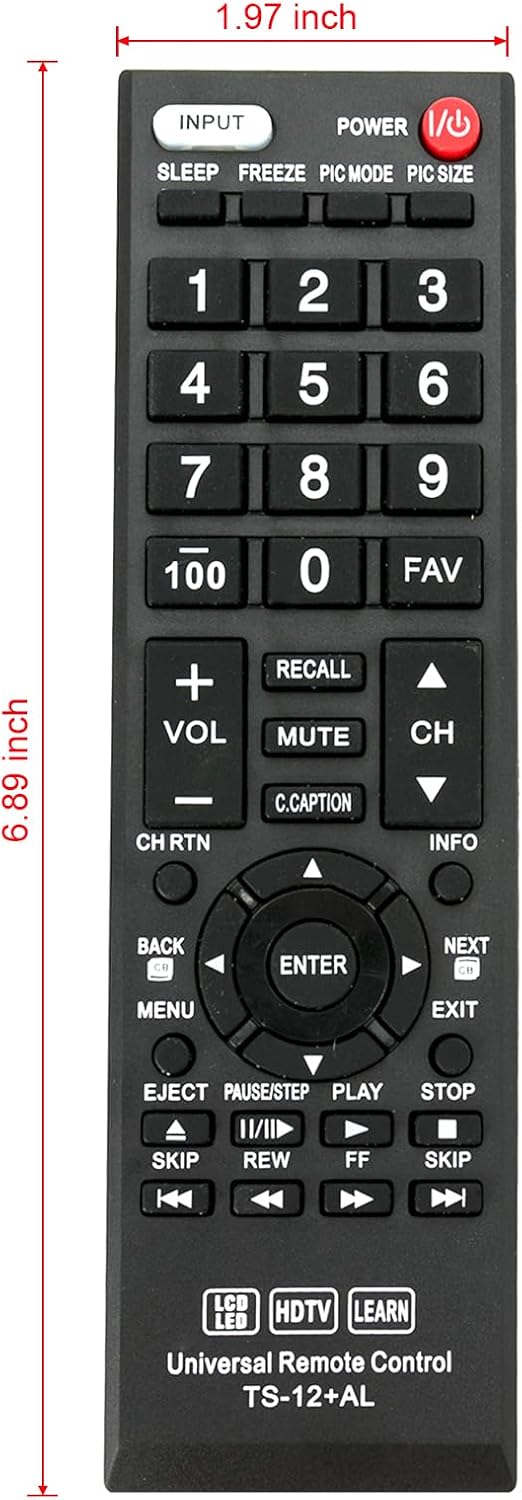
Image 4: Remote control with indicated dimensions (1.97 inches width, 6.89 inches length).
7. Баталгаат хугацаа ба дэмжлэг
This product comes with a standard limited warranty against manufacturing defects. For specific warranty details, please refer to the product packaging or contact your retailer.
For technical support, troubleshooting assistance, or inquiries regarding product functionality, please contact the manufacturer or your point of purchase. Please have your product model number (TS-12+AL) and purchase information ready when contacting support.