Танилцуулга
This manual provides detailed instructions for the installation, operation, and maintenance of the Vivolink Control Panel 8 Button, model VLCP8B. Please read this manual thoroughly before using the device to ensure proper functionality and safety.
Аюулгүй байдлын мэдээлэл
Гал түймэр, цахилгаанд цохиулах, хүний биед гэмтэл учруулах эрсдлийг бууруулахын тулд энэ бүтээгдэхүүнийг ашиглахдаа аюулгүй байдлын үндсэн арга хэмжээг үргэлж дагаж мөрдөөрэй. Энэ гарын авлагыг цаашид лавлах зорилгоор хадгална уу.
- Төхөөрөмжийг чийг, хэт өндөр температурт бүү гарга.
- Төхөөрөмжийг задлах, өөрчлөхийг бүү оролдоорой. Бүх үйлчилгээг мэргэшсэн боловсон хүчинд шилжүүлээрэй.
- Ensure the power supply used is compatible with the device's specifications.
- Төхөөрөмжийг хүчтэй соронзон орноос хол байлга.
Багцын агуулга
Бүх зүйл багцад байгаа эсэхийг шалгана уу:
- Vivolink Control Panel 8 Button (VLCP8B)
- Суурилуулах эрэг (хэрэв байгаа бол)
- Түргэн эхлүүлэх гарын авлага (хэрэв байгаа бол)
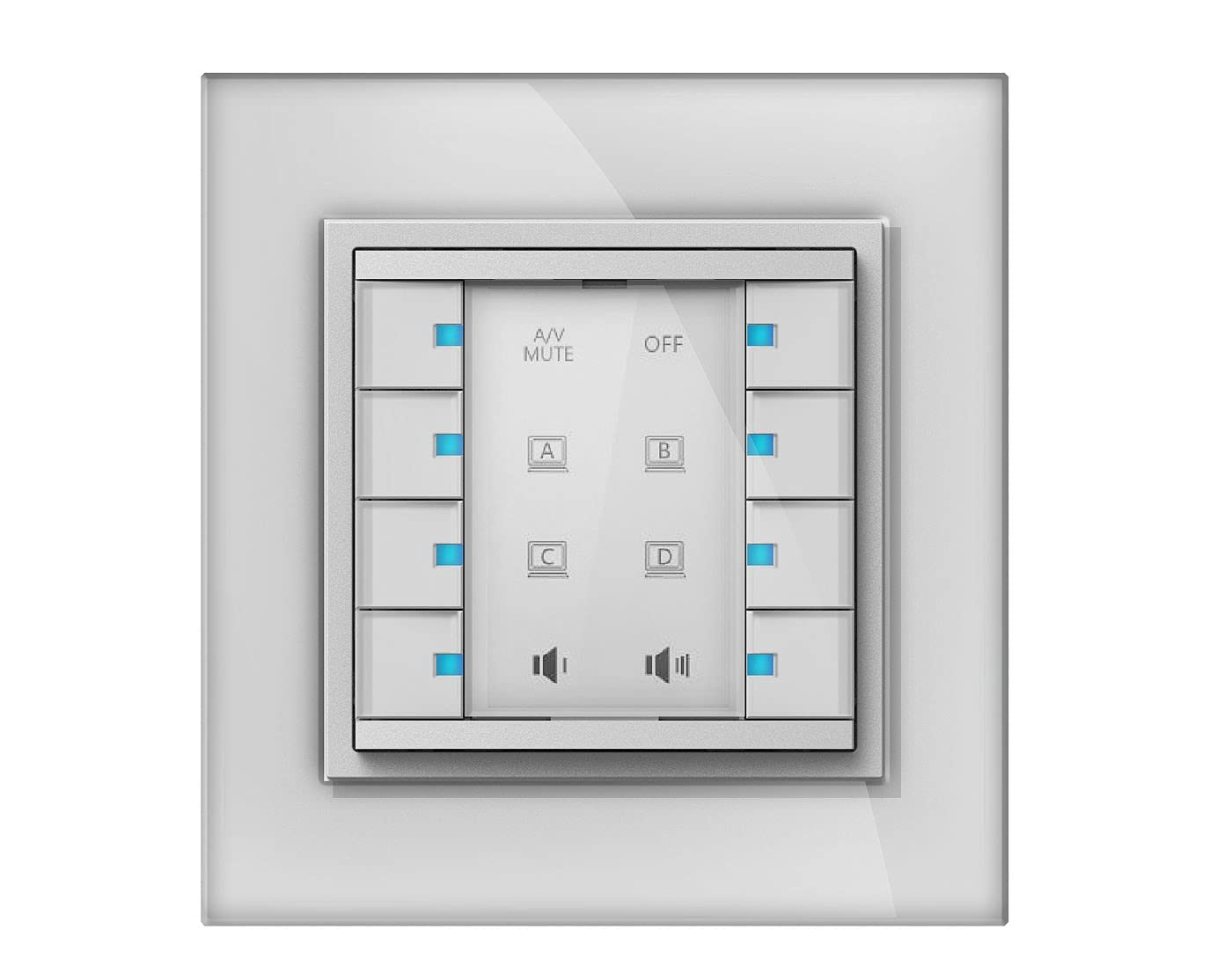
Image: The Vivolink Control Panel 8 Button, model VLCP8B, showing its front face with eight distinct buttons arranged in a grid.
Тохиргоо
1. Физик суурилуулалт
The VLCP8B control panel is designed for wall mounting or integration into a standard equipment rack. Ensure the mounting surface is stable and can support the device's weight.
- Байршил сонгоно уу: Select a suitable location that allows for easy access and visibility, away from direct heat sources or excessive dust.
- Суурилуулалт: Use appropriate screws and anchors (not always included) to secure the control panel to the desired surface. Refer to the mounting template if provided with the physical product.
2. Холболтууд
Connect the necessary cables to the control panel. The specific connections will depend on the system it is integrating with.
- Эрчим хүчний холболт: Connect the power adapter (if external) or power cable to the designated power input port.
- Хяналтын холболтууд: Connect control cables (e.g., Ethernet, RS-232, USB) from the VLCP8B to the devices it will control, following the system's wiring diagram.
3. Асаах
Once all physical and control connections are securely made, connect the power supply to an electrical outlet. The device should power on automatically, indicated by status lights (if present).
Ашиглалтын заавар
The Vivolink Control Panel 8 Button is designed for intuitive operation. Each of the eight buttons can be programmed to perform specific functions within your integrated system.
1. Товчлуурын үндсэн функцууд
Each button on the VLCP8B typically corresponds to a pre-programmed action. Pressing a button will trigger its assigned function.
- Ганц хэвлэл: Activates the primary function assigned to that button.
- Урт хэвлэл: Some buttons may have a secondary function activated by pressing and holding for a few seconds. Refer to your system's configuration for specific long-press functions.
2. Customization and Programming
The functionality of the 8 buttons is determined by the system's programming. Customization is typically performed using dedicated software or a control system interface, not directly on the panel itself. Consult your system integrator or the Vivolink support website for programming guides and software tools.
Common functions that can be assigned to buttons include:
- Power On/Off for connected devices (e.g., projector, display)
- Source Selection (e.g., HDMI 1, VGA, DisplayPort)
- Volume Control (Up/Down/Mute)
- Lighting Scene Recall
- Macro Execution (a sequence of commands)
Засвар үйлчилгээ
Regular maintenance ensures the longevity and optimal performance of your Vivolink Control Panel.
- Цэвэрлэгээ: Use a soft, dry cloth to wipe the surface of the control panel. For stubborn marks, a slightly damp cloth with a mild, non-abrasive cleaner can be used. Ensure no liquid enters the device.
- Програм хангамжийн шинэчлэлтүүд: Periodically check the Vivolink support website for firmware updates. Updates can improve performance, add features, or resolve issues. Follow the provided instructions carefully when performing firmware updates.
- Шалгалт: Кабель болон холболтыг элэгдэл, гэмтлийн шинж тэмдэг байгаа эсэхийг үе үе шалгаж байх.
Алдааг олж засварлах
If you encounter issues with your Vivolink Control Panel, refer to the following common problems and solutions:
| Асуудал | Боломжит шалтгаан | Шийдэл |
|---|---|---|
| Panel does not power on. | Цахилгаан хангамж байхгүй эсвэл холболт буруу байна. | Check power cable connection to the panel and the electrical outlet. Ensure the outlet is functional. |
| Товчнууд хариу өгөхгүй байна. | Incorrect programming or communication issue. | Verify the control system's programming. Check control cable connections. Restart the control system and the panel. |
| Incorrect function triggered. | Button misconfiguration. | Review the button assignments in the control system's programming interface. |
If the problem persists after attempting these solutions, contact Vivolink technical support or your system integrator.
Үзүүлэлтүүд
- Загвар: VLCP8B
- Брэнд: Виволинк
- Товчлуур: 8 програмчлах товчлуур
- Холболт: (Assumed, based on typical control panels: e.g., Ethernet, RS-232, USB) - Specifics not provided in source data.
- Эрчим хүчний хангамж: (Assumed, based on typical control panels: e.g., DC 5V) - Specifics not provided in source data.
- Хэмжээ: (Эх сурвалжийн мэдээлэлд оруулаагүй болно)
- Жин: (Эх сурвалжийн мэдээлэлд оруулаагүй болно)
Note: Detailed technical specifications may be available on the official Vivolink product page or in a separate technical datasheet.
Баталгаат болон дэмжлэг
Vivolink products are designed for reliability and performance. For information regarding warranty terms and conditions, please refer to the warranty card included with your product or visit the official Vivolink webсайт.
For technical assistance, troubleshooting, or service inquiries, please contact Vivolink customer support or your authorized dealer. Provide your product model (VLCP8B) and serial number (if applicable) when seeking support.
Vivolink Official Webсайт: www.vivolink.net


