1. Танилцуулга
This manual provides essential information for the safe and effective operation, maintenance, and troubleshooting of your STANLEY FATMAX FMHT1-77441 Rotary Laser Level. Please read this manual thoroughly before using the product and retain it for future reference.
The STANLEY FATMAX FMHT1-77441 is a self-leveling rotary laser level with a green beam, designed for alignment, horizontal and vertical leveling, squaring, and inclined plane applications. Its robust FATMAX design ensures durability for intensive professional use.
2. Аюулгүй байдлын мэдээлэл
АНХААРУУЛГА: This product emits a Class 2 laser beam. Direct eye exposure to the laser beam may cause eye injury. Do not stare into the laser beam. Do not intentionally direct the laser beam at others.
- Always wear appropriate laser safety glasses when operating the device, especially in bright conditions where the beam may be difficult to see.
- Ensure the laser is set up on a stable surface to prevent accidental movement.
- Do not attempt to modify or disassemble the laser level. This may result in hazardous laser radiation exposure and will void the warranty.
- Төхөөрөмжийг хүүхдэд хүрэхгүй газар хадгална уу.
- Operate the laser level only in well-ventilated areas.
- Avoid using the laser level near highly reflective surfaces that could redirect the beam.

Figure 2.1: Laser safety glasses for eye protection.
3. Багцын агуулга
Upon unpacking, verify that all items are present and undamaged. The standard package for the FMHT1-77441 Rotary Laser Level typically includes:
- STANLEY FATMAX FMHT1-77441 Rotary Laser Level
- Алсын удирдлага
- Laser Detector (Receiver)
- Лазер зорилтот хавтан
- Лазер хамгаалалтын шил
- Rechargeable NiMH Batteries (4 product-specific)
- Зай цэнэглэгч
- Хэрэглэгчийн гарын авлага (энэ баримт бичиг)
- Зөөврийн цүнх
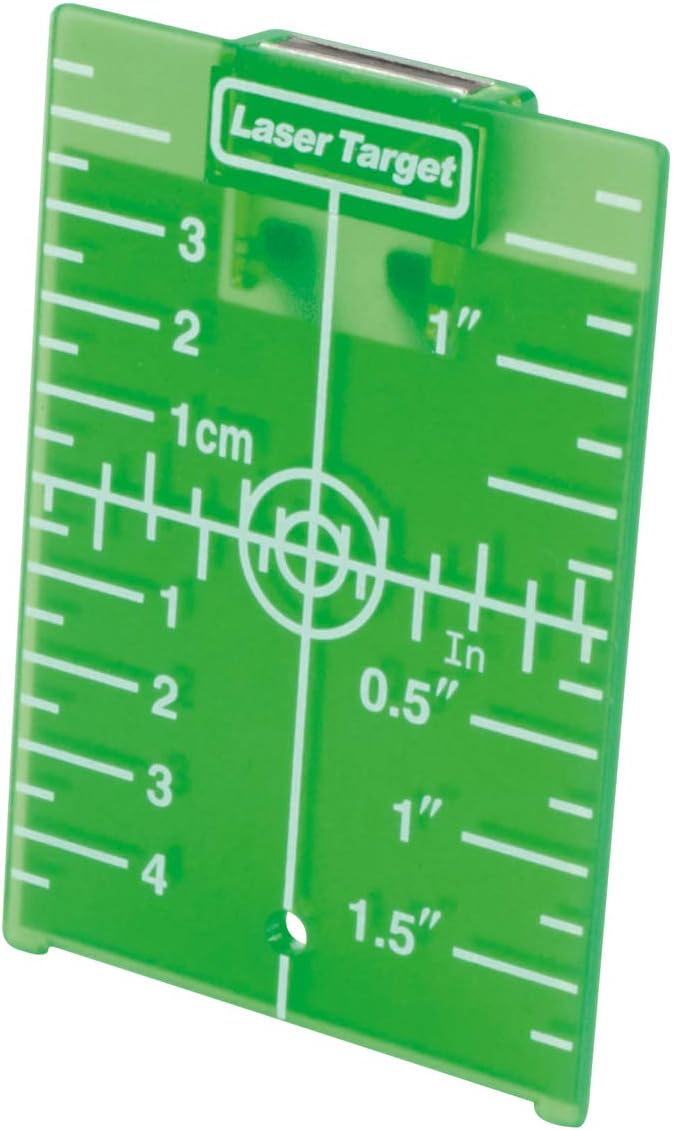
Figure 3.1: Main unit and typical accessories.
4. Бүтээгдэхүүний онцлог
The FMHT1-77441 Rotary Laser Level is engineered with advanced features for precision and durability:
- FATMAX Design: Enhanced robustness and ergonomics for intensive professional use.
- Өөрийгөө тэгшлэх: Automatic leveling for quick and accurate setup in horizontal and vertical applications.
- Ногоон лазер диод: Class 2 green laser beam for improved visibility in various lighting conditions.
- Dual Plumb Beams: Projects both up (green) and down (red) plumb points for precise vertical alignment.
- Manual Slope Adjustment: Allows for manual adjustment of slopes on both X and YZ axes, up to 10%.
- Хамгаалалтын шил: Durable glass protects the laser head from damage.
- Өндөр нарийвчлал: Provides an accuracy of 1.5mm at 30 meters.
- Өргөтгөсөн хүрээ: Operates with a range of up to 300 meters with a detector.
- Rubberized Protection: Rubber grip and protective elements on the base enhance solidity and impact resistance.
- ADS Alarm: An Automatic Displacement System (ADS) alarm signals any accidental movement or displacement of the level, ensuring measurement integrity.
- Хазайлтын функц: Enables the laser to be set at an angle for specific applications.
- 5/8" Thread: Compatible with standard tripods and mounting accessories.
5. Тохиргоо
5.1. Батерей суурилуулах, цэнэглэх
- Лазер түвшинд батерейны тасалгааг олоорой.
- Insert the NiMH rechargeable batteries, ensuring correct polarity.
- Зайны тасалгааг найдвартай хаа.
- Connect the battery charger to the laser level and a power outlet. Allow sufficient time for a full charge before first use.
5.2. Mounting the Laser Level
- Tripod суурилуулах: The laser level features a 5/8" thread on its base. Securely attach it to a compatible tripod. Ensure the tripod is stable and level.
- Хананд суурилуулах: For vertical applications, the laser level can be mounted to a wall bracket (sold separately) using the integrated mounting points.

Figure 5.1: Laser level mounted on a tripod for horizontal applications.
6. Ашиглалтын заавар
6.1. Асаах/унтраах
- To power on, press the power button. The laser will begin its self-leveling sequence.
- To power off, press and hold the power button until the laser beam extinguishes.
6.2. Self-Leveling Operation
Once powered on, the laser level will automatically self-level. If the device is outside its self-leveling range, an alarm may sound, and the laser beam may flash. Adjust the device's position until it self-levels.
6.3. Horizontal Leveling
- Place the laser level on a stable surface or tripod.
- Power on the device. It will self-level to project a horizontal plane.
- Use the laser detector to locate the beam at desired points across the work area.

Figure 6.1: Horizontal leveling application.
6.4. Vertical Leveling and Squaring
- Mount the laser level vertically using a wall bracket or a tripod configured for vertical operation.
- Power on the device. It will self-level to project a vertical plane.
- The up (green) and down (red) plumb points can be used for precise vertical alignment and squaring tasks.

Figure 6.2: Vertical leveling application.
6.5. Manual Slope Adjustment (Tilt Function)
For inclined plane applications, the FMHT1-77441 allows manual slope adjustment up to 10% on both X and YZ axes.
- Engage the manual mode (refer to the device's control panel or remote for specific button). This will disable self-leveling.
- Use the directional buttons on the device or remote control to adjust the laser plane to the desired angle.
- Confirm the angle with an external measuring tool if high precision is required for the slope.

Figure 6.3: Remote control for adjusting laser functions.
6.6. Using the Laser Target Plate
The laser target plate enhances the visibility of the laser beam, especially over longer distances or in bright conditions. Place the target plate at the desired measurement point to easily identify the laser line.

Figure 6.4: Laser target plate for improved beam visibility.
7. Засвар үйлчилгээ
- Цэвэрлэгээ: Regularly clean the laser level with a soft, damp cloth. Do not use harsh chemicals or abrasive cleaners. Ensure the laser output window is clean for optimal performance.
- Хадгалах: Store the device in its carrying case in a dry, cool place when not in use. Remove batteries if storing for extended periods to prevent leakage.
- Шалгалт тохируулга: While the device is self-calibrating, periodic professional calibration is recommended to ensure continued accuracy, especially after significant impacts or prolonged use.
- Батерейны арчилгаа: Follow the manufacturer's instructions for charging and discharging NiMH batteries to maximize their lifespan.
8. Алдаа засах
| Асуудал | Боломжит шалтгаан | Шийдэл |
|---|---|---|
| Laser beam is not visible or very dim. |
|
|
| Laser beam is flashing or alarm is sounding. |
|
|
| Буруу хэмжилт. |
|
|
9. Техникийн үзүүлэлтүүд
| Загварын дугаар | FMHT1-77441 |
| Брэнд | Стэнли ФАТМАкс |
| Лазер анги | 2-р анги |
| Лазер өнгө | Ногоон |
| Нарийвчлал | 1.5 м-ийн зайд ±30 мм |
| Ажлын хүрээ | Up to 300 m (with detector) |
| Налуу тохируулга | Manual, up to 10% on X and YZ axes |
| Эрчим хүчний эх үүсвэр | NiMH Rechargeable Batteries (4x product-specific) |
| Tripod утас | 5/8" |
| Хэмжээ (L x W x H) | 28.5 x 40.5 x 48 см |
| Жин | 7.08 кг |
| Материал | Резин, шил |
| Үйлдлийн горим | Auto-leveling, Manual |
10. Баталгаат хугацаа ба дэмжлэг
Specific warranty information for the STANLEY FATMAX FMHT1-77441 Rotary Laser Level is not provided within this manual. Please refer to the warranty card included with your product or visit the official STANLEY webнарийвчилсан баталгаат нөхцөлийг сайтаас авна уу.
For technical support, service, or spare parts, please contact your local STANLEY dealer or authorized service center. Contact information can typically be found on the STANLEY official webсайт.


