1. Танилцуулга
The Showlite LB-4390 LED Light System is a comprehensive lighting solution designed for various applications, from small stages and events to clubs. This versatile system features four Tri-LED PAR spots and four white strobe spots, offering a wide range of lighting effects and full RGB color mixing. With multiple control options including DMX512, a wireless footswitch, and built-in automatic and sound-activated programs, the LB-4390 provides flexible operation for both professional users and solo entertainers. This manual provides detailed instructions for setup, operation, maintenance, and troubleshooting to ensure optimal performance and longevity of your device.

Figure 1.1: Showlite LB-4390 LED Light System
2. Аюулгүй ажиллагааны заавар
2.1 Ерөнхий аюулгүй байдал
- Төхөөрөмжийг ажиллуулахын өмнө бүх зааврыг анхааралтай уншина уу.
- Төхөөрөмжийг ус, чийг, өндөр чийгшилээс хол байлга.
- Орон сууцыг нээж болохгүй; дотор нь хэрэглэгчийн засвар үйлчилгээ хийх хэсэг байхгүй. Бүх үйлчилгээг мэргэшсэн боловсон хүчинд шилжүүлээрэй.
- Use only the specified power supply (100-240V, 50/60Hz).
- Хэт халалтаас урьдчилан сэргийлэхийн тулд төхөөрөмжийн эргэн тойронд хангалттай агааржуулалтыг хангана.
- Нүдэнд гэмтэл учруулж болзошгүй тул гэрлийн эх үүсвэрт шууд өртөхөөс зайлсхий.
- Securely mount the unit to prevent accidental falls.
- Disconnect the device from the power supply before cleaning or performing any maintenance.
3. Багцын агуулга
3.1 Юу багтсан бэ
Хүлээн авахдаа багцын агуулгыг шалгаж, бүх зүйл байгаа бөгөөд гэмтэлгүй эсэхийг шалгана уу.
- Showlite LB-4390 LED Light System (T-Bar with integrated PAR spots and strobe spots)
- Утасгүй хөлийн унтраалга
- Adjustable Lighting Stand
- Цахилгаан кабель
- Mounting Material for fixed installation (brackets, screws)
- 2 Transport Bags (one for the T-Bar, one for the stand)
- Зааварчилгааны гарын авлага


Figure 3.1: Included components and accessories
4. Тохиргоо
4.1 Угсралт
- Бүх эд ангиудыг савлагаанаас нь болгоомжтой салга.
- Extend the tripod stand legs to a stable position and adjust the height to your desired level, ensuring the stand is firmly planted.
- Mount the T-Bar with the integrated lights onto the top pole of the stand. Secure it tightly using the provided locking knob.
- Adjust the angle of the individual PAR spots and strobe spots on the T-Bar as needed for optimal light coverage.
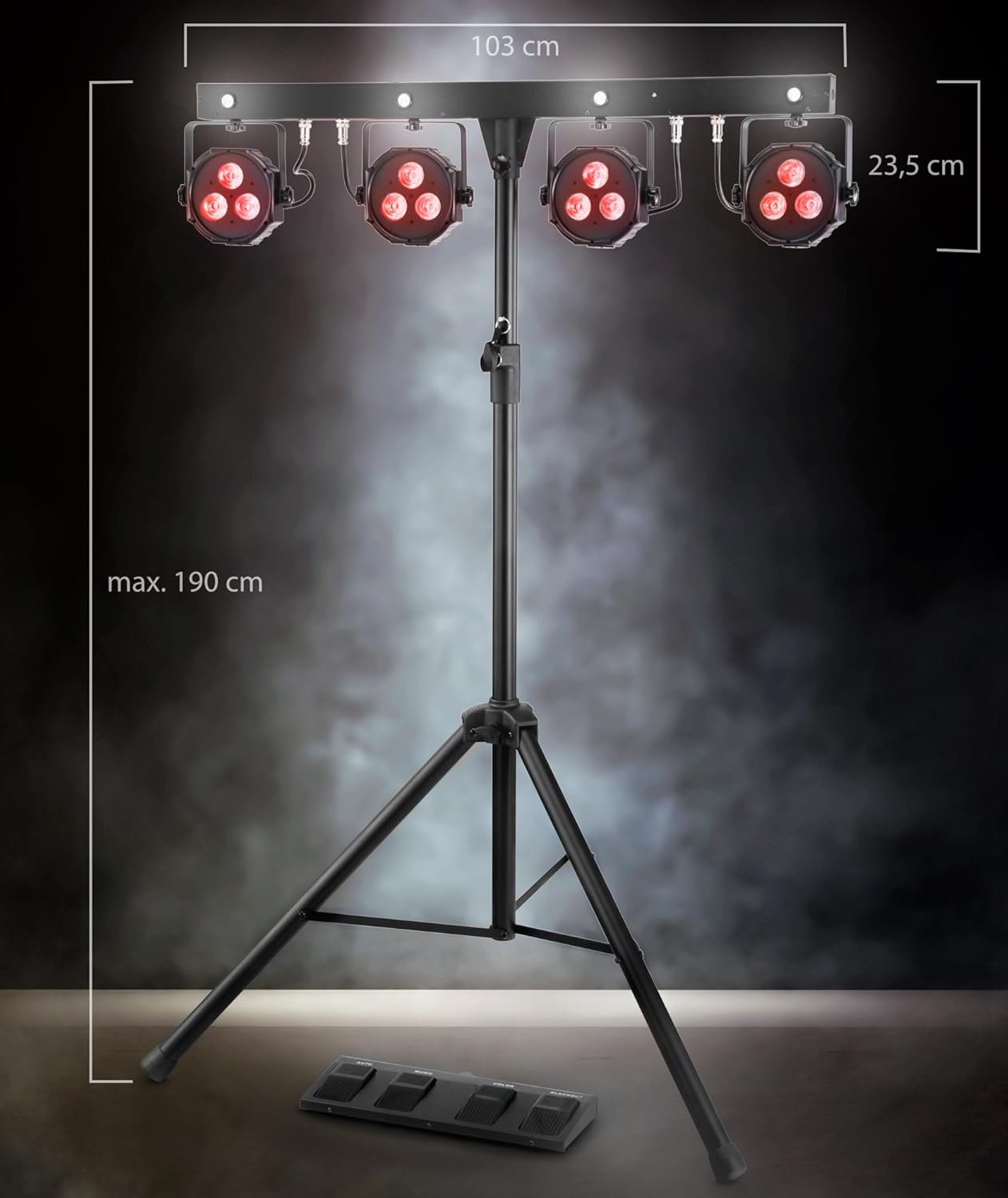
Figure 4.1: Product dimensions and assembly overview
4.2 холболт
- Connect the provided power cable to the power input on the rear of the T-Bar unit. Then, plug the other end into a suitable power outlet (100-240V, 50/60Hz).
- For DMX control, connect a DMX cable from your DMX controller to the 'DMX IN' port on the unit. If chaining multiple DMX devices, connect from 'DMX OUT' to the next device's 'DMX IN'.

Зураг 4.2: Арын самбарын холболтууд
5. Үйлдлийн горимууд
5.1 Хяналтын самбар дээрview
The main control panel is located on the rear of the T-Bar unit and features an LCD display, navigation buttons (MENU, UP, DOWN, ENTER), a built-in microphone, DMX input/output, and a USB port.

Зураг 5.1: Хяналтын самбар
5.2 DMX хяналт
The LB-4390 can be controlled via DMX512 protocol. Set the DMX address using the control panel's LCD display and navigation buttons. The unit supports various DMX channel modes: 03CH, 05CH, 12CH, 12CF (with Flash LED), and 24CH. Refer to the detailed DMX parameter lists in the full manual for specific channel functions.
5.3 Wireless Footswitch Operation
The included wireless footswitch provides convenient remote control over the light system. Ensure the footswitch is powered on and properly paired with the main unit. The footswitch features four buttons:
- АВТО: Activates the built-in automatic programs, cycling through various light sequences.
- ХӨГЖИМ: Engages the sound-activated mode, where the lights react to ambient sound picked up by the unit's built-in microphone.
- ӨНГӨ: Cycles through a selection of static color presets.
- ХАР: Turns off all lights instantly.

Figure 5.2: Wireless Footswitch (Top View)

Figure 5.3: Wireless Footswitch (Side View)
5.4 Гарын авлагын горим
Use the MENU, UP, DOWN, and ENTER buttons on the control panel to manually select specific colors, programs, or adjust settings without a DMX controller or footswitch.
5.5 Дуугаар идэвхжүүлсэн горим
In this mode, the light system reacts to sound via its built-in microphone. You can adjust the microphone sensitivity via the control panel to fine-tune the response to music or ambient sounds.
5.6 Өнгөний горим
This mode allows you to select and mix colors manually, creating custom static color scenes.
6. Засвар үйлчилгээ
6.1 Цэвэрлэгээ
To maintain the performance and appearance of your light system:
- Цэвэрлэхийн өмнө нэгжийг үргэлж цахилгаан тэжээлээс салга.
- Гаднах гадаргууг арчихын тулд зөөлөн, хуурай, хөвөнгүй даавуу ашиглаарай.
- Зүлгүүрийн цэвэрлэгч, уусгагч эсвэл хүчтэй химийн бодис бүү хэрэглэ, учир нь эдгээр нь өнгөлгөө болон дотор эд ангиудыг гэмтээж болзошгүй.
- Periodically check the lenses for dust or smudges and gently clean them to ensure optimal light output.
6.2 Хадгалалт
When not in use, store the light system in a cool, dry place, away from direct sunlight and extreme temperatures. Utilize the provided transport bags to protect the T-Bar and stand from dust and physical damage during storage and transport.
7. Алдаа засах
7.1 Нийтлэг асуудлууд
| Асуудал | Боломжит шалтгаан | Шийдэл |
|---|---|---|
| Төхөөрөмжид цахилгаан байхгүй байна. | Power cable disconnected, faulty outlet, blown fuse. | Check power cable connection. Test outlet with another device. Check and replace fuse (T1, 6A) if necessary. |
| Гэрэл DMX-д хариу өгөхгүй байна. | Буруу DMX хаяг, гэмтэлтэй DMX кабель, DMX хянагчийн асуудал. | Verify DMX address on the unit matches controller. Check DMX cable for damage. Ensure DMX controller is functioning correctly. |
| Wireless footswitch not working. | Footswitch not powered on, out of range, interference. | Ensure footswitch is switched on. Move closer to the main unit. Reduce potential sources of wireless interference. |
| Sound-activated mode not reacting. | Microphone sensitivity too low, no sound input. | Increase microphone sensitivity via the control panel. Ensure there is sufficient sound for the unit to detect. |
8. Техникийн үзүүлэлтүүд
8.1 Техникийн мэдээлэл
| Параметр | Үнэ цэнэ |
|---|---|
| Загварын дугаар | LB-4390 LED |
| LED | 4 x Tri-LED PAR-Spots (3x 9W 3-in-1 LEDs), 4 x white Strobe-Spots (1W LEDs) |
| Цацрагийн өнцөг | 15° |
| Хяналтын сонголтууд | DMX512, Wireless Footswitch, Manual, Sound-Activated, Color Mode |
| DMX сувгууд | 03CH, 05CH, 12CH, 12CF (with Flash LED), 24CH |
| Дэлгэц | LCD |
| Микрофон | Built-in with sensitivity control |
| Эрчим хүчний хэрэглээ | 84 ватт |
| Оролтын хэмжээtage | 100-240 В, 50/60 Гц |
| Гал хамгаалагч | T1, 6A (250V) |
| Хэмжээ (H x W x D) | 235 x 1032 x 71 мм |
| Нэгж жин | 10.2 кг |
| Савласан жин | 11.8 кг |
| Зогс | Сунгах боломжтой |
9. Баталгаат хугацаа ба дэмжлэг
9.1 Баталгаат хугацааны мэдээлэл
This Showlite product comes with a standard manufacturer's warranty. Please refer to your purchase documentation or contact your retailer for specific terms, conditions, and duration of the warranty applicable to your region.
9.2 Хэрэглэгчийн дэмжлэг
For technical assistance, spare parts, or service inquiries regarding your Showlite LB-4390 LED Light System, please contact Showlite customer support or your authorized dealer. Have your model number and purchase information ready when contacting support.


