1. Танилцуулга
This manual provides essential information for the proper installation, operation, and maintenance of the Molex 106114-1100 MPO EMI Adapter. Please read this manual thoroughly before using the product to ensure safe and efficient performance. Keep this manual for future reference.
2. Аюулгүй байдлын мэдээлэл
АНХААРУУЛГА:
- Always disconnect power to associated equipment before installation or removal of the adapter.
- Handle with care to avoid damage to the adapter or connected optical fibers.
- Ensure proper grounding if required by your system specifications to maintain EMI shielding effectiveness.
- Do not expose the adapter to extreme temperatures, moisture, or corrosive environments.
- Refer to local electrical codes and regulations for proper installation practices.
3. Бүтээгдэхүүн дууссанview
The Molex 106114-1100 is an MPO (Multi-fiber Push-on) EMI (Electromagnetic Interference) adapter designed for screw mounting. This adapter facilitates secure and reliable MPO fiber optic connections while providing essential EMI shielding to protect sensitive equipment from electromagnetic interference. It features a male-to-male connector gender and is RoHS compliant, ensuring it meets environmental standards.
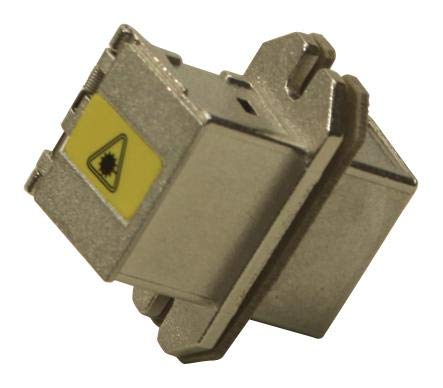
Figure 3.1: Molex 106114-1100 MPO EMI Adapter. This image displays the Molex 106114-1100 MPO EMI Adapter. It is a compact, metallic component designed for screw mounting, featuring a yellow label with a warning symbol, indicating its function as an EMI adapter for MPO connections.
4. Тохиргоо ба суурилуулалт
Follow these steps for proper installation of the MPO EMI Adapter:
- Бэлтгэл: Ensure the mounting surface is clean, dry, and free from debris. Verify that the mounting holes align with the adapter's screw mounts.
- Суурилуулалт: Position the adapter in the desired location. Secure it using appropriate screws (not included) through the designated screw mounting holes. Do not overtighten the screws to avoid damaging the adapter or the mounting surface.
- Холболт: Carefully align the MPO connectors with the adapter ports. Insert the connectors until they click into place, ensuring a secure and full connection. Verify that the fiber optic cables are not kinked or strained.
- EMI хамгаалалт: Ensure that the adapter's metallic body makes proper contact with the chassis or enclosure for effective EMI shielding.
5. Үйл ажиллагаа
The Molex 106114-1100 MPO EMI Adapter is a passive component designed to facilitate MPO fiber optic connections while providing electromagnetic interference shielding. Once properly installed and connected, it operates by maintaining the optical signal integrity and preventing external electromagnetic noise from affecting the connected equipment. No user interaction is required for its operation beyond initial installation.
6. Засвар үйлчилгээ
The MPO EMI Adapter requires minimal maintenance. Regular inspection and cleaning are recommended to ensure optimal performance:
- Шалгалт: Periodically inspect the adapter for any signs of physical damage, corrosion, or loose connections.
- Цэвэрлэгээ: If necessary, gently clean the exterior of the adapter with a soft, dry, lint-free cloth. Do not use abrasive cleaners or solvents. For cleaning the MPO connector interfaces, use only specialized fiber optic cleaning tools and procedures to avoid damaging the optical surfaces.
- Байгаль орчин: Ensure the operating environment remains within specified temperature and humidity ranges to prevent degradation.
7. Алдаа засах
Хэрэв танд асуудал тулгарвал дараах нийтлэг алдааг олж засварлах алхмуудыг анхаарч үзээрэй.
| Асуудал | Боломжит шалтгаан | Шийдэл |
|---|---|---|
| Poor or intermittent connection | Loose MPO connector; dirty connector end-face; damaged fiber. | Ensure MPO connectors are fully seated and locked. Clean connector end-faces using appropriate fiber optic cleaning tools. Inspect fiber for damage. |
| Reduced EMI shielding effectiveness | Improper grounding; loose mounting screws; damaged adapter housing. | Verify proper grounding of the adapter to the chassis. Tighten mounting screws. Inspect adapter for physical damage and replace if necessary. |
| Adapter does not fit mounting location | Incorrect adapter model; incompatible mounting holes. | Verify the adapter model number against your system requirements. Ensure mounting hole dimensions match. |
If the issue persists after attempting these steps, contact Molex customer support or a qualified technician.
8. Техникийн үзүүлэлтүүд
| Атрибут | Үнэ цэнэ |
|---|---|
| Брэнд | Молекс |
| Загварын дугаар | 106114-1100 |
| Холбогч Хүйс | Эрэгтэй-Эр |
| Суурилуулах төрөл | Шураг суурилуулах |
| ROHS нийцсэн | Тиймээ |
| Зүйлийн жин | 0.64 унц (ойролцоогоор 0.04 фунт) |
| Үйлдвэрлэгч | MOLEX |
| Эхний боломжтой огноо | 28 оны зургадугаар сарын 2022 |
9. Баталгаат хугацаа ба дэмжлэг
For information regarding warranty terms and conditions, please refer to the official Molex website or contact Molex customer support directly. Support contact details can typically be found on the manufacturer's official webсайт эсвэл бүтээгдэхүүний сав баглаа боодол.
Molex Official Webсайт: www.molex.com


