Бүтээгдэхүүн дууссанview
The Brecknell SBWLPS400 Portable Shipping Scale is designed for accurate weighing in shipping, warehouse, and general-purpose applications. It features a robust four-load cell design, ensuring precise measurements up to 400 lb. This scale offers dual power modes for both portability and permanent installation, making it versatile for various environments. Its compatibility with major shipping software, including UPS, streamlines your workflow.
The large, easy-to-read LCD display can be wall-mounted or desk-mounted for optimal visibility, and its large keyboard switches are designed for ease of use, even with gloved hands. An RS232 link and PC Serial Interface Cable are included for seamless computer integration.
Тохируулах гарын авлага
1. Савлагааг задлах болон агуулгыг шалгах
Сав баглаа боодолоос бүх бүрэлдэхүүн хэсгүүдийг болгоомжтой арилгана. Дараах зүйлс байгаа эсэхийг шалгаарай:
- Жинлэх платформ
- Заагч нэгж
- RS-232 кабель
- 4 х AAA батерей
- Mounting Bracket (for indicator)
- Хэрэглэх заавар (энэ баримт бичиг)

Figure 1: Included components of the Brecknell SBWLPS400 Portable Shipping Scale. This image shows the weighing platform, the digital indicator, connecting cables, and the AAA batteries required for operation.
2. Жинлүүрийг асаах
The scale can be powered using the included AAA batteries or an optional AC adapter (not included). For battery operation, open the battery compartment on the indicator unit and insert the 4 AAA batteries, observing polarity.
For continuous operation or when connecting to a computer, it is recommended to use an AC adapter (DC 6V, 500mA, center positive) plugged into the power input port on the indicator unit.
3. Бүрэлдэхүүн хэсгүүдийг холбох
Connect the weighing platform to the indicator unit using the coiled cable. Ensure the connector is securely inserted into the designated port on the indicator.
The indicator unit can be placed on a desk or mounted on a wall using the provided bracket for optimal viewing ба хүртээмжтэй байдал.

Зураг 2: Жишээ ньample setup of the Brecknell SBWLPS400 scale in a typical shipping environment. The weighing platform is on the floor, and the indicator is conveniently mounted on a wall for easy reading.
Ашиглалтын заавар
1. Үндсэн жинлэлт
- Жинлүүрийг хатуу, тэгш гадаргуу дээр байрлуул.
- дээр дарна уу ON/OFF/TEG button to power on the scale. The display will show "0.00" when ready.
- Place the item to be weighed onto the center of the weighing platform.
- LCD дэлгэц дээр гарч буй жинг уншина уу.
2. Using the Display and Buttons
The indicator unit features a clear LCD display and several function buttons:
- ON/OFF/ZERO: Powers the scale on or off, and zeros the display.
- НЭМЭГДЭЛ: Toggles between available weight units (e.g., lb, kg).
- ТАР: Subtracts the weight of a container or packaging, allowing only the net weight of the contents to be measured.
- HOLD/PRINT: Holds the displayed weight or sends the weight data via the RS232 port.

Зураг 3: Нарийвчилсан view of the indicator's LCD display and operator keys. The display shows the weight, and the buttons allow for functions like power, unit selection, tare, and data hold/print.
3. Савны функц
To use the Tare function:
- Платформ дээр хоосон савыг байрлуул.
- Wait for the weight to stabilize.
- дээр дарна уу ТАРИАЛ button. The display will return to "0.00", indicating the container's weight has been tared out.
- Жинлэх зүйлсийг саванд хийнэ. Дэлгэц дээр зөвхөн зүйлсийн цэвэр жинг харуулна.
4. Computer Interface (RS232)
The scale includes an RS232 port for connecting to a computer or compatible shipping systems. This allows for direct weight data transfer to software like UPS Worldship or FedEx Ship Manager.
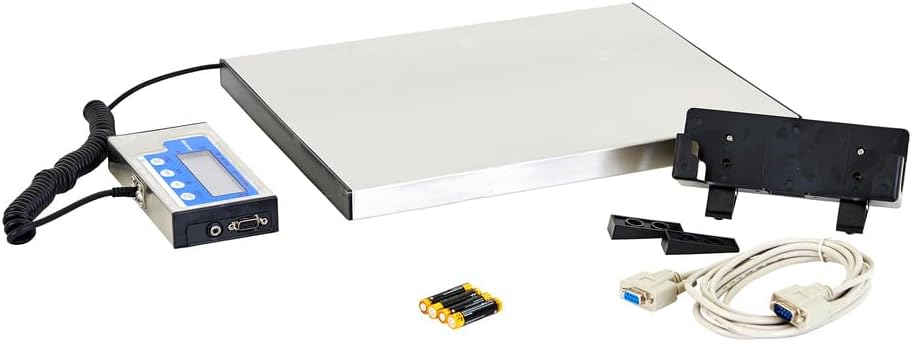
Figure 4: The back panel of the indicator unit, highlighting the RS232 serial port for data communication and the power input jack.
Засвар үйлчилгээ
1. Цэвэрлэгээ
To maintain accuracy and longevity, keep the scale clean. Wipe the stainless steel platform and indicator unit with a damp cloth. Avoid using abrasive cleaners or excessive water, as this can damage electronic components.
2. Зай солих
If the display becomes dim or the scale does not power on with batteries, replace all four AAA batteries. Ensure correct polarity when inserting new batteries.
3. Шалгалт тохируулга
The scale is factory calibrated. If you suspect calibration issues or experience consistent inaccuracies, it is recommended to contact Brecknell customer support or a certified scale technician for recalibration. Do not attempt to self-calibrate unless specifically instructed by official documentation or support.
4. Хадгалах
When not in use for extended periods, store the scale in a dry, stable environment. If using batteries, remove them to prevent leakage and potential damage to the indicator unit.
Алдааг олж засварлах
Нийтлэг асуудал ба шийдэл
- Scale does not power on:
- Батерейны суурилуулалтыг шалгаж, батерей нь шинэ эсэхийг шалгаарай.
- If using an AC adapter, ensure it is properly connected and the power outlet is functional.
- Буруу уншилтууд:
- Хэмжээ нь тогтвортой, тэгш гадаргуу дээр байгаа эсэхийг шалгаарай.
- Verify that nothing is touching the platform or interfering with its movement.
- Check for debris under the platform.
- Consider recalibration if issues persist (contact support).
- Display shows "OVERLOAD" or "Err":
- Remove any excessive weight from the platform. The scale has a maximum capacity of 400 lb.
- Power cycle the scale (turn off, then on again).
Integrating with UPS Worldship (Advanced Configuration)
Some users have reported challenges with initial setup for UPS Worldship. The following steps, derived from user experience, may assist in configuring the scale for proper communication:
- Хэмжээний тохиргоо:
- Жинлүүрийг унтраа.
- -г барина уу ON/OFF/TEG товчлуур болон НЭГЖ button simultaneously to enter setup mode.
- дээр дарна уу ТАРИАЛ button to navigate through parameters (P1 through P20).
- руу оч P4, дараа нь товчийг дарна уу НЭГЖ button to change the setting to 7 (NCI protocol).
- дарна уу ТАРИАЛ to save and proceed to P5. Change this to 2 (4800 baud).
- дарна уу ТАРИАЛ to save and proceed to P6. Change this to 2 (7E1).
- дээр дарна уу ON/OFF/TEG button to save all settings and exit setup.
- PC Port Settings (Windows):
- Go to Device Manager, then Ports (COM & LPT).
- Double-click on the COM port assigned to your scale (e.g., COM1).
- Go to the "Port Settings" tab and configure as follows:
- Секундэд бит: 4800
- Өгөгдлийн битүүд: 7
- Паритет: Тэр ч байтугай
- Битийг зогсоох: 1
- Урсгалын хяналт: Байхгүй
- Click OK and close Device Manager.
- UPS Worldship Configuration:
- Open UPS Worldship.
- руу оч Багаж хэрэгсэл > Системийн тохиргоо > Техник хангамж.
- Change the "Scale port" to the COM port you configured (e.g., COM1).
- Change the "Scale Type" to NCI 3835.
- дарна уу Туршилтын масштаб. The weight should now report from the scale.
Үзүүлэлтүүд

Figure 5: Key dimensions and features of the Brecknell SBWLPS400 Portable Shipping Scale, including the stainless steel weighing platform and the high LCD display.
| Онцлог | Дэлгэрэнгүй |
|---|---|
| Загварын дугаар | SBWLPS400 |
| Жингийн багтаамж | 400 фунт (181 кг) |
| Унших нарийвчлал | 0.1 фунт (0.005 кг) |
| Платформын хэмжээ (L x W x H) | 15" x 12" x 1" (38.1 см x 30.5 см x 2.54 см) |
| Бүтээгдэхүүний ерөнхий хэмжээ | 15.2 x 12.2 x 1.1 инч |
| Зүйлийн жин | 10.18 фунт |
| Материал | Alloy Steel, Stainless Steel (Platform) |
| Дэлгэцийн төрөл | LCD (0.65" high) |
| Эрчим хүчний эх үүсвэр | 4 x AAA batteries (included) or optional AC adapter (DC 6V, 500mA) |
| Интерфэйс | RS232 цуваа порт |
| Зөвлөмж болгож буй хэрэглээ | Shipping, general purpose, mailroom, manifest, warehouse |
Баталгаат болон дэмжлэг
Brecknell products are manufactured to high standards and are backed by a manufacturer's warranty. For specific warranty terms and conditions, please refer to the documentation included with your purchase or visit the official Brecknell webсайт.
For technical support, service, or calibration inquiries, please contact Brecknell customer service. You may also find additional resources and frequently asked questions on the official Brecknell support page.
A comprehensive User Manual in PDF format is also available for download from the product's Amazon listing or the manufacturer's website for further detailed information.


