1. Танилцуулга
The Viltrox JY-610C is a compact and lightweight mini speedlite designed for Canon DSLR cameras. It supports E-TTL, Manual (M), and Multi (Stroboscopic) flash modes, offering versatile lighting control. This manual provides detailed instructions for the proper setup, operation, and maintenance of your JY-610C flash unit.
2. Аюулгүй байдлын мэдээлэл
- Төхөөрөмжийг өөрөө задлах эсвэл засах гэж бүү оролдоорой. Мэргэшсэн үйлчилгээний ажилтанд хандана уу.
- Төхөөрөмжийг хуурай байлга. Бороо эсвэл чийгэнд бүү гарга.
- Зөвхөн тусгай зориулалтын АА батерейг ашиглаарай. Хуучин болон шинэ батерей эсвэл өөр төрлийн батерейг хольж хэрэглэж болохгүй.
- Гэрлийн чийдэнг нүдэнд шууд хүргэхээс, ялангуяа ойрын зайнаас зайлсхий, учир нь энэ нь харааны түр зуурын алдагдалд хүргэж болзошгүй.
- Хүүхдийн гар хүрэхгүй газар хадгална.
3. Багцын агуулга
Бүх зүйл багцад байгаа эсэхийг шалгана уу:
- Viltrox JY-610C Mini Speedlite
- Зөөх цүнх
- User Manual (English and Chinese)
Тэмдэглэл: АА батерейг багтаагүй бөгөөд тусад нь худалдаж авах шаардлагатай.
4. Бүтээгдэхүүн дууссанview
Familiarize yourself with the components and controls of the Viltrox JY-610C Mini Flash Light.
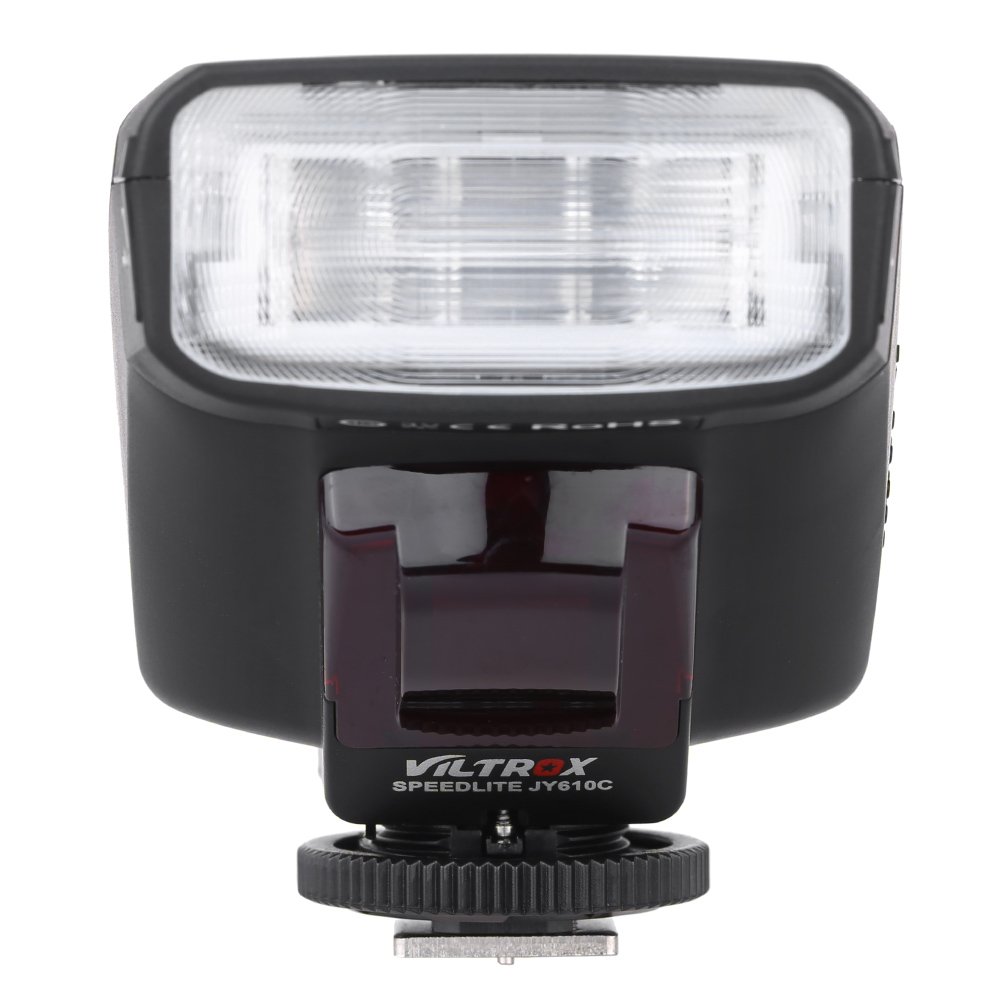
Зураг 4.1: Урд View
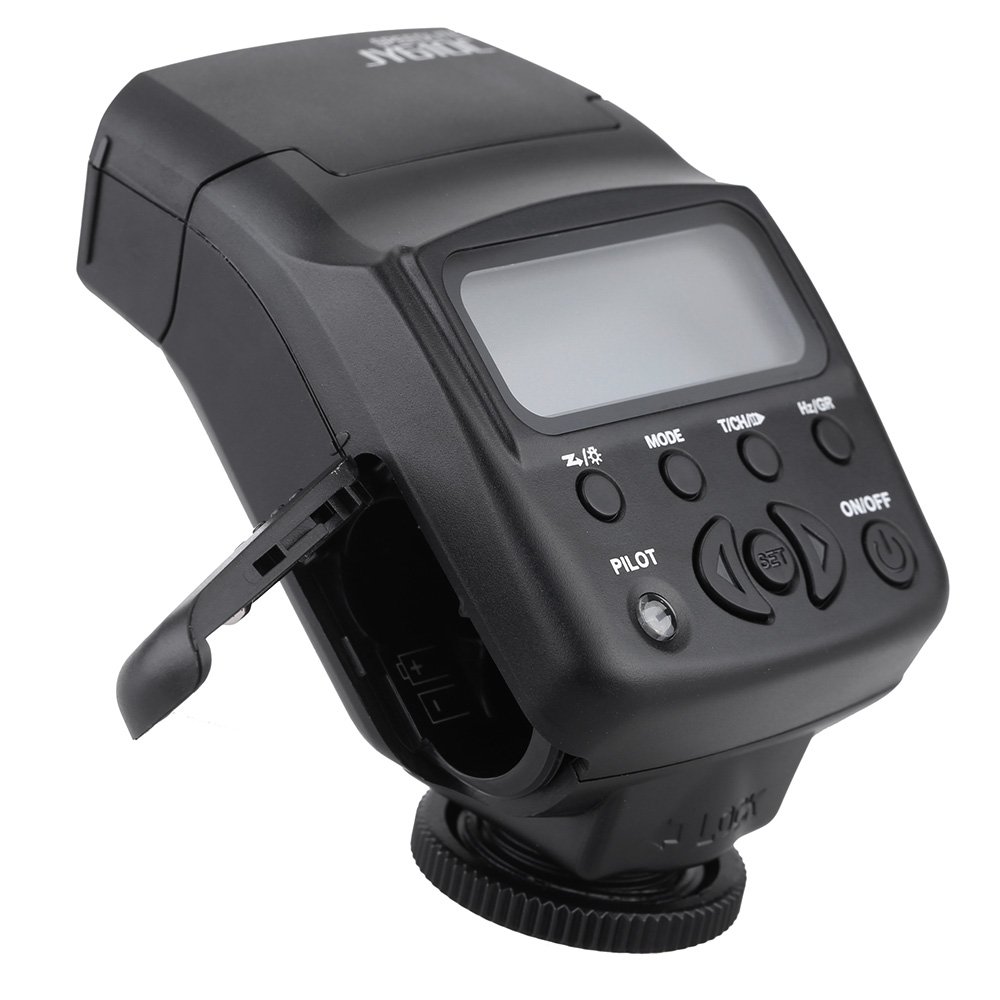
This image shows the front of the Viltrox JY-610C flash unit, highlighting the LCD display, control buttons (Pilot, Mode, T/CH/D, Hz/GR, ON/OFF), and the hot shoe mount with its locking mechanism.

Зураг 4.2: Дээд тал View
Дээд талд view of the Viltrox JY-610C, displaying the "SPEEDLITE JY610C" branding and the flash head. This perspective shows the compact design of the unit.

Зураг 4.3: Хажуу тал View with Battery Compartment Open
This image illustrates the side of the flash unit with the battery compartment door open, revealing the slots for AA batteries. This is where batteries are inserted or replaced.
Зураг 4.4: Ар талд View
арын view of the Viltrox JY-610C, showing the hot shoe connection point for mounting on a camera, the slave sensor (red window), and regulatory markings. The locking ring for secure attachment is also visible.

Figure 4.5: LCD Display Modes
This composite image shows the Viltrox JY-610C flash unit alongside close-ups of its LCD screen displaying different operational modes: Manual (M) with power setting, Multi (Stroboscopic) with frequency and flash count, and E-TTL with exposure compensation. This demonstrates the user interface for mode selection and settings adjustment.
4.1. Хяналтын самбар
- LCD дэлгэц: Displays current settings and mode.
- ON/OFF товч: Төхөөрөмжийг асаах эсвэл унтраах.
- MODE товчлуур: Cycles through E-TTL, M (Manual), and Multi (Stroboscopic) flash modes.
- T/CH/D Button: Used for setting channels/groups in slave mode or other parameters.
- Hz/GR Button: Used for setting frequency in Multi mode or groups.
- PILOT товч: Test flash button. Also serves as a flash-ready indicator (red light).
- Чиглүүлэгч товчлуурууд (Дээш/Доош/Зүүн/Баруун): Цэс рүү шилжиж, тохиргоог тохируулна уу.
- SET товчлуур: Сонголтыг баталгаажуулна.
5. Тохиргоо
5.1. Зай суурилуулах
- Open the battery compartment cover located on the side of the flash unit (refer to Figure 4.3).
- Insert two (2) AA-size batteries according to the polarity indicators inside the compartment.
- Зайны тасалгааны тагийг сайтар хаа.
Note: Ensure batteries are inserted correctly to prevent damage to the unit.
5.2. Камерт суурилуулах
- Slide the hot shoe mount of the JY-610C into the hot shoe of your Canon DSLR camera.
- Rotate the locking ring clockwise until the flash unit is securely fastened to the camera's hot shoe. Do not overtighten.
- To remove, rotate the locking ring counter-clockwise and slide the flash unit off the hot shoe.
6. Үйлдлийн горимууд
дээр дарна уу MODE button to cycle through the available flash modes: E-TTL, M (Manual), and Multi (Stroboscopic).
6.1. E-TTL Mode (Automatic Flash)
In E-TTL mode, the flash output is automatically controlled by the camera to achieve optimal exposure. This mode is ideal for general photography.
- дарна уу MODE until "E-TTL" appears on the LCD screen (refer to Figure 4.5).
- You can adjust Flash Exposure Compensation (FEC) using the directional buttons (e.g., +1/3, +2/3, etc.) if needed. Press SET баталгаажуулах.
- The flash will fire automatically based on the camera's metering.
6.2. Гарын авлагын (M) горим
Manual mode allows you to set the flash output power manually, providing precise control over lighting.
- дарна уу MODE until "M" appears on the LCD screen (refer to Figure 4.5).
- Use the directional buttons to adjust the flash output from 1/1 (full power) to 1/128, with 22 levels of fine tuning.
- дарна уу SET to confirm the power setting.
6.3. Олон (стробоскопийн) горим
Multi mode fires the flash multiple times during a single exposure, creating stroboscopic effects for capturing motion.
- дарна уу MODE until "Multi" appears on the LCD screen (refer to Figure 4.5).
- Use the directional buttons to set the flash frequency (Hz) and the number of flashes.
- дарна уу SET баталгаажуулах.
6.4. Slave Modes (S1/S2)
The JY-610C can function as an optical slave unit, triggered by another flash.
- S1 горим: The flash will fire in response to the first flash it detects. Suitable for manual flash triggers.
- S2 горим: The flash will ignore the pre-flash from a master E-TTL flash and fire on the main flash. Suitable for E-TTL master flashes.
- To activate slave mode, press and hold the T/CH/D button until "SLAVE" appears, then use directional buttons to select S1 or S2.
- The unit supports 4 channels in 3 groups for more complex multi-flash setups.
7. Нарийвчилсан шинж чанарууд
7.1. өртөлтийн нөхөн төлбөр
In E-TTL mode, you can adjust the flash exposure compensation to fine-tune the brightness of your subject. Use the directional buttons to increase or decrease the exposure value.
7.2. Front-Curtain Sync / Rear-Curtain Sync
The JY-610C supports both front-curtain and rear-curtain sync. This setting is typically controlled via your camera's flash menu. Consult your camera's manual for specific instructions on how to enable these features.
- Урд хөшигний синк: Хөшиг нээгдсэний дараа гэрэл шууд асна.
- Арын хөшигний синк: The flash fires just before the shutter closes. Useful for creating motion blur effects with the flash freezing the subject at the end of the exposure.
7.3. Adjustable Vertical Angle
The flash head can be tilted vertically to angles of 60, 75, and 90 degrees. This allows for bounce flash photography, directing the light off a ceiling or wall for softer, more natural illumination.
8. Засвар үйлчилгээ
- Цэвэрлэгээ: Флэш төхөөрөмжийг цэвэрлэхийн тулд зөөлөн, хуурай даавуу ашиглана уу. Зөрүүд шороонд бага зэрэг damp даавууг хэрэглэж болно, дараа нь хуурай даавуу. Хүчтэй угаалгын нунтаг, уусгагчийг бүү ашигла.
- Хадгалах: When not in use for extended periods, remove the batteries to prevent leakage and store the unit in its carrying bag in a cool, dry place.
- Батерейны арчилгаа: Replace batteries when the recycle time becomes excessively long or the flash-ready indicator does not light up.
9. Алдаа засах
| Асуудал | Боломжит шалтгаан | Шийдэл |
|---|---|---|
| Флэш асахгүй. |
|
|
| Дахин боловсруулах урт хугацаа. |
|
|
| Флэш гаралт хэт тод/харанхуй байна. |
|
|
| Slave mode not triggering. |
|
|
10. Техникийн үзүүлэлтүүд
| Онцлог | Дэлгэрэнгүй |
|---|---|
| Хөтөчийн дугаар | GN27 (ISO 100/m) |
| Флэш горим | E-TTL / M / Multi |
| Боолын горим | Slave / S1 / S2 (4 channels in 3 groups) |
| Flash Control | 8 levels of output control (1/128 - 1/1), 22 levels of fine tuning |
| Flash-ready indicator | Улаан нисгэгчийн гэрэл |
| Үр дүнтэй флэш хүрээ | 0.7 - 19.3m (Quick flash: 0.7 - 11.1m) |
| Дахин боловсруулах хугацаа | 0.1 - 4с |
| Flash Times | 100 - 680 times (with fresh AA batteries) |
| Эрчим хүчний хангамж | 2 х АА батерей (оруулаагүй) |
| Барааны хэмжээ | 8.5 х 6 х 4.5 см / 3.3 х 2.4 х 1.8 инч |
| Зүйлийн жин | 145 гр / 5.1 унц |
| Босоо өнцгийг тохируулах боломжтой | 60 / 75 / 90 degrees |
| Sync Support | Front-curtain sync / Rear-curtain sync |
| өртөлтийн нөхөн төлбөр | Дэмжигдсэн |
11. Баталгаат хугацаа ба дэмжлэг
For warranty information and technical support, please refer to the warranty card included with your product or visit the official Viltrox webсайт. Худалдан авалтын баримтаа баталгаат нэхэмжлэлд зориулж худалдан авалтын баталгаа болгон хадгална уу.


