1. Танилцуулга
This manual provides detailed instructions for the installation, operation, and maintenance of your Alpine CDE-163BT Advanced Bluetooth CD Receiver. Please read this manual thoroughly before using the unit to ensure proper operation and to prevent damage. Keep this manual for future reference.
The Alpine CDE-163BT is a versatile car stereo receiver featuring advanced Bluetooth connectivity for hands-free calling and audio streaming, CD playback, USB input, and FM/AM tuner capabilities. It is designed to deliver high-quality audio performance and user-friendly control.
2. Тохиргоо ба суурилуулалт
2.1 Багцын агуулга
Суулгацыг эхлүүлэхийн өмнө бүх бүрэлдэхүүн хэсгүүд байгаа эсэхийг шалгана уу:
- Alpine CDE-163BT Head Unit
- Утсан бэхэлгээ
- Ханцуйвч болон обудны цагираг суурилуулах
- Bluetooth гар чөлөөтэй дуудлага хийх микрофон
- Эзэмшигчийн гарын авлага (энэ баримт бичиг)
- Суурилуулах тоног төхөөрөмж (эрэг, хаалт)
2.2 Холболтын схем
Refer to the wiring diagram provided with the unit's installation guide for specific connections. Key connections include:
- Эрчим хүч: Yellow (constant 12V), Red (switched 12V), Black (ground).
- Илтгэгчид: White/White-Black (Front Left), Gray/Gray-Black (Front Right), Green/Green-Black (Rear Left), Purple/Purple-Black (Rear Right).
- Антен: Blue (power antenna/amplifier remote turn-on).
- Микрофон: Connect the supplied microphone to the dedicated input for hands-free calling.
Анхааруулга: Incorrect wiring can cause damage to the unit or vehicle's electrical system. If you are unsure about any wiring connections, consult a qualified professional installer.
2.3 Анхдагч асаалттай
After installation, turn on your vehicle's ignition. The unit should power on. Follow any on-screen prompts for initial setup, such as language selection or clock setting.
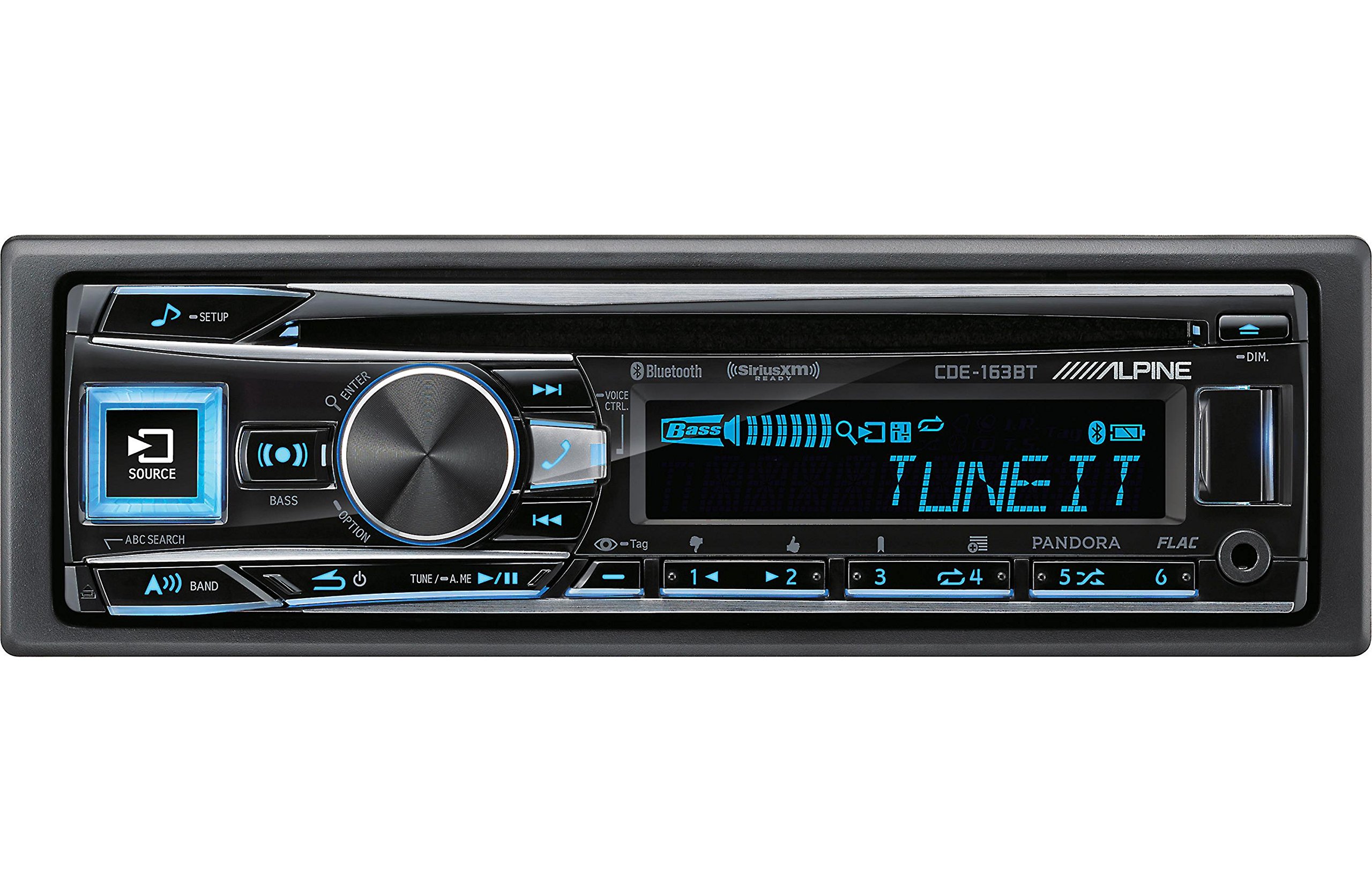
Figure 2.3.1: Front panel of the Alpine CDE-163BT receiver. This image displays the main controls, including the large rotary knob, source button, setup button, and display screen showing "TUNEIT" and "Bass" indicators.
3. Үйл ажиллагаа
3.1 Урд талын самбарын удирдлагаview
Familiarize yourself with the main controls on the front panel:
Зураг 3.1.1: Нарийвчилсан view of the Alpine CDE-163BT front panel. Key controls include the SOURCE button (left, illuminated), SETUP button (top left), large central rotary knob for volume and selection, BASS/OPTION button, VOICE CTRL button, and various preset/track skip buttons along the bottom.
- SOURCE товч: Selects the audio source (CD, Tuner, USB, Bluetooth Audio, AUX).
- SETUP товч: Accesses the main setup menu for system adjustments.
- Rotary Knob (Volume/ENTER): Turns to adjust volume. Press to confirm selections in menus.
- BASS/OPTION Button: Provides quick access to bass settings or other options depending on the current mode.
- VOICE CTRL Button: Activates voice control features on connected smartphones.
- Товчлуурын товч: Switches between FM1, FM2, FM3, and AM bands in tuner mode.
- TUNE/A.ME/II Buttons: Used for manual tuning, auto memory, and play/pause functions.
- Track Skip/Preset Buttons (1-6): Used for skipping tracks or selecting radio presets.
- DIM товчлуур: Дэлгэцийн тод байдлыг тохируулна.
3.2 Power On/Off and Source Selection
- Нэгжийг эргүүлэхийн тулд ON, press any button (e.g., SOURCE or the Rotary Knob).
- Нэгжийг эргүүлэхийн тулд OFF, press and hold the power button (often integrated with the TUNE/A.ME button).
- дээр дарна уу ЭХ СУРВАЛЖ button repeatedly to cycle through available audio sources: CD, Tuner, USB, Bluetooth Audio, AUX.
3.3 Дууны хяналт
Том төвийг эргүүл Ротари хаалга дууг нэмэгдүүлэхийн тулд цагийн зүүний дагуу, багасгахын тулд цагийн зүүний эсрэг эргүүлнэ үү.
3.4 Аудио тохиргоо
дээр дарна уу BASS/OPTION button or navigate through the SETUP menu to adjust audio settings such as Bass, Treble, Balance (left/right), and Fader (front/rear). Use the Rotary Knob to adjust values and press it to confirm.
3.5 Radio Operation (FM/AM Tuner)
- Select "Tuner" as the source using the ЭХ СУРВАЛЖ товч.
- дээр дарна уу БАНД button to switch between FM1, FM2, FM3, and AM bands.
- Гараар тааруулах: дээр дарна уу ТААРУУЛАХ buttons (◀ / ▶) to manually tune frequencies.
- Тааруулахыг эрэлхийлэх: -г удаан дар ТААРУУЛАХ товчлуурууд нь дараагийн хүчирхэг станцыг автоматаар хайх.
- Урьдчилан тохируулсан станцууд: To store a station, tune to the desired frequency, then press and hold one of the numbered preset buttons (1-6) until you hear a beep. To recall a preset, simply press the corresponding numbered button.
3.6 CD тоглуулах
- Дискний үүрэнд CD оруулна уу. Төхөөрөмж нь CD эх үүсвэр рүү автоматаар шилжиж, тоглуулж эхэлнэ.
- Use the ◀ / ▶ buttons to skip tracks.
- дээр дарна уу TUNE/A.ME/II button for Play/Pause.
- дээр дарна уу ABC SEARCH button to search for tracks by name.
3.7 Bluetooth холболт
The CDE-163BT features built-in Bluetooth for hands-free calling and audio streaming.
3.7.1 Bluetooth төхөөрөмжийг холбох
- Таны мобайл төхөөрөмж дээр Bluetooth идэвхжсэн эсэхийг шалгаарай.
- On the CDE-163BT, go to the SETUP menu and select "Bluetooth Setup".
- Choose "Pairing" or "Device Search".
- On your mobile device, search for available Bluetooth devices and select "Alpine CDE-163BT".
- Confirm the pairing code if prompted. Once paired, the Bluetooth icon on the receiver's display will illuminate.
3.7.2 Гар чөлөөтэй дуудлага хийх
- Дуудлага ирэхэд төхөөрөмж дуудагчийн ID-г харуулна. Дараах товчийг дарна уу ENTER button (Rotary Knob) to answer.
- Дуудлага дуусгахын тулд товчийг дарна уу ENTER дахин товчлуур.
- Use the supplied microphone for clear communication.
- дээр дарна уу VOICE CTRL button to activate your smartphone's voice assistant.
3.7.3 Bluetooth аудио дамжуулалт
- Select "Bluetooth Audio" as the source.
- Start playback on your paired mobile device. Audio will stream through the receiver.
- Use the ◀ / ▶ buttons on the receiver to skip tracks.
3.8 USB тоглуулах
- Connect a USB storage device (e.g., USB flash drive) to the USB port.
- Select "USB" as the source. The unit will automatically detect and begin playing compatible audio files (including FLAC format).
- Use the ◀ / ▶ buttons to skip tracks.
- The unit supports various audio formats.
3.9 Pandora and SiriusXM Ready
- Пандора: Connect your iPhone or Android smartphone via USB or Bluetooth and launch the Pandora app. Select Pandora as the source on the receiver to control the app.
- SiriusXM: This unit is SiriusXM Ready. An optional SiriusXM Connect Vehicle Tuner and subscription are required for satellite radio reception. Connect the tuner and select SiriusXM as the source.
3.10 Дэлгэцийн тохиргоо
- дээр дарна уу DIM дэлгэцийн тод байдлыг тохируулах товчлуур.
- Access the SETUP menu to customize display colors for buttons and the screen.
4. Засвар үйлчилгээ
4.1 Төхөөрөмжийг цэвэрлэх
Wipe the front panel with a soft, dry cloth. For stubborn stains, dampen the cloth lightly with water. Avoid using harsh chemicals, abrasive cleaners, or solvents as they can damage the finish.
4.2 Дискний арчилгаа
Handle CDs by their edges. Keep discs clean and free of scratches. If a disc is dirty, wipe it gently from the center outwards with a soft, lint-free cloth. Do not use solvents or abrasive cleaners on discs.
5. Алдаа засах
If you experience issues with your CDE-163BT, refer to the table below for common problems and solutions.
| Асуудал | Боломжит шалтгаан | Шийдэл |
|---|---|---|
| Хүч чадалгүй | Буруу утас; Гал хамгаалагч шатсан; Тээврийн хэрэгслийн гал асаах унтраалттай. | Цахилгаан холболтыг шалгах; Гал хамгаалагчийг солих; Тээврийн хэрэгслийн асаалтыг асаах. |
| Дуу алга | Дууны түвшин хэт бага байна; Дуугүй болгох горим идэвхжсэн; Чанга яригчийн холболт буруу байна; Ampөргөгчийг унтраа. | Increase volume; Deactivate mute; Check speaker connections; Check ampөргөх хүч. |
| Bluetooth холбогдоогүй байна | Device not in pairing mode; Bluetooth off on phone; Interference. | Ensure phone Bluetooth is on and discoverable; Re-attempt pairing; Move closer to unit. |
| CD skips or won't play | Dirty or scratched disc; Disc inserted incorrectly. | Clean disc; Insert disc correctly; Try a different disc. |
| USB төхөөрөмж танигдаагүй байна | Тохиромжгүй формат; Гэмтсэн USB төхөөрөмж; Сул холболт. | Баталгаажуулах files are compatible; Try a different USB device; Reconnect USB device. |
If the problem persists after attempting these solutions, please contact Alpine customer support.
6. Техникийн үзүүлэлтүүд
Below are the technical specifications for the Alpine CDE-163BT Advanced Bluetooth CD Receiver:
- Загварын дугаар: 79380
- Бүтээгдэхүүний хэмжээ: 5 x 11 x 10 инч
- Барааны жин: 4.05 фунт (4.1 фунт)
- Утасгүй холбооны технологи: Bluetooth
- Холболтын технологи: Bluetooth
- Онцлог шинж чанарууд: Built-In Bluetooth, FM Tuner
- Бусад дэлгэцийн онцлогууд: Утасгүй
- Өнгө: ХАР
- Үйлдвэрлэгч: Альпийн
- Холболтын технологи: Bluetooth
- Тохиромжтой төхөөрөмжүүд: Ухаалаг утас
- Холбогч төрөл: 3.5 мм залгуур, USB
- Аудио гаралтын горим: Моно, стерео
- Хүрээлэн буй орчны дууны сувгийн тохиргоо: 4 суваг
- Ватtage: 200 ватт
- Эхний боломжтой огноо: 19 оны нэгдүгээр сарын 2016
7. Баталгаат хугацаа ба хэрэглэгчийн дэмжлэг
7.1 Баталгаат хугацааны мэдээлэл
Alpine products are manufactured to the highest quality standards. This product is covered by a limited warranty. Please refer to the separate warranty card included with your purchase for specific terms, conditions, and duration of coverage. Retain your proof of purchase for warranty claims.
7.2 Хэрэглэгчийн дэмжлэг
For technical assistance, troubleshooting beyond this manual, or warranty service, please contact Alpine customer support:
- Webсайт: Албан ёсны Альпийн үзэсгэлэнд зочлоорой webдэмжлэгийн эх сурвалж, Түгээмэл асуултууд болон холбоо барих маягтуудын сайт.
- Утас: Refer to the Alpine website or your warranty card for regional customer service phone numbers.
- Эрх бүхий үйлчилгээний төвүүд: For repairs, locate an authorized Alpine service center through the official webсайт.
When contacting support, please have your product model number (CDE-163BT) and serial number ready.