Танилцуулга
This manual provides essential instructions for the safe and efficient operation of your ICOM IC-7300 Direct Sampling Shortwave Radio. Please read this manual thoroughly before using the transceiver to ensure proper functionality and to prevent damage.
The ICOM IC-7300 is a high-performance HF/50MHz transceiver featuring RF direct sampling technology. It includes a 4.3-inch color touchscreen LCD, a real-time spectrum scope, and a built-in automatic antenna tuner. It supports various modes including SSB, CW, RTTY, AM, and FM, with a maximum output power of 100 Watts.
Аюулгүй байдлын мэдээлэл
- Do not operate the transceiver in explosive atmospheres.
- Цахилгаан цочролоос сэргийлэхийн тулд зөв газардуулга хийх.
- Avoid exposing the unit to direct sunlight, rain, or extreme temperatures.
- Зөвхөн заасан тэжээлийн эх үүсвэрийг (13.8V DC) ашиглана уу.
- Do not open the transceiver casing; мэргэшсэн боловсон хүчинд үйлчилгээ үзүүлэх.
Багцын агуулга
Бүх зүйл багцад байгаа эсэхийг шалгана уу:
- ICOM IC-7300 Radio Unit
- HM-219 Hand Microphone
- DC цахилгаан кабель
- Суурилуулалтын техник хангамж
- Хэрэглэгчийн гарын авлага (энэ баримт бичиг)
Тохиргоо
1. Цахилгаан хангамжийг холбох
Connect the supplied DC power cable to the transceiver's DC IN connector and to a stable 13.8V DC power source. Ensure correct polarity (red to positive, black to negative) to prevent damage.
2. Антеныг холбох
Connect a suitable HF/50MHz antenna to the ANT connector on the rear panel. For optimal performance and to protect the transceiver, use an antenna designed for the operating frequencies and ensure it is properly matched.
3. Микрофоныг холбох
Plug the HM-219 hand microphone into the MIC connector on the front panel.
4. Анхдагч асаалттай
дээр дарна уу ХҮЧ button to turn on the transceiver. The ICOM logo will appear on the display, followed by the operating screen.

Image: Front panel of the ICOM IC-7300, displaying the main operating screen with frequency, mode, and spectrum scope.
Ашиглалтын заавар
Үндсэн үйл ажиллагаа
- Давтамжийн сонголт: Томыг нь ашиглана уу ОЛОН dial to change the operating frequency. You can also directly input frequencies using the touchscreen keypad.
- Горим сонгох: Tap the mode indicator on the touchscreen (e.g., USB, LSB) to cycle through available modes (SSB, CW, RTTY, AM, FM).
- Дууны тохируулга: -г ашиглана уу AF/RF/SQL knob to adjust the audio output level.
- Дамжуулах: дээр дарна уу ДАМЖУУЛАХ button or the PTT button on the microphone to transmit. Ensure your antenna is tuned before transmitting.
Мэдрэгчтэй дэлгэцийг ашиглах
The 4.3-inch color touchscreen provides intuitive access to various functions and settings.
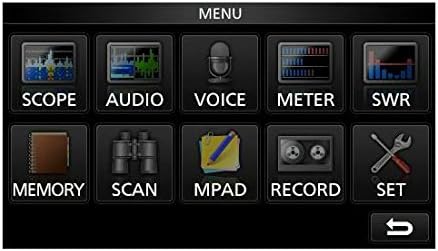
Image: The main menu screen of the IC-7300, accessible via the touchscreen, showing various function icons.
- Spectrum Scope: Товш ХАМРАХ ХҮРЭЭ руу view the real-time spectrum scope, which displays signal activity across a selected frequency range.
- Тоолуурын дэлгэц: Товш МЕТР руу view various operational parameters such as output power, ALC, SWR, and voltage.
- Тохиргоо: Товш SET to access detailed configuration options for the transceiver.
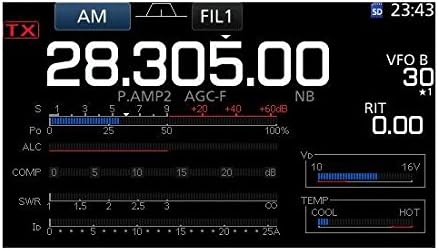
Зураг: Нарийвчилсан view of the IC-7300's display in AM mode, showing frequency, filter settings, and various operational meters.
Built-in Auto Tuner
The IC-7300 includes an internal automatic antenna tuner. To activate, press the АВТО ТОХИРУУЛАХ button. The tuner will automatically adjust to achieve the lowest possible SWR for your connected antenna. This function is effective for SWR values up to approximately 3:1.
Засвар үйлчилгээ
- Цэвэрлэгээ: Трансиверийн гадна талыг зөөлөн, хуурай даавуугаар цэвэрлэ. Зүлгүүрийн цэвэрлэгч эсвэл уусгагч хэрэглэж болохгүй.
- Агааржуулалт: Ensure the ventilation holes on the top and sides of the unit are not obstructed to prevent overheating.
- Хадгалах: When not in use for extended periods, store the transceiver in a dry, dust-free environment.
Алдааг олж засварлах
| Асуудал | Боломжит шалтгаан | Шийдэл |
|---|---|---|
| Хүч чадалгүй | Цахилгааны кабель салсан; дууны түвшин буруу байнаtagд; гал хамгаалагч шатсан. | Check power cable connections; verify 13.8V DC supply; inspect and replace fuse if necessary. |
| Аудио гаралт байхгүй | Volume too low; speaker/headphone disconnected; squelch set too high. | Adjust AF/RF/SQL knob; check speaker/headphone connection; reduce squelch level. |
| Дамжуулах боломжгүй | Antenna not connected; high SWR; PTT button not pressed. | Connect antenna; use auto tuner or external tuner to reduce SWR; ensure PTT is engaged. |
| Хүлээн авалт муу | Antenna issue; incorrect mode/frequency; high noise level. | Check antenna connection and type; verify operating mode and frequency; adjust noise reduction (NB, NR) settings. |
Үзүүлэлтүүд
| Онцлог | Дэлгэрэнгүй |
|---|---|
| Загварын дугаар | IC-7300 |
| Давтамжийн хүрээ (RX) | 0.030 - 74.800 МГц |
| Гаралтын хүч | 100 W (SSB, CW, RTTY, FM); 25 W (AM) |
| Хүлээн авагчийн төрөл | Шууд Сampлинг |
| Сувгийн тоо | 101 |
| Цахилгаан хангамж Voltage | 13.8 В DC (±15%) |
| Хэмжээ (W×H×D) | 9.4 x 3.7 x 9.4 инч (240 × 94 × 238 мм) |
| Жин | 8.4 фунт (3.8 кг) |
| Онцлог шинж чанарууд | 4.3-inch Color Touchscreen LCD, Real-time Spectrum Scope, Built-in Auto Tuner |
Баталгаат болон дэмжлэг
Баталгаат хугацаа болон техникийн дэмжлэг авахыг хүсвэл албан ёсны ICOM-оос лавлана уу website or contact your authorized ICOM dealer. Keep your purchase receipt as proof of purchase for warranty claims.
Online resources and additional support may be available at the ICOM America Store on Amazon.
Нийцлийн мэдээлэл
Энэ төхөөрөмж нь FCC дүрмийн 15-р хэсэгт нийцдэг. Ашиглалт нь дараах хоёр нөхцлийн дагуу явагдана: (1) Энэ төхөөрөмж нь хортой хөндлөнгийн оролцоо үүсгэхгүй, (2) энэ төхөөрөмж нь хүсээгүй ажиллагааг үүсгэж болзошгүй хөндлөнгийн оролцоо зэрэг хүлээн авсан аливаа хөндлөнгийн оролцоог хүлээн авах ёстой.


