1. Танилцуулга
This user manual provides detailed instructions for the installation, operation, and maintenance of the Vivolink HDBaseT VL120007 70m 4K HDMI Extender Kit. This kit is designed to extend 4K HDMI signals up to 70 meters over a single Cat5e/6 cable, supporting bi-directional IR and CEC.
The Vivolink VL120007 is a premium quality product, ensuring reliable and high-performance signal transmission for various professional and home theater applications.
2. Бүтээгдэхүүн дууссанview
The Vivolink VL120007 kit consists of a Transmitter unit and a Receiver unit. Both units are compact and designed for easy integration into existing setups.
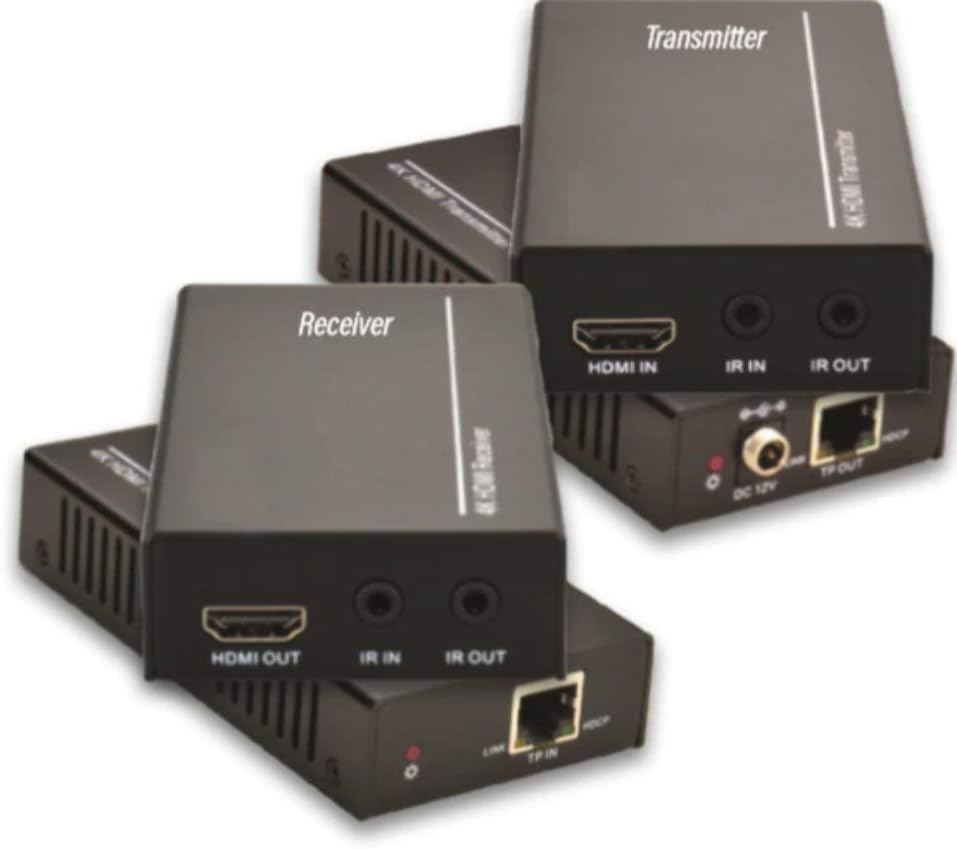
Figure 2.1: Vivolink HDBaseT VL120007 Transmitter (top) and Receiver (bottom) units. The Transmitter unit features HDMI IN, IR IN, IR OUT, DC 12V power input, and TP-OUT (HDBaseT) ports. The Receiver unit features HDMI OUT, IR IN, IR OUT, and TP-IN (HDBaseT) ports.
2.1. Үндсэн шинж чанарууд
- Extends 4K HDMI signals up to 70 meters (230 feet) over a single Cat5e/6 cable.
- Supports HDMI 1.4 and HDCP 2.2 compliant.
- Bi-directional IR pass-through for controlling source or display devices.
- Supports CEC (Consumer Electronics Control) functionality.
- Суулгахад хялбар авсаархан загвар.
- Includes one Power Supply Unit (PSU).
3. Багцын агуулга
Please verify that all items are present and in good condition upon opening the package. If any items are missing or damaged, please contact your vendor.
- 1x Vivolink HDBaseT Transmitter Unit (VL120007-TX)
- 1x Vivolink HDBaseT Receiver Unit (VL120007-RX)
- 1x 12V DC Power Supply Unit
- 1x IR Blaster кабель
- 1x IR хүлээн авагч кабель
- 1x хэрэглэгчийн гарын авлага (энэ баримт бичиг)
4. Тохиргоо ба суурилуулалт
Before beginning installation, ensure all devices are powered off and disconnected from their power sources.
4.1. Холболтын схем
The following diagram illustrates a typical connection setup for the Vivolink VL120007 extender kit.
(A detailed connection diagram would typically be placed here. For illustration, imagine a diagram showing Source -> Transmitter -> Cat Cable -> Receiver -> Display.)
4.2. Суулгах алхамууд
- Connect an HDMI cable from your source device (e.g., Blu-ray player, media streamer) to the HDMI оролт дээрх порт Дамжуулагч нэгж.
- Connect a single Cat5e/6 cable (recommended Cat6 for optimal performance) from the TP-OUT дээрх порт Дамжуулагч нэгж рүү TP-IN дээрх порт Хүлээн авагч unit. Ensure the cable is properly terminated with RJ45 connectors following TIA/EIA-568B wiring standards.
- -аас HDMI кабелийг холбоно уу HDMI OUT дээрх порт Хүлээн авагч unit to your display device (e.g., TV, projector).
- For IR control, connect the IR Blaster cable to the IR OUT port on the unit that will send the IR signal (e.g., Transmitter for controlling source, Receiver for controlling display). Position the IR emitter head directly over the IR sensor of the device to be controlled.
- Хэт улаан туяаны хүлээн авагчийн кабелийг холбоно уу IR IN port on the unit that will receive the IR signal. Position the IR receiver head in a location where it can receive signals from your remote control.
- Connect the included 12V DC Power Supply Unit to the DC 12V port on either the Transmitter or Receiver unit. The system supports Power over Cable (PoC), meaning only one power supply is needed for both units.
- Power on all connected devices (source, display, and extender units).
5. Ашиглалтын заавар
Once all connections are made and power is supplied, the Vivolink VL120007 extender kit should automatically establish a connection and transmit the HDMI signal.
5.1. LED үзүүлэлтүүд
Both the Transmitter and Receiver units feature LED indicators to show their status:
- Эрчим хүчний LED: Төхөөрөмж цахилгаан авч байх үед гэрэл асдаг.
- LED холболт: Illuminates when a stable HDBaseT link is established between the Transmitter and Receiver units.
- Өгөгдлийн LED: May flash to indicate active HDMI data transmission.
5.2. IR хяналт
The bi-directional IR pass-through allows you to control your source device from the display location or your display device from the source location. Ensure the IR Blaster and IR Receiver cables are correctly positioned.
5.3. CEC Functionality
The extender kit supports CEC (Consumer Electronics Control), allowing compatible devices to communicate and control each other over the HDMI connection. This feature typically works automatically if supported by your source and display devices.
6. Засвар үйлчилгээ
The Vivolink VL120007 extender kit requires minimal maintenance.
- Төхөөрөмжийг сэрүүн, хуурай газар, нарны шууд тусгал, дулааны эх үүсвэр, хэт их чийгнээс хол байлга.
- Clean the units with a soft, dry cloth. Do not use liquid or aerosol cleaners.
- Хэт халалтаас урьдчилан сэргийлэхийн тулд нэгжийн эргэн тойронд зохих агааржуулалтыг хангана.
- Кабелийн холболтууд найдвартай эсэхийг шалгахын тулд тэдгээрийг тогтмол шалгаж байгаарай.
7. Алдаа засах
If you encounter issues with your Vivolink VL120007 extender kit, please refer to the following common troubleshooting steps:
| Асуудал | Боломжит шалтгаан | Шийдэл |
|---|---|---|
| Видео/аудио гаралт байхгүй. |
|
|
| IR хяналт ажиллахгүй байна. |
|
|
| Завсарлагатай дохио эсвэл анивчдаг. |
|
|
If the problem persists after trying these steps, please contact Vivolink customer support for further assistance.
8. Техникийн үзүүлэлтүүд
| Онцлог | Дэлгэрэнгүй |
|---|---|
| Загварын дугаар | VL120007 |
| Брэнд | Виволинк |
| HDMI нийцтэй байдал | HDMI 1.4 |
| HDCP-ийн нийцэл | HDCP 2.2 |
| Хамгийн их нарийвчлалын дэмжлэг | 4K (UHD) |
| Дамжуулах зай | Up to 70 meters (230 feet) for 4K over Cat5e/6 |
| Кабелийн шаардлага | Single Cat5e/6/7 cable |
| IR нэвтрүүлэх | Хоёр чиглэлтэй |
| CEC-ийн дэмжлэг | Тиймээ |
| Эрчим хүчний хангамж | 12V DC (PoC supported) |
| Зүйлийн жин | 1.21 килограмм (ойролцоогоор 2.67 фунт) |
| Үйлдвэрлэгч | Виволинк |
9. Баталгаат хугацааны мэдээлэл
Specific warranty details are not provided in the product information. Please refer to the warranty card included with your product or contact your point of purchase for detailed warranty terms and conditions.
10. Хэрэглэгчийн дэмжлэг
For technical support, troubleshooting assistance beyond this manual, or warranty inquiries, please contact Vivolink customer support or your authorized dealer.
Please have your model number (VL120007) and purchase information ready when contacting support.


