1. Оршил ба түүнээс дээшview
The DSC HS2LCD PowerSeries Neo Full Message LCD Keypad is an essential component of your DSC PowerSeries Neo security alarm system. This hardwired keypad provides a clear, full-message liquid crystal display (LCD) for easy system status viewing, event logging, and user interaction. It allows for arming and disarming the system, bypassing zones, and performing various user functions.
This keypad is designed for compatibility with DSC PowerSeries Neo control panels, including models HS2016, HS2032, HS2064, and HS21218. For detailed system programming and advanced features, refer to the installer manual for your specific PowerSeries Neo control panel.
2. Аюулгүй байдлын мэдээлэл
- Мэргэжлийн суурилуулалтыг санал болгож байна: Installation of this keypad and integration with a security system should be performed by a qualified security professional. Improper installation can lead to system malfunction or compromise security.
- Цахилгааны аюулгүй байдал: Ensure all power to the alarm control panel is disconnected before performing any wiring or installation procedures. Work with low voltagзөвхөн цахим утас.
- Байгаль орчны нөхцөл: Install the keypad in a dry indoor location, away from direct sunlight, extreme temperatures, and high humidity.
- Хохирол: Do not attempt to open or service the keypad yourself. Refer all servicing to qualified personnel.
3. Багцын агуулга
Таны багц дараах зүйлсийг агуулж байгаа эсэхийг шалгана уу.
- DSC HS2LCD PowerSeries Neo Full Message LCD Keypad
- Installation Guide / Quick Start Guide (may be included with the main control panel)

Figure 1: DSC HS2LCD Keypad as received, with protective film.
This image shows the DSC HS2LCD keypad, still partially in its original packaging. The keypad is white with a green protective film covering the LCD screen area. The DSC logo is visible on the packaging and faintly on the keypad itself.
4. Тохиргоо ба суурилуулалт
The HS2LCD keypad is designed for professional hardwired installation. The following steps provide a general overview; always refer to the detailed installation instructions provided with your DSC PowerSeries Neo control panel for specific wiring diagrams and mounting procedures.
4.1. Товчлуурыг суурилуулах
- Select a suitable indoor location, typically near an entry/exit point, that is easily accessible and visible.
- Carefully open the keypad housing to access the mounting holes.
- Secure the keypad to the wall using appropriate screws and anchors (not included), ensuring it is level and firmly attached.
4.2. Утасны холболт
The HS2LCD keypad connects to the PowerSeries Neo control panel via a 4-wire Keybus connection. Ensure power to the control panel is OFF before making any connections.
- Connect the Red terminal on the keypad to the Red (Aux+) terminal on the control panel.
- Connect the Black terminal on the keypad to the Black (Aux-) terminal on the control panel.
- Connect the Yellow terminal on the keypad to the Yellow (Keybus Data) terminal on the control panel.
- Connect the Green terminal on the keypad to the Green (Keybus Data) terminal on the control panel.
Жич: Proper polarity and secure connections are crucial for reliable operation. Consult your control panel's installation manual for specific terminal locations and wiring best practices.
4.3. Анхны эрчим хүч
Once all wiring is complete and verified, restore power to the control panel. The keypad should power on and display initial system messages. The installer will then configure the keypad's address and integrate it into the system.
5. Ашиглалтын заавар
5.1. Keypad Layout and Display
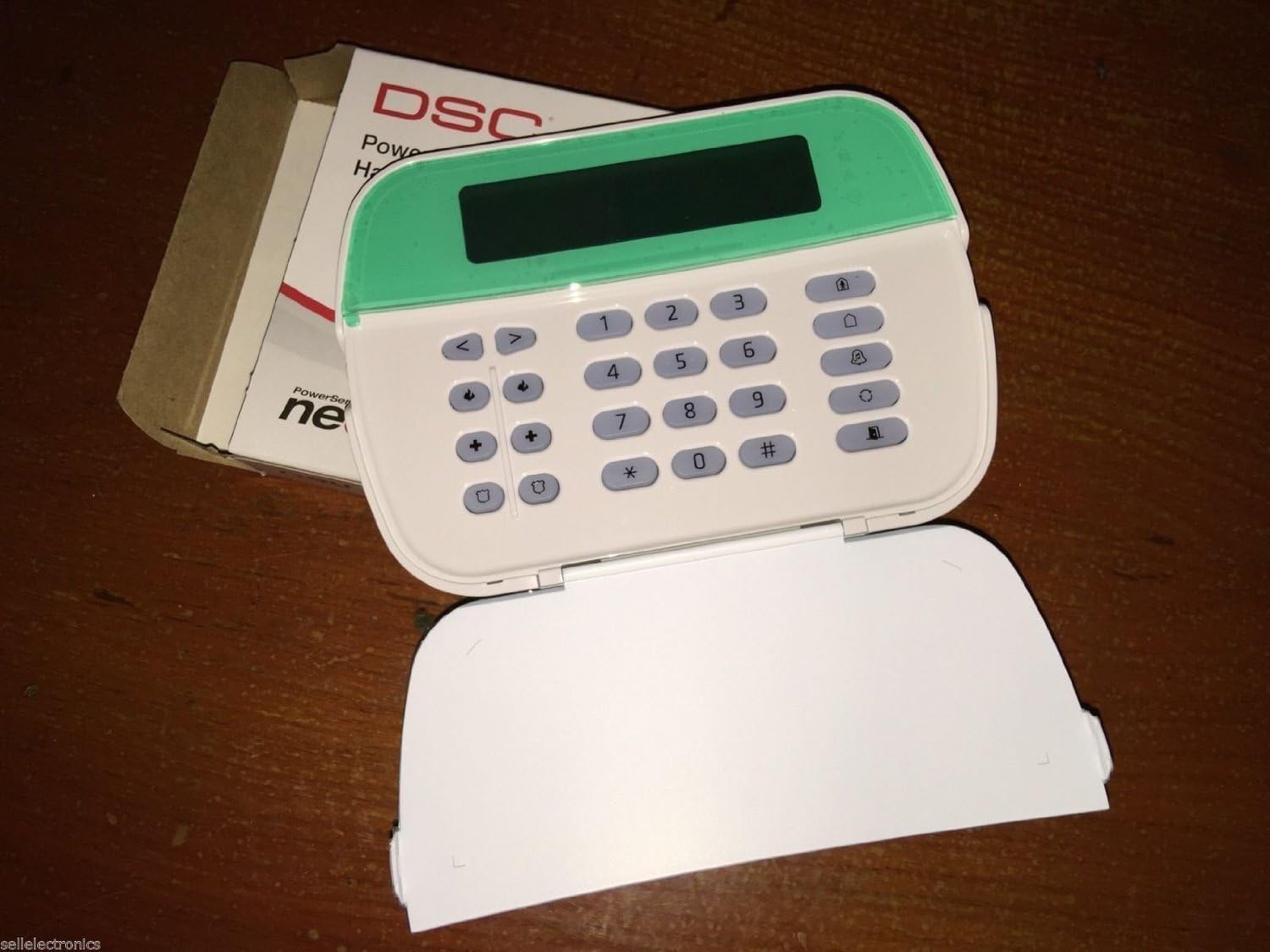
Figure 2: DSC HS2LCD Keypad with cover open.
This image displays the DSC HS2LCD keypad with its front cover flipped down, exposing the full alphanumeric keypad. The LCD screen is visible at the top, above the numbered keys (0-9), asterisk (*), and pound (#) keys, along with various function buttons.
The HS2LCD features a full-message LCD display that provides clear text prompts and system status. Below the display, you will find a standard numeric keypad (0-9, *, #) and dedicated function buttons for common operations.
5.2. Basic System Operations
All operations require a valid 4-digit or 6-digit user code.
- Arming Away: To arm the system when all occupants are leaving, enter your Хэрэглэгчийн код. The system will provide an exit delay.
- Arming Stay: To arm the system while occupants remain inside (bypassing interior zones), press the Байна button, then enter your Хэрэглэгчийн код.
- Зэвсэггүй болгож байна: To disarm the system, enter your Хэрэглэгчийн код. This will silence any alarms and restore the system to a disarmed state.
- Тойрох бүсүүд: To temporarily remove a zone from the system's protection (e.g., a window left open), press the Тойрох button, enter your Хэрэглэгчийн код, then enter the 2-digit zone number(s) to bypass. Press # гарах.
- Viewing System Status: The LCD will display system status messages (e.g., "System Ready to Arm", "Not Ready", "Alarm Memory"). Use the arrow keys to scroll through messages if available.
- Үймээн самууны дохиолол: Dedicated panic buttons (often labeled F, A, P or with symbols) can be pressed and held for 2 seconds to activate immediate alarms (Fire, Auxiliary, Panic). Consult your installer for specific button assignments.
5.3. Changing User Codes
To change a user code (if enabled by your installer):
- дарна уу [*] [5].
- Өөрийн гэсэн хэсгийг оруулна уу Мастер хэрэглэгчийн код.
- Enter the 2-digit Хэрэглэгчийн дугаар (e.g., 01 for User 1).
- -г оруулна уу Хэрэглэгчийн шинэ код (4 or 6 digits).
- дарна уу # програмчлалаас гарах.
Жич: Not all user codes have permission to change other codes. Consult your installer for user code management. For advanced programming, refer to the DSC PowerSeries Neo Installer Manual.
6. Засвар үйлчилгээ
- Цэвэрлэгээ: To clean the keypad, gently wipe the surface with a soft, dry cloth. For stubborn marks, slightly dampen the cloth with water. Do not use abrasive cleaners, solvents, or spray liquids directly onto the keypad.
- Тогтмол шалгалтууд: Periodically check the keypad for any physical damage or loose connections. Ensure the display is clear and all buttons respond correctly.
- Системийн туршилт: Follow your security provider's recommendations for regular system testing to ensure all components, including the keypad, are functioning correctly.
7. Алдаа засах
If you experience issues with your HS2LCD keypad, consider the following common problems and solutions. For complex issues or system-wide faults, contact your professional security installer.
| Асуудал | Боломжит шалтгаан | Шийдэл |
|---|---|---|
| Keypad display is blank or unresponsive. | No power to the keypad or control panel; loose wiring connection. | Check power to the control panel. Verify all 4 Keybus wires are securely connected at both the keypad and the control panel. Contact installer if issue persists. |
| Keypad beeps continuously or displays an error message. | System trouble condition (e.g., low battery, communication error, zone fault). | дээр дарна уу [*] товчийг дарна уу view trouble conditions on the LCD. Address the specific trouble (e.g., close open doors/windows). If it's a system fault, contact your installer. |
| Товчнууд хариу өгөхгүй байна. | Keypad frozen; physical damage. | Try disarming the system if it's armed. If unresponsive, a power cycle of the main control panel (by an installer) may be required. If physically damaged, replacement may be necessary. |
| System does not arm. | Zones are open; system not ready. | Check the keypad display for "Not Ready" messages. Close all protected doors and windows. Bypass any zones you wish to leave open. |
Чухал: The DSC HS2LCD keypad is a component of a larger security system. Many issues may originate from the main control panel or other connected devices. Always consult your security system's comprehensive manual or contact your professional installer for advanced diagnostics and repairs.
8. Техникийн үзүүлэлтүүд
| Брэнд | DSC |
| Загварын дугаар | HS2LCD (Part Number), 4331024609 (Item Model Number) |
| UPC | 702188341806 |
| Өнгө | Цагаан |
| Эрчим хүчний эх үүсвэр | Corded Electric (via control panel) |
| Тохиромжтой хяналтын самбарууд | HS2016, HS2032, HS2064, HS21218 (DSC PowerSeries Neo) |
| Холболтын технологи | Wired (Keybus) |
| Суурилуулалтын төрөл | Professional Hard-wired |
| Хяналтын арга | Хүрэх (товчлуурууд) |
| Хэмжээ (L x W x H) | 9.8 x 7.3 x 2.2 инч (24.9 x 18.5 x 5.6 см) |
| Зүйлийн жин | 1.1 фунт (0.5 кг) |
9. Баталгаат хугацаа ба дэмжлэг
Warranty information for the DSC HS2LCD keypad is typically provided by the manufacturer, DSC, and may be included with your main PowerSeries Neo control panel or available on the official DSC website. Warranty terms and conditions can vary.
For technical support, service, or warranty claims, please contact your professional security system installer or the authorized DSC distributor from whom the product was purchased. They are best equipped to provide assistance specific to your installed system.
You can also visit the official DSC website for product documentation, FAQs, and contact information for customer support.


