Танилцуулга
This manual provides detailed instructions for the setup, operation, maintenance, and troubleshooting of your EZCAP284 HD 1080P Capture HDMI YPbPr Recorder. Please read this manual thoroughly before using the device to ensure proper functionality and to prevent damage.
Аюулгүй байдлын мэдээлэл
- Төхөөрөмжийг чийг, бороо, хэт өндөр температурт бүү тавь.
- Төхөөрөмжийг унагах эсвэл хүчтэй нөлөөнд оруулахаас зайлсхий.
- Зөвхөн заасан тэжээлийн адаптерийг ашиглана уу.
- Төхөөрөмжийг задлах, өөрчлөхийг бүү оролдоорой. Энэ нь баталгааг хүчингүй болгоно.
- Төхөөрөмжийг хүүхдээс хол байлга.
Багцын агуулга
Таны багцад бүх зүйл байгаа эсэхийг шалгана уу:
- EZCAP284 HD 1080P Capture Device
- Алсын удирдлага
- Цахилгаан адаптер (тодорхой жагсаалтад ороогүй боловч ажиллуулах зориулалттай)
- Хэрэглэгчийн гарын авлага (энэ баримт бичиг)
Бүтээгдэхүүн дууссанview
The EZCAP284 is a standalone HD video capture device designed for recording gameplay and other HDMI/YPbPr sources directly to a USB storage device without the need for a PC. It features HDMI pass-through for real-time viewing.

Зураг 1: Дээд тал view of the EZCAP284 device, featuring a prominent record button.

Зураг 2: Нарийвчилсан view of the input and output ports on the EZCAP284.
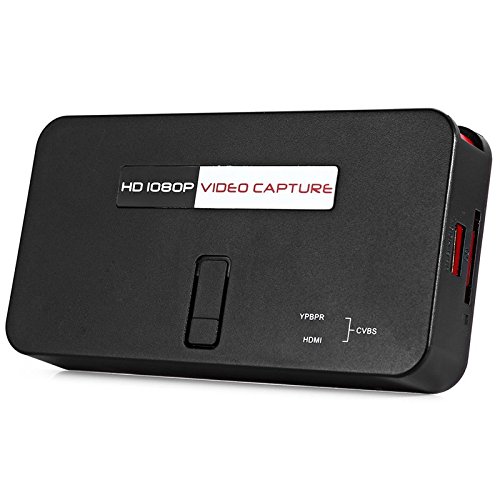
Зураг 3: Доод талд view of the EZCAP284 device, indicating model and certification information.
Тохиргоо
- Видеоны эх сурвалжийг холбох: Connect your game console (e.g., PS3) or other video source to the HDMI оролт or YPbPr IN port on the EZCAP284 using the appropriate cables.
- Дэлгэцийг холбох: Connect your TV or monitor to the HDMI OUT port on the EZCAP284. This allows you to view your gameplay in real-time while recording.
- USB санг холбох: Insert a USB flash drive or external hard drive (formatted as FAT32 or NTFS) into the USB 2.0 port on the EZCAP284. This is where your recordings will be saved.
- Эрчим хүчийг холбох: Connect the power adapter to the DC IN port on the EZCAP284 and then plug it into a power outlet. The device will power on.
- Optional Audio Input: If you wish to record live commentary, connect a microphone to the 3.5 мм аудио оролт порт.
Ашиглалтын заавар
Recording Gameplay
- Тохиргоо хэсэгт тайлбарласны дагуу бүх холболтууд аюулгүй байгаа эсэхийг шалгаарай.
- Turn on your video source (e.g., game console) and your display.
- дээр дарна уу REC button on the EZCAP284 device or the remote control to start recording. The indicator light will change to show recording is in progress.
- дээр дарна уу REC button again to stop recording. The indicator light will revert to its standby state.
- Your recorded video file will be saved to the connected USB storage device.
Adding Live Commentary
To record your voice along with the gameplay:
- -д микрофон холбоно уу 3.5 мм аудио оролт port before starting your recording.
- The device will automatically mix the microphone audio with the video source audio during recording.
Тоглуулах
руу view your recorded videos, safely remove the USB storage device from the EZCAP284 and connect it to a computer or a media player that supports the recorded video format.
Засвар үйлчилгээ
- Цэвэрлэгээ: Төхөөрөмжийн гадна талыг цэвэрлэхийн тулд зөөлөн, хуурай даавуу ашиглаарай. Шингэн цэвэрлэгч эсвэл уусгагч хэрэглэж болохгүй.
- Хадгалах: Төхөөрөмжийг ашиглаагүй үед нарны шууд тусгал, хэт температураас хол, сэрүүн, хуурай газар хадгална.
- Програм хангамж: Үйлдвэрлэгчийг шалгана уу website periodically for any firmware updates that may improve performance or add features.
Алдааг олж засварлах
| Асуудал | Боломжит шалтгаан | Шийдэл |
|---|---|---|
| Дэлгэц дээр видео гаралт байхгүй байна. | Incorrect cable connection; input source not active; display input not selected. | Check HDMI/YPbPr connections. Ensure video source is on. Select correct input on your TV/monitor. |
| Бичлэг амжилтгүй болох эсвэл гэнэт зогсох. | USB storage full; USB drive not compatible; power interruption. | Ensure USB drive has sufficient space. Try a different USB drive (FAT32/NTFS). Check power connection. |
| No audio in recording. | Audio cables not connected; source audio muted; microphone not connected or faulty. | Verify audio connections from source. Ensure source audio is not muted. Check microphone connection and functionality. |
| Алсын удирдлага ажиллахгүй байна. | Batteries low or inserted incorrectly; IR sensor blocked. | Replace batteries. Ensure line of sight to the device's IR sensor. |
Үзүүлэлтүүд
| Онцлог | Тодорхойлолт |
|---|---|
| Загвар | EZCAP284 |
| Төрөл | Adapter / Video Capture Device |
| Материал | Зэс (дотоод бүрэлдэхүүн хэсэг) |
| Интерфейсүүд | 3.5mm Audio In, HDMI In, HDMI Out, YPbPr In, USB 2.0 |
| Видео бичлэгийн нягтрал | 1080p хүртэл |
| Платформын нийцтэй байдал | PlayStation (and other HDMI/YPbPr sources) |
| Оруулсан бүрэлдэхүүн хэсгүүд | Алсын удирдлага |
| Өнгө | Хар |
| Хэмжээ (L x W x H) | 14.00 x 7.40 x 2.00 см (ойролцоогоор) |
| Жин | 0.463 кг (ойролцоогоор савлагааны жин) |
Баталгаат болон дэмжлэг
For warranty information and technical support, please refer to the documentation provided with your purchase or contact the seller/manufacturer directly. Keep your proof of purchase for warranty claims.


