1. Танилцуулга
The Protmex MS6208A is a compact, portable handheld digital tachometer designed for precise contact measurement of rotational and linear speeds. It is equipped with a high-speed integrated chip for stable and reliable performance. This device is ideal for a wide range of applications, including measuring the speed of motors, fans, conveyor belts, and various industrial and automotive equipment.
This manual provides detailed instructions on the proper setup, operation, maintenance, and troubleshooting of your MS6208A tachometer to ensure accurate measurements and extend the product's lifespan.
2. Аюулгүй байдлын мэдээлэл
Please read and understand all safety instructions before operating the device. Failure to follow these instructions may result in injury or damage to the instrument.
- Always wear appropriate personal protective equipment (PPE) when taking measurements, especially when working with moving machinery.
- Do not attempt to measure rotating objects that are unstable or could pose a hazard.
- Ensure the device is clean and dry before use. Do not operate in wet or explosive environments.
- Төхөөрөмжийг хүчтэй цахилгаан соронзон орноос хол байлга.
- Багажийг задлах эсвэл өөрчлөхийг хориглоно. Бүх засвар үйлчилгээг мэргэшсэн ажилтнуудад даатга.
- Батерей бага байгаагийн дохио гарч ирэхэд нарийвчлалтай уншихын тулд батерейг нэн даруй солино уу.
3. Багцын агуулга
Савлахдаа бүх зүйл байгаа, сайн нөхцөлд байгаа эсэхийг шалгаарай.
- 1 x Protmex MS6208A Digital Tachometer
- 1 x 6-inch Idler Wheel
- 1 x 0.1m Idler Wheel
- 2 x Touch Tips (Protruding and Concave)
- 1 x Өргөтгөх баар
- 4 x 1.5V AAA батерей
- 1 х хэрэглэгчийн гарын авлага (энэ баримт бичиг)
- 1 x Meter Bag
4. Бүтээгдэхүүн дууссанview
The MS6208A tachometer is designed for versatility and ease of use, featuring a robust build and intuitive controls.

Figure 4.1: Labeled diagram of the Protmex MS6208A Digital Tachometer, showing the LCD screen, transmission shaft, power button, mode switch, data storage (MEM), data storage read (READ), and plus/minus buttons.
Гол онцлогууд:
- Highly Reliable Digital Tachometer: Features a 16-bit high-speed integrated chip for stable and reliable performance. The double-layer ABS casing, produced by secondary injection molding, offers an ergonomic design for easy operation and maintenance.
- Холбоо барих хэмжилт: Measures rotational speeds from 50 RPM to 19999 RPM and surface speeds. Includes 5 different contact accessories (idler wheels, touch tips) to suit various measurement needs.
- Олон функцууд: Offers 5 unit selections (m/min, m/sec, ft/min, ft/sec, in/min). Features include 100 groups of data recording, data hold, and average value functions.
- LCD арын гэрэлтүүлэг: Equipped with an LCD backlight display for easy data reading in dark environments.
- Эрчим хүч хэмнэх: Includes a low battery indicator and automatically powers off after 30 seconds of inactivity to conserve energy.
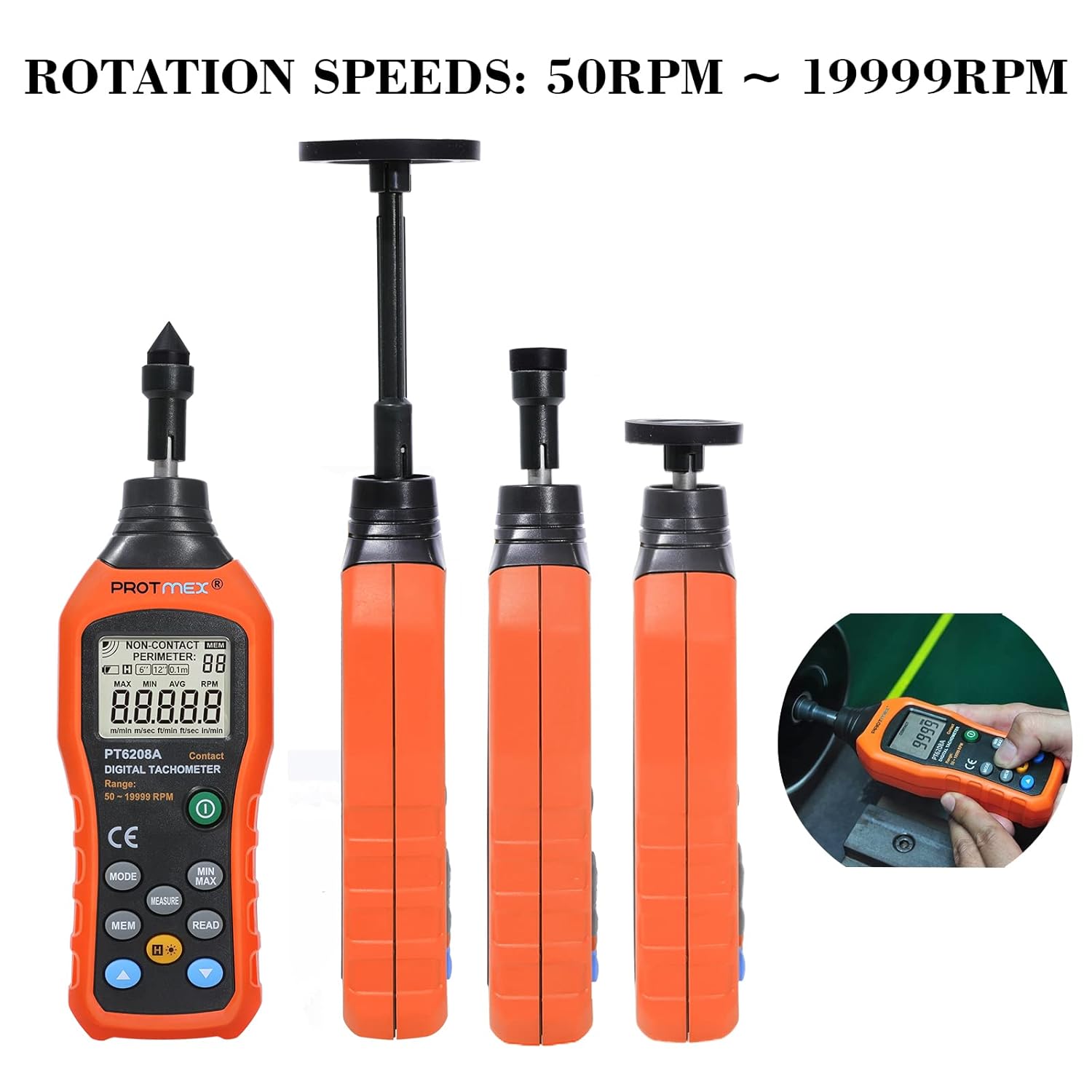
Figure 4.2: The Protmex MS6208A tachometer shown with different contact attachments, illustrating its capability to measure rotation speeds from 50 RPM to 19999 RPM.
5. Тохиргоо
5.1 Батерей суурилуулах
- Тахометрийн арын хэсэгт зайны тасалгааг ол.
- Open the battery cover by sliding it off or unscrewing it, depending on the model.
- Insert four (4) 1.5V AAA batteries, ensuring correct polarity (+ and -).
- Зайны тасалгааг найдвартай хаа.

Зураг 5.1: View of the Protmex MS6208A's battery compartment, showing the placement for four AAA batteries and the internal 16-bit low-power MCU chip.
5.2 Attaching Measurement Accessories
The tachometer comes with various accessories for different measurement scenarios.
- Select the appropriate contact accessory (idler wheel or touch tip) for your measurement task.
- Attach the chosen accessory firmly to the transmission shaft at the top of the tachometer. For extended reach, use the extension bar between the shaft and the accessory.

Figure 5.2: The Protmex MS6208A tachometer demonstrating its adaptability with a 0.1m/6in. idler wheel, protruding touch tip, and concave touch tip, along with an extension bar.
6. Ашиглалтын заавар
6.1 Асаах/унтраах
- дээр дарна уу Хүч товч () төхөөрөмжийг асаахын тулд.
- The device will automatically power off after 30 seconds of inactivity. To manually turn off, press and hold the Хүч товч.
6.2 Measurement Modes and Unit Selection
- After powering on, the device defaults to RPM measurement.
- дээр дарна уу MODE button to cycle through different measurement units: RPM, m/min, m/sec, ft/min, ft/sec, in/min.
- Ensure the selected unit matches your measurement requirement.
6.3 Хэмжилт хийх
- Attach the appropriate contact accessory to the tachometer.
- Gently press the contact accessory against the center of the rotating object or surface you wish to measure.
- Ensure stable contact. The LCD will display the real-time measurement.
- For surface speed measurements, use an idler wheel and press it against the moving surface.
6.4 Data Hold, MAX/MIN/AVG Functions
- дээр дарна уу ХЭМЖЭЭ button to hold the current reading on the display. Press again to release.
- дээр дарна уу MIN / MAX button to cycle through Maximum, Minimum, and Average readings during a measurement session.
6.5 Data Storage (MEM) and Recall (READ)
Төхөөрөмж нь 100 хүртэлх бүлгийн өгөгдлийг хадгалах боломжтой.

Figure 6.1: The Protmex MS6208A tachometer in use, demonstrating its ability to store up to 100 sets of measurement data.
- To store a reading, press the MEM button while a measurement is displayed. The display will show the storage location number.
- To recall stored data, press the УНШИХ товч. -г ашиглана уу Дээрээс нь (+) болон Хасах (-) buttons to navigate through the stored data groups.
6.6 Арын гэрэлтүүлэг
- дээр дарна уу Арын гэрэлтүүлэг товч () to turn the LCD backlight on or off for improved visibility in low-light conditions.

Зураг 6.2: Ойрын зураг view of the Protmex MS6208A's backlit LCD display, showing clear readability of contact RPM measurements.
7. Засвар үйлчилгээ
7.1 Цэвэрлэгээ
- Төхөөрөмжийг зөөлөн, хуурай даавуугаар арчина. Зөөлөн бохирдлыг бага зэрэг арчина.amp cloth with mild detergent, then dry thoroughly.
- Зүлгүүрийн цэвэрлэгч эсвэл уусгагч хэрэглэж болохгүй, учир нь тэдгээр нь цонхыг гэмтээж болзошгүй.asing эсвэл дэлгэц.
- Keep the transmission shaft and contact accessories free from dust and debris to ensure smooth operation and accurate readings.
7.2 Хадгалалт
- When not in use for an extended period, remove the batteries to prevent leakage and damage to the device.
- Store the tachometer and its accessories in the provided meter bag in a cool, dry place, away from direct sunlight and extreme temperatures.
7.3 Батерейг солих
- When the low battery indicator appears on the display, replace all four AAA batteries promptly.
- 5.1-р хэсэгт дурдсан батерей суурилуулах алхмуудыг дагана уу.
8. Алдаа засах
If you encounter issues with your Protmex MS6208A, refer to the following common problems and solutions:
| Асуудал | Боломжит шалтгаан | Шийдэл |
|---|---|---|
| Төхөөрөмж асахгүй байна. | Дууссан эсвэл буруу суурилуулсан батерей. | Батерейны туйлшралыг шалгана уу. Шинэ AAA батерейгаар солино. |
| Буруу уншилтууд. | Poor contact with the rotating object; incorrect accessory used; low battery. | Ensure firm and stable contact. Use the correct accessory for the surface. Replace batteries. |
| Дэлгэц бүдэгхэн эсвэл анивчих. | Батерей бага. | Шинэ AAA батерейгаар солино. |
| Cannot store data. | Memory full; incorrect operation. | Ensure you are pressing MEM during a live measurement. If memory is full, consider clearing data (refer to advanced functions in full manual if available). |
| Auto-off too quickly. | Normal operation (30 seconds inactivity). | This is a power-saving feature. Press any button to keep the device active. |
9. Техникийн үзүүлэлтүүд
| Параметр | Үнэ цэнэ |
|---|---|
| Загвар | MS6208A (PT6208A Contact Tachometer) |
| Хэмжилтийн төрөл | Холбоо барих |
| RPM Measurement Range | 50 ~ 19999 эрг / мин |
| Нарийвчлал | ± (0.03% + 2 оронтой) |
| Хэмжилтийн зай | N/A (Contact Measurement) |
| Нэгжийн сонголт | m/min, m/sec, ft/min, ft/sec, in/min |
| Өгөгдлийн бүртгэл | 100 бүлэг |
| Функцүүд | MAX/MIN/AVG, Data Hold, Display Backlight, Low Battery Indication |
| Автомат унтрах | 30 секундын идэвхгүй байдал |
| Эрчим хүчний хангамж | 4 x 1.5V AAA батерей |
| Бүтээгдэхүүний хэмжээ (L x W x H) | 19.3 x 6 x 2.9 см (7.6 x 2.4 x 1.1 инч) |
| Бүтээгдэхүүний жин | 120 гр (0.26 фунт) |
| Материал | ABS хуванцар |
| Гэрчилгээ | CE (LVE, EMC, RoHS) |
10. Баталгаат хугацаа ба дэмжлэг
Protmex is committed to providing quality products and customer satisfaction. This product is CE (LVE, EMC, RoHS) certified.
For any questions, technical assistance, or support needs, please contact Protmex customer service. We provide friendly 24/7 online support to assist you with any inquiries regarding your MS6208A Digital Tachometer.
Please refer to your purchase documentation or the official Protmex webтусгай баталгаат нөхцөл, холбоо барих мэдээллийг авах сайт.


