Танилцуулга
This manual provides instructions for the proper setup, operation, maintenance, and troubleshooting of your Excalibur Deluxe Virtual Casino 5-in-1 Video Game. Please read this manual thoroughly before using the device to ensure optimal performance and longevity.
The Excalibur Deluxe Virtual Casino is a handheld electronic gaming device featuring five classic casino games: Poker, Blackjack, Slots, Craps, and Roulette. It is designed for portable entertainment.
Тохиргоо
1. Зай суурилуулах
The Excalibur Deluxe Virtual Casino requires 3 AAA batteries (not included) for operation.
- Төхөөрөмжийн арын хэсэгт зайны тасалгааны тагийг олоорой.
- Бүрхүүлийг сумаар заасан чиглэлд нээнэ үү.
- Insert 3 AAA batteries, ensuring the correct polarity (+ and -) as marked inside the compartment.
- Зайны тасалгааны тагийг сольж, байрандаа найдвартай товшиж байгаа эсэхийг шалгаарай.
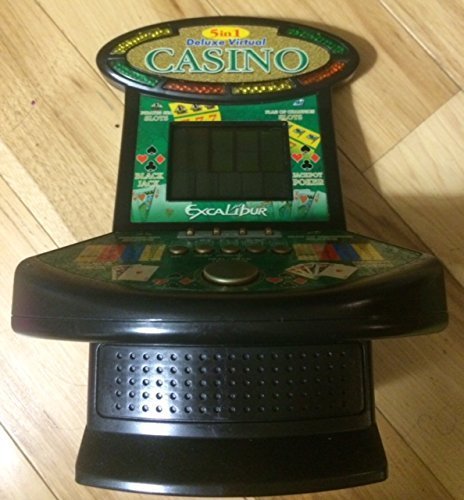
Зураг 1: Excalibur Deluxe Virtual Casino handheld device. This image shows the front of the device, featuring the LED display and control buttons, which include a directional pad and action buttons.
2. Анхдагч асаалт
After installing batteries, press the ХҮЧ button, usually located on the top or front of the device, to turn it on. The screen should illuminate, displaying the main menu or game selection screen.
Ашиглалтын заавар
Хяналтview
- Чиглэлийн дэвсгэр (D-Pad): Used for navigating menus and making selections within games.
- SELECT/MENU Button: Typically used to confirm selections or access in-game menus.
- ACTION Buttons (A, B, C, etc.): Used for specific game actions, such as dealing cards, spinning reels, or placing bets. Refer to individual game instructions for specific button functions.
- SOUND/VOLUME Button: Adjusts the device's sound level or mutes audio.
- Асаах товч: Төхөөрөмжийг асаах эсвэл унтраана.
Тоглоомын сонголт
Үндсэн цэсээс дараахыг ашиглана уу D-Pad to highlight your desired game (Poker, Blackjack, Slots, Craps, or Roulette). Press the СОНГОХ button to confirm your choice and start the game.
Basic Gameplay (General)
- Placing Bets: -г ашиглана уу D-Pad to select bet amounts or areas on the table (for Craps/Roulette). Confirm with an ҮЙЛ АЖИЛЛАГАА товч.
- Game Actions: Follow on-screen prompts. For example, in Poker/Blackjack, use ҮЙЛ АЖИЛЛАГАА buttons to "Hit," "Stand," "Deal," or "Fold." In Slots, press an ҮЙЛ АЖИЛЛАГАА button to "Spin."
- Viewing Rules: Some games may have an option to view rules within their respective menus. Access this via the Цэс боломжтой бол товчлуур.
Засвар үйлчилгээ
Цэвэрлэгээ
To clean the device, gently wipe the exterior with a soft, dry cloth. Do not use abrasive cleaners, solvents, or immerse the device in water. For the screen, use a soft, lint-free cloth specifically designed for electronics displays.
Батерейны арчилгаа ба хадгалалт
- Хэрэв төхөөрөмжийг удаан хугацаагаар ашиглахгүй бол ус гоожихоос сэргийлж зайгаа салга.
- Төхөөрөмжийг нарны шууд тусгал, хэт температураас хол, сэрүүн, хуурай газар хадгална.
- Хуучин болон шинэ батерей, өөр төрлийн батерейг бүү холь.
Алдааг олж засварлах
| Асуудал | Боломжит шалтгаан | Шийдэл |
|---|---|---|
| Төхөөрөмж асахгүй байна. | Дууссан эсвэл буруу суурилуулсан батерей. | Батерейны туйлшралыг шалгана уу. Шинэ AAA батерейгаар солино. |
| Дэлгэц хоосон эсвэл анивчих. | Low batteries or a temporary software glitch. | Replace batteries. Turn the device off and on again. |
| Товчнууд хариу өгөхгүй байна. | Low batteries or a software issue. | Replace batteries. Turn the device off and on again. Ensure buttons are not stuck. |
| Дуу алга. | Volume is muted or set too low. | дээр дарна уу SOUND/VOLUME button to adjust volume or unmute. |
Үзүүлэлтүүд
- Загвар: B01GGZSPTA
- Брэнд: Экскалибур
- Дэлгэцийн төрөл: LED
- Формат хүчин зүйл: Гарын төхөөрөмж
- Эрчим хүчний эх үүсвэр: 3 x AAA батерей (оруулаагүй)
- Багцад багтсан тоглоомууд: Poker, Blackjack, Slots, Craps, Roulette
Баталгаат болон дэмжлэг
Excalibur products are designed for quality and reliability. For information regarding warranty coverage, please refer to the warranty card included with your purchase or visit the official Excalibur webсайт.
For technical support or customer service inquiries, please contact Excalibur customer support through their official channels. Contact details are typically available on the product packaging or the manufacturer's webсайт.


