FIBARO хананы залгуурын хэрэглэгчийн гарын авлага
Model: FGWPE-102 ZW5 EU
1. Танилцуулга
The FIBARO Wall Plug is a compact, intelligent plug-in module designed to control lighting or other electrical devices via Z-Wave commands. It is engineered to work with any type of load up to a maximum power of 2500W. This device also features energy consumption measurement, providing instant and total consumption values to your Z-Wave controller.
A visual indicator ring on the plug provides an immediate overview of energy consumption: a green ring indicates low consumption, while a red ring signifies very high consumption. Additionally, the FIBARO Wall Plug offers a unique Z-Wave network range test function.

Image 1.1: The FIBARO Wall Plug (Type E) and its retail packaging.
2. Аюулгүй байдлын мэдээлэл
- Ensure the Wall Plug is connected to a properly grounded electrical outlet.
- Хамгийн их ачааллын хүчин чадал 2500 Вт-аас хэтрэхгүй.
- Төхөөрөмжийг задлах, өөрчлөхийг хориглоно.
- Ус, өндөр чийгшил бүхий орчноос хол байлга.
- Энэ төхөөрөмж нь зөвхөн дотор ашиглах зориулалттай.
- Цэвэрлэхийн өмнө төхөөрөмжийг цахилгааны залгуураас салга.
3. Тохиргоо
3.1. Физик суурилуулалт
- Plug the FIBARO Wall Plug into a standard Type E electrical outlet.
- Connect the appliance you wish to control into the FIBARO Wall Plug.

Image 3.1: The FIBARO Wall Plug supports Type E and Type F outlets.
3.2. Adding to Z-Wave Network (Inclusion)
- Place the FIBARO Wall Plug within direct range of your Z-Wave controller.
- Set your Z-Wave controller into inclusion mode (refer to your controller's manual for specific instructions).
- Press the button on the FIBARO Wall Plug three times quickly. The LED ring will flash blue to indicate inclusion mode.
- Once successfully added, the LED ring will change to a steady color, indicating its current power consumption.
3.3. Z-Wave Network Range Test
The Wall Plug can test the Z-Wave network coverage. To activate this function:
- Press and hold the button on the Wall Plug for a few seconds until the LED ring turns light violet.
- Release the button. The LED will then display a color indicating the current network coverage:
- Ногоон: Excellent range
- Шар: Сайн хүрээ
- Улбар шар: Moderate range
- Улаан: Муу муж
- Улаан анивчдаг: Холболт байхгүй
- To exit the test mode, press the button briefly.
4. Operating the Wall Plug
4.1. Үндсэн асаах/унтраах удирдлага
- Гарын авлагын хяналт: Press the button on the Wall Plug once to toggle the connected appliance ON or OFF.
- Алсын удирдлага: Use your Z-Wave controller or associated mobile application to remotely switch the connected appliance ON or OFF.
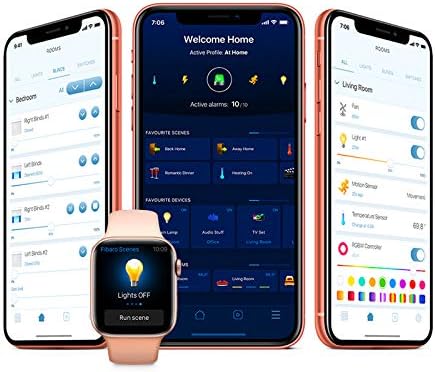
Зураг 4.1: Жишээ ньample of the FIBARO mobile application interface for controlling devices.
4.2. Эрчим хүчний хяналт
The FIBARO Wall Plug continuously monitors the energy consumption of the connected device. The LED ring changes color to visually represent the current power draw:
- Ногоон: Эрчим хүчний хэрэглээ бага
- Цэнхэр: Moderate power consumption
- Шар: Higher power consumption
- Улаан: Very high power consumption
- Улаан анивчдаг: Overload warning (disconnect appliance immediately if this occurs).
Detailed energy consumption data (instantaneous power and total accumulated energy) can be viewed through your Z-Wave controller's interface or associated applications.
5. Засвар үйлчилгээ
- Цэвэрлэгээ: Use a soft, dry cloth to clean the surface of the Wall Plug. Do not use abrasive cleaners or solvents.
- Програм хангамжийн шинэчлэлтүүд: The FIBARO Wall Plug supports wireless firmware updates when used with a FIBARO Home Center 2 or newer controller. Refer to your controller's manual for instructions on performing firmware updates.
6. Алдаа засах
6.1. Нийтлэг асуудлууд
- Төхөөрөмж хариу өгөхгүй байна:
- Ensure the Wall Plug is properly plugged into a live outlet.
- Check the Z-Wave network range using the built-in test function (Section 3.3).
- Verify that the Wall Plug is correctly included in your Z-Wave network. If not, try re-including it.
- Incorrect energy readings:
- Ensure the connected appliance is within the specified power limits.
- Check for any firmware updates for the Wall Plug or your Z-Wave controller.
- LED ring not illuminating:
- Цахилгаан хангамжийг залгуурт холбосон эсэхийг шалгана уу.
- If the device is unresponsive, try unplugging it for 30 seconds and plugging it back in.
6.2. Exclusion from Z-Wave Network
If you need to remove the Wall Plug from your Z-Wave network:
- Place the FIBARO Wall Plug within direct range of your Z-Wave controller.
- Set your Z-Wave controller into exclusion mode (refer to your controller's manual).
- Press the button on the FIBARO Wall Plug three times quickly. The LED ring will flash blue to indicate exclusion mode.
- Once successfully excluded, the LED ring will stop flashing and the device will no longer be controlled by the network.
7. Техникийн үзүүлэлтүүд
| Онцлог | Дэлгэрэнгүй |
|---|---|
| Загварын дугаар | FGWPE-102 ZW5 EU |
| Үйлдвэрлэгч | ФИБАРО |
| Хэмжээ (L x W x H) | 5 x 5 x 5 см |
| Жин | 90 грамм |
| Өнгө | No Color (Transparent/White) |
| Материал | Хуванцар |
| Эрчим хүчний төрөл | Сүлжээгээр тэжээгддэг |
| Ботьtage | 230 вольт |
| Хамгийн их ачаалал | 2500 Вт |
| Утасгүй технологи | Z-Wave Plus |
| Хэрэглээ | Хувийн болон арилжааны зориулалтаар ашиглах |
| Гарал үүслийн улс | Хятад |
8. Баталгаат хугацааны мэдээлэл
Specific warranty details for the FIBARO Wall Plug FGWPE-102 ZW5 EU are not provided in this manual. Please refer to the official FIBARO website or your point of purchase for comprehensive warranty terms and conditions.
9. Дэмжлэг
For further assistance, technical support, or detailed product documentation, please visit the official FIBARO support website or contact their customer service department. Contact information can typically be found on the FIBARO webсайт эсвэл бүтээгдэхүүний сав баглаа боодол.


