1. Танилцуулга
The Centralite Pearl Thermostat is designed to provide precise temperature control with an intuitive touch interface. It integrates seamlessly with various smart home platforms using ZigBee connectivity, offering efficient management of residential HVAC systems. This manual provides essential information for installation, operation, and maintenance of your Pearl Thermostat.
2. Үндсэн шинж чанарууд
- Compatible with SmartThings, Spectrum, Cox, Time Warner Cable, Vera, and ZigBee platforms.
- Supports up to 2-stage дулаан ба 2-сtage cool HVAC systems.
- Designed for quick installation, typically within 15 minutes.
- Features a built-in power amplifier for extended wireless range.
- Equipped with responsive touch controls for user interaction.
3. Багцын агуулга
Таны багцад бүх зүйл байгаа эсэхийг шалгана уу:
- Pearl Thermostat
- Суурилуулах эрэг (4)
- AA батерей (4)
- Түргэн эхлүүлэх гарын авлага
- Утасны шошго
4. Суурилуулалт
Суурилуулалтыг эхлүүлэхийн өмнө цахилгаанд цохиулахаас сэргийлж HVAC системийн цахилгааныг хэлхээний таслуур дээр унтраасан эсэхийг шалгаарай.
4.1 Mounting the Backplate
- Carefully remove your old thermostat from the wall. Note the wiring connections before disconnecting.
- Mount the Pearl Thermostat backplate to the wall using the provided mounting screws. Ensure it is level.
4.2 Утас
The Pearl Thermostat features quick-connect terminals for tool-free wiring. Match the wires from your HVAC system to the corresponding terminals on the thermostat backplate. Use the included wiring labels for identification.

Зураг 1: Ар талд view of the Pearl Thermostat backplate, illustrating battery compartments and quick-connect wiring terminals for HVAC system connection.
Common wiring configurations include:
- R/Rc/Rh: 24V AC power (usually red wire)
- C: Common wire (for continuous 24V power, often blue or black)
- W/W1: Heat (usually white wire)
- Y/Y1: Cool (usually yellow wire)
- G: Fan (usually green wire)
- O / B: Reversing valve for heat pumps
Insert each stripped wire end into its corresponding terminal until it is securely held.
4.3 Батерей суурилуулах
Insert the four AA batteries into the designated compartments on the back of the thermostat unit. Ensure correct polarity.
4.4 Attaching the Thermostat
Align the thermostat unit with the mounted backplate and gently push until it clicks into place. Restore power to your HVAC system at the circuit breaker.
5. Ашиглалтын заавар
The Pearl Thermostat features a clear LCD display and intuitive touch controls for easy operation.

Зураг 2: Урд view of the Pearl Thermostat, highlighting the digital display and touch-sensitive buttons for Mode, Hold, and Fan functions.
5.1 Температурыг тохируулах
-г ашиглана уу + болон - touch areas on the right side of the thermostat to increase or decrease the desired temperature set point.
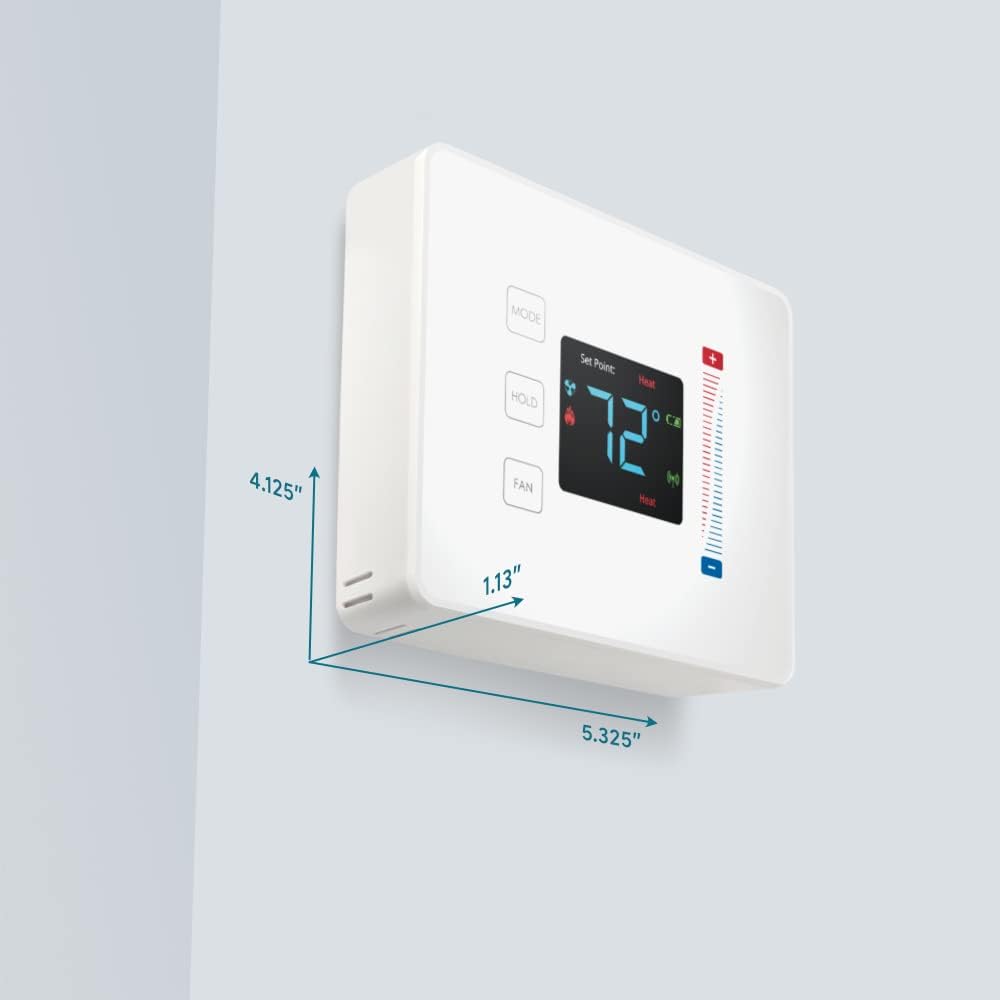
Figure 3: User interaction with the Pearl Thermostat's touch screen to modify temperature settings.
5.2 горимын сонголт
дээр дарна уу MODE button to cycle through available operating modes: Heat, Cool, Auto, Off.
5.3 Баривчлах функц
дээр дарна уу БАРЬ button to maintain the current temperature setting indefinitely, overriding any programmed schedules. Press again to release the hold and resume the schedule.
5.4 Сэнсний удирдлага
дээр дарна уу Fan button to cycle through fan settings: Auto (fan runs only when heating or cooling) or On (fan runs continuously).
6. Засвар үйлчилгээ
6.1 Батерейг солих
The Pearl Thermostat is powered by four AA batteries. When the battery level is low, a low battery indicator will appear on the display. To replace batteries:
- Gently pull the thermostat unit off its backplate.
- Remove the old AA batteries and dispose of them properly.
- Дөрвөн шинэ АА шүлтлэг батерейг оруулж зөв туйлшралыг хангана.
- Reattach the thermostat unit to the backplate.
Regular battery replacement ensures uninterrupted operation and maintains ZigBee connectivity.
6.2 Цэвэрлэгээ
Термостатын гадаргууг зөөлөн, d-ээр арчинаamp cloth. Avoid using abrasive cleaners or solvents, as these can damage the display and finish.
7. Алдаа засах
If you encounter issues with your Pearl Thermostat, refer to the following common troubleshooting steps:
- Дэлгэц / хүч байхгүй: Check if the AA batteries are correctly installed and fully charged. Ensure power to the HVAC system is on at the circuit breaker.
- HVAC систем хариу өгөхгүй байна: Verify that the wiring connections to the backplate are secure. Confirm the thermostat is in the correct operating mode (Heat/Cool/Auto).
- Connectivity Issues (ZigBee): Ensure your smart home hub is powered on and within range. Refer to your smart home hub's instructions for device pairing. You may need to initiate a re-pairing process.
- Температурын буруу заалт: Термостатыг нарны шууд тусгал, ноорог, дулааны эх үүсвэрт өртөөгүй байгаа эсэхийг шалгаарай, энэ нь түүний дотоод мэдрэгчэд нөлөөлдөг.
- Thermostat Not Responding to Touch: Gently clean the screen surface. If the issue persists, try removing the thermostat from its backplate, waiting 30 seconds, and reattaching it to perform a soft reset.
8. Техникийн үзүүлэлтүүд

Figure 4: Dimensions of the Centralite Pearl Thermostat.
| Тодорхойлолт | Дэлгэрэнгүй |
|---|---|
| Брэнд | Төв |
| Загварын нэр | Centralite Pearl Thermostat |
| Загварын дугаар | 3000-wC |
| Хянагчийн төрөл | SmartThings, Vera |
| Өнгө | Цагаан |
| Температурын хяналтын төрөл | Програмчлагдах боломжтой, дижитал |
| Холболтын технологи | ZigBee |
| Эрчим хүчний эх үүсвэр | Battery Powered (4 AA batteries, included) |
| Зүйлийн жин | 0.97 фунт (ойролцоогоор 15.5 унц) |
| Ботьtage | 230 Volts (HVAC system) |
| Материал | Сувдан |
| Дэлгэцийн төрөл | LCD |
| Төгсгөлийн төрөл | Сатин |
| Хяналтын төрөл | Мэдрэгч самбарын удирдлага |
| Хяналтын арга | Апп |
| Суурилуулах төрөл | Ханын бэхэлгээ |
| Арын гэрэлтүүлэг | Тиймээ |
| Бүтээгдэхүүний хэмжээ (L x W x H) | 5.33 x 1.13 x 4.13 инч |
| UPC | 812489022264 |
9. Баталгаат хугацаа ба дэмжлэг
For warranty information and technical support, please refer to the documentation included with your product or visit the official Centralite webсайт. Худалдан авалтын баримтаа худалдан авалтын баталгаа болгон хадгалаарай.


