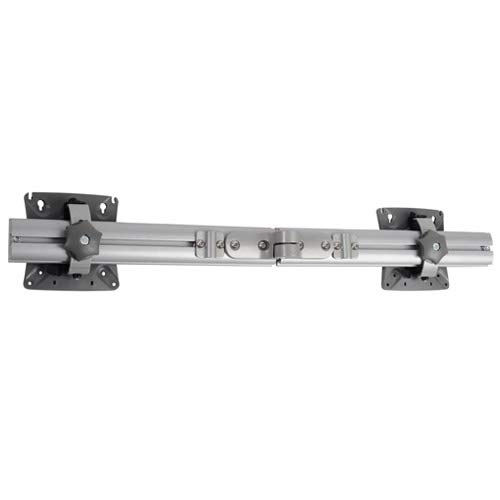
Chief KRA221SXRH

Chief KRA221SXRH Expansion Arm Kit Instruction Manual

Model: KRA221SXRH

1. Танилцуулга

This manual provides detailed instructions for the installation and use of the Chief KRA221SXRH Expansion Arm Kit. This kit is designed to expand existing Chief K1C series monitor arm installations, allowing for additional monitor configurations.

The KRA221SXRH facilitates upgrading a single-arm K1C120SXRH to a dual-arm K1C220SXRH setup or adding a third and/or fourth arm to a multi-workstation configuration when used with the KRA226 grommet plate accessory.

2. Аюулгүй байдлын мэдээлэл

3. Багцын агуулга

Verify that all components are present and undamaged before proceeding with installation. If any parts are missing or damaged, contact Chief customer support.

Chief KRA221SXRH Expansion Arm Kit components

Image: Components of the Chief KRA221SXRH Expansion Arm Kit. This image displays the primary arm component and associated mounting hardware.

4. Тохиргоо ба суурилуулалт

This section outlines the steps to install the KRA221SXRH Expansion Arm Kit. Ensure you have all necessary tools and an existing Chief K1C series mount in place.

4.1. Expanding a Single-Arm K1C120SXRH to a Dual-Arm K1C220SXRH

  1. Prepare the Existing Mount: Ensure your existing K1C120SXRH single-arm mount is securely installed.
  2. Attach the Expansion Arm: Locate the designated attachment point on the existing K1C mount's pole or central hub. Align the KRA221SXRH expansion arm with this point.
  3. Secure the Arm: Use the provided mounting hardware (screws, washers, etc.) to firmly attach the expansion arm. Refer to the specific diagrams in your K1C base mount manual for precise screw locations and torque specifications.
  4. Mount the Second Monitor: Attach your second monitor to the newly installed expansion arm using the VESA mounting plate.
  5. Кабелийн менежмент: Route monitor cables through the integrated cable management channels of both arms for a clean setup.

4.2. Adding a Third or Fourth Arm (Requires KRA226 Grommet Plate)

For configurations requiring three or four arms, the Chief KRA226 Grommet Plate Accessory is necessary. This accessory provides additional mounting points for expansion arms in a center-of-table setup.

  1. Install KRA226 Grommet Plate: If not already installed, follow the instructions provided with the KRA226 grommet plate to securely mount it to your workstation.
  2. Attach Expansion Arms: Identify the available mounting points on the KRA226 grommet plate. Attach the KRA221SXRH expansion arms to these points using the provided hardware.
  3. Мониторуудыг суурилуулах: Secure your monitors to the expansion arms.
  4. Тохируулах, хамгаалах: Make any necessary adjustments to monitor height, tilt, and swivel. Ensure all connections are tight and secure.

5. Тохируулга

Once installed, the KRA221SXRH expansion arm allows for various adjustments to optimize your viewтуршлага.

Always ensure that adjustments are made smoothly and that all locking mechanisms are securely fastened after positioning to prevent accidental movement.

6. Засвар үйлчилгээ

Regular maintenance ensures the longevity and safe operation of your Chief KRA221SXRH Expansion Arm Kit.

7. Алдаа засах

АсуудалБоломжит шалтгаанШийдэл
Arm feels loose or wobbly.Холбох эрэг нь хангалттай нягт биш юм.Check and retighten all mounting screws on the expansion arm and the main K1C mount.
Monitor sags or does not hold position.Weight capacity exceeded or tension adjustment needed.Ensure monitor weight is within limits. Adjust the tension mechanism on the monitor head if available (refer to your K1C base mount manual).
Difficulty attaching expansion arm.Incorrect alignment or missing hardware.Review installation steps. Ensure correct orientation and that all necessary hardware is used. Confirm compatibility with your existing K1C mount.

If you encounter issues not listed here, please contact Chief customer support for assistance.

8. Техникийн үзүүлэлтүүд

9. Баталгаат хугацаа ба дэмжлэг

For information regarding warranty coverage, please refer to the official Chief website or the warranty documentation included with your original K1C series monitor arm. Chief provides customer support for product inquiries, technical assistance, and troubleshooting.

Холбоо барих мэдээлэл:

Холбогдох баримт бичиг - KRA221SXRH

Урьдчилсанview TS318SU/TS318TU/TS325TU дунд зэргийн савлууртай гарны бэхэлгээний угсралтын гарын авлага
TS318SU, TS318TU, болон TS325TU загварын Chief Medium Swing Arm Mounts-ийн дэлгэрэнгүй суурилуулах заавар. Төрөл бүрийн ханын төрлүүдэд зориулсан эд ангийн жагсаалт, шаардлагатай багаж хэрэгсэл, алхам алхмаар угсрах, суурилуулах журмыг багтаасан болно.
Урьдчилсанview Chief PDR цувралын том хавтгай самбартай хос гартай хананд бэхлэх угсралтын заавар
Том хавтгай дэлгэцэнд зориулагдсан Chief PDR цувралын хос гартай ханын бэхэлгээний дэлгэрэнгүй суурилуулах заавар. Хананд бэхлэх, дэлгэцийг бэхлэх, кабелийн удирдлага, таталтын тохируулга, савлуурын хөшүүргийн тохиргоог хамарна. Аюулгүй байдлын анхааруулга, бүтээгдэхүүний үзүүлэлт, холбоо барих мэдээлэл багтсан болно.
Урьдчилсанview Chief PNR цувралын том хавтгай самбартай хос гартай хананд бэхлэх угсралтын заавар
Chief PNR цувралын том хавтгай самбартай хос гартай ханын бэхэлгээний суурилуулах дэлгэрэнгүй гарын авлагад аюулгүй байдлын урьдчилан сэргийлэх арга хэмжээ, эд анги, багаж хэрэгсэл, суурилуулах журам, тохируулга, дэлгэцийг зайлуулах талаар тусгасан болно.
Урьдчилсанview MSBV VESA интерфейсийн хаалт суурилуулах заавар
Дэлгэцийг суурилуулах шийдэл болох Chief MSBV VESA интерфейсийн хаалтанд зориулсан суулгах дэлгэрэнгүй гарын авлага. Аюулгүй байдал, хэмжээс, эд анги, VESA нийцтэй байдал (100x100-аас 400x200) болон угсралтын горимыг хамарна. Legrand |-ийн холбоо барих мэдээллийг багтаасан болно AV.
Урьдчилсанview RMF3/RMT3/RLF3/RLT3 суурилуулах зааварчилгаа
Chief-ийн RMF3, RMT3, RLF3, болон RLT3 хавтгай хавтангийн суурилуулалтын цогц гарын авлага, янз бүрийн төрлийн ханын тоног төхөөрөмжийн шаардлага, угсралтын алхамууд болон аюулгүй байдлын урьдчилан сэргийлэх арга хэмжээг нарийвчлан харуулсан.
Урьдчилсанview Chief Thinstall Large Tilt Universal бэхэлгээний суурилуулах гарын авлага
Chief Thinstall™ Large Tilt Universal Mount (LTTU)-г суурилуулах цогц заавар. Энэхүү гарын авлагад ханын хавтан суурилуулах, дэлгэцийн бэхэлгээ, хазайлтын тохируулга, кабелийн менежментийн нарийвчилсан алхмуудыг багтаасан бөгөөд дэлгэцийг аюулгүй, зөв ​​​​тохируулж тохируулах боломжийг олгоно.