Танилцуулга
This manual provides essential instructions for the safe and effective use of your Coby CVG-02-RC Virtual Reality Goggles. Please read this manual thoroughly before using the device and retain it for future reference.
The Coby CVG-02-RC transforms your smartphone into a 3D virtual reality headset, offering an immersive experience for compatible VR applications and content. It features adjustable optics and comes with a wireless remote control for enhanced interaction.
Аюулгүй байдлын мэдээлэл
- Do not use the VR goggles while operating a vehicle or machinery, or in situations requiring full attention to your surroundings.
- Take frequent breaks during use to prevent eye strain, dizziness, or discomfort. If you experience any discomfort, discontinue use immediately.
- Ensure your surroundings are clear of obstacles to avoid injury while immersed in virtual reality.
- Төхөөрөмжийг нарны шууд тусгал, өндөр температур, чийгнээс хол байлга.
- Төхөөрөмжийг задлах, өөрчлөхийг бүү оролдоорой. Энэ нь баталгааг хүчингүй болгож, гэмтэл учруулж болзошгүй.
- This device is not suitable for children under 13 years of age. Adult supervision is recommended for younger users.
Багцын агуулга
Бүх зүйл багцад байгаа эсэхийг шалгана уу:
- Coby CVG-02-RC Virtual Reality Goggles
- Утасгүй алсын удирдлага
- Хэрэглэгчийн гарын авлага (энэ баримт бичиг)
Бүтээгдэхүүн дууссанview
Familiarize yourself with the components of your Coby VR Goggles.
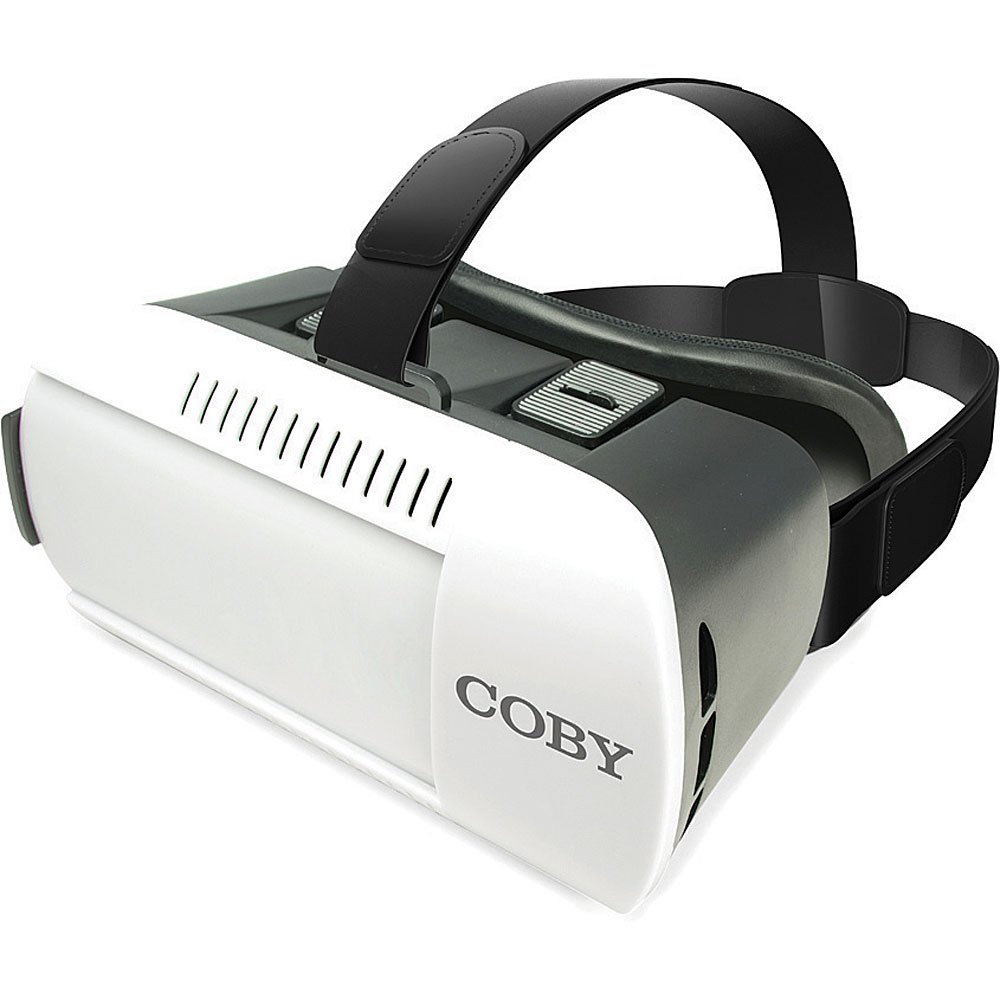
Зураг 1: Урд view of the Coby CVG-02-RC Virtual Reality Goggles. This image shows the main body of the goggles, including the adjustable head strap, the padded face cushion, and the lenses visible from the user's perspective. The top features adjustment sliders for lens positioning.
Goggles Components:
- Тохируулах боломжтой толгойн оосор: Secures the goggles to your head.
- Padded Face Cushion: Provides comfort and blocks external light.
- Spherical Lenses: Provide the 3D virtual reality view.
- Lens Adjustment Dials/Sliders: Located on top, these allow for focus and interpupillary distance (IPD) adjustments.
- Smartphone Tray/Compartment: Front section where the smartphone is inserted.
Утасгүй алсын удирдлага:
The remote control typically includes buttons for navigation, selection, and volume, enhancing interaction within VR applications. Refer to the remote's specific instructions for detailed button functions.
Тохиргоо
1. Ухаалаг утсаа оруулах
- Open the front cover of the VR goggles. This usually involves unlatching or sliding the front panel.
- Place your smartphone into the designated tray or holder. Ensure the phone is centered and securely held. The screen should face the lenses.
- Урд тагийг сайтар хаа.
- Жич: The goggles are compatible with smartphones up to 6 inches in screen size.
2. Adjusting the Head Straps
- Place the goggles on your head.
- Adjust the side and top straps to achieve a comfortable and secure fit. The goggles should feel snug but not overly tight, and the image should be centered in your vision.
3. Pairing the Wireless Remote Control
- Ухаалаг утасныхаа Bluetooth идэвхжсэн эсэхийг шалгаарай.
- Turn on the wireless remote control (refer to the remote's specific instructions for power on/off).
- Ухаалаг утсан дээрээ боломжтой Bluetooth төхөөрөмжүүдийг хайж олоорой.
- Select the remote control from the list (e.g., "VR-Remote" or similar) to pair.
- Once paired, the remote can be used to navigate within VR applications.
4. VR програмуудыг татаж авах
For the best experience, download virtual reality applications from your smartphone's app store:
- iOS төхөөрөмжүүдийн хувьд: -д зочилно уу Apple App Store and search for "VR games," "3D split screen," or "virtual reality."
- Android төхөөрөмжүүдийн хувьд: -д зочилно уу Google Play Store and search for "VR games," "3D split screen," or "virtual reality."
Many VR apps are designed for split-screen viewing, which is necessary for these goggles.
Ажиллаж байна
Using the VR Goggles
- Launch a VR application on your smartphone. The screen should display a split-screen view.
- Insert your smartphone into the goggles as described in the "Setup" section.
- Put on the goggles and adjust the head straps for comfort.
- Use the lens adjustment dials/sliders on the top of the goggles to achieve a clear and focused image. Adjust both the focus (distance from lenses to screen) and the interpupillary distance (IPD - distance between the centers of the lenses) until the image is sharp and comfortable for both eyes.
- Use the wireless remote control to interact with the VR application.
Adjusting Lenses
The Coby CVG-02-RC features adjustable dual optics to optimize your viewтуршлага:
- Фокусын тохируулга: Slide the dials on the top of the goggles forward or backward to adjust the clarity of the image. This compensates for different vision needs.
- IPD (хүлэг хоорондын зай) тохируулга: Slide the dials left or right to adjust the distance between the lenses. This aligns the lenses with your eyes for a single, clear 3D image.

Зураг 2: Топ view of the Coby CVG-02-RC Virtual Reality Goggles, highlighting the lens adjustment sliders. These sliders allow users to fine-tune the focus and interpupillary distance for optimal viewтав тух, тодорхой байдлыг бий болгодог.
Засвар үйлчилгээ
- Цэвэрлэх линз: Use a soft, dry microfiber cloth specifically designed for optical lenses. Do not use abrasive cleaners or paper towels.
- Cleaning Goggles Body: Гадна талыг зөөлөн, бага зэрэг арчинаamp даавуу. Аливаа нүхэнд чийг орохоос зайлсхий.
- Хадгалах: Store the goggles in a cool, dry place away from direct sunlight and dust. Use the original packaging or a protective case if available.
- Padded Cushion: The foam padding can be gently wiped with a damp cloth and mild soap if necessary. Ensure it is completely dry before use.
Алдааг олж засварлах
| Асуудал | Боломжит шалтгаан | Шийдэл |
|---|---|---|
| Зураг бүдэг эсвэл фокусгүй байна. | Incorrect lens adjustment. | Adjust the focus and IPD dials/sliders on top of the goggles until the image is clear. |
| Double vision or eye strain. | Incorrect IPD adjustment; phone not centered. | Adjust the IPD dials to match your eye distance. Ensure your smartphone is perfectly centered in the tray. Take a break. |
| Remote control not connecting. | Bluetooth not enabled; remote not powered on; remote not paired. | Ensure Bluetooth is on your phone. Power on the remote. Re-pair the remote via your phone's Bluetooth settings. Check remote battery. |
| No 3D effect or distorted image. | App not designed for VR; phone not properly seated. | Ensure the app displays a split-screen VR view. Re-seat your smartphone securely and centered in the goggles. |
| Ухаалаг гар утасны хэт халалт. | Extended use of demanding VR apps. | Remove the phone from the goggles and allow it to cool down. Reduce usage time for demanding applications. |
Үзүүлэлтүүд
- Загвар: CVG-02-RC
- -ийн талбар View (FOV): 98-99 градус
- Линзний төрөл: High Transparency Spherical Lens
- Ухаалаг гар утасны нийцтэй байдал: Up to 6 inches screen size (iOS/Android)
- Connectivity (Remote): Bluetooth
- Бүтээгдэхүүний хэмжээ: 13 x 14 x 20 инч (ойролцоогоор, бүтээгдэхүүний өгөгдлийн дагуу)
- Барааны жин: 1.2 фунт (бүтээгдэхүүний мэдээллийн дагуу ойролцоогоор)
- Үйлдвэрлэгч: Коби
Баталгаат болон дэмжлэг
For warranty information and technical support, please refer to the warranty card included with your product or visit the official Coby webсайт. Худалдан авалтын баримтаа худалдан авалтын баталгаа болгон хадгалаарай.
For further assistance, you may contact Coby customer service through their official channels.


