1. Бүтээгдэхүүн дууссанview
The ADATA HM900 (model AHM900-6TU3-CEUBK) is a 6TB external hard disk drive designed for high-capacity data storage and transfer. This mechanical hard disk drive offers ample space for extensive data needs and supports simultaneous operations without compromising performance. It connects via USB, making it compatible with various devices, including personal computers and televisions.

Зураг 1: Урд тал view of the ADATA HM900 External Hard Drive.
2. Тохируулах заавар
2.1 Багцын агуулга
Үргэлжлүүлэхийн өмнө багцад бүх зүйл байгаа эсэхийг шалгаарай:
- ADATA HM900 External Hard Disk Drive
- USB мэдээллийн кабель
- Эрчим хүчний адаптер
- Хурдан эхлүүлэх гарын авлага (хэрэв байгаа бол)
2.2 Хатуу дискийг холбох
- Цахилгаан хувиргагчийг холбоно уу: Plug the power adapter into the DC IN port on the back of the ADATA HM900. Connect the other end of the power adapter to a wall outlet. The device requires 12 Watts of power.
- USB кабелийг холбоно уу: Insert one end of the provided USB data cable into the USB port (marked 'SS' for SuperSpeed USB) on the back of the hard drive.
- Төхөөрөмждөө холбогдох: Plug the other end of the USB cable into an available USB port on your computer, television, or other compatible device.
- Асаах: The drive should power on automatically. A status indicator light will typically illuminate to show it is active.
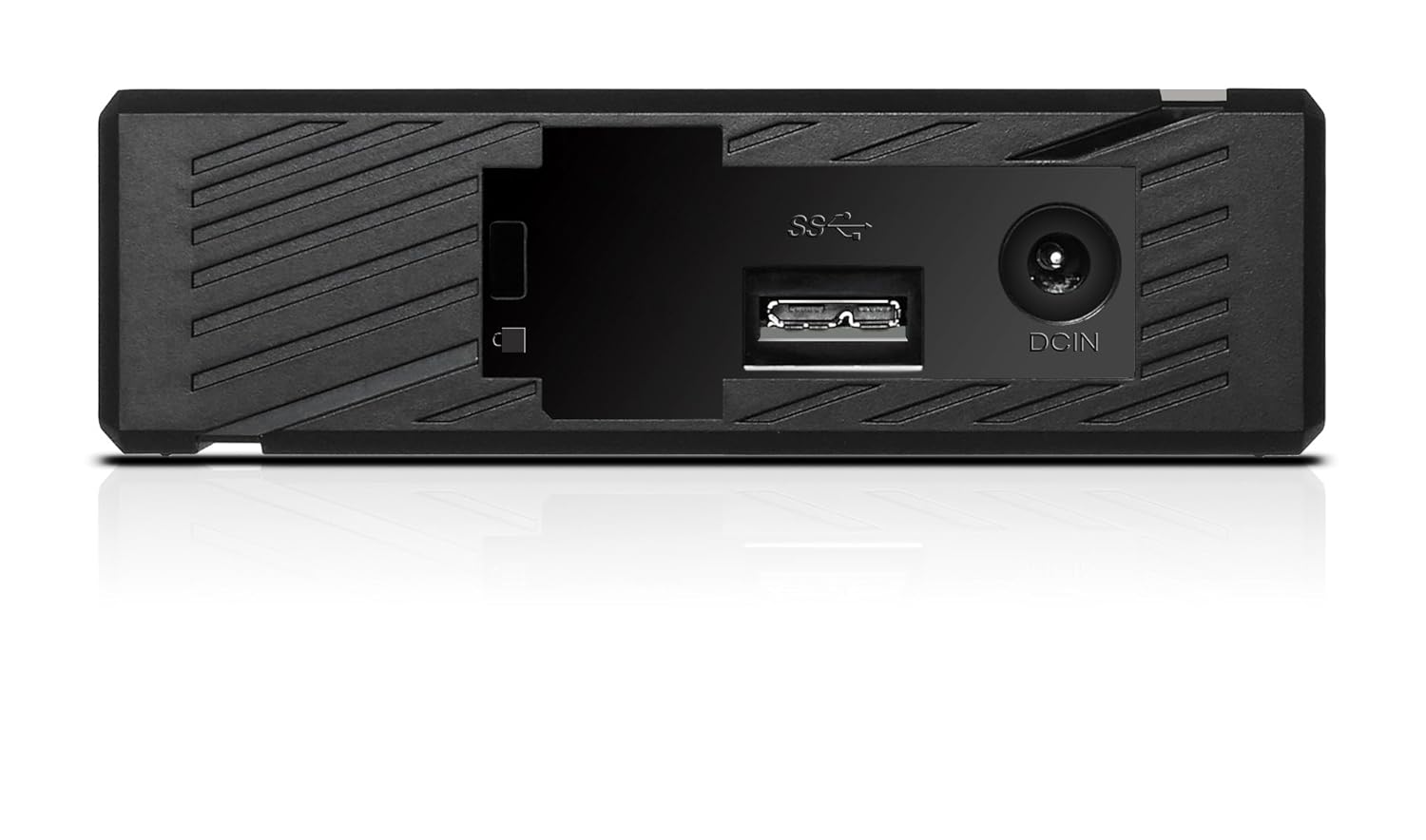
Зураг 2: Ар талд view of the ADATA HM900, highlighting the USB and DC IN ports for connection.
3. Хатуу дискийг ажиллуулах
3.1 Анхны хүлээн зөвшөөрөх
Upon first connection, your operating system (Windows, macOS, Linux) or compatible device (e.g., smart TV) should automatically detect the ADATA HM900. For computers, it may appear as a new drive letter or volume in 'My Computer'/'This PC' or 'Finder'.
3.2 Мэдээлэл дамжуулах
Шилжүүлэхийн тулд files, simply drag and drop them to and from the HM900 drive icon. For larger transfers, it is recommended to use your operating system's copy/paste functions or dedicated backup software.
3.3 Using with a Television
The ADATA HM900 is compatible with televisions that support external storage devices. Connect the drive as described in Section 2.2. Refer to your television's user manual for specific instructions on how to access and play media files from an external USB drive.
4. Засвар үйлчилгээ, арчилгаа
Proper care ensures the longevity and reliability of your ADATA HM900 external hard drive:
- Аюулгүй салгах: Always safely eject or unmount the hard drive from your operating system before physically disconnecting the USB cable or power. This prevents data corruption.
- Бие махбодийн хамгаалалт: Avoid dropping or subjecting the drive to strong impacts, as it contains a mechanical hard disk that can be damaged.
- Байгаль орчны нөхцөл: Store and operate the drive in a cool, dry environment, away from direct sunlight, extreme temperatures, and high humidity.
- Цэвэрлэгээ: Хөтөчийн гадна талыг зөөлөн, хуурай даавуугаар цэвэрлэ. Шингэн цэвэрлэгч, уусгагчийг бүү ашигла.
5. Алдаа засах
5.1 Драйв илрээгүй байна
- Холболтуудыг шалгах: Ensure both the power adapter and USB cable are securely connected to the drive and your device.
- Өөр USB портыг туршиж үзээрэй: Connect the drive to a different USB port on your computer or device.
- Эрчим хүчийг баталгаажуулах: Confirm the power adapter is plugged into a working electrical outlet and the drive's indicator light is on.
- Төхөөрөмжийг дахин эхлүүлэх: Restart your computer or television and try connecting the drive again.
- Check Disk Management (Windows) / Disk Utility (macOS): For computers, check if the drive appears in disk management tools, even if it doesn't have a drive letter assigned.
5.2 Өгөгдөл дамжуулах хурд удаан
- Use USB 3.0 Port: Ensure the drive is connected to a USB 3.0 (or higher) port on your device for optimal speeds. USB 2.0 ports will result in slower transfers.
- Avoid Other USB Devices: Disconnect other high-bandwidth USB devices during large transfers.
- Драйвын эрүүл мэндийг шалгана уу: Run a disk check utility on your computer to ensure the drive is healthy.
6. Техникийн үзүүлэлтүүд
| Онцлог | Тодорхойлолт |
|---|---|
| Брэнд | ADATA |
| Загварын дугаар | AHM900-6TU3-CEUBK |
| Дижитал хадгалах багтаамж | 6 TB |
| Хатуу дискний тодорхойлолт | Механик хатуу диск |
| Хатуу дискний хэлбэр хүчин зүйл | 2.5 инч |
| Холболтын технологи | USB |
| Хэмжээ (LxWxH) | 19 x 12.1 x 3.65 сантиметр |
| Зүйлийн жин | 998 гр |
| Ватtage | 12 ватт |
| Тохиромжтой төхөөрөмжүүд | Television, Personal Computers |
| Эхний боломжтой огноо | 11 оны арваннэгдүгээр сарын 2016 |
7. Баталгаат хугацаа ба дэмжлэг
For detailed warranty information, please refer to the warranty card included with your product or visit the official ADATA website. Support resources, including drivers and firmware updates, may also be available on the ADATA support portal.


