1. Танилцуулга
This user manual provides detailed instructions for the safe and efficient operation of your Xerox VersaLink B405/DN Monochrome Multifunction Printer. It covers initial setup, daily use, routine maintenance, and troubleshooting common issues. Please read this manual thoroughly before using the device to ensure optimal performance and longevity.

Зураг 1.1: Урд view of the Xerox VersaLink B405/DN Multifunction Printer.
2. Аюулгүй байдлын мэдээлэл
Хэвлэгчийг гэмтээх, гэмтээхээс урьдчилан сэргийлэхийн тулд дараах аюулгүй байдлын арга хэмжээг дагаж мөрдөнө үү.
- Принтерийг үргэлж газардуулсан цахилгаан залгуурт холбоно уу.
- Агааржуулалтын нүхийг хааж болохгүй.
- Принтерийг ус эсвэл хэт чийгнээс хол байлга.
- Зөвхөн заасан цахилгааны утас болон дагалдах хэрэгслийг ашиглана уу.
- Do not attempt to service the printer yourself; refer all servicing to qualified personnel.
3. Багцын агуулга
Бүх зүйл багцад байгаа эсэхийг шалгана уу:
- Xerox VersaLink B405 Multifunction Printer
- Standard Capacity Toner Cartridge (5900 capacity)
- Програм хангамж ба баримт бичгийн CD
- Суулгах гарын авлага
- Түргэн ашиглах гарын авлага
- Цахилгааны утас
- Факс утас
4. Тохиргоо
4.1 Савлах ба байрлуулах
Carefully remove the printer from its packaging. Place the printer on a stable, level surface with adequate ventilation. Ensure sufficient space around the device for operation and maintenance.
4.2 Эрчим хүчний холболт
Connect the provided power cord to the printer's power inlet and then to a grounded electrical outlet.
4.3 Сүлжээний холболт
Connect an Ethernet cable from your network router or switch to the Ethernet port on the rear of the printer. This printer uses an Ethernet hardware interface for network connectivity.
4.4 Програм хангамж суурилуулах
Insert the software and documentation CD into your computer's CD-ROM drive. Follow the on-screen instructions to install the printer drivers and utility software. Alternatively, visit the official Xerox support webХамгийн сүүлийн үеийн драйверуудыг татаж авах сайт.
4.5 Цаас ачаалж байна
Open the paper tray located at the front of the printer. Adjust the paper guides to fit the size of your paper. Load the paper stack, ensuring it does not exceed the maximum fill line. The printer supports various print media including plain paper, envelopes, and labels, with a maximum media size of 8.5 x 14 inches.

Зураг 4.1: Урд view showing the paper trays for loading media.
4.6 Хорны хайрцаг суурилуулах
If the toner cartridge is not pre-installed, open the front access panel of the printer. Carefully insert the standard capacity toner cartridge into its designated slot until it clicks into place. Close the access panel.
5. Ашиглалтын заавар
The VersaLink B405/DN features an intuitive control panel for managing various functions.
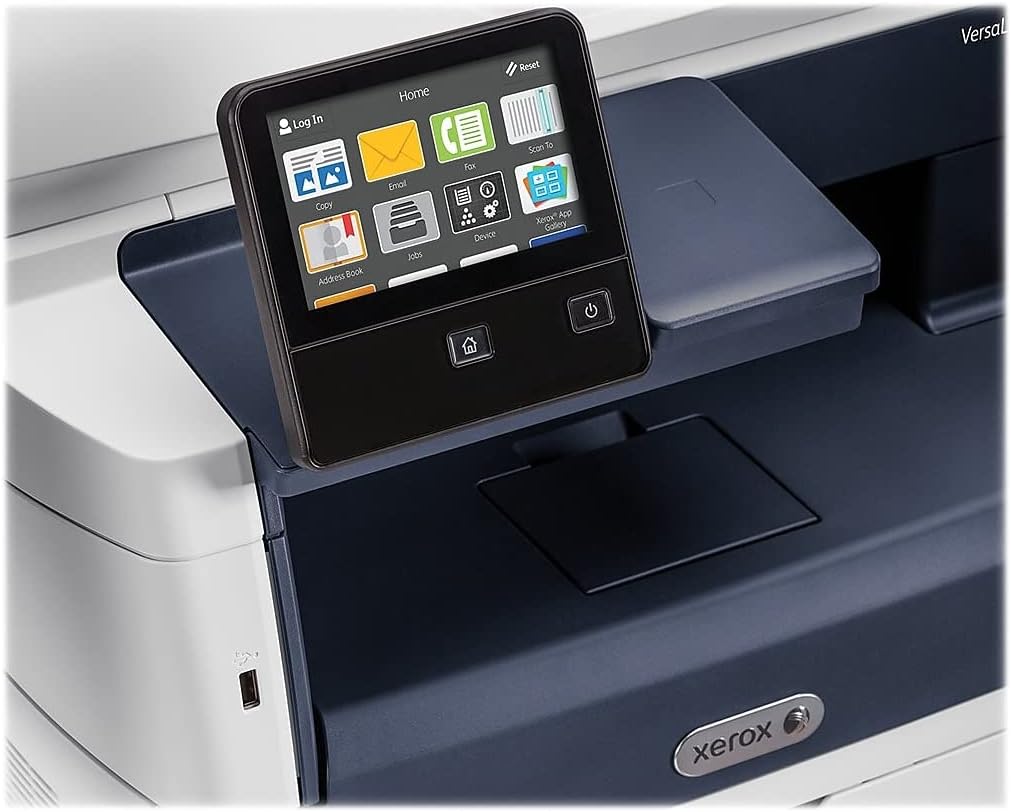
Figure 5.1: The touch-screen control panel for printer operation.
5.1 Хэвлэх
To print a document from your computer, select the Xerox VersaLink B405/DN from your printer list. Adjust print settings such as paper size, orientation, and duplex printing (automatic dual-sided printing is supported) as needed. Confirm the print job.
5.2 Хуулбарлах
Place your document face-up in the Automatic Document Feeder (ADF) or face-down on the scanner glass. On the control panel, select the 'Copy' function. Adjust settings like number of copies, lightness/darkness, and two-sided copying. Press the 'Start' button to begin copying.

Figure 5.2: Paper loaded in the Automatic Document Feeder for copying or scanning multiple pages.
5.3 Сканнердах
Place your document in the ADF or on the scanner glass. On the control panel, select the 'Scan' function. Choose your desired scan destination (e.g., Scan to Email, Scan to Network, Scan to USB). Configure scan settings such as resolution and file форматлах. Сканыг эхлүүлэхийн тулд 'Эхлүүлэх' товчийг дарна уу.

Figure 5.3: The scanner lid open, showing the flatbed for scanning single pages or delicate documents.
5.4 Факс илгээх
Connect the provided fax cord to the printer's fax port and a telephone wall jack. Place your document in the ADF or on the scanner glass. On the control panel, select the 'Fax' function. Enter the recipient's fax number and press 'Start'.
6. Засвар үйлчилгээ
6.1 Хор солих
When the printer indicates low toner, order a replacement Xerox toner cartridge. Open the front access panel, remove the old cartridge by pulling it out, and insert the new cartridge until it locks into place. Close the panel.
6.2 Цэвэрлэгээ
Принтерийн гадна талыг зөөлөн, гamp даавуу. Сканнерын шилний хувьд хөвөнгүй даавуу болон үрэлтгүй шил цэвэрлэгч ашиглана уу. Цэвэрлэгчийг шилэн дээр шууд шүршихээс зайлсхий.
6.3 Цаасан саатлыг арилгах
If a paper jam occurs, the control panel will display instructions. Open the indicated access covers and carefully remove any jammed paper, pulling in the direction of the paper path. Ensure all paper fragments are removed before closing the covers.
7. Алдаа засах
Энэ хэсэгт танд тулгарч болох нийтлэг асуудлуудыг авч үзэх болно:
- Принтер хариу өгөхгүй байна: Check power connections, network cable, and ensure the printer is online. Restart both the printer and your computer.
- Хэвлэх чанар муу: Check toner levels. Perform a print quality diagnostic from the printer's control panel or software. Clean the print heads if necessary (refer to the printer's internal menu).
- Цаасан саатал: Follow the instructions on the control panel to locate and clear the jam. Ensure paper is loaded correctly and not creased or damaged.
- Сканнердах асуудал: Verify network connectivity. Ensure the scanner glass and ADF are clean. Check scan settings on the control panel.
For more complex issues, consult the full documentation on the provided CD or the Xerox support webсайт.
8. Техникийн үзүүлэлтүүд
| Онцлог | Тодорхойлолт |
|---|---|
| Бүтээгдэхүүний хэмжээс | 19.5"D x 19.5"W x 21.7"H |
| Зүйлийн жин | 48 фунт |
| Хамгийн их медиа хэмжээ | 8.5 x 14 инч |
| Хамгийн их оролтын хуудасны багтаамж | 2350 хуудас |
| Хар ба цагаан хэвлэх хамгийн дээд нягтрал | 1200 x 1200 dpi |
| Хамгийн их хэвлэх хурд Monochrome | 47 ppm |
| Хамгийн их хуулбарлах хурд (Хар цагаан) | 6.2 seconds (first copy out) |
| Хоёр талт хэвлэх | Автомат |
| Тоног төхөөрөмжийн интерфейс | Ethernet, USB |
| Санах ойн хадгалах багтаамж | 2 ГБ |
| Процессорын тоо | 2 |
| Принтерийн бэхний төрөл | Тонер |
| Сканнерийн төрөл | Document (ADF and Flatbed) |
9. Баталгаат хугацаа ба дэмжлэг
The Xerox VersaLink B405/DN Monochrome Multifunction Printer comes with a standard one-year warranty. For warranty claims, technical support, or service inquiries, please contact Xerox customer support directly. Refer to the official Xerox website or the documentation included with your product for contact details and further support resources.


