Танилцуулга
This manual provides detailed instructions for the setup, operation, and maintenance of your Hyperkin Knight Premium Controller. Designed for use with PlayStation 3 (PS3), PC, and Mac systems, this controller offers a versatile gaming experience with its ergonomic design and responsive controls. Please read this manual thoroughly before using the product to ensure optimal performance and longevity.
Бүтээгдэхүүний онцлог
- Хос аналог жойстикууд: Two wide-spectrum analog joysticks for precise control.
- Pressure-Sensitive D-Pad: An eight-way directional pad with pressure sensitivity.
- Pressure-Sensitive Buttons: Four shoulder buttons and four face buttons with pressure sensitivity for nuanced input.
- Хүчтэй санал хүсэлт: Integrated force feedback for immersive gaming experiences.
- Нүүр хуудас товч: Dedicated button for system menu access.
- Урт кабель: A 6-foot (1.8 meter) cable for flexible positioning.
- Олон платформын нийцтэй байдал: Compatible with all PS3 models, as well as PC and Mac via USB.
Багцын агуулга
- Hyperkin Knight Premium Controller (White)
- Integrated USB Cable (6 ft.)
Тохируулах заавар
PlayStation 3 (PS3) руу холбогдож байна
- Ensure your PS3 console is powered off or in standby mode.
- Locate an available USB port on your PS3 console.
- Plug the USB connector of the Hyperkin Knight Controller into the USB port on your PS3.
- Power on your PS3 console. The controller should be automatically recognized and assigned a player number.
- If the controller does not respond, try a different USB port or restart the console.
PC/Mac-д холбогдож байна
- Компьютер эсвэл Mac компьютер дээрээ боломжтой USB портыг олоорой.
- Plug the USB connector of the Hyperkin Knight Controller into the USB port.
- Your operating system (Windows, macOS) should automatically detect and install the necessary drivers. This process may take a few moments.
- Once installed, the controller will be ready for use with compatible games and applications. You may need to configure controller settings within individual games or system preferences.
- Жич: Functionality may vary depending on the operating system and specific game titles.
Ашиглалтын заавар
The Hyperkin Knight Premium Controller features a standard layout for intuitive gameplay.
Хянагчийн зохион байгуулалт

Зураг: дээд view of the Hyperkin Knight Premium Controller, showing the D-pad, analog sticks, face buttons, and central buttons.
- D-Pad (Чиглүүлэгч дэвсгэр): Located on the left, used for directional input.
- Зүүн аналог зөөгч: Below the D-Pad, for precise movement and camera control.
- Баруун аналог зөөгч: On the right side, typically for camera control or aiming.
- Нүүрний товчлуурууд (Гурвалжин, Тойрог, Загалмай, Дөрвөлжин): On the right, used for actions within games.
- Мөрний товчлуурууд (L1, L2, R1, R2): Located on the top edge of the controller, used for various in-game functions.
- СОНГОХ товчлуур: Typically used for menu access or specific game functions.
- START товч: Typically used for pausing games or confirming selections.
- HOME товчлуур: Central button to access the PS3 XMB (CrossMediaBar) or system menus on PC/Mac.
Хүчтэй санал хүсэлт
The controller features force feedback (rumble) functionality, which provides tactile sensations during gameplay, enhancing immersion. This feature is automatically enabled when supported by the game and system. If you wish to disable it, check your game's or system's controller settings.
Засвар үйлчилгээ
- Цэвэрлэгээ: Удирдлагыг арчихын тулд зөөлөн, хуурай даавуу ашиглаарай. Зөрүүд бохирдлыг бага зэрэг арчинаampдаавуугаар усаар. Хүчтэй химийн бодис, зүлгүүрийн цэвэрлэгч хэрэглэхээс зайлсхий.
- Хадгалах: Хянагчийг сэрүүн, хуурай газар, нарны шууд тусгал болон хэт өндөр температураас хол хадгална уу. Гэмтэхээс сэргийлж кабелийг хэт чанга ороохоос зайлсхий.
- Кабель арчилгаа: Do not pull the controller by its cable. Always grasp the USB connector when plugging or unplugging.
Алдааг олж засварлах
Хянагч хариу өгөхгүй байна
- Холболтыг шалгах: Ensure the USB cable is securely plugged into both the controller and the console/computer.
- Өөр USB порт ашиглаж үзээрэй: Connect the controller to another USB port on your system.
- Системийг дахин эхлүүлэх: Power cycle your PS3, PC, or Mac.
- Driver Check (PC/Mac): On PC, check Device Manager to see if the controller is recognized and if there are any driver issues. On Mac, check System Information > USB.
Incorrect Button Mapping or Limited Functionality
- Тоглоомын тохиргоо: Many games allow for custom controller mapping. Check the in-game settings for controller configuration.
- System Settings (PC/Mac): For PC, some games or emulators may require specific controller configurations or third-party software. For Mac, check System Preferences > Game Controllers (if available) or specific application settings.
- PS3 нийцтэй байдал: While compatible with all PS3 models, some older games or specific PS3 system software versions might have unique controller handling. Ensure your PS3 system software is up to date.
Force Feedback Not Working
- Тоглоомын дэмжлэг: Verify that the game you are playing supports force feedback.
- Тоглоомын доторх тохиргоо: Check the game's options menu to ensure force feedback (rumble) is enabled.
- Системийн тохиргоо: On PC, ensure rumble is enabled in your controller settings.
Үзүүлэлтүүд
| Загварын дугаар | M07213-WH |
| Тохиромжтой байдал | PlayStation 3, PC, Mac (via USB) |
| Кабелийн урт | 6 фут (ойролцоогоор 1.8 метр) |
| Оролтын төрөл | Pressure-sensitive buttons and D-pad, dual analog joysticks |
| Санал хүсэлт | Force Feedback (Rumble) |
| Хэмжээ | 2.99 x 7.99 x 7.01 инч (ойролцоогоор 7.6 x 20.3 x 17.8 см) |
| Жин | 12.5 унц (ойролцоогоор 354 грамм) |
| Үйлдвэрлэгч | Hyperkin Inc |
Баталгаат болон дэмжлэг
For warranty information and technical support, please refer to the official Hyperkin webсайт эсвэл харилцагчийн үйлчилгээтэй шууд холбогдоно уу. Худалдан авалтын баримтаа аливаа баталгаат нэхэмжлэлийг худалдан авсан баримт болгон хадгална уу.
Үйлдвэрлэгч: Hyperkin Inc
Webсайт: www.hyperkin.com (Албан тушаалтан дээр очно уу website for the most current support information.)
Бүтээгдэхүүн дууссанview Зураг
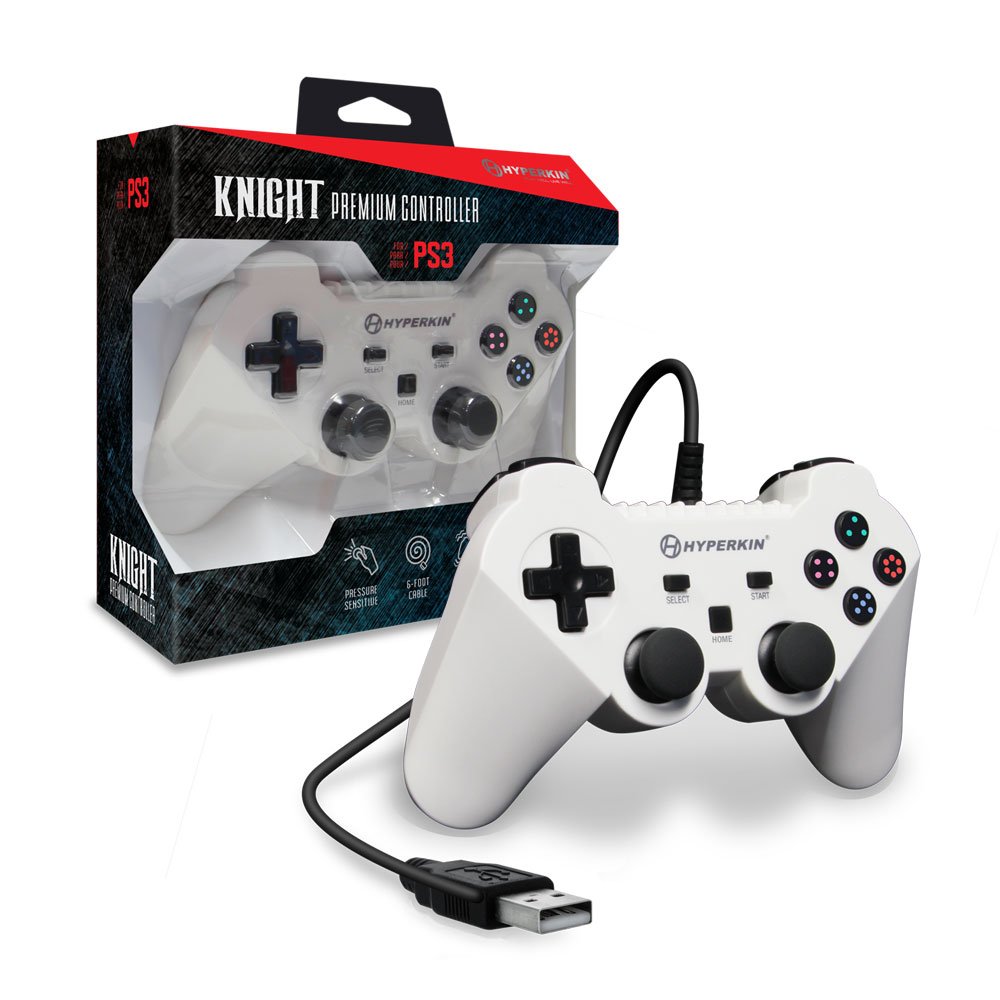
Image: The Hyperkin Knight Premium Controller displayed alongside its retail packaging, highlighting the product's design and branding.

Зураг: Ойрын зураг view of the Hyperkin Knight Premium Controller's retail box, showcasing key features and design elements.

Зураг: өнцөгт view of the Hyperkin Knight Premium Controller, emphasizing its ergonomic shape and button placement.


