Танилцуулга
The Yaesu FT-25R is a robust and reliable 144 MHz VHF FM handheld transceiver designed for clear and efficient communication. This manual provides essential information for the safe and effective operation of your device, covering setup, basic functions, and maintenance.
Аюулгүй байдлын мэдээлэл
- Бүх зааврыг уншина уу: Before operating the transceiver, thoroughly read and understand all instructions provided in this manual.
- Antenna safety: Never touch the antenna during transmission. Avoid operating the transceiver near unshielded blasting caps or in explosive atmospheres.
- Батерейны арчилгаа: Use only the specified battery pack and charger. Do not short-circuit, incinerate, or disassemble the battery pack.
- Усанд өртөх: While the FT-25R has an IP54 rating for dust and splash protection, avoid submerging the unit in water.
- Сонсголын хамгаалалт: Prolonged exposure to high volume levels can cause hearing damage. Adjust the volume to a comfortable level.
Багцын агуулга
Таны багц дараах зүйлсийг агуулж байгаа эсэхийг шалгана уу.
- Яесу FT-25R дамжуулагч төхөөрөмж
- Антен
- Зайны багц
- Зай цэнэглэгч
- Бүсний хавчаар
- Хэрэглэгчийн гарын авлага (энэ баримт бичиг)
Бүтээгдэхүүн дууссанview
Familiarize yourself with the various parts of your FT-25R transceiver.
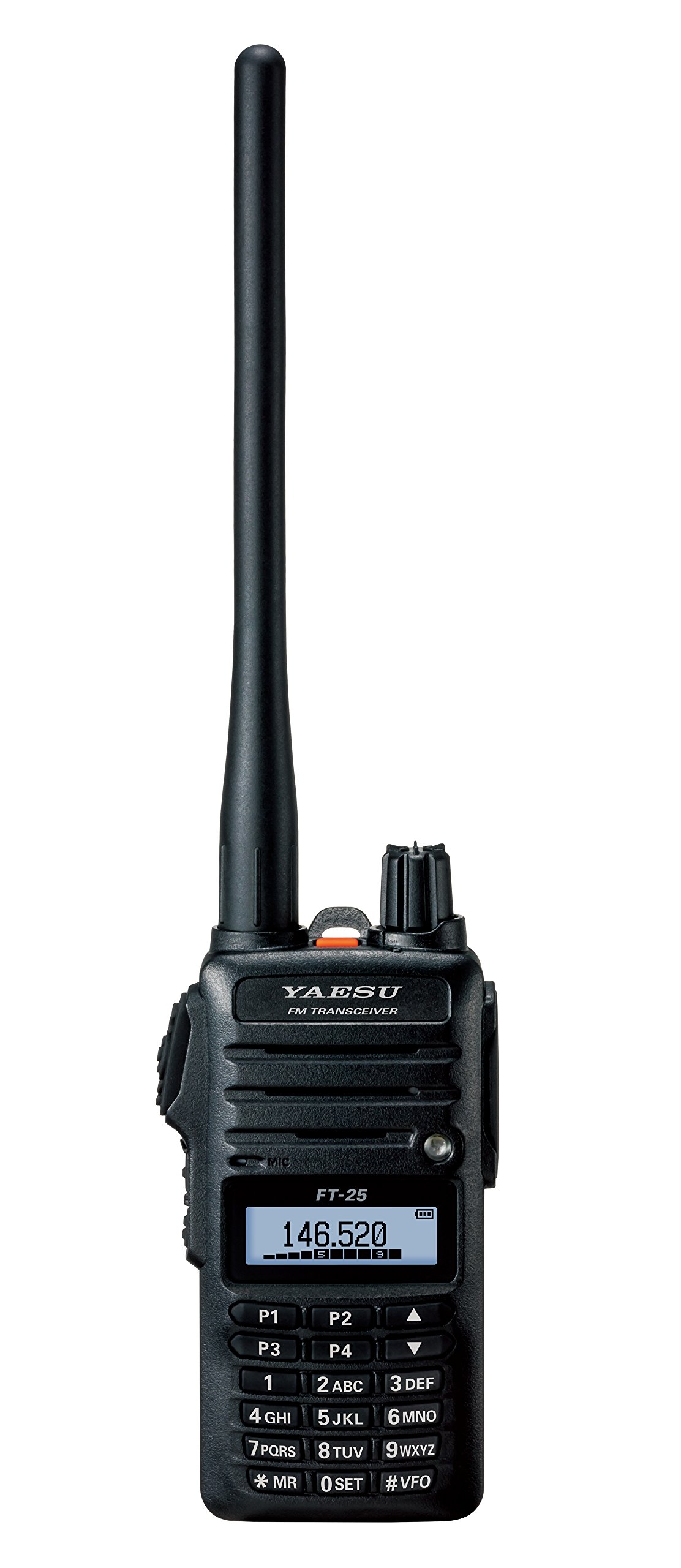
Зураг 1: Урд view of the Yaesu FT-25R transceiver, showing the antenna, volume/power knob, display, and keypad. The display shows "146.520" MHz, indicating the current operating frequency. The keypad includes numerical inputs and function keys like P1-P4, MR, SET, and VFO.
Гол бүрэлдэхүүн хэсгүүд:
- Антен: Радио дохиог дамжуулах, хүлээн авахад зориулагдсан.
- Эзлэхүүн/Цахилгааны бариул: Controls power ON/OFF and audio volume.
- LCD дэлгэц: Давтамж, сувгийн дугаар, батерейны төлөв болон бусад ажиллагааны үзүүлэлтүүдийг харуулна.
- Товчлуур: Used for frequency entry, channel selection, and accessing various functions.
- PTT (товч-ярих) товч: Located on the side, press to transmit.
- Чанга яригч/микрофоны залгуур: Гадаад аудио дагалдах хэрэгслийн хувьд.
Тохиргоо
1. Батерейг суурилуулах, цэнэглэх:
- Трансивер унтарсан эсэхийг шалгаарай.
- Align the battery pack with the battery compartment on the back of the transceiver.
- Батерейны багцыг найдвартай товших чимээ гартал нь байранд нь гулсуулна уу.
- Connect the battery charger to a power outlet and then to the charging port on the transceiver or battery pack.
- Allow the battery to charge fully before first use (refer to charger indicator for status).
2. Antenna Attachment:
- Дагалдах антенныг цагийн зүүний дагуу дамжуулагчийн дээд хэсэгт байрлах антенны холбогч дээр хуруугаараа чангалтал нь шургуул. Хэт чангалж болохгүй.
3. Belt Clip Installation:
- Attach the belt clip to the designated area on the back of the transceiver using the provided screws.
Үндсэн үйл ажиллагаа
1. Power On/Off and Volume:
- To power on, rotate the Volume/Power knob clockwise until it clicks.
- To adjust volume, continue rotating the knob.
- Унтраахын тулд товчлуурыг товших хүртэл цагийн зүүний эсрэг эргүүлнэ үү.
2. Frequency Selection (VFO Mode):
- дээр дарна уу #VFO key to enter VFO (Variable Frequency Oscillator) mode.
- Use the numeric keypad to directly enter the desired frequency (e.g., 146520 for 146.520 MHz).
- Эсвэл, ашиглана уу ДЭЭШ/ДООШ arrow keys (above 2ABC and 5JKL) to tune the frequency in steps.
3. Transmitting and Receiving:
- To receive, simply listen to the speaker. The display will show the current frequency.
- Дамжуулахын тулд товчийг удаан дар PTT button on the side of the transceiver. Speak clearly into the microphone.
- -г суллана PTT Хүлээн авах горим руу буцахын тулд товчийг дарна уу.
Нарийвчилсан шинж чанарууд
1. Memory Channel Programming:
- VFO горимд хүссэн давтамж руугаа тааруулна уу.
- дээр дарна уу *MR key to enter Memory Recall mode.
- Select an empty memory channel using the ДЭЭШ/ДООШ сумтай товчлуурууд.
- -г удаан дар *MR key again until you hear a beep, indicating the frequency is saved.
2. Scanning:
- The FT-25R supports various scanning functions (e.g., VFO scan, Memory scan). Consult the full manual for detailed instructions on activating and customizing scan modes.
3. Squelch Adjustment:
- The squelch circuit mutes background noise when no signal is present. Adjust the squelch level via the menu (0 БАГЦ key) to an appropriate level where noise is suppressed but weak signals can still be received.
Засвар үйлчилгээ
- Цэвэрлэгээ: Зөөлөн ашиглах, damp cloth to clean the exterior of the transceiver. Do not use harsh chemicals or abrasive cleaners.
- Батерейны арчилгаа: To prolong battery life, avoid overcharging or completely discharging the battery frequently. Store the transceiver and battery in a cool, dry place when not in use for extended periods.
- Антен: Periodically check the antenna connection for tightness.
Алдааг олж засварлах
| Асуудал | Боломжит шалтгаан | Шийдэл |
|---|---|---|
| Хүч чадалгүй | Батерей цэнэггүй болсон эсвэл буруу суурилуулсан. | Зайг цэнэглэх эсвэл зөв дахин суулгана уу. |
| Дамжуулах, хүлээн авах боломжгүй | Incorrect frequency, squelch too high, or antenna not connected. | Verify frequency, adjust squelch, check antenna connection. |
| Дууны чанар муу | Low battery, weak signal, or external interference. | Charge battery, move to an area with better signal, check for interference sources. |
Үзүүлэлтүүд
| Онцлог | Дэлгэрэнгүй |
|---|---|
| Брэнд | YAESU |
| Загварын дугаар | FT-25R |
| Давтамжийн хүрээ | 144 MHz VHF (Mono Band) |
| Зүйлийн жин | 8.4 унц (ойролцоогоор 238 грамм) |
| Бүтээгдэхүүний хэмжээс | 3 x 1.5 x 5 инч (ойролцоогоор 7.6 x 3.8 x 12.7 см) |
| Олон улсын хамгаалалтын зэрэглэл | IP54 (Dust and Splash Protection) |
| Сувгийн тоо | 1 |
| UPC | 702685259222, 788026159512 |
Баталгаат болон дэмжлэг
The Yaesu FT-25R transceiver comes with a 3 жилийн баталгаат хугацаа from the date of purchase. This warranty covers manufacturing defects under normal use. For warranty claims or technical support, please contact your authorized Yaesu dealer or visit the official Yaesu webүйлчилгээний мэдээлэл авах сайт.
For further assistance, refer to the comprehensive user manual available on the Yaesu support portal or contact customer service.


