Бүтээгдэхүүн дууссанview
The Delphi TA2407 Steering Idler Arm is engineered to meet the rigorous standards of original equipment (OE) performance and longevity. This component undergoes extensive dimensional and material analysis to ensure optimal compatibility with both OE and aftermarket parts. It is designed to withstand extreme temperatures, from below -40°C to over 120°C, ensuring reliable performance even in harsh conditions. For enhanced durability and aesthetics, parts are subjected to 720 hours of salt spray testing, providing superior corrosion protection.
Гол онцлогууд нь:
- Necessary accessories are included for a complete installation.
- Fatigue tested to prevent premature failure.
- Ball studs are machined to micron tolerances for guaranteed durability and smooth joint operation.
- Anti-corrosion protection applied for optimum protection and enhanced aesthetics.
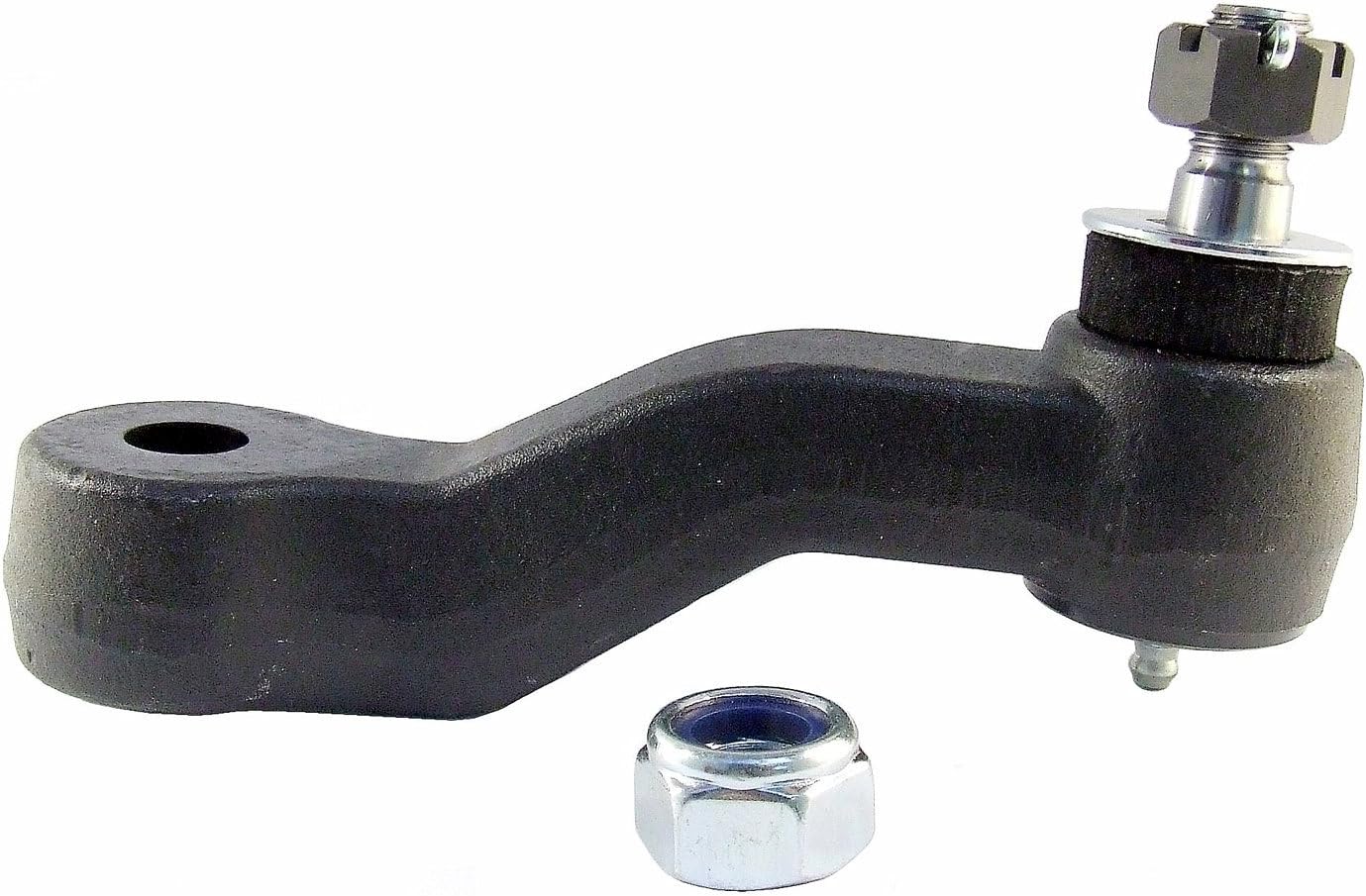
Figure 1: Delphi TA2407 Steering Idler Arm. This image shows the main component, a black metal arm with a ball joint and a mounting hole, along with a separate nut.

Figure 2: The official Delphi brand logo, typically found on product packaging and documentation.
Суурилуулалт (Тохируулга)
Installation of the Delphi TA2407 Steering Idler Arm requires specific automotive knowledge and tools. It is highly recommended that this component be installed by a qualified professional mechanic to ensure proper fitment, function, and vehicle safety. Refer to your vehicle's specific service manual for detailed, step-by-step installation procedures, torque specifications, and safety precautions.
Оруулсан бүрэлдэхүүн хэсгүүд:
- Steering Pitman Arm (Note: The product is an Idler Arm, but the included components list mentions "Steering Pitman Arm". Please verify the actual contents upon receipt.)
- (2) самар
Суурилуулалтын ерөнхий анхаарах зүйлс:
- Ensure the vehicle is safely supported on jack stands or a lift.
- Disconnect the battery if working near electrical components.
- Carefully remove the old idler arm, noting its orientation and connection points.
- Clean mounting surfaces thoroughly before installing the new component.
- Apply thread locker to fasteners as recommended by the vehicle manufacturer.
- Torque all fasteners to the vehicle manufacturer's specifications.
- After installation, a professional wheel alignment is strongly recommended to ensure correct steering geometry and tire wear.
Үйл ажиллагаа
The Delphi TA2407 Steering Idler Arm is a critical component of your vehicle's steering system. It supports the center link on the passenger side of the vehicle, allowing it to pivot as the steering wheel is turned. This ensures smooth and precise steering response. Once properly installed, the idler arm operates continuously as part of the steering linkage, requiring no direct user interaction.
Proper functioning of the idler arm contributes to:
- Stable steering and handling.
- Reduced play or looseness in the steering wheel.
- Even tire wear.
Засвар үйлчилгээ
The Delphi TA2407 Steering Idler Arm is designed for long-term durability and typically requires minimal maintenance after proper installation. However, regular inspection of all steering and suspension components is crucial for vehicle safety and performance.
Санал болгож буй засвар үйлчилгээний шалгалтууд:
- Харааны үзлэг: During routine vehicle service (e.g., oil changes, tire rotations), visually inspect the idler arm for any signs of damage, corrosion, or torn dust boots.
- Тоглолтын шалгалт: With the vehicle safely lifted, check for excessive play in the idler arm by attempting to move the component by hand. Any noticeable looseness or clunking indicates potential wear.
- Тосолгоо: While many modern idler arms are sealed and maintenance-free, some may have grease fittings. If present, lubricate with appropriate chassis grease according to your vehicle's service manual. The Delphi TA2407 is designed with precision-machined ball studs for smooth operation, implying a low-maintenance design.
Address any signs of wear or damage promptly to maintain vehicle safety and prevent further component degradation.
Алдааг олж засварлах
If you experience issues with your vehicle's steering after installing or while using the Delphi TA2407 Steering Idler Arm, consider the following common symptoms and potential causes:
| Шинж тэмдэг | Боломжит шалтгаан | Үйлдэл |
|---|---|---|
| Сул эсвэл замбараагүй жолооны хүрд | Worn idler arm, improper installation, other worn steering components (e.g., tie rods, pitman arm) | Inspect idler arm for play. Check other steering components. Ensure all fasteners are torqued correctly. |
| Clunking or popping noises from front suspension | Worn idler arm, loose fasteners, worn ball joints or bushings | Inspect idler arm and surrounding components for looseness or damage. Re-torque fasteners. |
| Дугуйны жигд бус элэгдэл | Misalignment after installation, worn idler arm affecting steering geometry, other suspension issues | Perform a professional wheel alignment. Inspect idler arm for excessive play. |
If troubleshooting does not resolve the issue, or if you are unsure about the diagnosis, it is strongly recommended to consult a certified automotive technician.
Үзүүлэлтүүд
| Атрибут | Дэлгэрэнгүй |
|---|---|
| Үйлдвэрлэгч | Делфи |
| Брэнд | Делфи |
| Загвар | Delphi TA2407 Steering Idler Arm |
| Зүйлийн жин | 3.37 фунт |
| Бүтээгдэхүүний хэмжээс | 8.3 x 3.9 x 2.4 инч |
| Загварын дугаар | TA2407 |
| Гаднах өнгөлгөө | Боловсруулсан |
| Үйлдвэрлэгчийн хэсгийн дугаар | TA2407 |
| OEM хэсгийн дугаар | MK6534, IA6534, K6534, JIA204 |
| ASIN | B06X6F2GPC |
| Эхний боломжтой огноо | 30 оны зургадугаар сарын 2017 |
Баталгаат болон дэмжлэг
Чухал баталгаат мэдээлэл:
Delphi products purchased through, from, or on Amazon do not qualify for Delphi’s standard LIMITED warranty. When purchased through, from, or on Amazon, any warranty on this product is offered by and is the sole responsibility of the seller identified on the shipment details of your order. Please review all warranties carefully and contact the identified seller for all warranty details and claims.
For product support or technical inquiries regarding the Delphi TA2407 Steering Idler Arm, please refer to the contact information provided by the seller from whom you purchased the product. For general information about Delphi automotive parts, you may visit the official Delphi website or consult their authorized distributors.


