1. Танилцуулга
This user manual provides detailed instructions for the installation, operation, and maintenance of the Transition Networks M/GE-PSW-SX-01 Mini Gigabit Ethernet Media Converter. This device is designed to convert 10/100/1000Base-TX Ethernet signals to 1000Base-SX fiber optic signals, enabling seamless integration of copper-based Ethernet networks with fiber optic infrastructure.
The M/GE-PSW-SX-01 is a compact and reliable solution for extending network distances or connecting different network segments using fiber optic cabling.
2. Онцлогууд
- Device Type: Fiber media converter
- Form Factor: External, compact design
- Холболтын технологи: Утастай
- Cabling Type Support: 10Base-T, 100Base-TX, 1000Base-T (copper) and 1000Base-SX (fiber)
- Data Link Protocol: 10Mb LAN, 100Mb LAN, GigE
- Мэдээлэл дамжуулах хурд: 1 Gbps хүртэл
- Optical Wave Length: 850 nm
- Maximum Transfer Distance: Up to 1800 ft (550 meters) over fiber
- Status Indicators: Comprehensive LEDs for Port status, Power, Link/Activity for both copper and fiber ports
3. Багцын агуулга
Багц нь ихэвчлэн дараахь зүйлийг агуулдаг.
- Transition Networks M/GE-PSW-SX-01 Media Converter Unit
- Гадаад цахилгаан адаптер
- Quick Start Guide or User Manual (this document)
Жич: Please check the packaging for any additional accessories or documentation.
4. Бүтээгдэхүүн дууссанview
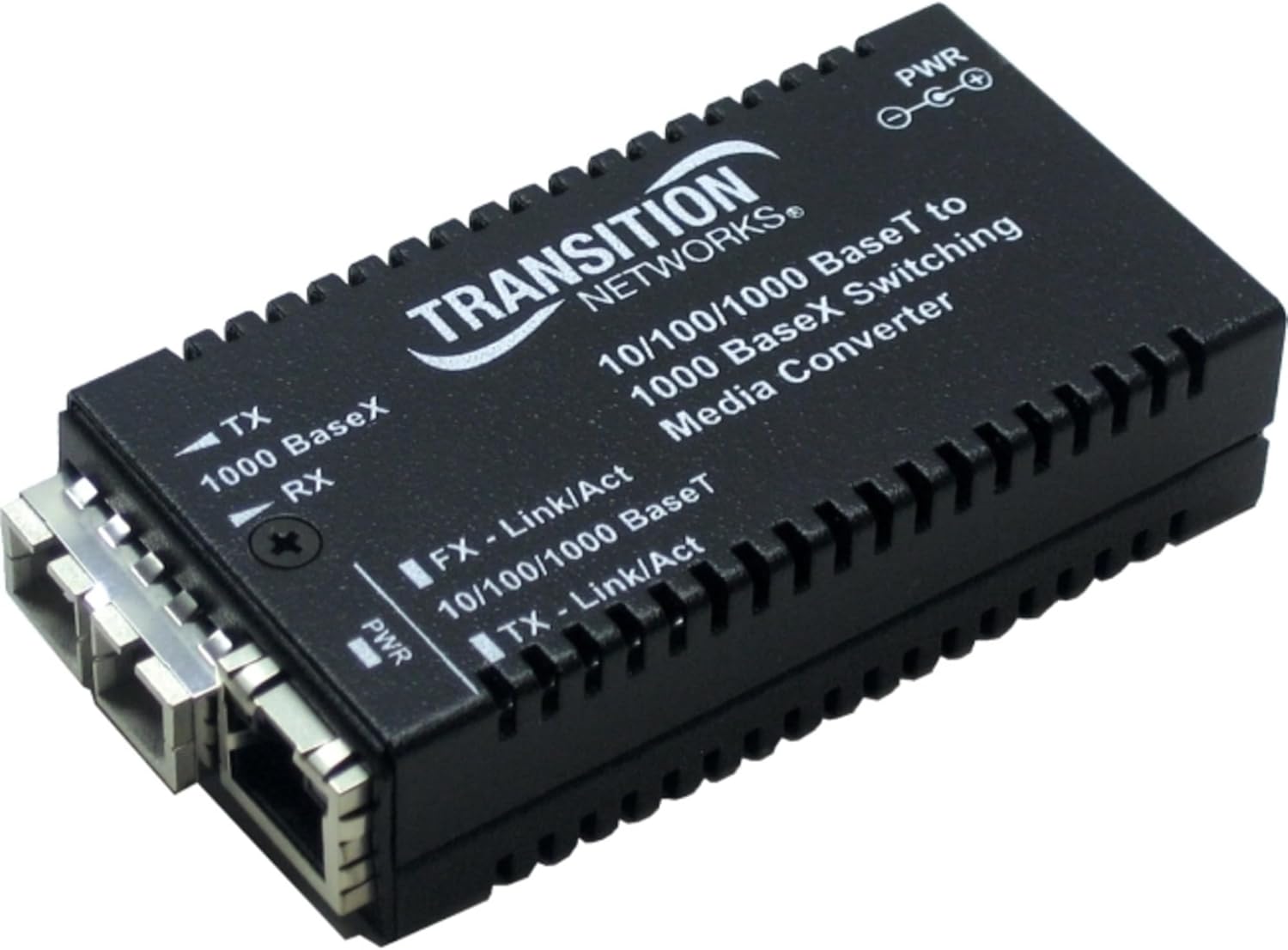
Зураг 1: Transition Networks M/GE-PSW-SX-01 Media Converter
This image displays the Transition Networks M/GE-PSW-SX-01 media converter. It is a compact black device with a ribbed casing. The front panel features an RJ45 Ethernet port and an SC fiber optic port. Several LED indicators are visible, including PWR (Power), FX-Link/Act (Fiber Link/Activity), and TX-Link/Act (Ethernet Link/Activity), along with labels for TX (Transmit) and RX (Receive) for the fiber connection.
LED үзүүлэлтүүд:
- PWR: Indicates power status. Lit when the device is powered on.
- FX - Link/Act: Indicates the status of the fiber optic (FX) port. Lit when a valid fiber link is established; blinks when data is being transmitted or received.
- TX - Link/Act: Indicates the status of the copper Ethernet (TX) port. Lit when a valid Ethernet link is established; blinks when data is being transmitted or received.
- 10/100/1000 BaseT: (Often integrated with TX-Link/Act or a separate LED) Indicates the speed of the copper Ethernet connection (10 Mbps, 100 Mbps, or 1000 Mbps).
- 1000 BaseX: (Often integrated with FX-Link/Act) Indicates the speed of the fiber optic connection (1000 Mbps).
5. Тохиргоо ба суурилуулалт
- Унтраах төхөөрөмжүүд: Before making any connections, ensure that all devices (network switches, routers, computers) are powered off.
- Шилэн кабелийг холбоно уу: Insert the SC fiber optic cable into the "FX" port of the media converter. Connect the other end of the fiber optic cable to your fiber network device (e.g., fiber switch, another media converter). Ensure the TX (Transmit) and RX (Receive) fibers are correctly matched.
- Ethernet кабель холбох: Insert a standard RJ45 Ethernet cable into the "TX" port of the media converter. Connect the other end of the Ethernet cable to your copper-based network device (e.g., computer, switch, router).
- Цахилгаан адаптерийг холбоно уу: Plug the provided external power adapter into the DC power input port on the media converter. Then, plug the power adapter into a suitable electrical outlet.
- Асаах төхөөрөмжүүд: Power on the media converter. The PWR LED should illuminate. Then, power on your connected network devices.
- Холболтуудыг баталгаажуулах: Check the Link/Act LEDs for both the FX and TX ports. They should illuminate steadily when a valid link is established and blink to indicate data activity.
Чухал: Always handle fiber optic cables with care. Avoid bending them sharply or touching the optical connectors.
6. Ашиглалтын заавар
Once properly installed, the M/GE-PSW-SX-01 operates automatically. It functions as a transparent converter between the copper Ethernet and fiber optic segments of your network.
Хяналтын байдал:
Observe the LED indicators on the device to monitor its operational status:
- Хатуу PWR LED indicates the unit is receiving power.
- Хатуу FX - Link/Act LED indicates a stable fiber optic link. Blinking indicates data transmission.
- Хатуу TX - Link/Act LED indicates a stable copper Ethernet link. Blinking indicates data transmission.
- If the Link/Act LEDs are off, it suggests a problem with the cable connection or the connected device.
7. Засвар үйлчилгээ
The Transition Networks M/GE-PSW-SX-01 is designed for reliable, maintenance-free operation. However, following these guidelines can help ensure its longevity:
- Байгаль орчин: Operate the device within its specified temperature and humidity ranges. Avoid extreme temperatures, direct sunlight, and high humidity.
- Цэвэрлэгээ: Keep the device clean and free of dust. Use a soft, dry cloth for cleaning the exterior. Do not use liquid cleaners or aerosols.
- Кабелийн менежмент: Ensure cables are not excessively bent or strained, especially fiber optic cables, as this can degrade performance or cause damage.
- Эрчим хүчний хангамж: Зөвхөн төхөөрөмжид дагалддаг тэжээлийн адаптерийг ашиглана уу.
8. Алдаа засах
| Асуудал | Боломжит шалтгаан | Шийдэл |
|---|---|---|
| Цахилгаан байхгүй (PWR LED унтарсан) | Цахилгаан адаптер холбогдоогүй эсвэл алдаатай; цахилгаан гаралтын асуудал. | Ensure power adapter is securely connected to the converter and a working electrical outlet. Try a different outlet. |
| No Link on Fiber (FX - Link/Act LED off) | Incorrect fiber connection (TX/RX swapped); damaged fiber cable; issue with connected fiber device. | Verify fiber cable connections (ensure TX connects to RX on the other end). Inspect fiber cable for damage. Check the status of the connected fiber device. |
| No Link on Ethernet (TX - Link/Act LED off) | Faulty Ethernet cable; incorrect cable type (e.g., crossover vs. straight-through); issue with connected Ethernet device. | Replace Ethernet cable. Ensure the cable is appropriate for the connection. Check the status of the connected Ethernet device. |
| Poor Performance/Intermittent Connection | Cable quality issues; network congestion; environmental interference. | Use high-quality cables. Check for sources of electromagnetic interference. Ensure network devices are not overloaded. |
9. Техникийн үзүүлэлтүүд
| Атрибут | Дэлгэрэнгүй |
|---|---|
| Загварын дугаар | M/GE-PSW-SX-01-NA |
| Төхөөрөмжийн төрөл | Шилэн медиа хөрвүүлэгч |
| Form Factor | Гадаад |
| Холболт | Утастай |
| Зэс портууд | 1 x RJ-45 (10/100/1000Base-T) |
| Шилэн портууд | 1 x SC (1000Base-SX) |
| Өгөгдлийн холболтын протокол | 10Mb LAN, 100Mb LAN, GigE |
| Өгөгдөл дамжуулах хурд | 1 Gbps |
| Оптик долгионы урт | 850 нм |
| Max Transfer Distance | 1800 фут (550 метр) |
| Бүтээгдэхүүний хэмжээс | 11 x 9.5 x 3.25 инч |
| Зүйлийн жин | 1 фунт |
| Локалчлал | Хойд Америк |
10. Баталгаат хугацаа ба дэмжлэг
For information regarding product warranty, technical support, or service, please contact Transition Networks directly or visit their official webсайт. Худалдан авалтын баримтаа баталгаат нэхэмжлэлд зориулж худалдан авалтын баталгаа болгон хадгална уу.
Transition Networks Contact Information:
- Webсайт: www.transition.com
- Refer to the product packaging or the Transition Networks webхамгийн сүүлийн үеийн холбоо барих мэдээллийг авах сайт.


