Танилцуулга
This manual provides instructions for the proper use and care of your Helios 77M-4 50mm F1.8 vintage lens. Designed for Sony E-mount cameras, this manual focus lens offers a classic photographic experience with its distinct optical characteristics. Please read this manual thoroughly before using the lens to ensure optimal performance and longevity.
Линзний бүрэлдэхүүн хэсгүүд
Familiarize yourself with the main components of your Helios 77M-4 lens.
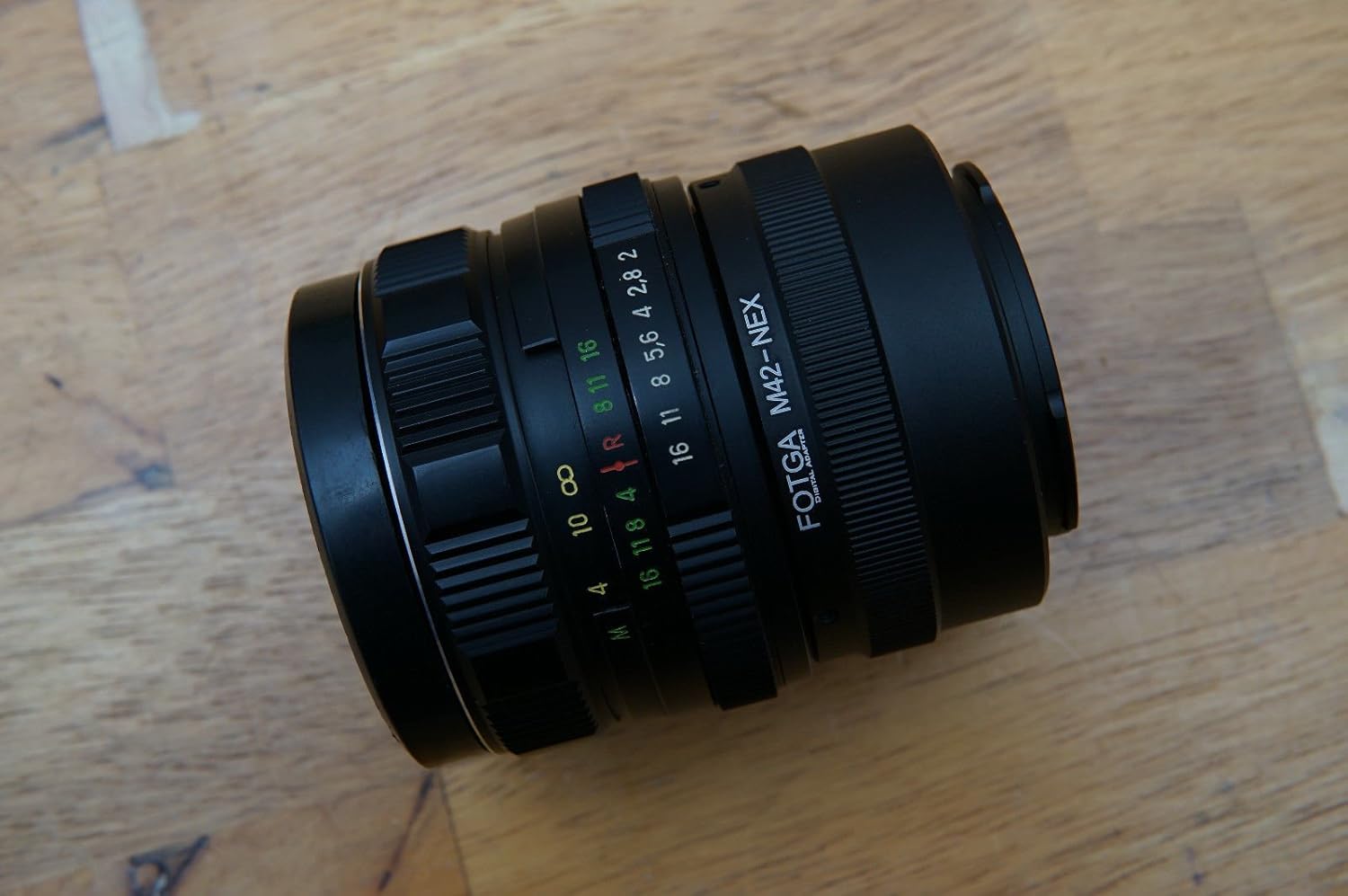
Image: The Helios 77M-4 50mm F1.8 lens, displaying its manual focus ring, aperture ring, and depth of field scale. This view highlights the robust construction and clear markings essential for manual operation.
- Фокус бөгж: Used to adjust the focus manually.
- Апертурын бөгж: Used to set the desired aperture (f-stop).
- Depth of Field Scale: Provides an indication of the depth of field at various apertures.
- Холбох цагираг: Линзийг камерын биетэй холбодог.
Тохиргоо
Линзийг суурилуулах
- Камераа унтраасан эсэхийг шалгаарай.
- Remove the rear lens cap from the Helios 77M-4 lens and the body cap from your Sony E-mount camera.
- Align the white index mark on the lens barrel with the corresponding white index mark on the camera body.
- Линзийг камерын бэхэлгээнд хийж, товших хүртэл цагийн зүүний дагуу эргүүлнэ үү. Линзийг хүчээр бүү хий.
- Once mounted, remove the front lens cap.

Image: The Helios 77M-4 lens securely attached to a Sony E-mount camera body. This illustrates the correct mounting position, ready for use.
Камерын тохиргоо
Since this is a manual lens, you will need to adjust your camera settings:
- Камераа тохируулна уу Гарын авлага (M) or Aperture Priority (A) горим.
- Идэвхжүүлэх "Release without lens" or "Shoot without lens" in your camera's menu, as the camera will not detect an electronic connection to the lens.
- Ашиглах талаар бодож үзээрэй "Focus Peaking" болон "Magnified View" features on your camera for easier manual focusing. Refer to your camera's manual for specific instructions on these features.
Линзийг ажиллуулах
Диафрагмыг тохируулах
The aperture is controlled directly on the lens using the aperture ring. Rotate the ring to select your desired f-stop. A wider aperture (smaller f-number like F1.8) allows more light and creates a shallower depth of field, ideal for portraits. A narrower aperture (larger f-number) allows less light and creates a deeper depth of field, suitable for landscapes.
Гараар төвлөрөх
To focus, rotate the focus ring on the lens barrel until your subject appears sharp in the viewfinder or on the LCD screen. Utilize your camera's focus peaking and magnification features for precise focusing, especially at wider apertures.
- Фокусын оргил үе: Highlights in-focus areas with a colored outline.
- Томруулсан View: Zooms in on a portion of the image for critical focus assessment.
Засвар үйлчилгээ
Линзийг цэвэрлэх
- Use a soft, lint-free microfiber cloth specifically designed for optical surfaces to clean the front and rear elements.
- Зөрүүд толботой бол линз цэвэрлэгч уусмалыг линз рүү шууд биш, даавуунд бага хэмжээгээр түрхээрэй.
- Зурагдахаас сэргийлж тоосны хэсгүүдийг арчихаасаа өмнө үлээгч сойз ашиглан арчина.
- Хэзээ ч зүлгүүрийн материал эсвэл хүчтэй химийн бодис хэрэглэж болохгүй.
Хадгалах
- Линзийг ашиглаагүй үед урд болон хойд линзний тагийг үргэлж хавсаргана.
- Линзийг нарны шууд тусгал, хэт температураас хол, сэрүүн, хуурай газар хадгална.
- If storing for extended periods, consider using a dehumidifying agent to prevent fungus growth.
Алдааг олж засварлах
| Асуудал | Боломжит шалтгаан | Шийдэл |
|---|---|---|
| Camera does not recognize lens / Cannot take photos | Manual lens, no electronic contacts. | Enable "Release without lens" or "Shoot without lens" in camera settings. |
| Зургууд бүдэг байна | Incorrect focus or camera shake. | Ensure proper manual focus using focus peaking/magnification. Use a faster shutter speed or tripod to prevent camera shake. |
| Images are too dark/bright | Incorrect exposure settings (aperture, shutter speed, ISO). | Adjust aperture on the lens. Adjust shutter speed and ISO on the camera to achieve desired exposure. |
| Dust or smudges on images | Бохир линзний элементүүд. | Clean lens elements carefully using a blower brush and microfiber cloth. |
Үзүүлэлтүүд
| Онцлог | Дэлгэрэнгүй |
|---|---|
| Загвар | Helios 77M-4 |
| Фокусын урт | 50 мм |
| Хамгийн их диафрагм | F1.8 |
| Линзний төрөл | Стандарт Ерөнхий линз |
| Тохиромжтой бэхэлгээ | Sony E-Mount (NEX, A7 series, 6500, a6300, a6000, a5100, a5000, a3000) |
| Фокусын төрөл | Гараар фокус |
| Үйлдвэрлэгч | 77M-4 (as per product data) |
Баталгаат болон дэмжлэг
This product is a vintage lens. Specific warranty information may vary depending on the seller and purchase conditions. Please refer to your purchase documentation for details regarding any applicable warranty.
For technical support or inquiries, please contact the retailer or the original manufacturer if contact information is available. As a vintage item, direct manufacturer support may be limited.