1. Танилцуулга
This user manual provides comprehensive instructions for the Comix CS-3302 12-Digit Desktop Calculator. Please read this manual thoroughly before using the calculator to ensure proper operation and to maximize its lifespan. This calculator is designed for general office and school use, featuring a large LCD display, dual power source, and various calculation functions.
2. Аюулгүй байдлын мэдээлэл
- Тооцоолуурыг хэт өндөр температур, нарны шууд тусгал эсвэл өндөр чийгшилд бүү байлга.
- Тооцоолуурыг унагаах эсвэл хүчтэй цохилтод өртөхөөс зайлсхий.
- Do not attempt to disassemble or modify the calculator. This will void the warranty.
- Use a soft, dry cloth for cleaning. Do not use liquid cleaners or abrasive materials.
- Бага насны хүүхдээс хол байлга.
3. Бүтээгдэхүүн дууссанview

Зураг 3.1: Урд view of the Comix CS-3302 Desktop Calculator, showing the large LCD display and full keypad.
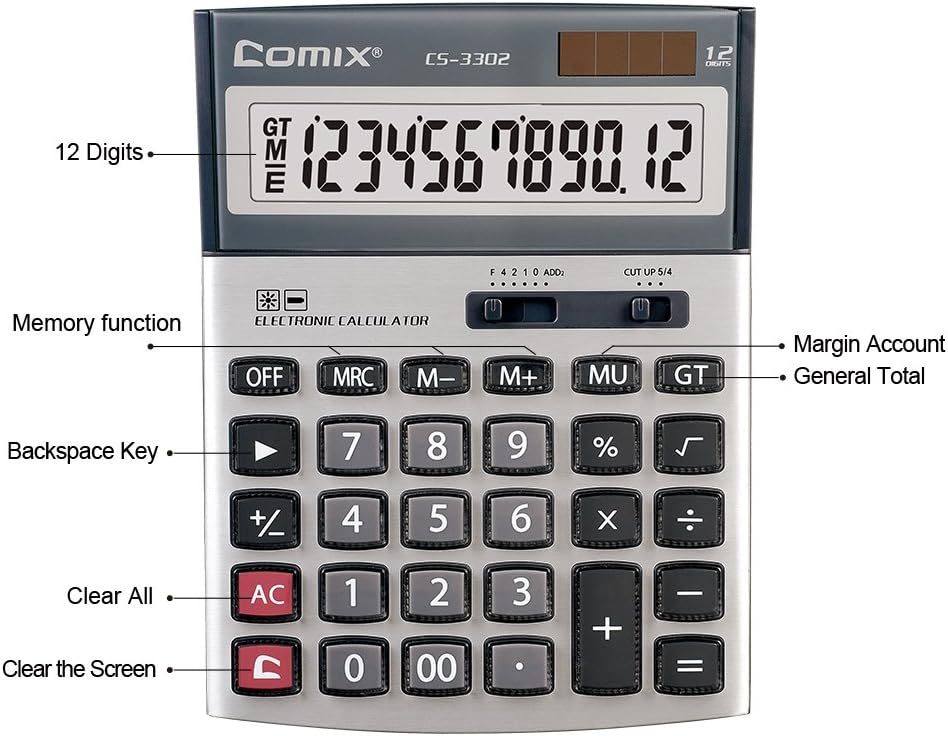
Зураг 3.2: Key functions and display features of the Comix CS-3302 Calculator, including 12 digits display, memory functions, and clear keys.

Зураг 3.3: Dimensions of the Comix CS-3302 Calculator, showing its compact and ergonomic design.

Зураг 3.4: Өнцөгтэй view of the Comix CS-3302 Calculator, highlighting its sleek profile болон түлхүүрийн зохион байгуулалт.

Зураг 3.5: Хажуу талын мэргэжлийнfile of the Comix CS-3302 Calculator, showing its slim design.

Зураг 3.6: Retail packaging of the Comix CS-3302 Calculator, highlighting key features like 12 digits, dual power, and acrylic keys.
4. Тохиргоо
4.1 Эрчим хүчний эх үүсвэр
The Comix CS-3302 calculator operates on a dual power system: solar and battery. The solar panel provides power in well-lit environments, while a single AA battery (not included) serves as an auxiliary power source for low-light conditions or when solar power is insufficient.
- Батерей суурилуулах: Locate the battery compartment on the back of the calculator. Open the cover and insert one AA battery, ensuring correct polarity (+/-). Close the battery compartment cover securely.
- Анхны асаалт: The calculator should power on automatically when sufficient light is available or with the battery installed. If not, press the Асаалттай/AC товч.
5. Ашиглалтын заавар
5.1 Үндсэн үйлдлүүд
- Нэмэлт (+): Эхний дугаарыг оруулаад, дарна уу +, хоёр дахь дугаарыг оруулаад, дараа нь дарна уу =.
- Хасах (-): Эхний дугаарыг оруулаад, дарна уу -, хоёр дахь дугаарыг оруулаад, дараа нь дарна уу =.
- Үржүүлэх (×): Эхний дугаарыг оруулаад, дарна уу ×, хоёр дахь дугаарыг оруулаад, дараа нь дарна уу =.
- Хэсэг (÷): Эхний дугаарыг оруулаад, дарна уу ÷, хоёр дахь дугаарыг оруулаад, дараа нь дарна уу =.
- Персенtage (%): Дугаар оруулаад, дарна уу × (эсвэл ÷), enter the percentage утгыг оруулаад дараа нь дарна уу %. Жишээ ньample, 200-ийн 10%-ийг тооцоолохын тулд 200 гэж оруулна уу × 10 %.
- Квадрат язгуур (√): Дугаарыг оруулаад дараа нь дарна уу √.
5.2 Тусгай чиг үүрэг
- Унтрааж байна: Powers off the calculator.
- АС (Бүгд тодорхой): Бүх оруулга болон санах ойг арилгаж, тооцоолуурыг анхны төлөвт нь буцаана.
- C (Цэвэр оруулга): Clears the last entered number or the current display value without affecting previous calculations or memory.
- Backspace (►): Оруулсан сүүлийн цифрийг устгана.
- M+ (Memory Plus): Харуулсан утгыг санах ойд нэмнэ.
- M- (санах ой хасах): Харуулсан утгыг санах ойгоос хасна.
- MRC (санах ойг эргүүлэн татах/цэвэрлэх): Press once to recall the memory value. Press twice to clear the memory.
- MU (Mark Up / Margin Account): Used for profit margin calculations. Enter cost, press MU, enter selling price, then press = to get the profit margin.
- GT (Их нийт): Accumulates the results of all calculations. Pressing GT displays the grand total.
- +/- (Тэмдгийн өөрчлөлт): Харуулсан тооны тэмдгийг (эерэгээс сөрөг, эсвэл сөрөгээс эерэг) өөрчилнө.
5.3 Decimal and Rounding Settings
The calculator features two slide switches at the top for controlling decimal places and rounding:
- Decimal Selector (F 4 2 1 0 ADD2):
- F (Floating Decimal): Displays all available decimal places.
- 4, 2, 1, 0: Sets the number of decimal places to 4, 2, 1, or 0 respectively.
- ADD2 (Add Mode): Automatically adds two decimal places to all results, useful for currency calculations.
- Rounding Selector (CUT UP 5/4):
- CUT (Cut Off): Truncates the number, discarding all digits beyond the set decimal places.
- UP (Round Up): Rounds up the last digit if there are any non-zero digits beyond the set decimal places.
- 5/4 (Round Half Up): Rounds up if the first discarded digit is 5 or greater, otherwise rounds down.
6. Засвар үйлчилгээ
- Цэвэрлэгээ: Wipe the calculator surface with a soft, dry cloth. For stubborn dirt, slightly dampen the cloth with water, but ensure no liquid enters the calculator. Do not use chemical cleaners.
- Хадгалах: When not in use for extended periods, store the calculator in a cool, dry place away from direct sunlight and extreme temperatures.
- Зай солих: If the display becomes dim or unresponsive in low light, replace the AA battery. Ensure the calculator is off before replacing the battery.
7. Алдаа засах
| Асуудал | Боломжит шалтгаан | Шийдэл |
|---|---|---|
| Дэлгэц хоосон эсвэл бүдэг байна. | Insufficient light for solar power, or low battery. | Move to a brighter area or replace the AA battery. |
| Буруу тооцооллын үр дүн. | Incorrect input, incorrect decimal/rounding settings, or memory interference. | дарна уу AC to clear all and restart. Check decimal and rounding switch positions. Ensure correct key presses. |
| Түлхүүрүүд хариу өгөхгүй байна. | Calculator frozen or physical damage. | Дарж үзээрэй OFF тэгээд Асаалттай/AC. If problem persists, remove and reinsert battery. If still unresponsive, contact support. |
8. Техникийн үзүүлэлтүүд
| Брэнд | Комикс |
| Загварын дугаар | CS-3302 (P/N: 11821063) |
| Дэлгэц | 12 оронтой LCD |
| Эрчим хүчний эх үүсвэр | Dual Power (Solar & 1x AA Battery - not included) |
| Материал | Нийлэг, Металл |
| Хэмжээ (L x W x H) | Ойролцоогоор 23.6 x 15.7 x 4.3 см (9.3 x 6.2 x 1.7 инч) |
| Жин | Ойролцоогоор 322 гр (0.71 фунт) |
| Ашиглалтын температур | -25 ℃ to +60 ℃ (-13 ℉ to +140 ℉) |
| UPC | 842064102524 |
9. Баталгаат хугацаа ба дэмжлэг
Comix products are designed for quality and durability. This product comes with a 3 жилийн баталгаат хугацаа худалдан авсан өдрөөс эхлэн хэвийн ашиглалтын үед гарсан материал болон хийцийн согогийг нөхнө.
For warranty claims, technical support, or any inquiries regarding your Comix CS-3302 calculator, please contact Comix customer service through their official website or the retailer where the product was purchased. Please have your proof of purchase and the product model number ready when contacting support.
For more information, visit the official Comix webсайт: www.comix.com


