1. Танилцуулга
This manual provides comprehensive instructions for the safe and effective use of the PCE Instruments PCE-170 A Light Meter. This device is designed for measuring illuminance (lux or foot-candles) in various environments, such as offices, factories, and outdoor settings. It features a wide measurement range, fast response time, and a compact design for ease of use.
Төхөөрөмжийг ажиллуулахаасаа өмнө энэхүү гарын авлагыг сайтар уншиж, ирээдүйд лавлах зорилгоор хадгална уу.
2. Аюулгүй байдлын мэдээлэл
Observe the following safety precautions to prevent injury and avoid damage to the device:
- Төхөөрөмжийг хэт өндөр температур, чийгшил, нарны шууд тусгалд бүү тавь.
- Хүчтэй чичиргээ, нөлөөллөөс зайлсхий.
- Төхөөрөмжийг нээх эсвэл өөрчлөхийг бүү оролдоорой. Бүх үйлчилгээг мэргэшсэн боловсон хүчинд шилжүүлээрэй.
- Keep the light sensor clean and free from obstructions to ensure accurate readings.
- Хэрэв төхөөрөмжийг удаан хугацаагаар ашиглахгүй бол ус гоожихоос сэргийлж зайгаа ав.
- Батерей болон төхөөрөмжийг орон нутгийн дүрэм журмын дагуу устгана уу.
3. Бүтээгдэхүүн дууссанview
The PCE-170 A Light Meter consists of a main unit with a display and control buttons, and an integrated light sensor.

Зураг 1: Урд view of the PCE-170 A Light Meter, showing the display, control buttons, and light sensor at the top.
3.1 Бүрэлдэхүүн хэсэг
- Гэрэл мэдрэгч: Located at the top of the device, protected by a white dome. This silicon photodiode measures incident light.
- LCD дэлгэц: A 5-digit display showing measurement values, units (lux/fc), and function indicators (e.g., AUTO RANGE, HOLD, MIN, MAX).
- Цахилгаан товч (асаах/унтраах): Төхөөрөмжийг асаах эсвэл унтраана.
- CAL товчлуур: Used for zero adjustment.
- HOLD товч: Дэлгэц дээрх одоогийн уншилтыг царцаана.
- fc/lx Button: Toggles between foot-candle (fc) and lux (lx) measurement units.
- RANGE товчлуур: Manually selects measurement ranges or activates auto-ranging.
- Зайны тасалгаа: Located at the rear, houses the 9V battery.

Зураг 2: Ойролцоогоор view of the LCD display, showing a reading of "534 lx" and "AUTO RANGE 4 000".
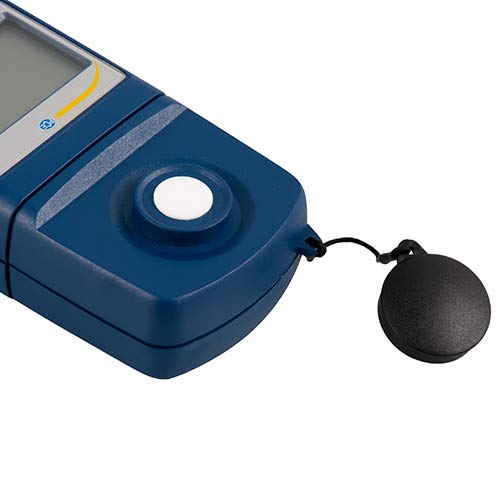
Зураг 3: Нарийвчилсан view of the light sensor at the top of the device, with its protective cap removed.
4. Тохиргоо
4.1 Батерей суурилуулах
- Төхөөрөмжийн арын хэсэгт зайны тасалгааны тагийг олоорой.
- Slide the cover open or unscrew it, depending on the model.
- Зөв туйлшралыг (+/-) ажиглан нэг 9V батерейг оруулна уу.
- Зайны тасалгааны тагийг найдвартай солино.
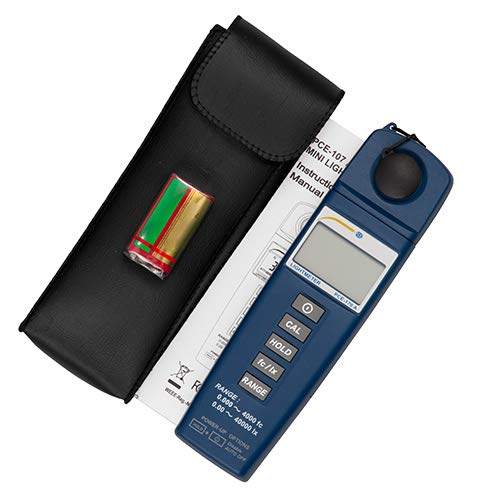
Зураг 4: The PCE-170 A Light Meter shown with its carrying case and the included 9V battery, ready for installation.
4.2 Анхдагч асаалттай
дээр дарна уу Хүч button to turn on the device. The display will illuminate and show a reading. If the battery symbol appears, replace the battery.
5. Ашиглалтын заавар
5.1 Хэмжилт хийх
- ашиглан төхөөрөмжийг асаана уу Хүч товч.
- Ensure the light sensor is clean and unobstructed.
- Position the light sensor at the location where illuminance is to be measured. Ensure the sensor is facing the light source directly for accurate readings.
- The current illuminance value will be displayed on the LCD.

Зураг 5: A user measuring light levels in an office environment with the PCE-170 A Light Meter.
5.2 Changing Measurement Units (fc/lx)
дээр дарна уу fc/lx button to toggle between foot-candles (fc) and lux (lx) units. The selected unit will be indicated on the display.
5.3 HOLD функц
дээр дарна уу БАРЬ button to freeze the current reading on the display. Press it again to release the hold and resume live measurements.
5.4 Zero Adjustment (CAL)
Тэг тохируулга хийхийн тулд:
- Place the light sensor in a completely dark environment (e.g., cover it with the protective cap or place it in a dark box).
- дээр дарна уу КАЛ button. The display should show "0.00" or a value very close to zero.
- If the display does not show zero, repeat the process.
5.5 Хүрээний сонголт
The device typically operates in auto-ranging mode. To manually select a range or cycle through available ranges, press the RANGE button. The display will indicate the active range. Press and hold the RANGE button to return to auto-ranging mode.
5.6 Min/Max Function (Power-Up Option)
The PCE-170 A supports Min/Max recording. To activate this feature, refer to the power-up options indicated on the device label (e.g., press and hold a specific button during power-on). This function records the minimum and maximum illuminance values detected during a measurement session.
6. Засвар үйлчилгээ
6.1 Цэвэрлэгээ
Wipe the device with a soft, dry cloth. Do not use abrasive cleaners or solvents. Keep the light sensor clean and free of dust or smudges, as this can affect measurement accuracy.
6.2 Хадгалалт
When not in use, store the PCE-170 A Light Meter in its carrying case in a cool, dry place, away from direct sunlight and extreme temperatures. Remove the battery if storing for extended periods.
7. Алдаа засах
| Асуудал | Боломжит шалтгаан | Шийдэл |
|---|---|---|
| Төхөөрөмж асахгүй байна. | Дууссан эсвэл буруу суурилуулсан зай. | Батерейны туйлшралыг шалгах эсвэл шинэ 9V батерейгаар солино уу. |
| Дэлгэц дээр "OL" (Хэт ачаалал) гарч ирнэ. | Light intensity exceeds the current measurement range. | Switch to a higher measurement range using the RANGE button, or move to a less intensely lit area. |
| Буруу уншилтууд. | Dirty sensor, incorrect zero adjustment, or sensor not facing light source correctly. | Clean the sensor, perform zero adjustment in darkness, and ensure the sensor is properly oriented. |
| Дэлгэц хоосон эсвэл анивчих. | Батерей бага. | 9V батерейг солино уу. |
8. Техникийн үзүүлэлтүүд
| Параметр | Үнэ цэнэ |
|---|---|
| Хэмжилтийн хүрээ | 0.00 ... 40,000 lux / 0.000 ... 4000 fc |
| Шийдвэр | 0.01 люкс / 0.001 фc |
| Нарийвчлал | ±3% of measurement value + 5 digits |
| Хэт ачааллын үзүүлэлт | "OL" |
| Хэмжилтийн хувь | 2 секунд тутамд |
| Ашиглалтын температур | 0 ... 40°C / 32 ... 104°F |
| Гэрэл мэдрэгч | Silicon photodiode, corrected cosine angle |
| Дэлгэц | 5 оронтой LCD |
| Эрчим хүчний эх үүсвэр | 9V зай (дагсан) |
| Хэмжээ | 33 x 54 x 196 мм / 1.3 x 2.1 x 7.7 инч |
| Жин | 180 g / <1 lb (approx. 9.17 ounces) |
8.1 Хүргэлтийн хамрах хүрээ
The standard delivery package includes:
- 1 x PCE-170 A Lux Meter
- 1 x 9V зай
- 1 х үүрэх цүнх
- 1 х хэрэглэгчийн гарын авлага (энэ баримт бичиг)
9. Баталгаат хугацаа ба дэмжлэг
PCE Instruments provides a warranty for this product against defects in materials and workmanship. For specific warranty terms and conditions, please refer to the warranty card included with your purchase or visit the official PCE Instruments website. For technical support, service, or calibration inquiries, please contact PCE Instruments customer service.
PCE Instruments US: Дэлгүүрт зочилно уу