Танилцуулга
Худалдан авалт хийсэнд баярлалааasing the OontZ Angle 3 Ultra Portable Bluetooth Speaker by Cambridge Soundworks. This manual provides essential information for setting up, operating, maintaining, and troubleshooting your speaker. Designed for superior sound quality and durability, the OontZ Angle 3 Ultra features a 14-watt output, rich bass, IPX7 waterproofing, and an impressive 30-meter Bluetooth range. Enjoy up to 20 hours of playtime on a single charge.

Image: The OontZ Angle 3 Ultra Portable Bluetooth Speaker, showcasing its sleek black, triangular design with control buttons on one end.
Тохиргоо
1. Оруулсан зүйлс
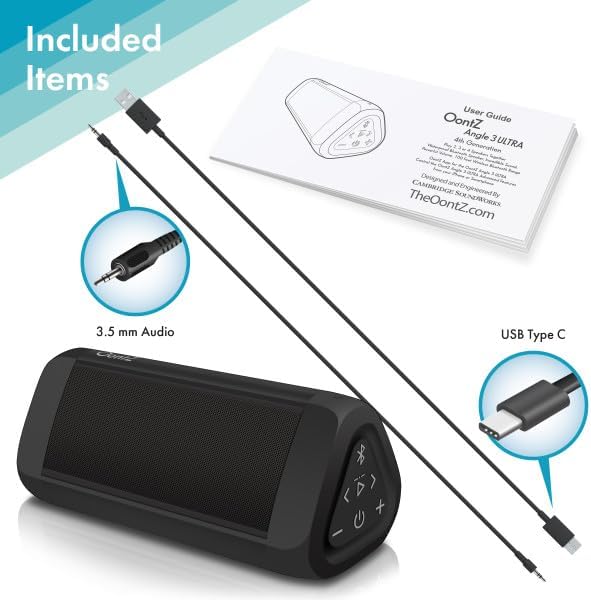
Image: The OontZ Angle 3 Ultra speaker along with its accessories: a Quick Start Guide, a 3.5mm audio cable, and a USB Type-C charging cable.
Before first use, ensure all components are present:
- OontZ Angle 3 Ultra Bluetooth Speaker
- Хурдан эхлүүлэх гарын авлага (Бүрэн гарын авлагыг онлайнаар авах боломжтой)
- 3.5 мм аудио кабель
- USB Type-C цэнэглэх кабель
2. Илтгэгчийг цэнэглэх
The speaker comes with a built-in rechargeable Lithium-ion battery. For optimal performance, fully charge the speaker before first use.
- Locate the charging port on the side of the speaker, protected by a rubber flap.
- Connect the supplied USB Type-C charging cable to the speaker's charging port.
- Connect the other end of the USB cable to a USB wall charger (not included) or a computer USB port.
- The charging indicator light will illuminate. A full charge takes approximately 20 hours for the first charge, and subsequent charges will be faster.

Зураг: Ойрын зураг view of the speaker's side, showing the 3.5mm AUX input and the USB-C charging port, typically protected by a waterproof flap.
3. Bluetooth хослол
Pair your OontZ Angle 3 Ultra with your Bluetooth-enabled device (smartphone, tablet, laptop).
- Цахилгаан товчийг удаан дарж чанга яригчийг асаана уу (⏻) until the indicator light flashes blue.
- Төхөөрөмжийнхөө Bluetooth тохиргоо руу очоод Bluetooth идэвхжсэн эсэхийг шалгаарай.
- Look for "OontZ Angle 3 Ultra" in the list of available devices and select it.
- Once paired, the speaker will emit a confirmation tone, and the indicator light will turn solid blue.
4. AUX оролтоор холбогдож байна
You can connect non-Bluetooth devices using the 3.5mm audio cable.
- 3.5 мм-ийн аудио кабелийн нэг үзүүрийг чанга яригчийн AUX IN порт руу холбоно уу.
- Нөгөө үзүүрийг төхөөрөмжийнхөө чихэвчний залгуур эсвэл аудио гаралтад холбоно уу.
- Чанга яригч автоматаар AUX горимд шилжинэ.
5. Pairing Two Speakers for Stereo Sound (OontZ Dual Wireless Stereo)
Enhance your audio experience by wirelessly connecting two OontZ Angle 3 Ultra speakers for impressive stereo separation.

Image: Two OontZ Angle 3 Ultra speakers positioned to provide stereo sound, with two individuals enjoying music in an outdoor setting.
- Ensure both OontZ Angle 3 Ultra speakers are charged and powered on.
- Disconnect both speakers from any previously paired Bluetooth devices.
- On one speaker (this will be the Left Channel), press and hold the Bluetooth button (Ⓑ) for 3 seconds until you hear a tone.
- On the second speaker (this will be the Right Channel), press and hold the Bluetooth button (Ⓑ) for 3 seconds until you hear a tone.
- The speakers will automatically connect to each other. Once connected, you will hear a confirmation tone, and the indicator lights on both speakers will turn solid blue.
- Now, connect your audio device to the Left Channel speaker via Bluetooth as described in "Bluetooth Pairing" above.
- For video audio, connect your device or TV to the Left Channel speaker using the 3.5mm audio cable.
Ашиглалтын заавар
1. Хяналтуудview
| Товч/Үзүүлэлт | Чиг үүрэг |
|---|---|
| ⏻ (Хүч) | Асаах/Унтраахын тулд дараад барина уу. |
| + (Эзлэхүүнийг нэмэгдүүлэх) | Дууг нэмэгдүүлэхийн тулд дарна уу. |
| - (Дууг бууруулах) | Дууг багасгахын тулд дарна уу. |
| ▷ (Тоглуулах/түр зогсоох) | Хөгжим тоглуулах/түр зогсоохын тулд дарна уу. |
| < (Өмнөх дуу) | Өмнөх дуу руу очихын тулд дарна уу. |
| > (Дараагийн дуу) | Дараагийн бичлэг рүү очихын тулд дарна уу. |
| Ⓑ (Bluetooth) | Press to disconnect current Bluetooth device and enter pairing mode. Press and hold for 3 seconds to initiate OontZ Dual Wireless Stereo pairing. |
| Заагч гэрэл | Flashes blue for pairing, solid blue for connected, red for charging. |
2. Гар чөлөөтэй дуудлага хийх
The OontZ Angle 3 Ultra has a built-in microphone for hands-free calls.
- Дуудлага ирэхэд хөгжим түр зогсоно. Дараах товчийг дарна уу ▷ дуудлагад хариулах товчлуур.
- Дуудлага дуусгахын тулд товчийг дарна уу ▷ дахин товчлуур.
- Дуудлагаас татгалзахын тулд the товчийг удаан дарна уу ▷ 2 секундын турш дарна уу.
- To activate Siri or Google Assistant, press and hold the ▷ button for 2 seconds when not on a call.
3. Waterproof Features (IPX7)
The OontZ Angle 3 Ultra is IPX7 certified, meaning it is fully waterproof and can be immersed in water up to 1 meter (3.3 feet) for up to 30 minutes.
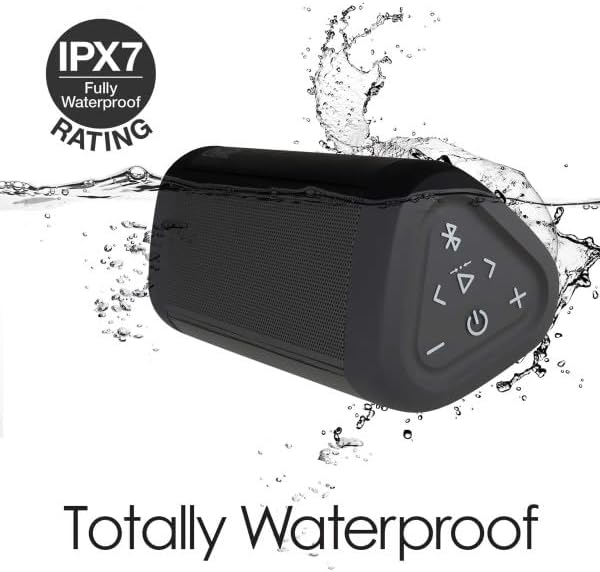
Image: The OontZ Angle 3 Ultra speaker shown partially submerged in water, illustrating its IPX7 waterproof capability.
- Ensure the rubber flap covering the charging and AUX ports is securely closed before exposing the speaker to water.
- Ideal for use by the pool, at the beach, or in the shower.
- Do not expose to salt water or chemicals. Rinse with fresh water after exposure to chlorinated water.
Засвар үйлчилгээ
1. Цэвэрлэгээ
Чанга яригчаа цэвэрлэхийн тулд зөөлөн, d ашиглана ууamp даавуу. Зүлгүүрийн цэвэрлэгч, уусгагчийг бүү ашигла.
2. Хадгалах
Чанга яригчийг нарны шууд тусгал, хэт температураас хол, сэрүүн, хуурай газар хадгална уу.
3. Зайны арчилгаа
Батерейны ашиглалтын хугацааг уртасгахын тулд:
- Байнга зайгаа бүрэн цэнэглэхээс зайлсхий.
- Батерейны ашиглалтын хугацааг уртасгахын тулд чанга яригчийг ашиглаагүй байсан ч тогтмол цэнэглээрэй.
- Do not expose the speaker to temperatures above 60°C (140°F).
Алдааг олж засварлах
| Асуудал | Шийдэл |
|---|---|
| Чанга яригч асахгүй. | Батерейг цэнэглэсэн эсэхийг шалгаарай. Чанга яригчийг USB-C кабель ашиглан тэжээлийн эх үүсвэрт холбоно уу. |
| Дуу байхгүй эсвэл дуу багатай. | Check the volume level on both the speaker and your connected device. Ensure the speaker is properly paired via Bluetooth or connected via AUX. |
| Bluetooth-ээр холбох боломжгүй. | Ensure the speaker is in pairing mode (flashing blue light). Turn off and on Bluetooth on your device. Move the speaker closer to your device. Disconnect from other Bluetooth devices. |
| Өндөр түвшний дууны гажуудал. | Reduce the volume on the speaker or your connected device. Ensure the audio source is not distorted. |
| OontZ Dual Wireless Stereo not connecting. | Ensure both speakers are disconnected from other Bluetooth devices. Follow the pairing steps carefully, ensuring both speakers are in pairing mode for stereo connection. |
Үзүүлэлтүүд
Key technical specifications for the OontZ Angle 3 Ultra Portable Bluetooth Speaker:
- Загварын дугаар: SWOA3UBLK
- Хэмжээ (L x W x H): 16.26 x 7.11 x 7.11 см (6.4 x 2.8 x 2.8 инч)
- Жин: 480 грамм (1.06 фунт)
- Чанга яригчийн гаралтын чадал: 14 ватт
- Bluetooth хувилбар: 4.2
- Утасгүй хүрээ: 30 метр (100 фут) хүртэл саадгүй
- Зайны хугацаа: Up to 20 hours (at 2/3 volume)
- Усны хамгаалалттай үнэлгээ: IPX7 (1 метр хүртэл гүнд 30 минутын турш шумбах боломжтой)
- Холболт: Bluetooth, 3.5mm AUX Input, USB-C Charging
- Оруулсан бүрэлдэхүүн хэсгүүд: Speaker, 3.5mm Audio Cable, USB-C Charging Cable, Quick Start Guide

Image: Diagram showing the dimensions of the OontZ Angle 3 Ultra speaker: 6.5 inches in length, 3 inches in width, and 2.75 inches in height.
Баталгаат болон дэмжлэг
For detailed warranty information and customer support, please visit the official OontZ website. The full localized manual is also available there.
Албан ёсны Webсайт: www.theoontz.com
Cambridge Soundworks is committed to providing high-quality audio products and customer satisfaction.


