Танилцуулга
The Paradox PMD2P/86 is a high-performance, supervised analog passive infrared (PIR) detector designed for reliable motion detection in security systems. This device features single optics, providing an 11x11 meter detection range with an 88.5° angle. It incorporates advanced technology for enhanced security and user convenience.
Гол онцлогууд нь:
- Patented Signal Processing: Utilizes pulse count processing for accurate detection.
- Температурын автомат нөхөн олговор: Ensures consistent performance across varying environmental temperatures.
- Energy Saving Transmission Block: After two detections within 5 minutes, transmission is blocked for 3 minutes to conserve battery life.
- High Pet Immunity: Designed to ignore pets weighing up to 18 kg, reducing false alarms.
- Tamper and Anti-Deterioration Switches: Provides additional security against unauthorized access or damage.
- Эрчим хүчний хангамж: Supplied with 3 AA alkaline batteries for immediate use.
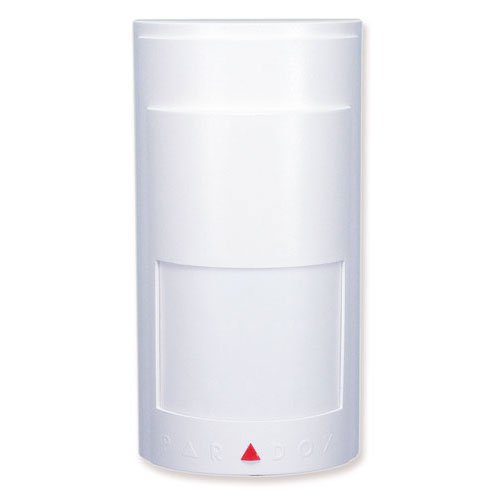
Энэ зураг нь урд талыг харуулж байна view of the Paradox PMD2P/86 detector, highlighting its compact design and lens.
Тохиргоо ба суурилуулалт
1. Батарейг задлах, суурилуулах
Carefully remove the detector from its packaging. The PMD2P/86 is supplied with 3 AA alkaline batteries. Open the detector casing according to the instructions provided in the full manual (not included here) and insert the batteries, ensuring correct polarity. Close the casing найдвартай.
2. Суурилуулах байршил
Choose a mounting location that provides optimal coverage of the area to be protected. Consider the following:
- Өндөр: Typically mounted at 2.1 to 2.7 meters (7 to 9 feet) above the floor.
- Илрүүлэх хүрээ: The detector offers an 11x11 meter range with an 88.5° angle. Position it to cover entry points and valuable areas.
- Гэрийн тэжээвэр амьтдын дархлаа: For optimal pet immunity (up to 18 kg), ensure the detector is mounted at the recommended height and that pets cannot climb onto objects within the detection zone that would place them at a higher level.
- зайлсхийх: Do not aim the detector directly at heat sources, air vents, or windows that receive direct sunlight, as these can cause false alarms.
3. Илрүүлэгчийг суурилуулах
Use the provided mounting hardware to securely attach the detector to a wall or corner. Ensure the tamper switch is properly engaged once the detector is mounted to prevent unauthorized removal.
4. Системийн нэгдэл
The PMD2P/86 is a supervised analog detector. Refer to your security system's control panel manual for instructions on how to enroll or integrate new wireless devices. The detector will communicate with the control panel at 868MHz.
Ашиглалтын заавар
Илрүүлэх зарчим
The Paradox PMD2P/86 detects motion by sensing changes in infrared energy (body heat) within its detection zone. When a moving heat source, such as a person, crosses the detection pattern, the detector triggers an alarm signal to the connected security system.
Амьтны дархлаа
The advanced design of the PMD2P/86 provides high immunity to pets weighing up to 18 kg. This means that normal movement of small to medium-sized pets within the protected area should not trigger an alarm. For best performance, ensure pets cannot get too close to the detector or climb onto furniture that would place them in the upper detection zones.
Эрчим хүчний хэмнэлтийн горим
To extend battery life, the detector incorporates an energy-saving feature. After two detections occur within a 5-minute period, the detector will enter a transmission block mode for 3 minutes. During this time, it will continue to detect motion but will not transmit further signals to the control panel. This prevents excessive battery drain in high-traffic areas.
Хяналт
As a supervised detector, the PMD2P/86 periodically sends a supervisory signal to the control panel. This confirms that the detector is operational and within communication range. If the control panel does not receive a supervisory signal within a set timeframe, it will indicate a trouble condition.
Засвар үйлчилгээ
Зай солих
The detector is powered by 3 AA alkaline batteries. When the battery level is low, the detector will send a low battery signal to your security system's control panel. Replace all three batteries promptly with new, high-quality alkaline AA batteries. Always ensure correct polarity during installation.
Цэвэрлэгээ
Periodically clean the detector's lens and casing with a soft, dry cloth. Do not use abrasive cleaners, solvents, or spray directly onto the unit, as this can damage the optics or electronic components.
Тогтмол туршилт
It is recommended to test the detector's functionality periodically (e.g., once a month) to ensure it is operating correctly. Refer to your security system's manual for instructions on how to perform a walk test or system test.
Алдааг олж засварлах
No Detection / Detector Not Responding
- Батерейг шалгах: Батерейг зөв суулгаж, дуусаагүй эсэхийг шалгаарай. Шаардлагатай бол солино.
- Саад бэрхшээл: Verify that there are no physical obstructions blocking the detector's field of view.
- Суурилуулах өндөр: Confirm the detector is mounted at the recommended height.
- Дохионы хүрээ: Ensure the detector is within the wireless communication range of the control panel. Relocate if necessary.
- Элсэлт: Confirm the detector is properly enrolled with the security system.
Хуурамч дохиолол
- Дулааны эх үүсвэрүүд: Check for heat sources (heaters, direct sunlight, air vents) within the detection zone. Relocate the detector or adjust its aim.
- Гэрийн тэжээвэр амьтад: Ensure pets are not exceeding the 18 kg immunity limit or climbing onto objects that place them higher in the detection zone.
- Ноорог: Strong drafts can sometimes cause false alarms. Seal windows or doors if this is a factor.
- Чичиргээ: Excessive vibrations near the detector can sometimes cause issues.
Батерей багатай заалт
If your control panel indicates a low battery for the PMD2P/86, replace all three AA alkaline batteries immediately. Do not mix old and new batteries.
Техникийн үзүүлэлтүүд
| Онцлог | Тодорхойлолт |
|---|---|
| Загвар | PMD2P/86 |
| Илрүүлэлтийн төрөл | Supervised Analog Passive Infrared (PIR) |
| Оптик | Single Optics |
| Илрүүлэх хүрээ | 11 x 11 метр (35 x 35 фут) |
| Илрүүлэх өнцөг | 88.5° |
| Амьтны дархлаа | 18 кг хүртэл (40 фунт) |
| Давтамж | 868 МГц |
| Эрчим хүчний эх үүсвэр | 3 х АА шүлтлэг батерей (дагсан) |
| Tamper Хамгаалалт | Эсрэг тamper and anti-deterioration switches |
| Хэмжээ (ойролцоогоор) | 13.2 x 6.8 x 4.8 см (5.2 x 2.7 x 1.9 инч) |
| Жин (ойролцоогоор) | 160 грамм (0.35 фунт) |
| Үйлдвэрлэгч | ПАРАДОкс |
Баталгаат болон дэмжлэг
For specific warranty information, please refer to the documentation provided with your purchase or contact your authorized Paradox dealer or installer. Warranty terms typically cover manufacturing defects for a specified period from the date of purchase.
If you encounter any issues that cannot be resolved using the troubleshooting guide, or require technical assistance, please contact your security system installer or Paradox customer support. Ensure you have your product model number (PMD2P/86) and purchase details available when seeking support.


