Танилцуулга
This manual provides essential instructions for the safe and effective use of your Sky Viper Drone Battery USB Charger. Please read this manual thoroughly before operating the charger to ensure proper function and longevity of your drone batteries.

Image: A set of two black USB chargers for Sky Viper drone batteries, each with a USB-A plug on one end and a small two-pin connector on the other, connected by a black cable.
Тохиргоо
Follow these steps to prepare your USB charger for use:
- Баглаа задлах: Carefully remove the USB charger from its packaging.
- Шалгах: Цэнэглэгч дээр харагдахуйц гэмтэл байгаа эсэхийг шалгана уу. Гэмтсэн тохиолдолд хэрэглэж болохгүй.
- Эрчим хүчний эх үүсвэр: Connect the USB-A plug of the charger to a compatible USB power source (e.g., computer USB port, USB wall adapter, power bank). Ensure the power source provides a stable 5V output.
- Заагч гэрэл: Once connected to a power source, the charger's indicator light (if present) may illuminate, indicating it is ready for use.
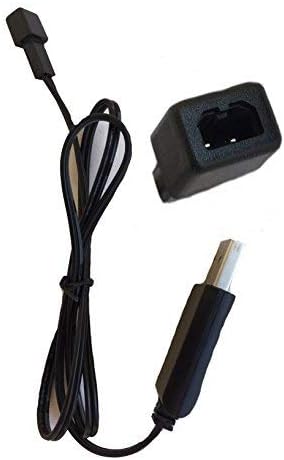
Image: A single black USB charger shown from the side, highlighting the USB-A connector and the small drone battery connector.
Video: This video demonstrates the Sky Viper USB charger, showing its components and how it can be handled. It highlights the USB-A connector and the drone battery connector.
Ашиглалтын заавар
To charge your Sky Viper drone battery:
- Батерейг холбох: Carefully align the two-pin connector of the charger with the corresponding port on your Sky Viper drone battery. Gently push to ensure a secure connection. Do not force the connection.
- Цэнэглэх үзүүлэлт: The charger's indicator light will typically change color or state to indicate that charging is in progress. Refer to your specific drone battery's manual for details on its charging status indicators.
- Цэнэглэх хугацаа: Charging times may vary depending on the battery's capacity and its current charge level. Avoid overcharging. Disconnect the battery once fully charged.
- Салгах: Once charging is complete, carefully disconnect the battery from the charger, then disconnect the charger from the USB power source.
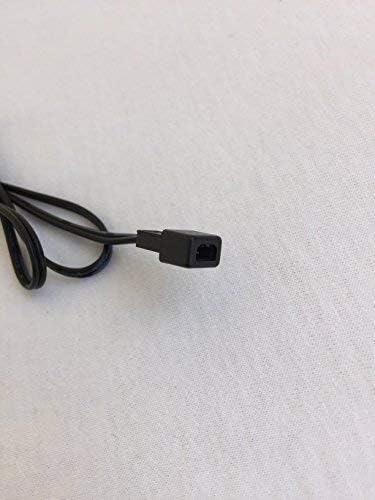
Зураг: Ойрын зураг view of the small two-pin connector on the charger cable, which connects to the drone battery.

Image: The USB charger is displayed alongside a Sky Viper drone, illustrating the product's intended use and compatibility.
Засвар үйлчилгээ
To ensure the longevity and proper function of your charger:
- Цэвэрлэгээ: Цэнэглэгчийг хуурай, зөөлөн даавуугаар арчина. Шингэн цэвэрлэгч эсвэл уусгагч хэрэглэж болохгүй.
- Хадгалах: Цэнэглэгчийг нарны шууд тусгал, хэт температураас хол, сэрүүн, хуурай газар хадгална.
- Харьцуулах: Avoid bending or twisting the cable excessively. Do not pull on the cable to disconnect it; always grasp the plug.
- Шалгалт: Кабель болон холбогчийг элэгдэл, гэмтлийн шинж тэмдэг байгаа эсэхийг үе үе шалгаж байгаарай.
Алдааг олж засварлах
| Асуудал | Боломжит шалтгаан | Шийдэл |
|---|---|---|
| Цэнэглэгчийн заагч гэрэл асахгүй байна. | No power from USB source, faulty USB port, or damaged charger. | Try a different USB power source or port. Ensure the USB plug is fully inserted. If the issue persists, the charger may be faulty. |
| Батерейг цэнэглэхгүй байна. | Loose battery connection, incompatible battery, or battery fault. | Ensure the battery connector is securely attached to the charger. Verify the battery is compatible with this charger. Test with a different battery if available. |
| Удаан цэнэглэж байна. | Low power USB source. | Use a USB power source with higher output (e.g., a wall adapter instead of a computer port). |
Үзүүлэлтүүд
- Брэнд: Sky Viper
- Загварын дугаар: 00
- Оролтын хэмжээtage: 240 вольт
- Гаралтын ботьtage: 3.7 вольт
- Өнгө: Хар
- Барааны жин: 0.352 унц
- Багцын хэмжээ: 3.74 x 2.28 x 0.51 инч
- UPC: 798896225866
- Эхний боломжтой огноо: 16 оны есдүгээр сарын 2017
Note: The "Input Voltage: 240 Volts" specification likely refers to the AC input for a compatible wall adapter, as USB power sources typically provide 5V DC. The charger itself is designed to accept 5V DC from a USB port.
Баталгаат болон дэмжлэг
For warranty information and customer support, please refer to the official Sky Viper website or contact the retailer where the product was purchased. Specific warranty terms and support contact details are not provided in this manual.


