Танилцуулга
This manual provides detailed instructions for the setup, operation, and maintenance of your Zebronics ZEB-BT6860RUCF 5.1 Channel Multimedia Speaker System. Please read this manual thoroughly before using the product to ensure proper functionality and to maximize your audio experience.
Багцын агуулга
Доор жагсаасан бүх зүйл таны багцад байгаа эсэхийг шалгаарай.
- 1 x Subwoofer Unit
- 5 x Satellite Speaker Units
- 1 x Алсын удирдлага
- Audio Cables (AUX, RCA)
- Хэрэглэгчийн гарын авлага
Бүтээгдэхүүн дууссанview

Image: The complete Zebronics ZEB-BT6860RUCF 5.1 speaker system, including the subwoofer, five satellite speakers, and the remote control.

Image: Close-up of the subwoofer's front panel, illustrating the 'Input', 'Previous', 'Next', 'Play', 'Volume' controls, along with the SD/MMC card slot and USB port.
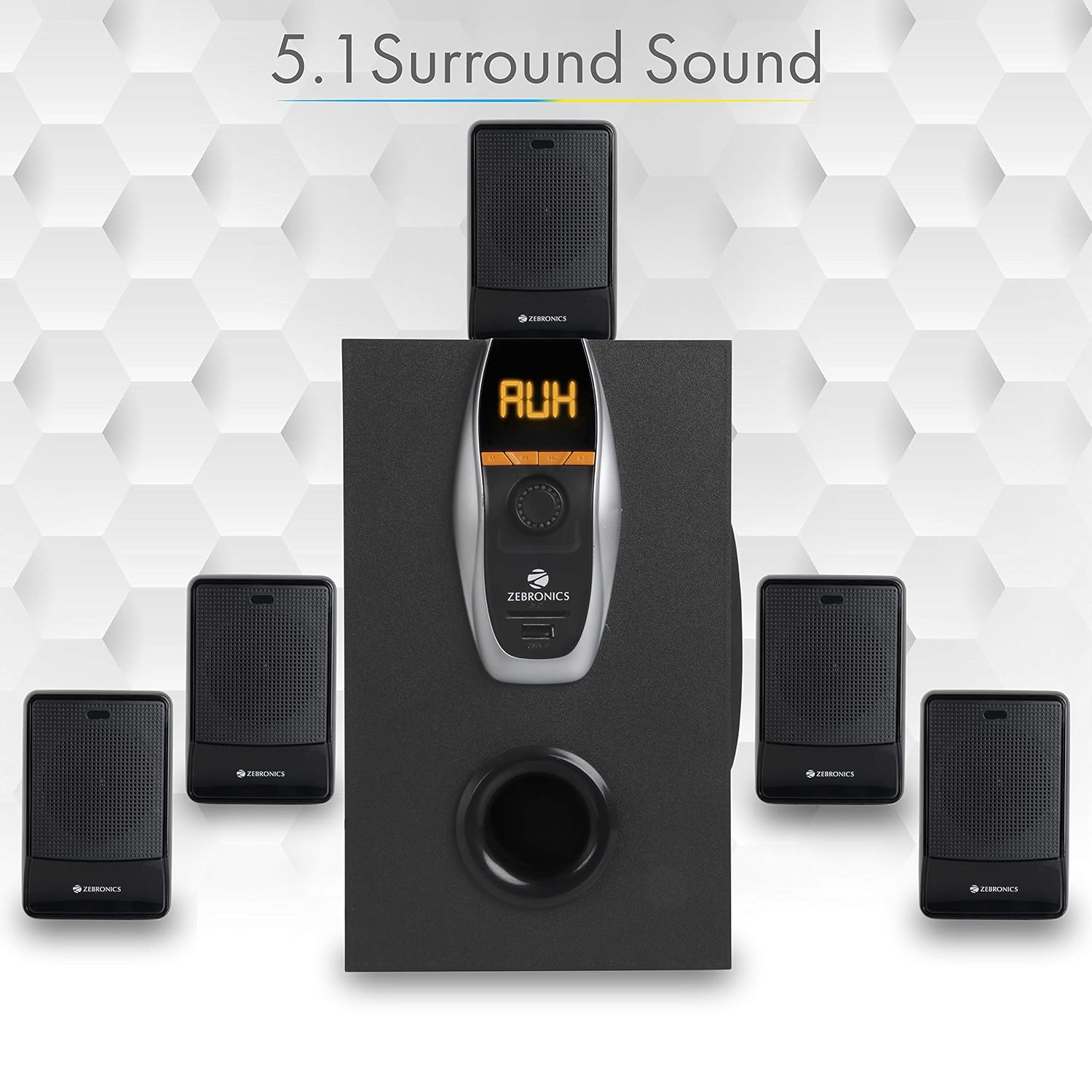
Image: A visual representation of the recommended 5.1 surround sound speaker setup, showing the central subwoofer and the five satellite speakers positioned for optimal audio distribution.

Зураг: Нарийвчилсан view of the subwoofer, highlighting its wooden enclosure design, which contributes to sound quality.

Image: The rear panel of the subwoofer, showing the various input and output ports, including Stereo Input, 5.1 Input, Satellite Output terminals, and the main Power Switch.

Image: A diagram illustrating the physical dimensions of the subwoofer unit: 160 mm (Width), 240 mm (Depth), and 277 mm (Height).
Тохируулах заавар
- Илтгэгчийн байршил: Position the subwoofer centrally. Place the five satellite speakers around your listening area for optimal 5.1 surround sound. Refer to the 5.1 Surround Sound Speaker Placement image for guidance.
- Хиймэл дагуулын чанга яригчийг холбох: Connect each of the five satellite speakers to the corresponding output terminals on the rear panel of the subwoofer. Ensure correct polarity (positive to positive, negative to negative).
- Эрчим хүчний холболт: Connect the power cable to the subwoofer and then plug it into a suitable power outlet.
- Аудио эх үүсвэрийн холболт:
- For 5.1 Input: Use the provided RCA cables to connect your 5.1 channel audio source (e.g., DVD player, compatible TV) to the 5.1 Input ports on the subwoofer's rear panel.
- For Stereo/AUX Input: Use a 3.5mm to RCA cable to connect your stereo audio source (e.g., computer, laptop, MP3 player) to the Stereo Input (AUX) ports on the subwoofer's rear panel.
- Асаах: Flip the power switch on the rear panel of the subwoofer to the 'ON' position. The front display will illuminate.
Ашиглалтын заавар
Урд самбарын удирдлага
The subwoofer's front panel features controls for various functions:
- Оруулах: Press to cycle through input modes (Bluetooth, USB, SD, AUX, FM).
- Өмнөх: Short press for previous track/station. Long press for fast rewind (USB/SD).
- Дараа нь: Short press for next track/station. Long press for fast forward (USB/SD).
- Тоглуулах/түр зогсоох: Play or pause audio playback. In FM mode, long press to auto-scan and save stations.
- Эзлэхүүний товчлуур: Үндсэн дууны түвшинг тохируулахын тулд эргүүлнэ үү.
- USB порт: MP3 тоглуулахын тулд USB флаш диск оруулна уу.
- SD/MMC картны үүр: Insert an SD or MMC card for MP3 playback.
Алсын удирдлагын функцууд
The included remote control provides convenient access to all speaker functions:
- Эрчим хүч: Turn the speaker system On/Off.
- Горим: Select input source (BT/USB/SD/AUX/FM).
- Эзлэхүүн +/-: Үндсэн дууны хэмжээг тохируулна уу.
- Дууг хаах: Дууны дууг хаах эсвэл нээх.
- Тоглуулах/түр зогсоох: Тоглуулахыг хянах.
- Өмнөх/Дараагийн: Navigate tracks or FM stations.
- Тэгшитгэл: Select equalizer presets (if available).
- Тоон түлхүүрүүд: Direct track selection (USB/SD) or FM station input.
Bluetooth ажиллагаа
- Power on the speaker system.
- Press the 'Input' button on the front panel or 'Mode' button on the remote until 'BT' mode is selected. The display will show 'BT' and a pairing indicator will flash.
- Enable Bluetooth on your mobile device or computer and search for available devices.
- Select 'ZEB-BT6860RUCF' from the list of devices.
- Хослуулсны дараа чанга яригч холболтыг баталгаажуулах бөгөөд та төхөөрөмжөөсөө аудио тоглуулж эхлэх боломжтой.
USB/SD картын ажиллагаа
- Insert a USB flash drive or SD/MMC card (up to 32GB) containing MP3 audio files into the respective port/slot on the front panel.
- The speaker system will automatically switch to USB or SD mode and begin playing the first track. If not, press the 'Input' or 'Mode' button to select the correct source.
- Use the 'Previous', 'Next', and 'Play/Pause' buttons on the front panel or remote control to manage playback.
AUX оролтын ажиллагаа
- Connect your audio source to the AUX input ports on the rear panel using an appropriate audio cable.
- Press the 'Input' button on the front panel or 'Mode' button on the remote until 'AUX' mode is selected.
- Холбогдсон төхөөрөмжөөсөө аудио тоглуулаарай.
FM радиогийн үйл ажиллагаа
- Press the 'Input' button on the front panel or 'Mode' button on the remote until 'FM' mode is selected.
- To auto-scan and save available FM stations, long press the 'Play/Pause' button on the front panel or remote control. The system will scan and store stations automatically.
- Use the 'Previous' and 'Next' buttons to navigate through the saved FM stations.
Засвар үйлчилгээ
- Цэвэрлэгээ: Чанга яригчийн гадаргууг цэвэрлэхийн тулд зөөлөн, хуурай даавуу ашиглана уу. Зүлгүүрийн цэвэрлэгч, лав, уусгагчийг бүү ашигла.
- Агааржуулалт: Ensure the subwoofer and satellite speakers have adequate ventilation. Do not block any ventilation openings.
- Байгаль орчин: Avoid exposing the speaker system to direct sunlight, extreme temperatures, high humidity, or dusty environments.
- Унтраах: Always power off the system and unplug it from the power outlet before cleaning or if it will be unused for an extended period.
Алдааг олж засварлах
| Асуудал | Боломжит шалтгаан | Шийдэл |
|---|---|---|
| Хүч чадалгүй | Цахилгааны кабель холбогдоогүй байна; Цахилгаан унтраалга унтарсан; Цахилгааны залгуур эвдэрсэн. | Ensure power cable is securely connected. Turn the power switch ON. Test the power outlet with another device. |
| Дуу алга | Volume too low; Incorrect input mode; Audio cables loose/faulty; Mute activated. | Increase volume. Select correct input mode. Check audio cable connections. Deactivate mute function. |
| Bluetooth холбогдоогүй байна | Speaker not in BT mode; Device Bluetooth off; Already connected to another device; Interference. | Ensure speaker is in BT mode. Turn on device Bluetooth. Disconnect from other devices. Move closer to the speaker. |
| USB/SD тоглуулах асуудал | Буруу file формат; Эвдэрсэн files; USB/SD card not inserted correctly; Max memory size exceeded. | Баталгаажуулах files are MP3 format. Check for corrupted files. Reinsert USB/SD card. Use cards up to 32GB. |
| Алсын удирдлага ажиллахгүй байна | Батерей дууссан; Бөглөрөл; Алсын мэдрэгч бөглөрсөн. | Replace remote control batteries. Remove any obstructions between remote and speaker. Ensure remote sensor on subwoofer is clear. |
| FM хүлээн авах чадвар муу байна | Сул дохио; Антенн сунгаагүй байна. | Extend the FM antenna fully. Try repositioning the antenna or the speaker system for better signal. |
Үзүүлэлтүүд
| Онцлог | Тодорхойлолт |
|---|---|
| Нийт гаралтын хүч (RMS) | 70 ватт |
| Сабвуферийн гаралтын хүч | 40 ватт |
| Хиймэл дагуулын гаралтын хүч | 6 ватт х 5 |
| Давтамжийн хариу үйлдэл | 35Гц - 20КГц |
| Мэдрэмж | 600мкв |
| Bluetooth хувилбар | 2.1 + EDR |
| USB/SD Max. Memory Size | 32 ГБ |
| USB/SD File Форматын дэмжлэг | MP3 |
| Холболтын сонголтууд | Bluetooth, USB, SD/MMC, AUX, FM |
| Тохиромжтой төхөөрөмжүүд | Desktop, Laptop, MP3 Player, DVD Players, Televisions |
| Сабвуферийн хэмжээс (D x W x H) | 35D x 39W x 45H Centimeters (Product Dimensions) |
| Зүйлийн жин | 5.4 кг |
| Эрчим хүчний хэрэглээ | 45 Вт |
| Хяналтын арга | Алсын удирдлага, Төхөөрөмжийг асаах товчлуурууд |
| Гарал үүслийн улс | Хятад |
Баталгаат болон дэмжлэг
Your Zebronics ZEB-BT6860RUCF Multimedia Speaker System comes with a 1-year carry-in warranty to the service center from the date of purchase. Please retain your purchase receipt for warranty claims.
For technical support, service, or warranty inquiries, please contact Zebronics customer service. Refer to the official Zebronics webхамгийн сүүлийн үеийн холбоо барих мэдээллийг сайт эсвэл таны бүтээгдэхүүний сав баглаа боодолоос авна уу.
Импортлогч: ZEBRONICS INDIA PVT LTD, NO : 118, POONAMMALE HIGH ROAD , VEPERY


