1. Танилцуулга
This manual provides essential information for the safe and efficient operation of your InFocus IN112XV Presentation Projector. The IN112XV is designed for business presentations and educational use, offering a long lamp life, high brightness, and clear image quality.
- Өргөтгөсөн Лamp Амьдрал: Enjoy over 15,000 hours of viewing.
- Өндөр тод байдал: 3800 lumens for clear images in various lighting conditions.
- Ялгаатай харьцаа: 26000:1 for distinct whites and blacks.
- Уян хатан Viewing: Projects images from 28 inches to 300 inches diagonally.
- Холболт: Features HDMI input and SVGA (800 x 600) resolution.
2. Багцын агуулга
Доор жагсаасан бүх зүйл таны багцад байгаа эсэхийг шалгаарай.
- InFocus IN112XV Projector
- Цахилгааны утас
- Алсын удирдлага
- VGA кабель
- Баримт бичиг (энэхүү гарын авлага болон бусад гарын авлага)
3. Бүтээгдэхүүн дууссанview
Familiarize yourself with the components and controls of your InFocus IN112XV projector.
3.1 Урд хэсэг View
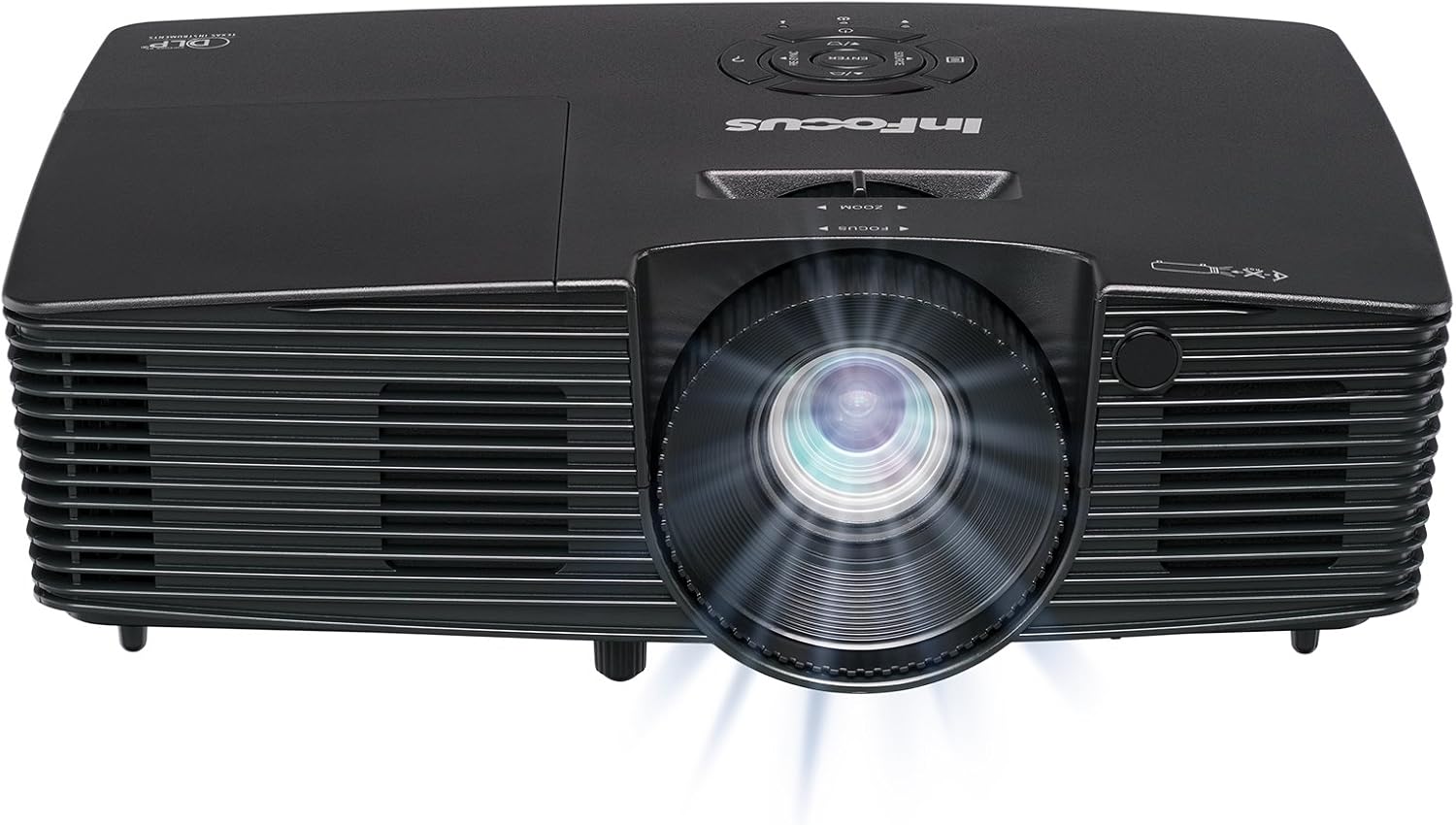
Зураг 3.1: Урд view of the InFocus IN112XV projector. This image highlights the main projection lens and the front ventilation grilles.
3.2 Дээд View болон хяналтын самбар

Зураг 3.2: Топ view of the InFocus IN112XV projector. The control panel is visible on the right, featuring buttons for power, source selection, menu navigation, keystone adjustment, and volume. The focus and zoom adjustment rings are located around the lens.
The control panel on the top of the projector allows for basic operation without the remote. Key buttons include:
- Эрчим хүч: Проекторыг асаах эсвэл унтраана.
- Эх сурвалж: Боломжтой оролтын эх үүсвэрүүдээр дамжин цикл хийнэ.
- Цэс: Дэлгэц дээрх (OSD) цэс рүү хандана.
- Оруулна уу: OSD цэсэн дэх сонголтыг баталгаажуулна.
- Сумтай товчлуурууд: Цэсний сонголтуудыг гүйлгэж, тохиргоог нь тохируулна уу.
- Re-Sync: Synchronizes the image.
3.3 Арын View болон холболтын портууд

Зураг 3.3: Арын view of the InFocus IN112XV projector. This image displays the available connection ports, including Video In, S-Video In, Computer In (VGA), HDMI, and the power input.
The rear panel provides various ports for connecting external devices:
- Видеонд: For composite video sources.
- S-Видео оролт: For S-Video sources.
- Computer In (VGA): For connecting to computers via VGA cable.
- HDMI: For digital video and audio sources.
- Үйлчилгээ: For service and maintenance purposes.
- Эрчим хүчний оролт: Connects the power cord to an electrical outlet.
3.4 Алсын удирдлага

Зураг 3.4: Remote control for the InFocus IN112XV projector. The remote provides full control over the projector's functions, including power, source selection, menu navigation, keystone correction, and volume.
The remote control offers convenient access to all projector functions. Ensure batteries are correctly installed.
4. Тохиргоо
4.1 Байршил
Position the projector on a stable, flat surface or mount it securely. Ensure there is adequate space around the projector for ventilation.
4.2 Эрчим хүчний холболт
- Цахилгааны утсыг проекторын тэжээлийн оролтын порт руу холбоно уу.
- Цахилгааны утасны нөгөө үзүүрийг газардуулсан цахилгааны залгуурт холбоно.
4.3 Оролтын эх үүсвэрүүдийг холбох
The projector supports various input sources. Choose the appropriate cable for your device:
- HDMI: Connect an HDMI cable from your source device (e.g., laptop, media player) to the projector's HDMI port.
- VGA (Компьютерийн оролт): Connect a VGA cable from your computer to the projector's Computer In port. This is a plug-and-play connection.
- Video In / S-Video In: Use composite video or S-Video cables for older video sources.
- Мобайл төхөөрөмж: To connect an iPad or smartphone, a LightCast Key (sold separately) is required.
5. Ашиглалтын заавар
5.1 Асаах/унтраах
- Асаахын тулд: дээр дарна уу Хүч button on the projector's control panel or the remote control. The power indicator light will change.
- Унтраахын тулд: дээр дарна уу Хүч button again. A confirmation message may appear. Press again to confirm shutdown. Allow the projector to cool down before unplugging.
5.2 Оролтын эх үүсвэрийг сонгох
After connecting your source device, select the correct input:
- дээр дарна уу Эх сурвалж button on the projector's control panel or the remote control to cycle through available inputs (HDMI, VGA, Video, S-Video).
- Alternatively, use the dedicated input buttons (HDMI, VGA, Video) on the remote control.
5.3 Фокус болон томруулалтыг тохируулах
For a clear and appropriately sized image, adjust the lens rings:

Зураг 5.1: Manual Focus Adjustment. This image illustrates the effect of adjusting the focus ring, transforming a blurry projection into a clear and sharp image.
- Фокус: -г эргүүл Төвлөр ring on the projector lens until the image appears sharp and clear.
- Томруулах: -г эргүүл Томруулах ring on the projector lens to adjust the size of the projected image.
5.4 Түлхүүр чулууг засах
If the projected image appears trapezoidal (wider at the top or bottom), use keystone correction to square it:
- дээр дарна уу Түлхүүр чулуу+ or Keystone- buttons on the remote control to adjust the image geometry.
5.5 Цэсийн навигаци
Access the On-Screen Display (OSD) menu for advanced settings:
- дээр дарна уу Цэс button on the remote or control panel.
- Use the arrow keys to navigate through menu options.
- дарна уу Оруулна уу сонголтыг сонгох эсвэл тохиргоог баталгаажуулна уу.
- дарна уу Цэс again to exit the OSD.
6. Засвар үйлчилгээ
6.1 лamp Амьдрал
Проектор лamp has an estimated life of over 15,000 hours. When the lamp reaches the end of its life, the projector may display a warning message or the image brightness may significantly decrease. Refer to the full service manual for lamp replacement procedures if necessary.
6.2 Цэвэрлэгээ
- Проектор Casing: Проекторын гадна талыг зөөлөн, хуурай даавуугаар арчина. Зүлгүүрийн цэвэрлэгч эсвэл уусгагч хэрэглэж болохгүй.
- Линз: Gently clean the lens with a lens cleaning cloth and specialized lens cleaning solution. Avoid touching the lens surface with your fingers.
- Агааржуулалтын нүхнүүд: Periodically check and clean the ventilation openings to ensure proper airflow and prevent overheating. Use a soft brush or compressed air to remove dust.
7. Алдаа засах
Энэ хэсэгт проектортой холбоотой нийтлэг асуудлуудыг авч үзэх болно.
| Асуудал | Боломжит шалтгаан | Шийдэл |
|---|---|---|
| Зураг харагдахгүй байна |
|
|
| Зураг бүдэг байна |
|
|
| Зураг нь трапец хэлбэртэй байна |
|
|
| Projector runs hot or smells of burning plastic |
|
|
| Аудио байхгүй |
|
|
Чухал тэмдэглэл: This projector is not recommended for high-definition movie viewing. While it can accept a 1080p input signal, it projects at its native SVGA (800 x 600) resolution.
8. Техникийн үзүүлэлтүүд
| Онцлог | Дэлгэрэнгүй |
|---|---|
| Загварын дугаар | IN112XV |
| Дэлгэцийн технологи | DLP |
| Төрөлхийн тогтоол | SVGA (800 x 600) |
| Гэрэлтүүлэг | 3800 люмен |
| Ялгаатай харьцаа | 26000:1 |
| Lamp Амьдрал | 15,000 цаг хүртэл |
| Холболт | HDMI, VGA (Computer In), Video In, S-Video In |
| Онцлог шинж чанар | 3D-бэлэн |
| Зөвлөмж болгож буй хэрэглээ | Business, Education |
| Бүтээгдэхүүний хэмжээс | 8.8 x 12.4 x 4 инч |
| Зүйлийн жин | 5.5 фунт |
9. Баталгаат хугацаа ба дэмжлэг
9.1 Баталгаат хугацааны мэдээлэл
The InFocus IN112XV projector is backed by a 2 жилийн баталгаат хугацаа. Энэхүү баталгаа нь ердийн ашиглалтын үед хийгдсэн материал, хийцийн согогийг хамарна. Баталгаат заргад зориулж худалдан авалтаа нотлох баримтаа үлдээнэ үү.
9.2 Хэрэглэгчийн дэмжлэг
For technical assistance, troubleshooting beyond this manual, or warranty service, please contact InFocus customer support. Contact information can typically be found on the official InFocus webсайт эсвэл таны бүтээгдэхүүнд хавсаргасан баримт бичигт.


