1. Танилцуулга
The Keliiyo HDMI Splitter 1x4 is designed to duplicate a single HDMI input signal to four identical HDMI output signals. This device allows for simultaneous transmission of video and audio without any loss in quality. It supports a wide range of resolutions, including Full HD 1080P, 3D, and up to 4K@30Hz, making it suitable for various display setups.
2. Аюулгүй байдлын мэдээлэл
- Хэт халалтаас урьдчилан сэргийлэхийн тулд төхөөрөмжийг агааржуулалт сайтай газар байрлуулсан эсэхийг шалгаарай.
- Avoid exposing the splitter to moisture, water, or extreme temperatures.
- Use only the provided AC power adapter to prevent damage to the unit.
- Төхөөрөмжийг өөрөө задлах, засах гэж бүү оролдоорой. Үйлчилгээ авахын тулд мэргэшсэн ажилтнуудтай холбоо барина уу.
- Хүүхдийн гар хүрэхгүй газар хадгална.
3. Багцын агуулга
Доор жагсаасан бүх зүйл таны багцад байгаа эсэхийг шалгана уу.
- 1x Keliiyo HDMI Splitter 1x4
- 1х хувьсах гүйдлийн цахилгаан адаптер
- 1x хэрэглэгчийн гарын авлага

Figure 3.1: Contents of the Keliiyo HDMI Splitter package, including the splitter unit, user manual, and power adapter.
4. Бүтээгдэхүүн дууссанview
The Keliiyo HDMI Splitter 1x4 features a robust metal casing for durability and efficient heat dissipation. Below is a description of its ports and indicators:
- Оруулах: HDMI input port for connecting your source device (e.g., computer, PS4, TV Box).
- ГАРЦ 1-4: Four HDMI output ports for connecting display devices (e.g., monitors, TVs, projectors).
- LED ДЭЭР: Indicates when an input signal is detected.
- 1-4 LEDs: Indicate active output connections.
- PW LED: Эрчим хүчний заагч гэрэл.
- DC 5V: AC адаптерийн тэжээлийн оролтын порт.
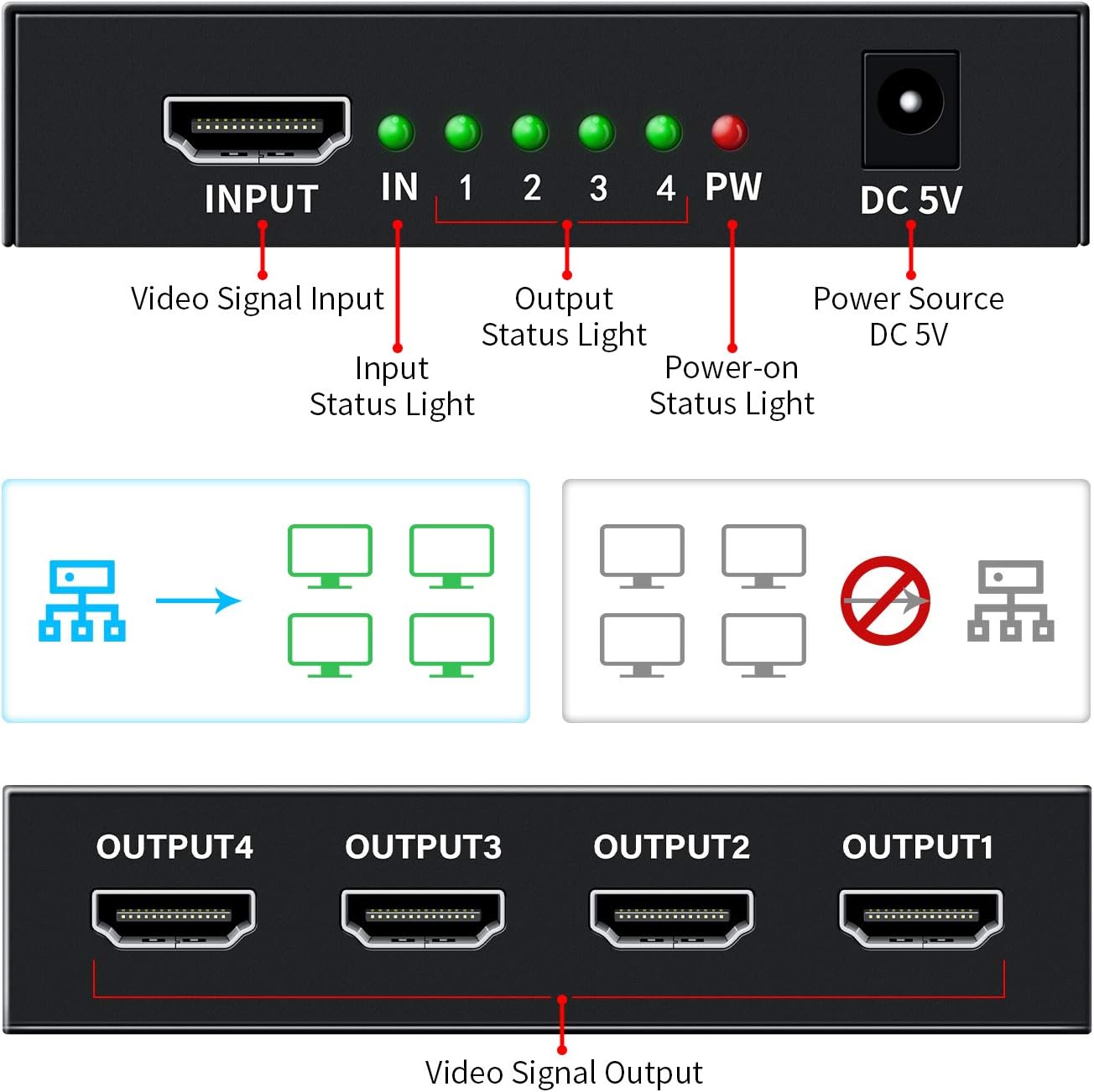
Зураг 4.1: Урд ба хойд view of the HDMI Splitter with labeled ports and indicator lights.

Зураг 4.2: Жишээ ньamples of compatible input and output devices for the HDMI Splitter.

Figure 4.3: Physical dimensions of the Keliiyo HDMI Splitter.
5. Тохируулах заавар
Follow these steps to set up your Keliiyo HDMI Splitter:
- Connect Input Device: Connect your HDMI source device (e.g., DVD player, gaming console, laptop) to the 'INPUT' port on the HDMI splitter using a high-quality HDMI cable (not included).
- Гаралтын төхөөрөмжүүдийг холбох: Connect up to four HDMI display devices (e.g., TVs, monitors, projectors) to the 'OUTPUT 1', 'OUTPUT 2', 'OUTPUT 3', and 'OUTPUT 4' ports on the splitter using HDMI cables.
- Эрчим хүчийг холбох: Plug the provided 5V AC power adapter into the 'DC 5V' port on the splitter, then plug the adapter into a power outlet. The 'PW' LED will illuminate.
- Асаах: Power on your HDMI source device and all connected display devices. The corresponding 'IN' and '1-4' LEDs on the splitter will light up, indicating active connections.
Чухал тэмдэглэл: For optimal performance and to ensure normal operation, please ensure that all connected output devices are set to the same resolution. If different resolutions are detected, the splitter will output the lowest common resolution to all displays.

Figure 5.1: Illustrates mirroring one screen to four identical screens simultaneously.
Video 5.1: An official Keliiyo video demonstrating the setup process and functionality of the HDMI Splitter, showing how to connect input and output devices and power supply.
6. Ашиглалтын заавар
Once the setup is complete and all devices are powered on, the Keliiyo HDMI Splitter will automatically duplicate the input signal to all connected output displays. No additional configuration is typically required.
- The green 'IN' LED indicates that an HDMI source is connected and providing a signal.
- The green '1', '2', '3', '4' LEDs indicate which output ports have active display devices connected and receiving a signal.
- The red 'PW' LED confirms that the device is receiving power.
The splitter is designed for simple plug-and-play operation, allowing you to share your video and audio content across multiple screens effortlessly.
7. Засвар үйлчилгээ
To ensure the longevity and optimal performance of your HDMI Splitter, please follow these maintenance guidelines:
- Цэвэрлэгээ: Төхөөрөмжийн гадна талыг цэвэрлэхийн тулд зөөлөн, хуурай даавуугаар цэвэрлээрэй. Шингэн цэвэрлэгч, аэрозоль хэрэглэж болохгүй.
- Хадгалах: Удаан хугацаагаар ашиглаагүй тохиолдолд төхөөрөмжийг нарны шууд тусгал, хэт температураас хол, сэрүүн, хуурай газар хадгална.
- Харьцуулах: Avoid dropping or subjecting the device to strong impacts. Handle cables carefully to prevent damage to the ports.
- Агааржуулалт: Ensure that the ventilation holes on the device are not blocked to allow for proper airflow and prevent overheating.
8. Алдаа засах
If you encounter issues with your Keliiyo HDMI Splitter, refer to the following common problems and solutions:
| Асуудал | Боломжит шалтгаан | Шийдэл |
|---|---|---|
| No picture or sound on display(s). | Loose connections, no power, incompatible resolution, faulty cables. |
|
| Flickering or distorted image. | Poor quality HDMI cables, long cable runs, resolution mismatch. |
|
| Image briefly disappears when a new display is turned on. | Splitter adjusting to new display connection. | This is normal behavior as the splitter may need to re-establish the signal handshake. The image should return shortly. |
9. Техникийн үзүүлэлтүүд
| Онцлог | Дэлгэрэнгүй |
|---|---|
| Загварын дугаар | 104 |
| Бүтээгдэхүүний хэмжээс | 2.44 x 3.77 x 0.86 инч |
| Зүйлийн жин | 7.8 унц |
| Өнгө | Хар |
| Холбогч төрөл | HDMI |
| Кабелийн төрөл | HDMI |
| Дэмжигдсэн тогтоолууд | 408i/576i/576p/720p/1080i/1080P, up to 4K@30Hz |
| 3D дэмжлэг | Тиймээ |
| HDCP хувилбар | V1.4 |
| Дамжуулах хамгийн их зай | Up to 100ft (Input 40ft, Output 60ft with AWG26 HDMI cable) |
| Эрчим хүчний хангамж | DC 5V (AC Adapter included) |
10. Баталгаат хугацаа ба дэмжлэг
For any questions, technical support, or warranty inquiries regarding your Keliiyo HDMI Splitter, please contact Keliiyo customer service. Refer to the contact information provided with your product packaging or visit the official Keliiyo webтусламж авах сайт.
Баталгаат заргад зориулж худалдан авалтаа нотлох баримтаа үлдээнэ үү.


