1. Танилцуулга
This manual provides instructions for the installation, operation, and maintenance of the Nexxt Solutions Naxos800 8-Port Fast Ethernet Network Switch. The Naxos800 is an unmanaged compact desktop switch designed for small office/home office (SOHO) environments, student dormitories, and small enterprises, offering reliable network connectivity.
2. Үндсэн шинж чанарууд
- 8 Fast Ethernet Ports: Provides 8 UTP/STP 10/100Mbps ports with auto MDI/MDIX.
- Plug and Play: Simple setup requiring no software configuration.
- Удирдлагагүй шилжүүлэгч: Operates without requiring complex management interfaces.
- Store-and-Forward Technology: Ensures efficient packet transmission.
- MAC хаяг сурах: Supports auto-learning and aging with a built-in 1000 MAC address table.
- Компакт дизайн: Suitable for desktop or wall mounting.
- Эрчим хүч хэмнэх: Эрчим хүч бага зарцуулдаг загвар.
- Урсгалын хяналт: Full duplex and half duplex back pressure flow control.
- Бат бөх чанар: Integrated lightning protection and a sturdy metal case.
- Чимээгүй ажиллагаа: Fanless design for silent performance.
3. Багцын агуулга
Таны багц дараах зүйлсийг агуулж байгаа эсэхийг шалгана уу.
- One (1) Nexxt Solutions Naxos800 8-Port Fast Ethernet Switch
- Нэг (1) тэжээлийн адаптер

Image: The Nexxt Solutions Naxos800 switch, its power adapter, and product packaging.
4. Бүтээгдэхүүн дууссанview

Зураг: Урд view of the Naxos800 switch, showing the Nexxt logo and eight green LED indicators for port activity.
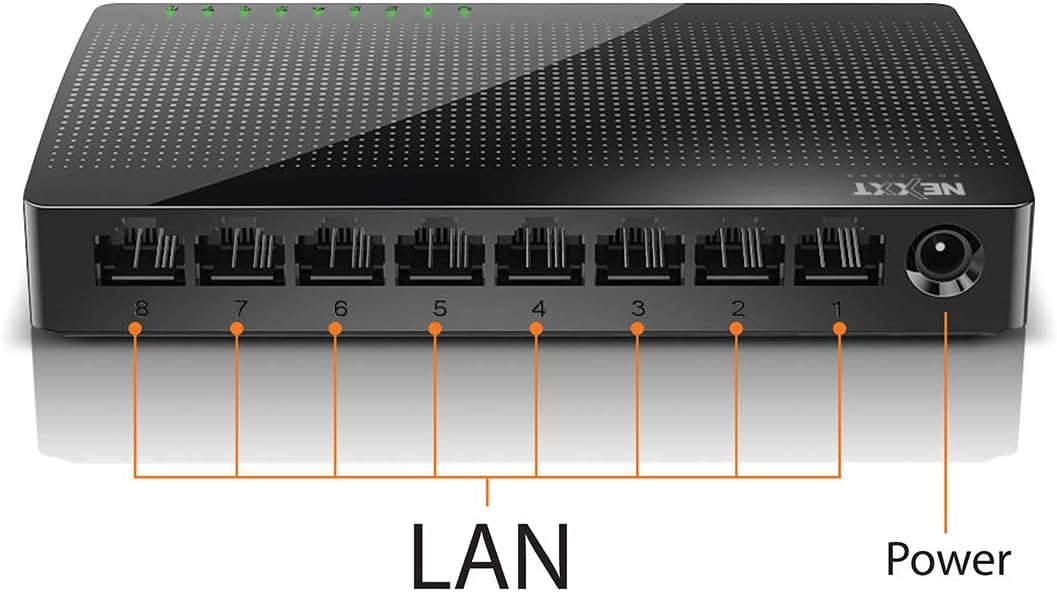
Зураг: Ар талд view of the Naxos800 switch, highlighting the eight LAN ports (numbered 1-8) and the power input port.
LED үзүүлэлтүүд
The front panel features LED indicators for each port, providing visual status:
- Ногоон LED (Хатуу): Indicates a stable link connection.
- Ногоон LED (анивчсан): Indicates data activity on the corresponding port.
- LED унтраалттай: No link or connection detected.
5. Тохиргоо ба суурилуулалт
The Naxos800 switch is designed for simple plug-and-play installation. No software or complex configuration is required.
- Байршил: Place the switch on a stable, flat surface or mount it on a wall using appropriate hardware (not included). Ensure adequate ventilation around the device.
- Цахилгаанд холбогдох: Connect the provided power adapter to the power input port on the switch and then plug the adapter into a standard electrical outlet. The power LED (if present, or the port LEDs will light up) should illuminate.
- Сүлжээнд холбогдох:
- Connect your router or modem to any of the 8 LAN ports on the Naxos800 switch using an Ethernet cable.
- Connect your network devices (e.g., computers, gaming consoles, IP cameras, Smart TVs, printers) to the remaining LAN ports on the Naxos800 switch using an Ethernet cable.
- Холболтыг баталгаажуулах: Once devices are connected, the corresponding LED indicators on the switch's front panel should light up green (solid for link, flashing for activity).

Image: Diagram illustrating a typical network setup. An ADSL or Cable Modem connects to a Router, which then connects to the Naxos800 switch. Various devices like laptops, media players, game consoles, IP cameras, Smart TVs, and IP phones are connected to the Naxos800 switch.
6. Шилжүүлэгчийг ажиллуулах
The Naxos800 is an unmanaged switch, meaning it operates automatically without user intervention once connected. It functions as an internet splitter, expanding the number of wired network connections available from your router or modem.
- Автомат хурд илрүүлэх: Each port automatically detects the speed of the connected device (10Mbps or 100Mbps) and adjusts accordingly.
- Автомат MDI/MDIX: Eliminates the need for crossover cables; the switch automatically detects and corrects for straight-through or crossover cable types.
- Өгөгдөл дамжуулах: Data packets are forwarded between connected devices at Fast Ethernet speeds. The store-and-forward architecture ensures data integrity.
7. Засвар үйлчилгээ
The Naxos800 switch requires minimal maintenance.
- Цэвэрлэгээ: Шилжүүлэгчийн гадна талыг зөөлөн, хуурай даавуугаар цэвэрлэ. Шингэн болон аэрозол цэвэрлэгч хэрэглэж болохгүй.
- Агааржуулалт: Хэт халалтаас урьдчилан сэргийлэхийн тулд агааржуулалтын нүхийг хаагаагүй эсэхийг шалгаарай.
- Эрчим хүчний мөчлөг: If the device experiences issues, a simple power cycle (unplugging and replugging the power adapter) can often resolve minor problems.
8. Алдаа засах
If you encounter issues with your Naxos800 switch, refer to the following common problems and solutions:
| Асуудал | Боломжит шалтгаан | Шийдэл |
|---|---|---|
| No power / Device not turning on. | Цахилгаан адаптер холбогдоогүй эсвэл алдаатай; цахилгаан залгуур ажиллахгүй байна. | Цахилгаан адаптер нь унтраалга болон ажиллаж байгаа цахилгааны залгуурт найдвартай холбогдсон эсэхийг шалгаарай. Өөр залгуураар оролдоно уу. |
| Холбогдсон төхөөрөмжид холбох гэрэл байхгүй. | Ethernet cable faulty or improperly connected; device not powered on or faulty; incorrect port. |
|
| Сүлжээний хурд удаан. | Network congestion; faulty cable; device limitations. |
|
9. Техникийн үзүүлэлтүүд
| Атрибут | Үнэ цэнэ |
|---|---|
| Загварын дугаар | ASIDT084U3 |
| Портууд | 8 x 10/100Mbps Fast Ethernet (UTP/STP) |
| Backplane bandwidth | 1.6 Gbps |
| MAC хаягийн хүснэгт | 1000 бичлэг |
| Хандалтын хяналт | CDMA |
| Урсгалын хяналт | Full duplex and half duplex back pressure |
| Хэмжээ (L x W x H) | 12.4 x 5.9 x 2.3 см |
| Жин | 140 гр |
| Эрчим хүчний оролт | Гадаад тэжээлийн адаптер (дагсан) |
Жич: Техникийн үзүүлэлтүүдийг урьдчилан мэдэгдэлгүйгээр өөрчилж болно.
10. Баталгаат хугацаа ба дэмжлэг
The Nexxt Solutions Naxos800 8-Port Fast Ethernet Network Switch comes with a 5 жилийн хязгаарлагдмал баталгаат хугацаа. For warranty claims or technical support, please contact Nexxt Solutions customer service. Refer to the official Nexxt Solutions webхамгийн сүүлийн үеийн дэмжлэгийн мэдээлэл болон холбоо барих мэдээллийг авах сайт.
Nexxt Solutions is a US company committed to quality and customer service.


