1. Танилцуулга
The ATEN VE8950T is a 4K HDMI Over IP Transmitter designed for extending 4K audio/video signals over a standard Gigabit Ethernet network. This device delivers visually lossless 4K AV signals with low latency, making it suitable for long-distance transmission in various professional environments. Its design focuses on ease of setup and operation, providing a scalable and flexible solution for multi-display 4K signal distribution.
The VE8950T offers an economical digital signage solution, addressing common challenges in AV over IP system implementation. Key benefits include limitless scalability, flexible deployment, simplified IP setup without the need for additional server PCs or software, and support for daisy-chaining to extend reach efficiently.
2. Үндсэн шинж чанарууд
- 4K HDMI Over IP Extender: Functions as a transmitter for extending HDMI signals over an IP network.
- Өндөр чанартай видео дамжуулах: Supports visually lossless video up to 4K at 60 Hz (4:2:0) and 4K at 30 Hz (4:4:4).
- Видео шахалтын дэвшилтэт хувилбар: Utilizes ATEN's advanced video lossless compression technology for stunning video quality.
- EDID Expert Technology: Automatically selects optimal EDID settings for smooth power-up, high-quality display, and best video resolution across various screens.
- Flexible AV Connections: Extends AV connections from simple point-to-point to complex multi-point to multi-point setups via LAN, without distance limitations.
3. Тоног төхөөрөмжийн тодорхойлолт
3.1. Урд самбар
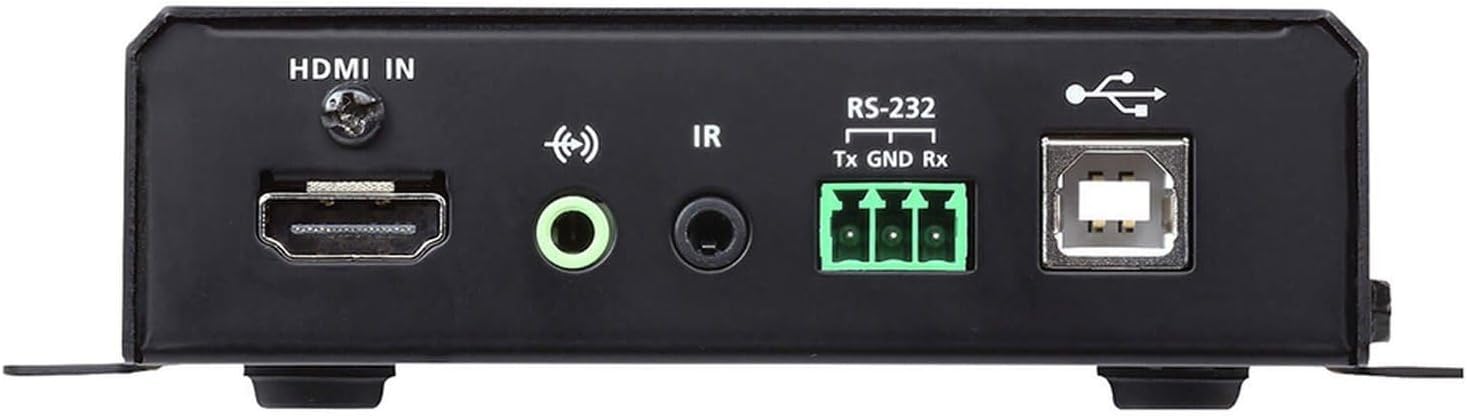
Зураг 1: Front Panel of the ATEN VE8950T Transmitter.
- HDMI IN: HDMI эх үүсвэрийн төхөөрөмжтэй холбогддог.
- АУДИО ОРОЛЦОО: Аналог аудио оролтод зориулсан 3.5 мм үүр.
- IR: 3.5mm jack for IR receiver connection.
- RS-232: Serial port for control and configuration.
- USB: USB Type B port for connecting to a computer or other USB host device.
3.2. Арын самбар

Зураг 2: Rear Panel of the ATEN VE8950T Transmitter.
- LAN: RJ-45 Ethernet port for network connection.
- DC5V: Power input jack for the 5V DC power adapter.
3.3. Топ самбар

Зураг 3: Top Panel of the ATEN VE8950T Transmitter.
- ID NUMBER Display: Three-digit LED display showing the device's ID.
- +/- Товчлуур: Used to adjust the device ID or navigate menu options.
- LINK LED: Indicates network link status.
- Эрчим хүчний LED: Эрчим хүчний төлөвийг заана.
4. Тохиргоо ба суурилуулалт
Follow these steps to set up your ATEN VE8950T Transmitter:
- Унтраах төхөөрөмжүүд: Ensure all devices, including the HDMI source, display, and the VE8950T, are powered off before making any connections.
- HDMI эх үүсвэрийг холбох: Use an HDMI cable to connect your HDMI source device (e.g., Blu-ray player, PC) to the HDMI оролт port on the VE8950T Transmitter.
- Сүлжээний холболт: Connect an Ethernet cable from your Gigabit network switch to the LAN port on the VE8950T Transmitter. Ensure the network switch supports Gigabit speeds.
- Эрчим хүчний холболт: Өгөгдсөн 5V DC тэжээлийн адаптерийг дараахтай холбоно уу DC5V port on the VE8950T Transmitter, then plug the adapter into a power outlet.
- Асаах: Power on the VE8950T Transmitter. The ХҮЧ LED гэрэл асах ёстой.
- Configure ID (Optional): If using multiple transmitters and receivers, configure the unique ID for each transmitter using the +/- buttons on the top panel. This ID must match the ID set on the corresponding receiver(s).
- Connect Receiver (Sold Separately): For a complete system, connect a compatible ATEN VE8950R Receiver (sold separately) to your display and the same network.
- Power On Source and Display: Power on your HDMI source device and the display.
For advanced configurations, including web GUI management and video wall setups, refer to the comprehensive user manual available on the ATEN webсайт.
5. Үйл ажиллагаа
Once the VE8950T Transmitter and its corresponding receiver(s) are properly connected and powered on, the system will automatically begin transmitting the HDMI signal over the IP network.
- Дохио дамжуулалт: The HDMI video and audio from the source connected to the VE8950T will be extended to the display connected to the receiver.
- Статусын үзүүлэлтүүд: -ийг ажигла ХОЛБООС болон ХҮЧ LEDs on the top panel. The POWER LED should be solid, and the LINK LED should indicate active network connection and data transmission.
- Web GUI Management: The VE8950T supports management via a web-based Graphical User Interface (GUI). Access the web GUI by entering the device's IP address into a web browser on a computer connected to the same network. The web GUI allows for advanced configuration, monitoring, and control, including video wall setup and firmware updates.
- RS-232 хяналт: The RS-232 port can be used for serial control from a control system. Refer to the detailed product manual for RS-232 command protocols.
- IR хяналт: If an IR receiver is connected, you can extend IR remote control signals from the display location back to the source device.
6. Засвар үйлчилгээ
To ensure optimal performance and longevity of your ATEN VE8950T Transmitter, follow these maintenance guidelines:
- Цэвэрлэгээ: Төхөөрөмжийг цэвэрлэхийн тулд зөөлөн, хуурай даавуу ашиглана уу. Шингэн болон аэрозол цэвэрлэгч хэрэглэж болохгүй.
- Агааржуулалт: Ensure proper ventilation around the device to prevent overheating. Do not block any ventilation openings.
- Байгаль орчин: Operate the device within the specified temperature and humidity ranges. Avoid exposing it to direct sunlight, excessive dust, or moisture.
- Програм хангамжийн шинэчлэлтүүд: ATEN-г үе үе шалгаж байх website for firmware updates. Keeping the firmware up-to-date can improve performance, add new features, and resolve potential issues.
- Кабелийн менежмент: Санамсаргүй тасрах, гэмтэхээс сэргийлэхийн тулд бүх кабелийг найдвартай холбож, зөв чиглүүлсэн эсэхийг шалгаарай.
7. Алдаа засах
If you encounter issues with your ATEN VE8950T Transmitter, refer to the following troubleshooting tips:
| Асуудал | Боломжит шалтгаан | Шийдэл |
|---|---|---|
| Дэлгэц дээр видео гаралт байхгүй байна. |
|
|
| Видеоны чанар муу эсвэл анивчих. |
|
|
| Нэвтрэх боломжгүй Web GUI. |
|
|
If the problem persists, please contact ATEN technical support for further assistance.
8. Техникийн үзүүлэлтүүд
| Загварын дугаар | VE8950T |
| Холболтын технологи | HDMI, Ethernet (IP) |
| Видео кодчилол | H.265 |
| Макс. Шийдвэр | 4K (3840 x 2160) @ 60Hz (4:2:0), 4K (3840 x 2160) @ 30Hz (4:4:4) |
| Аудио гаралтын горим | Стерео, Хүрээлэн буй орчин |
| Хүрээлэн буй орчны дуу чимээ | 5.1 Сувгийн тохиргоо |
| Нийт HDMI портууд | 1 (Оролт) |
| Хяналтын арга | Remote (IR), RS-232, Web GUI |
| Бүтээгдэхүүний хэмжээс | 9.5 x 6.5 x 6.3 инч |
| Зүйлийн жин | 10.14 фунт |
9. Баталгаат хугацаа ба дэмжлэг
ATEN is committed to providing high-quality products and excellent customer service. For support regarding your VE8950T Transmitter, please refer to the following:
- Техникийн дэмжлэг: ATEN offers free technical support. For assistance, please contact ATEN's support team. They aim to respond to customer inquiries within 4 hours.
- Баталгаат үйлчилгээ: Information regarding standard warranty coverage and extended warranty service packages can be found on the official ATEN webсайт эсвэл харилцагчийн үйлчилгээтэй холбоо барина уу.
- RMA үйлчилгээ: ATEN provides localized repair centers for Return Merchandise Authorization (RMA) services.
- Онлайн нөөцүүд: Visit the official ATEN website for product documentation, FAQs, driver downloads, and firmware updates.
Хамгийн сүүлийн үеийн, дэлгэрэнгүй баталгаат хугацааны мэдээллийг авахыг хүсвэл дараах хаягаар зочилно уу. ATEN-ийн албан ёсны дэлгүүр эсвэл тэдний корпораци webсайт.


