Танилцуулга
Thank you for choosing the Brookstone Big Blue True Wireless Earbuds. These earbuds are designed to provide a seamless audio experience, allowing you to enjoy music and manage calls wirelessly. This manual provides essential information on setting up, operating, maintaining, and troubleshooting your new earbuds.
Гол онцлогууд:
- True wireless design for freedom of movement.
- Rich, full-range audio with deep bass.
- Integrated microphone with Qualcomm cVc noise-cancelling technology for clear calls.
- Bluetooth connectivity for easy pairing with your smartphone or device.

Image: Brookstone Big Blue True Wireless Earbuds in their black charging case.
Тохиргоо
Хайрцагт юу байна
- Brookstone Big Blue True Wireless Earbuds (Left and Right)
- Утасгүй цэнэглэх хайрцаг
Чихэвч болон гэрийг цэнэглэж байна
- Place both earbuds into the charging case. Ensure they are seated correctly.
- Дагалдаж ирсэн цэнэглэгч кабелийг ашиглан цэнэглэгч хайрцгийг USB тэжээлийн эх үүсвэрт холбоно уу.
- The indicator lights on the case and earbuds will show charging status. Refer to the specific light patterns in your product packaging for details.
- Allow sufficient time for a full charge before first use.
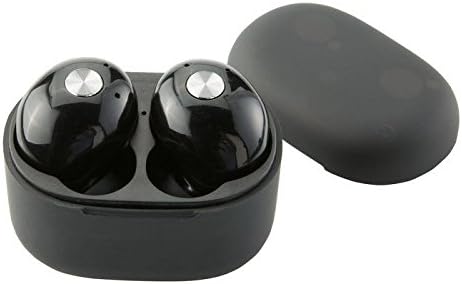
Зураг: Ойролцоогоор view of the earbuds within the charging case, illustrating proper placement for charging.
Bluetooth хослуулах
- Чихэвч цэнэглэгдсэн эсэхийг шалгаарай.
- Remove both earbuds from the charging case. They will automatically enter pairing mode, indicated by flashing LED lights (refer to your product packaging for specific light patterns).
- Ухаалаг утас эсвэл Bluetooth-тэй төхөөрөмж дээрээ Bluetooth тохиргоо руу очно уу.
- хайх new devices and select "BIG BLUE" (or similar name) from the list.
- Once connected, the earbud indicator lights will change, typically turning solid or off.
- If pairing fails, place the earbuds back in the case, close it, and repeat the steps.
Ашиглалтын заавар
Асаах/унтраах
- Асаах: Цэнэглэх хайрцагнаас чихэвчийг салга. Тэд автоматаар асаж, хамгийн сүүлд холбогдсон төхөөрөмжтэй холбогдохыг оролдох болно.
- Унтраах: Чихэвчийг дахин цэнэглэх хайрцагт хийж, тагийг нь хаа. Тэд автоматаар унтарч, цэнэглэж эхэлнэ.
Хөгжим тоглуулах, дуудлагын менежмент
The earbuds feature integrated controls for media playback and call handling. Specific functions may vary slightly; refer to your product's quick start guide for exact button presses.
- Тоглуулах/түр зогсоох: Typically a single press on either earbud.
- Дараагийн дуу: Often a double press on the right earbud.
- Өмнөх бичлэг: Often a double press on the left earbud.
- Дуудлагад хариулах/дуусах: A single press on either earbud during an incoming call or active call.
- Дуудлагаас татгалзах: A long press on either earbud during an incoming call.
- Дуут туслахыг идэвхжүүлэх: A triple press or long press on an earbud (check specific model instructions).

Image: A man wearing a Brookstone Big Blue True Wireless Earbud, demonstrating typical use.
Засвар үйлчилгээ
Цэвэрлэгээ
- Зөөлөн, хуурай, хөвөнгүй даавуугаар чихэвч болон цэнэглэгчийг цэвэрлэ.
- Зүлгүүрийн цэвэрлэгч, уусгагч, аэрозол шүршигч хэрэглэж болохгүй.
- Gently clean ear tips and speaker grilles with a dry cotton swab to remove earwax or debris.
Хадгалах
- Чихний чихэвчийг хамгаалж, цэнэгтэй байлгахын тулд ашиглаагүй үед нь үргэлж цэнэглэдэг хайрцагт нь хадгалаарай.
- Хэт өндөр температур, нарны шууд тусгалаас хол, сэрүүн, хуурай газар хадгална.
Батерейны арчилгаа
- Батерейны ашиглалтын хугацааг уртасгахын тулд чихэвч болон гэрийг байнга бүрэн цэнэггүй болгохоос зайлсхий.
- Төхөөрөмжийг байнга ашиглахгүй байсан ч тогтмол цэнэглээрэй.
Алдааг олж засварлах
| Асуудал | Боломжит шийдэл |
|---|---|
| Чихэвчийг төхөөрөмжтэй хослуулахгүй байна. |
|
| Sound skipping or cutting out. |
|
| Нэг чихэвч ямар ч дуугарахгүй байна. |
|
| Чихэвч цэнэглэхгүй байна. |
|
Үзүүлэлтүүд
| Онцлог | Дэлгэрэнгүй |
|---|---|
| Загварын дугаар | BIG BLUE |
| Утасгүй холбооны технологи | Bluetooth |
| Оруулсан бүрэлдэхүүн хэсгүүд | Утасгүй цэнэглэх хайрцаг |
| Материал | Хуванцар |
| Хяналтын төрөл | Хэвлэл мэдээллийн хяналт |
| Кабелийн онцлог | Кабельгүй |
| Зүйлийн жин | 2.4 унц (0.15 фунт) |
| Бүтээгдэхүүний хэмжээс | 3.35 x 1.57 x 5.71 инч |
| Онцлог шинж чанарууд | Microphone Included, Noise Cancellation, Wireless |
| Өнгө | Хар |
| Form Factor | Чихэнд |
| UPC / GTIN | 883594061516 |
Баталгаат хугацааны мэдээлэл
Brookstone products are designed with quality and reliability in mind. For specific warranty details regarding your Big Blue True Wireless Earbuds, please refer to the warranty card included in your product packaging or visit the official Brookstone webсайт. Аливаа баталгаат нэхэмжлэлийн хувьд худалдан авалтаа нотлох баримтаа хадгалаарай.
Хэрэглэгчийн дэмжлэг
If you encounter any issues not covered in this manual or require further assistance, please contact Brookstone customer support. Contact information can typically be found on the product packaging or the official Brookstone webсайт.


