Танилцуулга
Thank you for choosing the KROM Kernel TKL Mechanical Gaming Keyboard. This compact, tenkeyless (TKL) keyboard is designed for gaming enthusiasts, offering a responsive mechanical experience with customizable RGB backlighting and a Spanish layout. This manual provides detailed instructions for setup, operation, maintenance, and troubleshooting to ensure optimal performance and longevity of your device.
Бүтээгдэхүүн дууссанview
Гол онцлогууд
- Механик унтраалга: Durable and responsive mechanical key switches for precise input.
- Tenkeyless (TKL) Design: Compact form factor without a numeric keypad, ideal for saving desk space and improving mouse movement.
- RGB арын гэрэлтүүлэг: Customizable LED backlighting with various effects and colors.
- Макро функциональ байдал: Assign macro functions to any key for personalized commands.
- Мультимедиа түлхүүрүүд: Dedicated or function-layer multimedia controls for convenience.
- Эсрэг хий үзэгдэл: Тоглоомын эрчимтэй үед ч гэсэн бүх товчлуурын даралтыг зөв бүртгэдэг эсэхийг баталгаажуулдаг.
- Удаан эдэлгээтэй барилга: Удаан хугацааны турш ашиглах боломжтой чанартай материалаар хийгдсэн.
- Spanish Layout: Designed with a QWERTY Spanish key layout.
Багцын агуулга
- KROM Kernel TKL Mechanical Gaming Keyboard
- USB кабель (хавсаргасан)
- Хэрэглэгчийн гарын авлага (энэ баримт бичиг)
- (Note: Additional accessories may vary by region or specific product bundle.)
Зураг 1.1: KROM Kernel TKL Mechanical Gaming Keyboard packaging, showing the front and back of the box with product features and design.

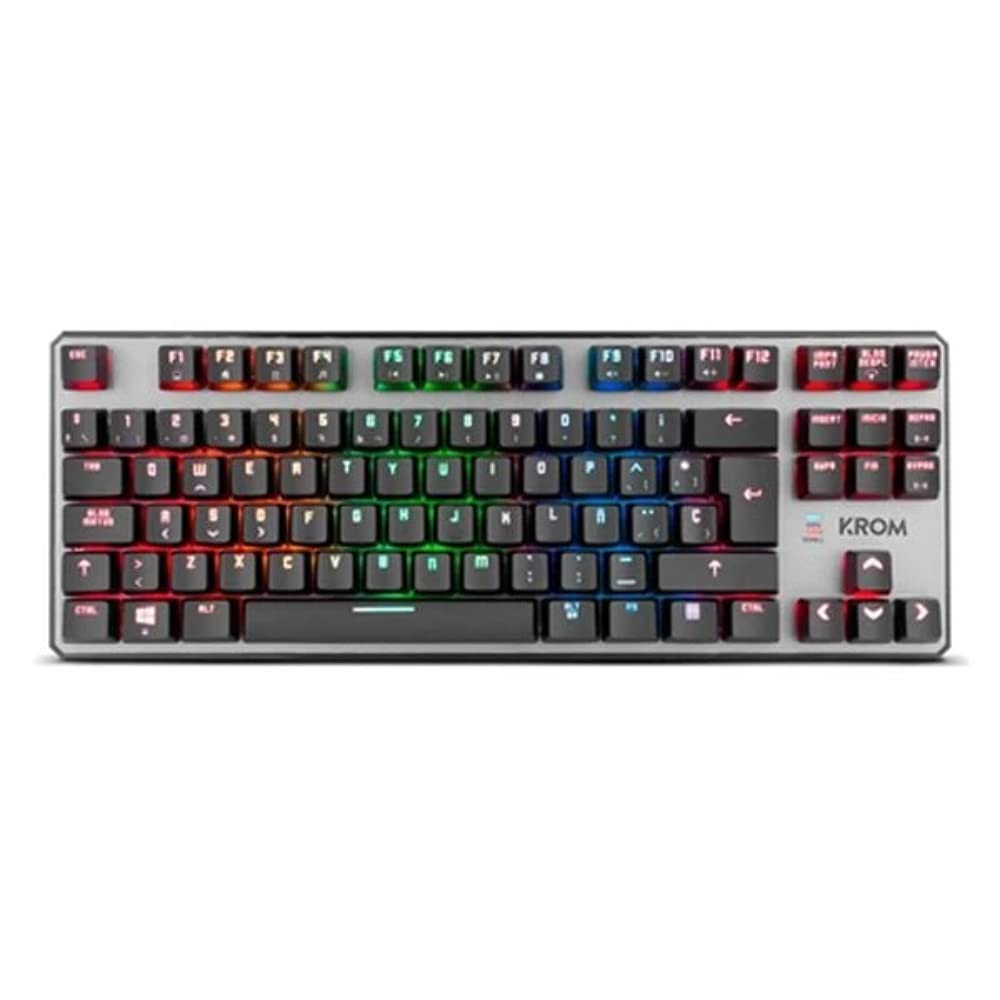
Зураг 1.2: Дээрээс доош view of the KROM Kernel TKL keyboard, showcasing its compact design and vibrant RGB backlighting across all keys.
Тохиргоо
- Гарыг задлах: Carefully remove the KROM Kernel TKL keyboard from its packaging.
- Компьютерт холбогдох: Locate the USB cable attached to the keyboard. Plug the USB connector into an available USB port on your computer (PC or laptop).
- Драйвер суурилуулах: The keyboard is plug-and-play. Your operating system (Windows 7/8/8.1/10) should automatically detect and install the necessary drivers. This process may take a few moments.
- Функцийг шалгах: Once drivers are installed, test the keyboard by typing in a text editor or browser to ensure all keys are responsive.
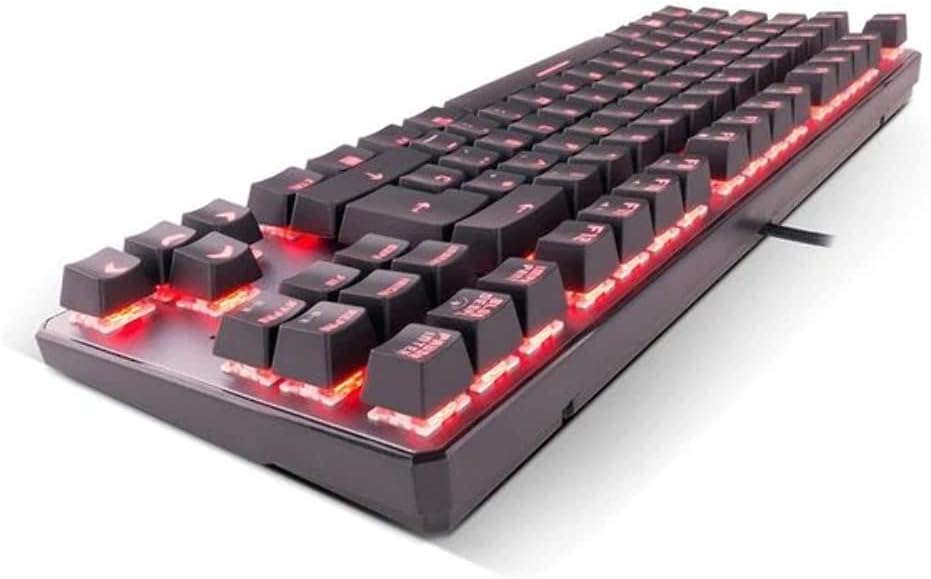
Зураг 2.1: Хажуу тал view of the KROM Kernel TKL keyboard, highlighting the red backlighting visible beneath the keycaps and the compact profile.
Ашиглалтын заавар
RGB арын гэрэлтүүлгийн хяналт
The KROM Kernel TKL keyboard features dynamic RGB backlighting. Use the following key combinations to adjust lighting effects:
- Fn + [Key]: Specific function keys (often F1-F12 or dedicated keys) are used in combination with the Function (Fn) key to cycle through lighting modes, adjust brightness, change speed, or select colors. Refer to the keyboard's keycap legends for specific symbols indicating lighting controls.
- Гэрэлтүүлгийн тохируулга: Typically Fn + Up/Down arrow keys or dedicated brightness keys.
- Үр нөлөөний хурд: Often Fn + Left/Right arrow keys to increase or decrease the speed of dynamic lighting effects.
- Горим солих: Cycle through various pre-set RGB lighting modes (e.g., wave, ripple, breathing, static color) using a dedicated Fn combination.

Зураг 3.1: The KROM Kernel TKL keyboard displaying its full RGB spectrum backlighting, enhancing the visual appeal during use.
Macro Function Assignment
The keyboard supports on-the-fly macro recording or software-based macro assignment. For on-the-fly recording:
- Initiate Recording: Press a specific Macro Record key (often labeled "MR" or a Fn combination).
- Select Target Key: Press the key you wish to assign the macro to.
- Бичлэг хийх дараалал: Type the sequence of keys you want to record as the macro.
- Бичлэгийг дуусгах: Press the Macro Record key again to save the macro.
Note: Detailed macro programming instructions may require specific software or refer to the full digital manual available on the KROM webсайт.
Мультимедиа болон товчлолын товчлуурууд
Access multimedia functions and system shortcuts using the Fn key in combination with the F-keys (F1-F12) or other designated keys. Common functions include:
- Дууны хяналт: Fn + Fx (e.g., F1-F3 for Mute, Volume Down, Volume Up).
- Медиа тоглуулах: Fn + Fx (e.g., F5-F8 for Play/Pause, Stop, Previous Track, Next Track).
- Аппликейшний товчлолууд: Fn + Fx (e.g., F9-F12 for Email, Web Browser, My Computer, Calculator).

Зураг 3.2: Ойрын зураг view of the KROM Kernel TKL keyboard's keycaps, clearly showing the Spanish QWERTY layout and secondary functions.
Засвар үйлчилгээ
Тохиромжтой засвар үйлчилгээ нь таны гарны урт наслалт, гүйцэтгэлийг баталгаажуулдаг.
- Цэвэрлэгээ:
- Цэвэрлэхийн өмнө гарыг компьютерээсээ салга.
- Товчлуурын тагны хоорондох тоос, хог хаягдлыг арилгахын тулд шахсан агаартай лааз ашиглана уу.
- Товчлуурын таг болон гарын гадаргууг зөөлөн, бага зэрэг арчина damp, хөвөнгүй даавуу. Хэт их чийгээс зайлсхий.
- Хүчтэй химийн бодис, зүлгүүрийн цэвэрлэгч, уусгагчийг бүү ашигла.
- Хадгалах: Гарыг хуурай, сэрүүн газар, нарны шууд тусгал болон хэт өндөр температураас хол хадгална уу.
- Харьцуулах: Avoid dropping the keyboard or exposing it to liquids. Do not attempt to disassemble the keyboard as this may void the warranty.

Зураг 4.1: Хажуу талын мэргэжилтэнfile view of the KROM Kernel TKL keyboard, illustrating its ergonomic tilt and compact design.

Зураг 4.2: A close-up image showing a mechanical switch on the KROM Kernel TKL keyboard, highlighting its design and potential for easy replacement (CIY Technology).

Зураг 4.3: The CIY Technology logo, indicating that the keyboard features hot-swappable mechanical switches for easy customization or replacement.
Алдааг олж засварлах
If you encounter issues with your KROM Kernel TKL keyboard, refer to the following common solutions:
- Гар хариу өгөхгүй байна:
- USB кабель гар болон компьютерт найдвартай холбогдсон эсэхийг шалгаарай.
- Компьютер дээрээ гарыг өөр USB порт руу залгаад үзээрэй.
- Компьютерээ дахин эхлүүлнэ үү.
- Асуудал нь гар эсвэл таны системд байгаа эсэхийг тодорхойлохын тулд өөр компьютер дээрх гарыг шалгана уу.
- Арын гэрэлтүүлэг ажиллахгүй эсвэл буруу байна:
- Check if the backlighting is turned off. Use the Fn key combinations to cycle through lighting modes and adjust brightness.
- Ensure no software conflicts are interfering with the lighting controls.
- Бүртгүүлээгүй эсвэл давхар шивээгүй түлхүүрүүд:
- Clean the affected keys with compressed air to remove any debris.
- If the keyboard uses hot-swappable switches (like the "CIY Technology" mentioned in an image), try gently removing and re-inserting the switch for the problematic key.
- Үйлдлийн системийн драйверууд тань шинэчлэгдсэн эсэхийг шалгаарай.
- Macro Functions Not Working:
- Review the macro programming steps to ensure correct recording.
- Check if any software is overriding the keyboard's native macro functions.
Үзүүлэлтүүд
| Онцлог | Дэлгэрэнгүй |
|---|---|
| Загварын дугаар | NXKROMKRNLTKL |
| Гарны төрөл | Механик |
| Зохион байгуулалт | Spanish QWERTY (TKL) |
| Арын гэрэлтүүлэг | RGB LED |
| Холболт | Wired USB (Gold-plated) |
| Кабелийн урт | 180 cm (Braided) |
| Үйлдлийн хүч | 60 +/- 10 гр |
| Санал хураалтын хувь | 1000 Гц |
| Дотоод санах ой | 64 KB (for macros/profiles) |
| Одоогийн хэрэглээ | 100-260 мА |
| Ботьtage | 5.0 +/- 0.25 V |
| Хэмжээ (L x W x H) | 361 x 133.5 x 22.5 мм |
| Жин | 950 +/- 30 гр |
| Тохиромжтой байдал | Windows 7/8/8.1/10 |
| Онцлог шинж чанарууд | Macro function assignment, Multimedia keys, Shortcut keys |
Баталгаат болон дэмжлэг
KROM products are designed for reliability and performance. This product comes with a standard manufacturer's warranty. For specific warranty terms and conditions, please refer to the warranty card included with your product or visit the official KROM webсайт.
For technical support, driver downloads, or further assistance, please visit the KROM official support page or contact their customer service. Contact information can typically be found on the KROM webсайт эсвэл бүтээгдэхүүний сав баглаа боодол.
KROM Official Webсайт: www.kromgaming.com (Жич: Энэ бол орлуулагч юм URL, please verify the actual KROM support webсайт.)


