
Танилцуулга
This manual provides comprehensive instructions for the setup, operation, and maintenance of your MASTER & DYNAMIC MH40 Over-Ear Headphones. Please read this guide thoroughly to ensure optimal performance and longevity of your device.
Багцын агуулга
Таны багцад бүх зүйл байгаа эсэхийг шалгана уу:
- MASTER & DYNAMIC MH40 Over-Ear Headphones
- Audio Cable with In-line Microphone
- USB-C Charging Cable (for Bluetooth functionality)
- Canvas Carrying Case
- Хэрэглэгчийн гарын авлага (энэ баримт бичиг)
Бүтээгдэхүүн дууссанview
The MH40 headphones are designed with premium materials for durability and comfort. Key components include:
- Forged Aluminum Body: Provides a robust and lightweight structure.
- Lambskin Ear Pads: Offer comfort for extended listening sessions.
- Custom Neodymium Drivers: Engineered for superior sound reproduction.
- Тохируулах боломжтой толгойн тууз: Аюулгүй, тав тухтай байдлыг хангана.
- Салдаг кабель: For both audio and charging.

Figure 1: MASTER & DYNAMIC MH40 Over-Ear Headphones, showcasing black metal and camo leather design.
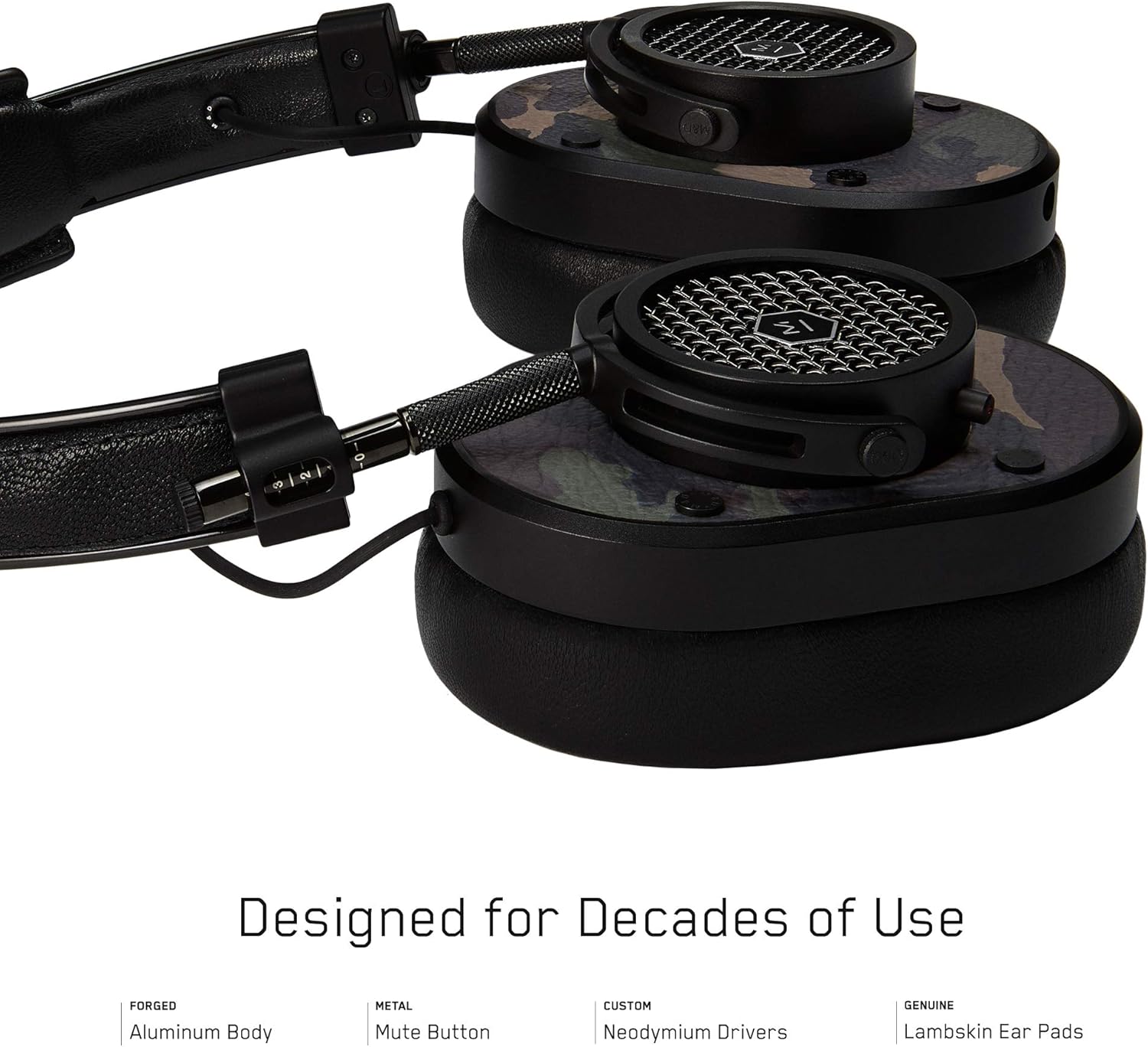
Зураг 2: Нарийвчилсан view of the MH40 headphone earcups, highlighting the lambskin ear pads, metal grille, and adjustable hinge.
Тохиргоо
1. Тохируулагчийг тохируулах
- Gently extend or retract the metal arms on each side of the headband to adjust the height.
- Чихэвчийг таны чихийг бүрэн хамрахаар байрлуулж, тав тухтай, найдвартай бэхлээрэй.
- The lambskin ear pads are designed to conform to your head shape for optimal sound isolation and comfort.
2. Утастай холболт
- Locate the audio input port on the left earcup.
- Insert one end of the provided audio cable into the headphone's audio input.
- Connect the other end of the audio cable to your audio device's 3.5mm jack.
3. Bluetooth хослуулах (Утасгүй холболт)
The MH40 headphones support Bluetooth connectivity for wireless audio. Ensure the headphones are charged before pairing.
- Асаах: Press and hold the power button (usually located on one of the earcups) until the indicator light flashes.
- Хослуулах горим: Continue holding the power button or press a dedicated Bluetooth pairing button (if available) until the indicator light flashes rapidly, indicating pairing mode.
- Төхөөрөмжийн холболт: On your audio device (smartphone, tablet, computer), navigate to Bluetooth settings and select "MH40" from the list of available devices.
- Баталгаажуулалт: The indicator light on the headphones will turn solid blue or green once successfully paired.
Note: The Bluetooth range is approximately 10 meters (33 feet).
Ашиглалтын заавар
Аудио тоглуулах
- Тоглуулах/түр зогсоох: Press the multi-function button (often on the in-line microphone or earcup) once.
- Дараагийн дуу: Press the multi-function button twice rapidly.
- Өмнөх бичлэг: Press the multi-function button three times rapidly.
- Дууны хяналт: Use the volume up/down buttons on the in-line microphone or dedicated earcup controls.
Дуудлага удирдах
- Дуудлагад хариулах/дуусах: Олон үйлдэлт товчлуурыг нэг удаа дарна уу.
- Дуудлагаас татгалзах: Олон үйлдэлт товчлуурыг ойролцоогоор 2 секунд дар.
- Микрофоны дууг хаах: The MH40 features a dedicated mute button, typically located on the earcup or in-line control. Press to mute/unmute during a call.
Засвар үйлчилгээ
- Цэвэрлэгээ: Use a soft, dry cloth to wipe the headphones. For leather parts, use a specialized leather cleaner if necessary. Avoid harsh chemicals or abrasive materials.
- Хадгалах: When not in use, store the headphones in the provided canvas carrying case to protect them from dust and scratches.
- Кабель арчилгаа: Handle cables gently. Avoid sharp bends or excessive pulling to prevent damage. The retractable cable feature helps manage cable length.
- Чихний дэвсгэр: The magnetic ear pads are removable for cleaning or replacement. Gently pull them off and reattach by aligning the magnets.
Алдааг олж засварлах
Дуу байхгүй
- Утастай: Ensure the audio cable is securely connected to both the headphones and the audio source. Check the volume level on both the headphones and the source device.
- Bluetooth: Verify that the headphones are powered on and successfully paired with your device. Check the volume levels. Try re-pairing the headphones.
Bluetooth-ээр холбох боломжгүй
- Ensure the headphones are in pairing mode (rapidly flashing indicator light).
- Эх үүсвэрийн төхөөрөмж дээрээ Bluetooth асаалттай байгаа эсэхийг шалгаарай.
- Чихэвчээ төхөөрөмждөө ойртуулаарай (10 метрийн дотор).
- Чихэвч болон төхөөрөмжөө унтраагаад асаагаад дахин хослуулахыг оролдоно уу.
- If previously paired, try "forgetting" the device on your source and re-pairing.
Микрофон ажиллахгүй байна
- Check if the microphone mute button is engaged.
- Ensure the audio cable with the in-line microphone is fully inserted.
- Холбогдсон төхөөрөмж дээрх микрофоны оролтын тохиргоог шалгана уу.
Үзүүлэлтүүд
| Загварын нэр | MH40 |
| Холболтын технологи | Утастай, Bluetooth |
| Утасгүй холбооны технологи | Bluetooth |
| Материал | Copper (components), Lambskin (ear pads), Canvas (carrying case) |
| Хяналтын төрөл | Дуудлагын удирдлага, Хүрэх |
| Кабелийн онцлог | Эвхэгддэг |
| Зүйлийн жин | 0.36 килограмм (12.7 унц) |
| Аудио драйверын төрөл | Динамик драйвер |
| Bluetooth хүрээ | 10 метр |
| Чихэвчний хэлбэр | Чихний дээгүүр |
| Онцлог шинж чанарууд | Carrying case included, Lightweight, Microphone Included, Noise Isolation, Wireless |
| Бүтээгдэхүүний хэмжээс | 7.48 x 6.3 x 2.76 инч |
| Үйлдвэрлэгч | MASTER & DYNAMIC |
| Өнгө | Black Metal / Camo Leather |
| Чихний байрлал | Чихний дээгүүр |
| Дуу чимээний хяналт | Дуу тусгаарлагч |
| UPC | 858901007099 |
Баталгаат болон дэмжлэг
For detailed warranty information and customer support, please refer to the official MASTER & DYNAMIC webсайт эсвэл харилцагчийн үйлчилгээтэй шууд холбогдоно уу. Баталгаат нэхэмжлэл гаргахын тулд худалдан авалтаа нотлох баримтаа хадгалаарай.
Онлайн дэмжлэг: www.masterdynamic.com/support (Exampхолбоос, бодит холбоос өөр байж болно)


