Танилцуулга
The D'Addario NS Micro Headstock Tuner offers discreet and accurate tuning for a variety of stringed instruments. Its compact design and versatile mounting options ensure it remains unobtrusive while providing clear, precise tuning feedback.

Зураг: Урд view of the D'Addario NS Micro Headstock Tuner, showing its compact size and control buttons.
Хайрцагт юу байна
- NS Micro Headstock Tuner
- Clip-free mount
- Суурилуулах эрэг
- CR2032 battery (pre-installed or included)
Гол онцлогууд
- Ухаалаг дизайн: The tuner's compact size allows it to remain hidden behind the instrument's headstock, blending seamlessly with its aesthetics.
- Clip-Free Mounting: Designed to screw directly into a tuning machine screw hole for a secure and permanent attachment. Necessary screws are included.
- Өндөр нарийвчлал: Utilizes a piezo transducer to detect instrument vibrations, ensuring precise tuning even in noisy environments. Features a wide calibration range (410-480Hz).
- Уншихад хялбар дэлгэц: A tri-color backlit screen indicates tuning status: red for out of tune, yellow for close, and green for in tune.
- Олон талт Viewing: A 360-degree swivel mechanism and adjustable padded clamp оновчтой хангах viewing angles and flexible positioning for various instruments.
- Broad Instrument Compatibility: Suitable for acoustic guitars, electric guitars, bass guitars, mandolins, banjos, and ukuleles.
- Автомат унтрах функц: Extends battery life by automatically turning off when not in use.
Тохиргоо ба суурилуулалт
The NS Micro Headstock Tuner is designed for a secure, clip-free installation directly onto your instrument's tuning machine. This method ensures the tuner is always available and discreet.
Суулгах заавар:
- Суурилуулах цэгийг тодорхойлох: Locate a suitable tuning machine screw hole on the back of your instrument's headstock. No additional holes are needed.
- Attach Clip-Free Mount: Align the tuner's clip-free mount with the chosen screw hole. Use the provided screw to securely fasten the mount to the headstock. Ensure it is tight enough to prevent movement but do not overtighten.
- Insert Tuner: Slide the tuner unit onto the mounted clip. The tuner is designed to fit snugly.
- Тохируулах Viewөнцөг The tuner body can rotate 360 degrees. Adjust its position for optimal visibility while playing.

Image: The D'Addario NS Micro Headstock Tuner securely mounted on the back of a guitar headstock, showing its discreet placement.
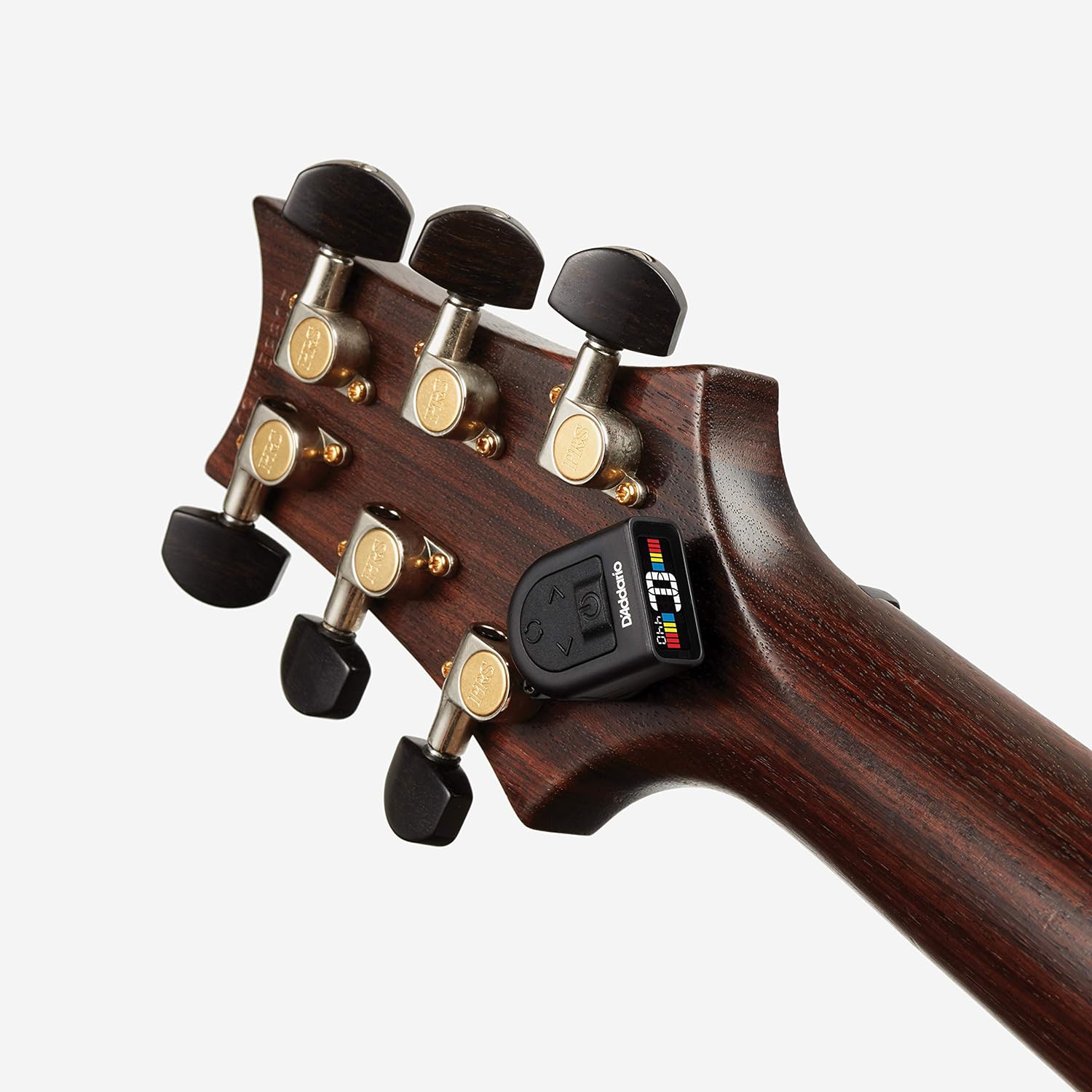
Image: The D'Addario NS Micro Headstock Tuner mounted on a bass guitar headstock, demonstrating its versatility across different instruments.
Ашиглалтын заавар
Асаах/унтраах:
Press and hold the power button (usually located on the front or top of the tuner) for a few seconds to turn the tuner on or off.
Хөгжмийн зэмсгээ тохируулах нь:
- Тохируулагчийг идэвхжүүлэх: Turn on the NS Micro Headstock Tuner.
- Pluck a String: Pluck a single string on your instrument. The tuner will detect the vibration and display the note.
- Дэлгэцийг уншина уу:
- Улаан: The note is significantly out of tune.
- Шар: The note is close to being in tune.
- Ногоон: The note is perfectly in tune.
- Өнгөний тохируулга: Turn your instrument's tuning peg until the display shows a green light, indicating the string is in tune.

Image: Close-up of the tuner's display showing a note in tune with green indicators.
Adjusting Calibration (Hz):
The tuner's calibration can be adjusted from 410Hz to 480Hz. Refer to your instrument's specific tuning requirements or personal preference for the correct Hz setting.
- Use the arrow buttons (left/right) on the tuner to increase or decrease the Hz value.
- The default setting is typically 440Hz.
Changing Display Orientation:
The display can be rotated to accommodate different mounting positions and user preferences. Press the rotation button (circular arrow icon) to cycle through the available display orientations.
Видео үзүүлбэр:
Video: Official D'Addario NS Micro Universal Tuner demonstration, showing its features and how to use it.
Засвар үйлчилгээ
Зай солих:
The NS Micro Headstock Tuner is powered by a CR2032 coin cell battery. When the display dims or the tuner becomes unresponsive, it's time to replace the battery.
- Carefully open the battery compartment, usually located on the back or side of the tuner.
- Хуучин CR2032 зайг салга.
- Шинэ CR2032 батерейг эерэг (+) талыг дээш харуулан оруулна.
- Зайны тасалгааг найдвартай хаа.
Цэвэрлэгээ:
Wipe the tuner with a soft, dry cloth to remove dust or smudges. Do not use liquid cleaners or abrasive materials.
Алдааг олж засварлах
- Tuner not turning on: Ensure the CR2032 battery is correctly installed and has sufficient charge. Replace if necessary.
- Буруу уншилтууд:
- Ensure the tuner is securely attached to the instrument's headstock to pick up vibrations effectively.
- Check the calibration (Hz) setting. The standard is 440Hz, but some instruments or preferences may require a different setting.
- Бусад чавхдаснуудаас үүсэх симпатик чичиргээнээс зайлсхийж, чавхдаснуудыг тодорхой бөгөөд тус тусад нь сугалж ав.
- Дэлгэц бүдэг байна: CR2032 батерейг солино уу.
- Tuner falls off: Ensure the clip-free mount is securely fastened with the screw and the tuner unit is properly slid onto the mount.
Үзүүлэлтүүд
| Зүйлийн жин | 1.13 унц |
| Бүтээгдэхүүний хэмжээс | 3 x 1.13 x 4.63 инч |
| Загварын дугаар | 19UKE02 |
| Батерей | 1 C battery required (CR2032 type) |
| Биеийн материал | Резин |
| Өнгө | Хар |
| Материалын төрөл | Резин |
| Тааруулах хүрээ | 410-480Hz (Calibration) |
| Дэлгэц | Tri-color backlit screen |
Баталгаат болон дэмжлэг
For warranty information, technical support, or to register your product, please visit the official D'Addario webсайт эсвэл харилцагчийн үйлчилгээтэй холбогдоно уу. Баталгаат зарга авахын тулд худалдан авалтын баримтаа хадгална уу.