1. Танилцуулга
This manual provides detailed instructions for the J-Tech Digital JTECH-WDEX-50M Wireless HDMI Extender Kit. This innovative transmitter and receiver pair is designed for streaming full HD 1080p video with support for the latest movie content up to 100 feet away within the same room. It features a compact design, making it suitable for on-site transmissions and setups requiring quick source changes, such as conference rooms or camera monitoring.
Гол онцлогууд:
- Wireless HD 1080p audio/video streaming up to 100 feet (line of sight, within the same room).
- Supports HDMI 1.3 and HDCP 1.2.
- Operates on a 5GHz wireless network to minimize interference.
- Wide 20-60KHz frequency range for IR control passthrough.
- Залгаад ажиллуулах суурилуулалт.
- Portable transmitter, powered by USB, ideal for various devices like laptops and cameras.
2. Багцын агуулга
Доор жагсаасан бүх зүйл таны багцад байгаа эсэхийг шалгаарай.
- 1x Extender Tx (Sender)
- 1x HDMI Extender Rx (Receiver)
- 1x DC5V/2A тэжээлийн адаптер
- 1x IR Blaster Extension Cable
- 1x IR хүлээн авагчийн өргөтгөлийн кабель
- 1x хэрэглэгчийн гарын авлага
- 1x USB кабель
- 1x HDMI Male to Female Cable

Зураг 2.1: All components included in the J-Tech Digital Wireless HDMI Extender Kit package.
3. Бүтээгдэхүүн дууссанview
The JTECH-WDEX-50M kit consists of a transmitter (Tx) and a receiver (Rx), designed for seamless wireless video and audio transmission.

Зураг 3.1: The J-Tech Digital Wireless HDMI Extender Transmitter (dongle) and Receiver unit.
3.1. Device Interfaces
Familiarize yourself with the ports and indicators on both the transmitter and receiver units.

Зураг 3.2: Нарийвчилсан view of the Receiver and Sender interfaces, showing HDMI In/Out, Power, and IR ports.
3.2. Хэмжээ
The compact design allows for flexible placement and portability.

Зураг 3.3: Dimensions of the J-Tech Digital Wireless HDMI Extender components.
4. Тохируулах заавар
Follow these steps to set up your J-Tech Digital Wireless HDMI Extender Kit.
4.1. Төхөөрөмжүүдийг цахилгаанаар хангах
Both the transmitter and receiver require power. The transmitter can be powered via USB, offering flexibility for portable use.

Зураг 4.1: Various power supply options for the J-Tech Digital Wireless HDMI Extender, including USB power adapter or laptop USB port.
4.2. Connecting and Pairing
The devices are designed for plug-and-play operation. For initial setup or re-pairing, follow the steps below:
- Connect the transmitter (Tx) to your HDMI source device (e.g., laptop, camera).
- Connect the receiver (Rx) to your display device (e.g., monitor, projector).
- Хоёр төхөөрөмж асаалттай байгаа эсэхийг шалгаарай.
- The devices should automatically pair. A fast flashing green light on the TX indicates successful pairing, and the green light on the RX will be solid.
Видео 4.1: A tutorial demonstrating the pairing process for the Wireless HDMI Extender.
Видео 4.2: Step-by-step guide on how to pair the WL009 Wireless HDMI Extender.
4.3. IR Passthrough Setup
To control your source device remotely, connect the IR blaster extension cable to the transmitter and position the blaster near your source device's IR receiver. Connect the IR receiver extension cable to the receiver and position it to face your remote control.
5. Ашиглалтын заавар
Once successfully paired, the extender will transmit video and audio wirelessly.
5.1. Video and Audio Transmission
The system supports wireless HD 1080p audio/video streaming. The transmission range is up to 100 feet within the same room, requiring a line of sight between the transmitter and receiver for optimal performance. A minimal latency of approximately 180ms is expected.

Зураг 5.1: Example application of the J-Tech Digital Wireless HDMI Extender in a conference room setting.
5.2. Supported Resolutions
The device supports a variety of HDMI resolutions, including:
- 480i@60Hz, 480p@60Hz
- 576i@50Hz, 576p@50Hz
- 720p@50/60Hz
- 1080i@50/60Hz, 1080p@24/30/50/60Hz
5.3. Portable Use with Cameras
The compact transmitter can be easily connected to HDMI cameras and powered by a USB connection, such as a camera's USB port or a 5VDC 2A power bank, for mobile monitoring applications.
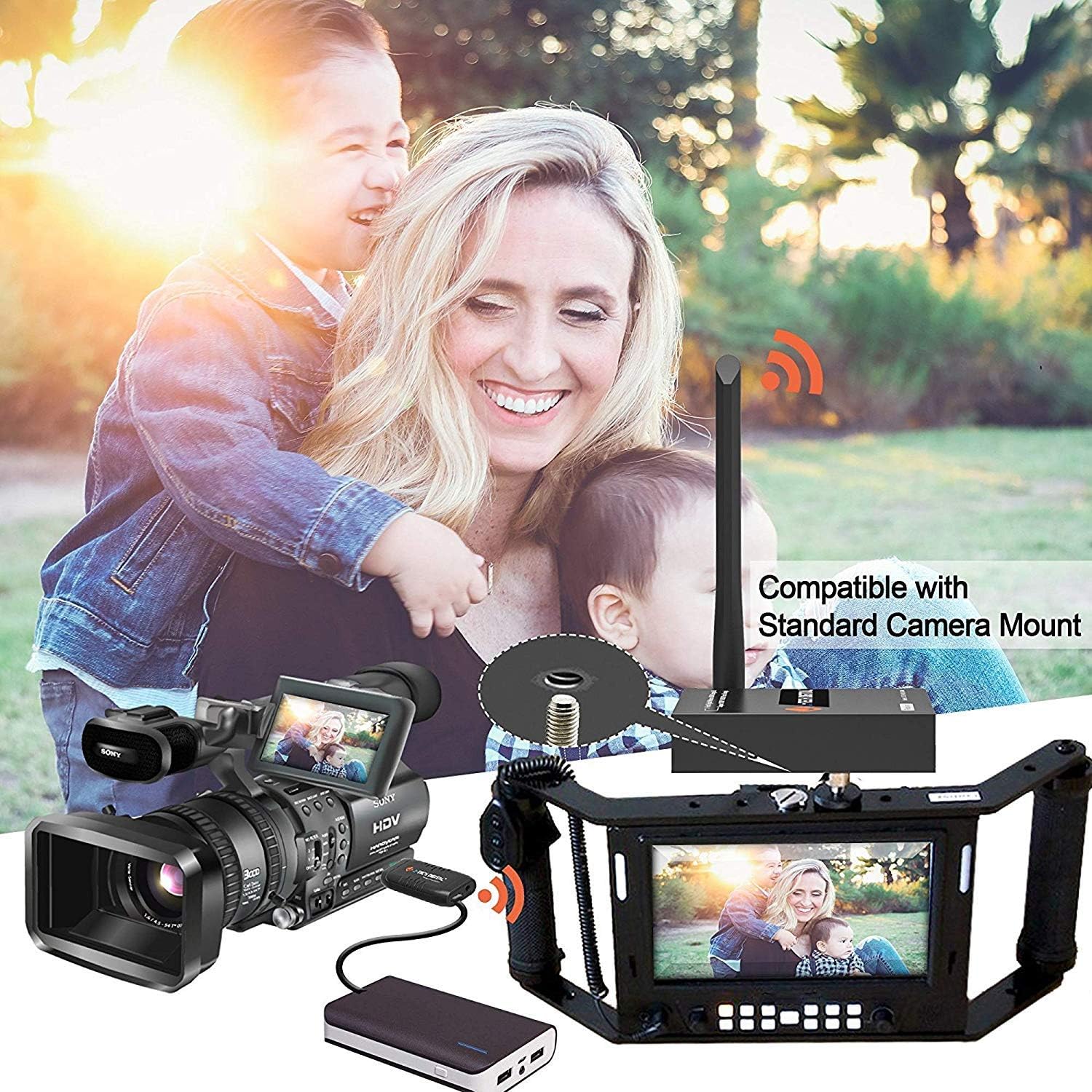
Зураг 5.2: The J-Tech Digital Wireless HDMI Extender transmitter connected to a camera setup, compatible with standard camera mounts.
Видео 5.3: Нэг гаруйview of the J-Tech Digital Wireless HDMI Extender Dongle, highlighting its features and applications.
6. Техникийн үзүүлэлтүүд
| Онцлог | Дэлгэрэнгүй |
|---|---|
| Загварын дугаар | JTECH-WDEX-50M |
| Утасгүй дамжуулалт | 1080p up to 100 feet (line of sight) |
| HDMI дэмжлэг | HDMI 1.3, HDCP 1.2 |
| Утасгүй давтамж | 5 ГГц |
| IR давтамжийн хүрээ | 20-60 кГц |
| Дэмжигдсэн тогтоолууд | 480i/p, 576i/p, 720p, 1080i/p (24/30/50/60Hz) |
| Эрчим хүчний оролт | 5VDC/2A (for receiver), USB (for transmitter) |
| Зүйлийн жин | 1.3 фунт |
| Бүтээгдэхүүний хэмжээс | 20 x 25 x 10 инч |
| Тоног төхөөрөмжийн интерфейс | HDMI, USB |
7. Засвар үйлчилгээ
To ensure the longevity and optimal performance of your J-Tech Digital Wireless HDMI Extender Kit, follow these maintenance guidelines:
- Цэвэрлэгээ: Use a soft, dry cloth to clean the device surfaces. Avoid using harsh chemicals or abrasive cleaners.
- Хадгалах: Төхөөрөмжийг ашиглаагүй үед нарны шууд тусгал, хэт температураас хол, сэрүүн, хуурай газар хадгална.
- Харьцуулах: Handle the units with care to prevent physical damage. Avoid dropping or subjecting them to strong impacts.
- Агааржуулалт: Ensure adequate airflow around the units to prevent overheating, especially during extended operation.
8. Алдаа засах
If you encounter issues with your Wireless HDMI Extender, refer to the following common troubleshooting steps:
- Сүлжээ алга:
- Ensure both the transmitter and receiver are powered on and their indicator lights are active.
- Verify that HDMI cables are securely connected to both the source and display devices.
- Check for line of sight between the transmitter and receiver. Obstructions (walls, furniture) can significantly reduce range and signal quality.
- Confirm that the source device is outputting a compatible HDMI signal (1080p, 720p, etc.).
- Re-pair the devices if they lose connection (refer to Section 4.2).
- Intermittent Signal/Poor Quality:
- Дамжуулагч ба хүлээн авагчийн хоорондох зайг багасгах.
- Бусад 5GHz утасгүй төхөөрөмжүүдээс үүсэх хөндлөнгийн оролцоог багасгах.
- Антеннуудыг найдвартай холбож, зөв чиглүүлсэн эсэхийг шалгаарай.
- Check power supply for stability. Use the provided power adapters.
- Хэт улаан туяаны удирдлага ажиллахгүй байна:
- Ensure the IR blaster is positioned directly in front of the source device's IR sensor.
- Verify the IR receiver is facing your remote control.
- Check that the IR cables are securely plugged into the correct ports on both units.
9. Баталгаат хугацаа ба дэмжлэг
All J-Tech Digital Products include a One-Year Manufacturer Warranty. Additionally, free lifetime technical support is available from our Customer Support Team located in Houston, Texas. Our team is available Monday-Friday, 9 AM-6 PM CST.
For contact information, please refer to the J-Tech Digital Seller Page.


