1. Танилцуулга
This user manual provides comprehensive instructions for the installation, operation, maintenance, and troubleshooting of the IP-COM G3224P 24-Port Managed PoE Switch. Please read this manual thoroughly before using the device to ensure proper and safe operation.
The IP-COM G3224P is a high-performance managed Power over Ethernet (PoE) switch designed for small to medium-sized businesses and enterprise networks. It offers 24 Gigabit Ethernet ports with PoE+ capabilities and additional SFP ports for fiber uplinks, providing flexible and scalable network solutions.
2. Бүтээгдэхүүн дууссанview
2.1 Багцын агуулга
- IP-COM G3224P 24-Port Managed PoE Switch
- Цахилгааны утас
- Rackmount иж бүрдэл (хаалт ба эрэг)
- Резинэн хөл (ширээний тавцан дээр байрлуулах зориулалттай)
- Шуурхай суулгах гарын авлага
2.2 Урд талын самбарын тодорхойлолт
The front panel of the IP-COM G3224P switch features various ports and LED indicators for status monitoring.
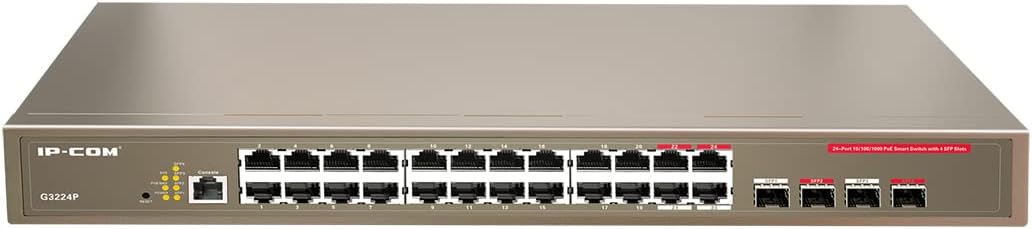
Figure 2.1: IP-COM G3224P Front Panel Layout
This image displays the front panel of the IP-COM G3224P switch. On the left, the IP-COM logo and model number G3224P are visible. To the right, there are LED indicators for SYS, PoE MAX, and individual port status. A console port is also present. The main section features 24 Gigabit Ethernet RJ45 ports, arranged in two rows, with port numbers 1 through 24. On the far right, there are four SFP ports labeled SFP1, SFP2, SFP3, and SFP4, which are used for fiber optic uplinks.
2.3 LED үзүүлэлтүүд
| LED үзүүлэлт | Статус | Тодорхойлолт |
|---|---|---|
| SYS | Ногоон (хатуу) | Систем хэвийн ажиллаж байна. |
| SYS | Ногоон (Анивчих) | System is booting up or firmware is being upgraded. |
| PoE MAX | Улаан (Хатуу) | PoE power budget is nearing or exceeding its limit. |
| Холбоос/Үйлдэл (Порт тус бүр) | Ногоон (хатуу) | Порт холбогдсон байна. |
| Холбоос/Үйлдэл (Порт тус бүр) | Ногоон (Анивчих) | Port is transmitting or receiving data. |
| PoE (порт бүрт) | Шар (Хатуу) | PoE power is being supplied to the connected device. |
3. Тохиргоо ба суурилуулалт
3.1 Аюулгүй байдлын урьдчилан сэргийлэх арга хэмжээ
- Эрчим хүчний хангамжийн хэмжээг баталгаажуулна ууtage matches the switch's requirements (240V as per specifications).
- Агааржуулалтын нүхийг хааж болохгүй.
- Төхөөрөмжийг ус, гал, өндөр температураас хол байлга.
- Төхөөрөмжийг өөрөө нээх, засах гэж бүү оролдоорой.
3.2 Rackmount суурилуулах
- Attach the provided rackmount brackets to the sides of the switch using the included screws.
- Тохиромжтой тавиурын эрэг шургийг ашиглан унтраалгыг стандарт 19 инчийн тоног төхөөрөмжийн тавиур дээр бэхлэнэ үү.
- Ensure adequate airflow around the switch for proper cooling.
3.3 Ширээний компьютер суурилуулах
- Өгөгдсөн резинэн хөлийг шилжүүлэгчийн ёроолд холбоно.
- Place the switch on a flat, stable surface with sufficient ventilation.
3.4 Шилжүүлэгчийг холбох
- Эрчим хүчний холболт: Connect the power cord to the power inlet on the rear panel of the switch and then to a grounded power outlet.
- Сүлжээний төхөөрөмжүүд: Connect network devices (e.g., computers, servers, IP cameras, VoIP phones) to the RJ45 ports (1-24) on the front panel using standard Ethernet cables.
- PoE төхөөрөмжүүд: For PoE-powered devices, simply connect them to any of the RJ45 ports. The switch will automatically detect and provide power if the device is PoE compliant.
- Uplink холболтууд: Use the SFP ports (SFP1-SFP4) for fiber optic uplinks to other network devices or the core network. Insert compatible SFP transceivers into the SFP slots before connecting fiber optic cables.
- Консолын холболт (заавал биш): For initial configuration or advanced management, connect a console cable from your computer to the console port on the switch.
4. Ашиглалтын заавар
4.1 Анхдагч асаалттай
After connecting the power cord, the switch will automatically power on. Observe the SYS LED indicator. It will blink during boot-up and turn solid green once the system is ready.
4.2 Сүлжээний үндсэн холболт
Once powered on, the switch will automatically detect connected devices. The Link/Act LED for each connected port will illuminate solid green, indicating a successful link. It will blink when data is being transmitted or received.
4.3 PoE Operation
When a PoE-compatible device is connected to a port, the switch will negotiate power delivery. The PoE LED for that port will turn yellow, indicating that power is being supplied. Monitor the PoE MAX LED; if it turns red, the total PoE power budget is being approached or exceeded, and you may need to reduce the number of PoE devices or use a higher-capacity power source.
4.4 Удирдлагын хандалт
The IP-COM G3224P is a managed switch, offering various configuration options via a web-based GUI, CLI (Command Line Interface) via the console port, or SNMP. Refer to the detailed management guide (usually available on the manufacturer's website) for advanced configuration, including VLANs, QoS, port mirroring, and security settings.
- Web GUI: Шилжүүлэгчид хандах web interface by typing its default IP address (check the Quick Installation Guide or manufacturer's documentation) into a web хөтөч.
- CLI: Connect via the console port using a terminal emulator (e.g., PuTTY) with appropriate serial port settings.
5. Засвар үйлчилгээ
5.1 Цэвэрлэгээ
- Regularly clean the exterior of the switch with a soft, dry cloth.
- Шингэн болон аэрозолийн цэвэрлэгч бүү ашигла.
- Агааржуулалтын нүхэнд тоос шороо, саад тотгор байхгүй эсэхийг шалгаарай.
5.2 Програм хангамжийн шинэчлэлтүүд
Periodically check the IP-COM official webПрограм хангамжийн шинэчлэлтийн сайт. Програм хангамжийг байнга шинэчилж байх нь оновчтой гүйцэтгэл, аюулгүй байдал, шинэ функцуудад хандах боломжийг олгоно. Програм хангамжийн шинэчлэлтийн багцтай хамт өгсөн зааврыг анхааралтай дагаж мөрдөнө үү.
5.3 Байгаль орчны асуудал
Ensure the switch operates within its specified environmental conditions (temperature, humidity) to prevent damage and ensure longevity.
6. Алдаа засах
| Асуудал | Боломжит шалтгаан | Шийдэл |
|---|---|---|
| No power / SYS LED off | Цахилгааны утас холбогдоогүй эсвэл тэжээлийн залгуур гэмтэлтэй. | Цахилгааны утасны холболтыг шалгана уу. Өөр залгуурыг туршаад үзээрэй. |
| No link on a port (Link/Act LED off) | Cable issue, device off, or incorrect port. | Check Ethernet cable. Ensure connected device is powered on. Try a different port or cable. |
| PoE device not powering on (PoE LED off) | Төхөөрөмж PoE-д нийцэхгүй, кабелийн асуудал эсвэл тэжээлийн төсөв хэтэрсэн. | Verify device is PoE compliant. Check cable. Check PoE MAX LED; if red, reduce PoE load. |
| Network performance issues | Cable quality, network congestion, or incorrect configuration. | Use high-quality Ethernet cables. Check for network loops. Review switch configuration (VLANs, QoS). |
| Нэвтрэх боломжгүй web удирдлагын интерфейс | Incorrect IP address, network settings, or firewall. | Verify the switch's IP address. Ensure your computer is on the same subnet. Disable temporary firewalls. |
If problems persist, consult the full product documentation or contact IP-COM technical support.
7. Техникийн үзүүлэлтүүд
| Онцлог | Дэлгэрэнгүй |
|---|---|
| Загвар | G3224P |
| Портууд | 24 x 10/100/1000Base-T (RJ45) with PoE+, 4 x 1000Base-X (SFP) |
| Шилжүүлэгч хүчин чадал | 56 Gbps |
| Дамжуулах хувь | 41.66 Mpps |
| PoE стандарт | IEEE 802.3af / at |
| Оролтын хэмжээtage | 240 вольт |
| Хэмжээ (L x W x H) | 29 x 44 x 44 см |
| Жин | 15 кг |
| Rackmount | Тиймээ |
| Менежмент | Удирдах (Web GUI, CLI, SNMP) |
Жич: Техникийн үзүүлэлтүүдийг урьдчилан мэдэгдэлгүйгээр өөрчилж болно.
8. Баталгаат болон техникийн дэмжлэг
8.1 Баталгаат хугацааны мэдээлэл
IP-COM products typically come with a limited warranty. Please refer to the warranty card included with your product or visit the official IP-COM webТанай бүс нутаг болон худалдан авалтын огноотой холбоотой нарийвчилсан баталгаат нөхцөлийг сайтаас авна уу.
8.2 Техникийн дэмжлэг
For technical assistance, product inquiries, or troubleshooting beyond the scope of this manual, please contact IP-COM technical support. Support contact information can usually be found on the official IP-COM webсайт эсвэл бүтээгдэхүүний савлагаанд .
IP-COM Official Webсайт: www.ip-com.com.cn


